当前位置:网站首页>Kernel performance analysis summary
Kernel performance analysis summary
2022-08-10 06:14:00 【Liu Shigang】
# Kernel performance analysis summary
1.unixbench
a. Test Introduction
UnixBench originated in 1995, the baseline system is "George", a workstation: SPARCstation 20‐61, 128MB RAM, Solaris 2.3, the index value of this system is set to 10, so if the final result of a systemA score of 520 means this system runs 52 times faster than the baseline system.
UnixBench also supports multi-CPU system testing, the default behavior is to test twice, the first is a process test, the second is N tests, N is equal to the number of CPUs.This design is for the following goals:
Test the single-task performance of the system
Test the multi-task performance of the system
Test the parallel processing ability of the system
UnixBench is a system-based benchmarking tool, not just aCPU memory or disk test tool.Test results depend not only on hardware, but also on system, development libraries, and even compilers.
Dhrystone test
The test focuses on string processing, no floating point operations.This test is used to test linker compilation, code optimization, memory caching, wait states, integer data types, etc. Hardware and software design will greatly affect the test results.
Whetstone Test
This test is used to test the efficiency and speed of floating point operations.This test project contains several typical performance modules of scientific computing, including a large number of C language functions, sin cos sqrt exp and log and mathematical operations using integer and floating point.Contains array access, conditional branches, and procedure calls.
Execl Throughput test
(execl throughput, where execl is a very important function of Unix-like system, non-office software excel)
This test measures the number of execl function calls per second.execl is part of the exec family of functions and replaces the current graphics processing with new graphics processing.There are many commands that are very similar to the front-end execve() function commands.
File Copy Test
This test measures the transfer of file data from one file to another, using a large amount of cache.Including file reading, writing, and copying tests, the test indicator is the number of characters that are rewritten, read, and copied within a certain period of time (10 seconds by default).
Pipe Throughput (pipe throughput) test
Pipe is simple communication between processes.The pipe throughput test measures the number of times a process writes 512 bits to a pipe and reads it back in one second.There is a gap between pipeline throughput testing and actual programming.
Pipe-based Context Switching (pipe-based context interaction) test
This test measures the number of times two processes switch through the pipe and increase throughput in multiples.Pipe-based context switching is very similar to real programs.The test program spawns a child thread for bidirectional pipe communication.
Process Creation Test
This test measures the number of times a process can spawn child threads and exit immediately.The new process really creates process blocking and memory usage, so the test program uses memory bandwidth directly.This test is used for typical relatively large number of operating system process creation operations.
Shell Scripts test
The shell script test is used to measure the number of times a process can start and stop shell scripts in one minute, usually tests 1, 2, 3, 4, 8 common copies of shell scripts,A shell script is a set of scripts that transform data files.
System Call Overhead Test
This test measures the overhead of entering and leaving the system kernel, eg, the overhead of system calls.The program simply repeats the getpid call (returns the calling process id).The metric consumed is the execution time of calls entering and leaving the kernel.
b.Run usage
Run [ -q | -v ] [-i ] [-c [-c …]] [test …]
Option description:
| -q | Do not show the test process |
|---|---|
| -v | Show test process |
| -i | Number of executions, minimum 3 times, default 10 |
| -c | n copies of each test in parallel (parallel tasks) |
Note: The -c option can be used to execute multiple times, such as:
Run -c 1 -c 4 means to execute twice, the first time a single copy, the second test task of 4 copies.
For the performance test strategy of the multi-cpu system, it is necessary to count the performance enhancement of single task, multitask and parallel.
Take a PC with 4 CPUs as an example, it needs to be tested twice, 4 CPUs are to execute 4 copies in parallel,
Run -q -c 1 -c 4
Test results The score of a single parallel task is 171.3, and the score of 4 parallel tasks is 395.7.You need to pay attention to this value when comparing tests.
c. Result display
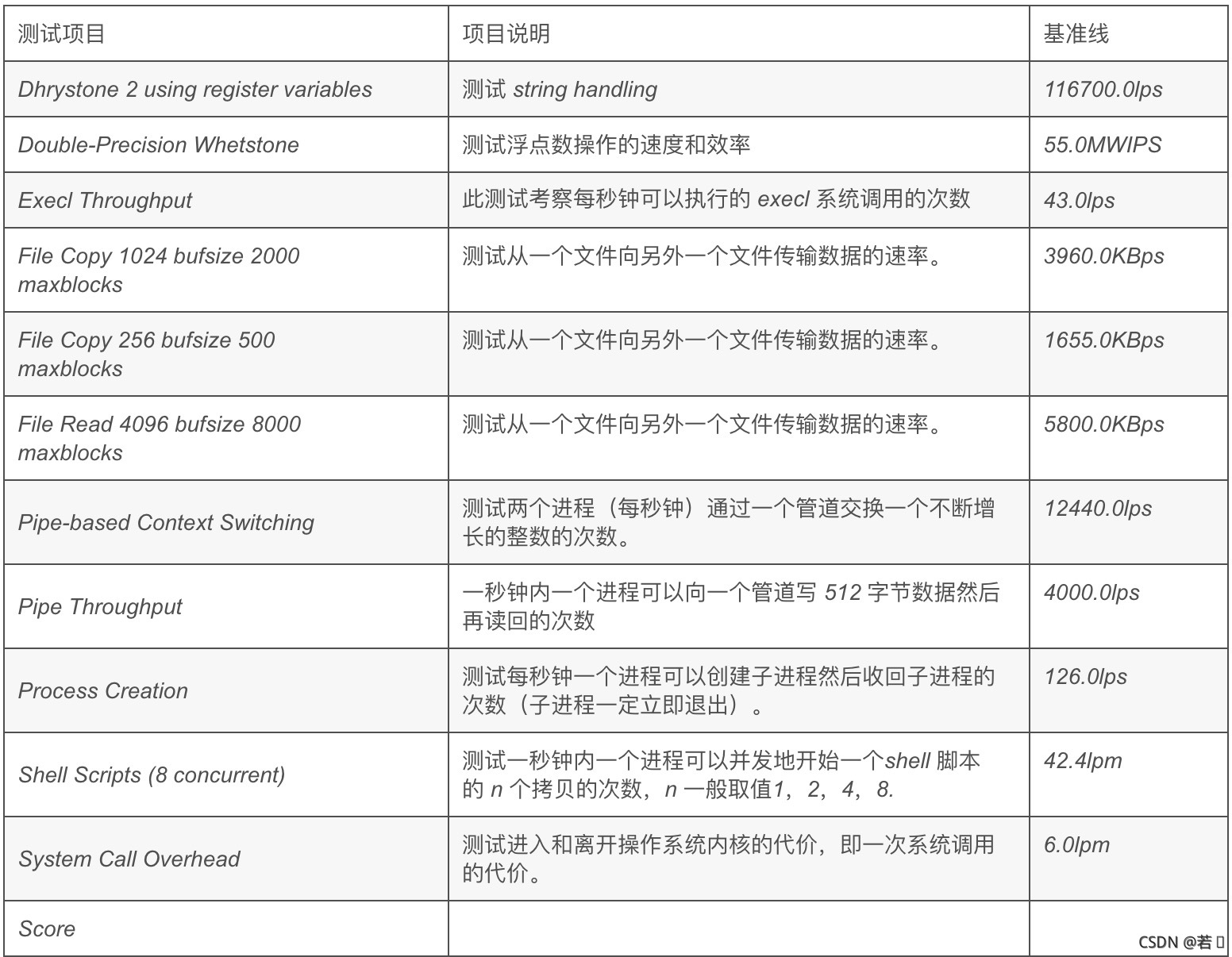
Reference blog: https://www.cnblogs.com/chenshengkai/p/12761467.html
2.netperf network performance
a.install
$ wget -c "https://codeload.github.com/HewlettPackard/netperf/tar.gz/netperf-2.5.0" -O netperf-2.5.0.tar.gz$ tar xvf netperf-2.5.0.tar.gz$ cd netperf-netperf-2.5.0/$ ./configure$ make && make install$ netperf -h #There is output indicating that the installation was successfulb.use
1. Server startup
$ netserverStarting netserver with host 'IN(6)ADDR_ANY' port '12865' and family AF_UNSPEC$ ss -lnt #Listen on port 128652. Test client startup
$ netperf -H 192.168.1.180MIGRATED TCP STREAM TEST from 0.0.0.0 (0.0.0.0) port 0 AF_INET to 192.168.1.180 (192.168.1.180) port 0 AF_INETRecv Send SendSocket Socket Message ElapsedSize Size Size Time Throughputbytes bytes bytes secs. 10^6bits/sec87380 16384 16384 10.47 86.40Throughput: 86.4 * 10^6 bits/sec
Convert it to 10Mbit/s (86.40/8=10.8*1000000bps=10Mbit/s)
边栏推荐
猜你喜欢

Pico设备中的截图以及视频文件通过adb命令保存到电脑中

STM32单片机RGB红蓝调光植物补光系统红光蓝光PWM调色调节亮度

Unity中实现Animation Clip动画片段的倒播(该案例可以防止动画延迟)

【fiddler2】使用fiddler mock response 数据

STC12C5A60S2单片机WIFI信号扫描报警监视系统信号增强信号过低报警

浅谈游戏中3种常用阴影渲染技术(1):平面阴影

在Unity中利用代码动态更改场景中的天空盒

51单片机智能远程遥控温控PWM电风扇系统红外遥控温度速度定时关机

每日刷题(day03)——leetcode 899. 有序队列

Easy to master Unity of eight prior to rendering
随机推荐
Pico设备中的截图以及视频文件通过adb命令保存到电脑中
mysql连接报错:Cannot get a connection, pool error Timeout waiting for idle object
【接口自动化】
解析树字符串并输出中序遍历
LruCache与DiskLruCache结合简单实现ImageLoader
STM32F407ZG GPIO输出相关实验
Share a professional TA's "Shader Reference"
二叉树 6/21 91-95
抛光树脂应用
Unity屏幕坐标转世界坐标,鼠标点击获取三维位置
手把手教你改内核源码--sysfs虚拟文件系统2
酸回收工艺讲解
视差映射:更逼真的纹理细节表现(上):为什么要使用视差映射
为什么游戏需要热更新?
中间件-Rocktmq
如何实现网格建造系统
制作一个启动软盘并用bochs模拟器启动
STM32F407ZG TIM通用定时器
氨氮吸附材料原理
碳酸锂、碳酸氢锂溶液除钙镁离子工艺原理