当前位置:网站首页>uniapp中设置tabBar及其窗口标题
uniapp中设置tabBar及其窗口标题
2022-08-11 05:17:00 【肖肖冲鸭】
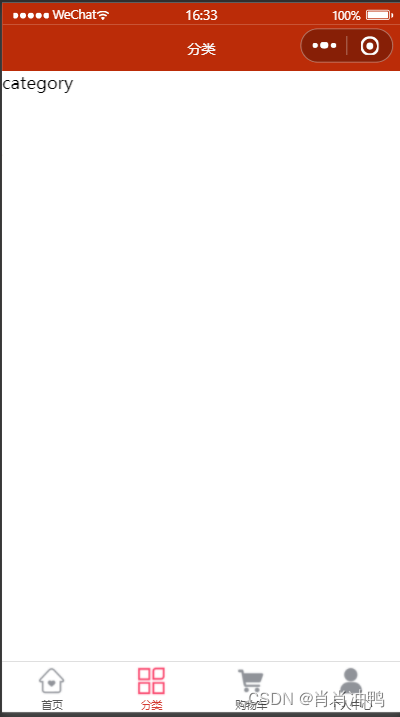
在微信小程序中,我们设置tabBar是在全局的pages.json中设置,窗口标题是在每个页面的单独的pages.json中设置
但是在uniapp找那个与微信小程序有所不同,它每个页面没有单独的pages.json文件,我们应该在全局的pages.json中每个页面的路径下的style标签下设置样式
{

    "globalStyle" : {

        "navigationBarTextStyle" : "white",
        "navigationBarTitleText" : "仿网易商城",
        "navigationBarBackgroundColor" : "#BB2C08"
    },
    "uniIdRouter" : {
    },
    "pages" : [
        {

            "path" : "pages/index/index",
            "style" : {

                "enablePullDownRefresh" : false
            }
        }
        ,{

            "path" : "pages/category/category",
            "style" :
            {

                "navigationBarTitleText": "分类",
                "enablePullDownRefresh": false
            }

        }
        ,{

            "path" : "pages/cart/cart",
            "style" :
            {

                "navigationBarTitleText": "购物车",
                "enablePullDownRefresh": false
            }

        }
        ,{

            "path" : "pages/personal/personal",
            "style" :
            {

                "navigationBarTitleText": "个人中心",
                "enablePullDownRefresh": false
            }

        }
    ],
		"tabBar": {

					"color": "#555",
					"selectedColor": "#D43C33",
					"list": [
						{

							"pagePath": "pages/index/index",
							"text": "首页",
							"iconPath": "/static/images/tabBar/tab-home.png",
							"selectedIconPath": "/static/images/tabBar/tab-home-current.png"
						},
						{

							"pagePath": "pages/category/category",
							"text": "分类",
							"iconPath": "/static/images/tabBar/tab-cate.png",
							"selectedIconPath": "/static/images/tabBar/tab-cate-current.png"
						},
						{

							"pagePath": "pages/cart/cart",
							"text": "购物车",
							"iconPath": "/static/images/tabBar/tab-cart.png",
							"selectedIconPath": "/static/images/tabBar/tab-cart-current.png"
						},
						{

							"pagePath": "pages/personal/personal",
							"text": "个人中心",
							"iconPath":"/static/images/tabBar/tab-my.png",
							"selectedIconPath": "/static/images/tabBar/tab-my-current.png"
						}
					]
		}
}

边栏推荐
猜你喜欢
06-引入Express创建web服务器、接口封装并使用postman测试,静态资源托管

(2) Construction of a real-time performance monitoring platform (Grafana+Prometheus+Jmeter)
C - file operations fseek () function, ftell, rewind, rounding
C语言自定义数据类型——联合体

Django--20 implements Redis support, context, and interaction of context and interface

【win10+cuda7.5+cudnn6.0安装caffe⑥】报错及处理方式
我的四核Cortex-A53学习之路
Flask framework to study: the debug and configuration items

【转载】如何理解数据集中【训练集】、【验证集】和【测试集】
08-JS对象、原型及原型链
随机推荐
08-JS对象、原型及原型链
Flask framework learning: trailing slashes for routes
[Verilog] I2S Master Test Bench
07-nodemon安装和使用
自制病毒——整蛊
win下Anaconda(环境配置等)和pycharm安装详细教程
【网站小白】Hibernate插入数据成功,不报错,但是数据库中没有值
C语言——文件操作函数 fseek、ftell、rewind详解
第8章 函数探幽-2
QT QLabel控件(使用详解)
09-ES6语法:变量、箭头函数、类语法、静态属性及非静态属性
labelme工具,对类别标注,再进行细致的分割
task05 PyTorch可视化
怎么用管理员方式打开压缩包
表单input控件数据双向绑定
Win下安装不同版本的MinGW(g++/gcc)以及对应clion编辑器的配置
Qt 字符串截取 查找字符串
c 指针学习(1)
性能效率测试
【win10+cuda7.5+cudnn6.0安装caffe①】安装cuda和cudnn