当前位置:网站首页>广城云服务实现每天定时填写一日一报
广城云服务实现每天定时填写一日一报
2022-04-22 07:15:00 【爱BUG的小胖子】
基于python实现的一日一报
学校的小程序更新了,所以我们的代码也要稍微改一下。我这边重新抓包一下,先打开我们的Charles,在将我们分享到文件传输助手的广城云服务打开。

我们通过些文本信息可以知道这个是我们的所需要抓包的小程序。这次学校小程序进行了大改,域名都改了。但是对于我们来说丝毫不影响,原理都一样。
我们实现自动填报的原理是模拟正常用户发送数据包到他们后台数据。我们正常用户访问的网页是通过get请求去获取数据的,而,我们提交数据用的就是post请求,我们要做的是使用post请求发送表单数据。我们尝试提交一次数据就会看到会有一个URL弹出来。

这个数据包 ,包含了我们需要提交的表单数据,还有URL(俗称链接)。
我这边源码已经写好了
# -*- coding: utf8 -*-
import requests
import json
#可自行更改为自己的token
token = "8966a1aa7508438fa384fc02767d5835"
studentinfo = {
    "version": "20220409",
    "name": "靓仔",#填写姓名
    "pwd": "12345678",#填写学号
    "openid": "openid",
    "subscription": "accept"

}

headers = {
        "User-Agent": "Mozilla/5.0 (Windows NT 6.1; WOW64) AppleWebKit/537.36 (KHTML, like Gecko) Chrome/53.0.2785.143 Safari/537.36 MicroMessenger/7.0.9.501 NetType/WIFI MiniProgramEnv/Windows WindowsWechat"
    }


def getuid(info):
    login_url = "https://jsd.hc-web.cn/api/index/login"
    return int(json.loads(requests.post(login_url, info, verify=False, headers=headers).text)["data"]["user"]["id"])


def putdata(uid):
    put_url = "https://jsd.hc-web.cn/api/index/putDay"
    data = {
       "version": 20220409,
        "uid": uid,
        "is_campus": "否",
        "campus": "在外实习未返校",
        "nowaddress": "目前在广州市内",
        "nowaddressinfo": "undefined",
        "region_address": "undefined",
        "phone": "15218128768",
        "fever": 2,
        "feverinfo": "undefined",
        "feverinfo1": "undefined",
        "feverinfo2": "undefined",
        "feverinfo3": "undefined",
        "jie": "5",
        "jie1": "undefined",
        "jie3": "undefined",
        "jie4": "undefined",
        "jie5": "undefined",
        "jie6": "undefined",
        "jie7": "undefined",
        "jie8": "undefined",
        "jie9": "undefined",
        "jie10": "undefined",
        "jie11": "undefined",
        "plan": 2,
        "planaddress": "undefined",
        "risk_area": "低风险区",
        "risk_area_address": "undefined",
        "jkcode": "绿码",
        "new_status": "在家中",
        "status_remark": "线上实习",
        "company" :"undefined",
        "city":"undefined",
        "other_status":"undefined",
    }
    response = json.loads(requests.post(put_url, data, verify=False).text)
    result = True if response["msg"] == "保存成功" else False
    return result


def server_push(result):
    push_url = "http://www.pushplus.plus/send?"
    title = "好耶,每日一报已完成" if result == True else "妈呀,每日一报失败了"
    oneyan = "<p>" + requests.get("https://v1.hitokoto.cn/?c=f&encode=text", verify=False).text + "</p>";
    data = {
        "token": token,
        "title": title,
        "content": oneyan + '',
        "template": "html"
    }
    response = json.loads(requests.post(push_url, data, verify=False, headers=headers).text)
    print(response)


def run():
    if token == "":
        putdata(getuid(studentinfo))
        return "每日一报成功,但并未开启微信通知推送!"
    else:
        server_push(putdata(getuid(studentinfo)))
        return "每日一报成功,微信通知已推送!"


def main_handler(event, context):
    return run()

# if __name__ == '__main__':
#    run()
使用腾讯云函数实现每日自动填报
这里没有申请腾讯云账号的可以去申请一个,百度云也行,我这里演示使用的是腾讯云(都是免费的)。点击右上角控制台--选择左上角云产品--选择云函数。

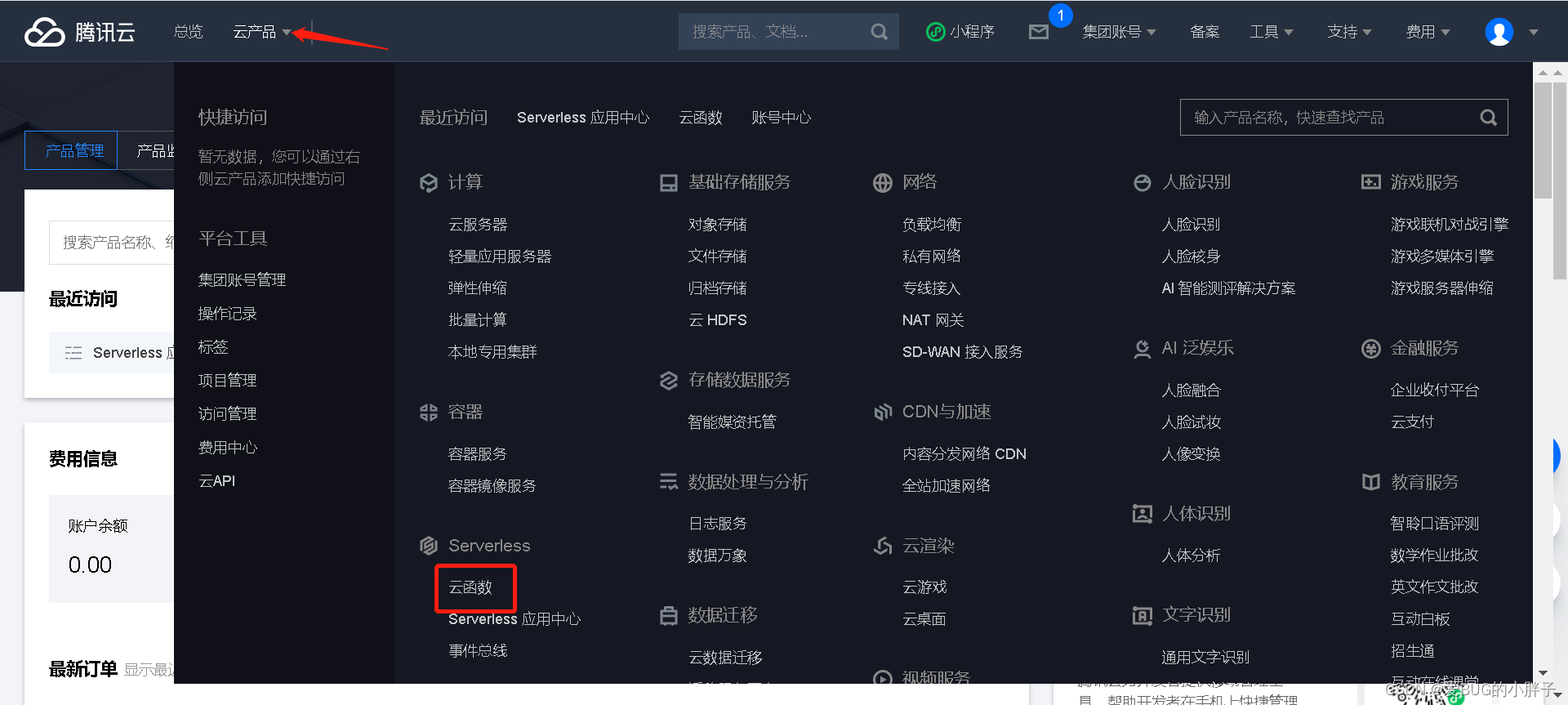
这里我们选择新建--选择从头开始(helloworld模板)--运行环境下滑选择python3.6版本。将里面有的代码删除,将我们上面的代码复制粘贴上去。
接下来就是最主要的环节,触发。我们需要每天定时10点触发运行程序。

选择自定义触发,这里我们不能选择十点触发程序运行,使用我们也是自定义一个。
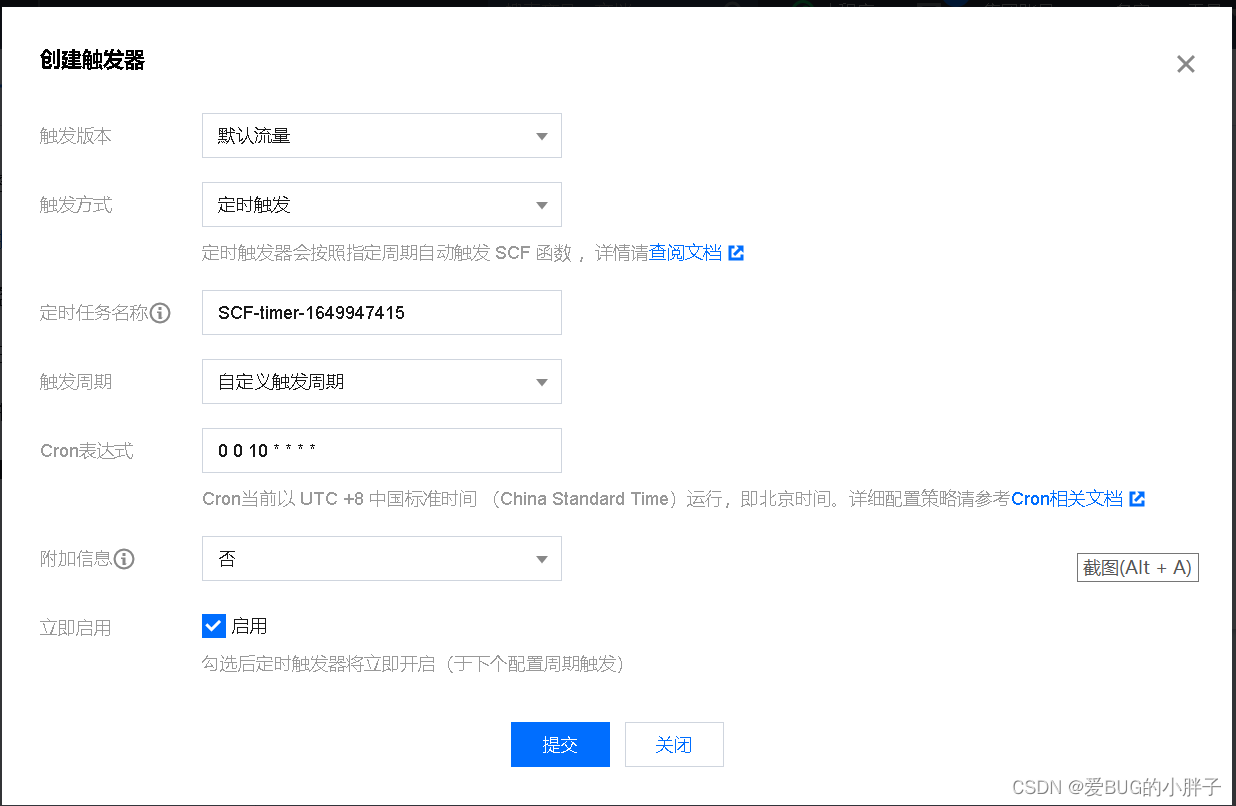
Cron 表达式里面的意思是每天10点触发一次程序运行,这样我们的程序就实现了每天定时运行。
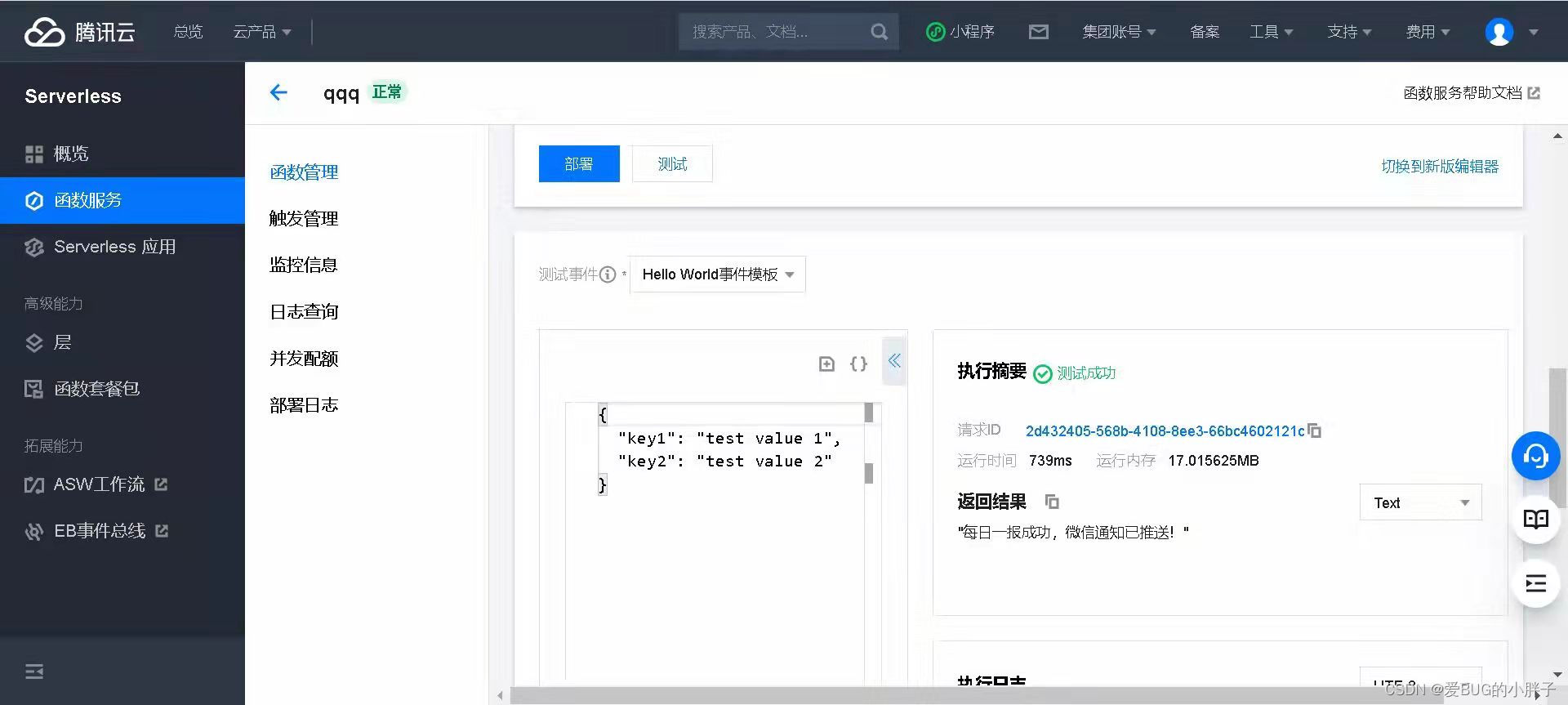
点击部署并测试,成功了证明代码没问题,到这里就基本结束了。
这里还有一个小细节,就是token,作用是为了告诉我们程序是运行成功了还是失败了。失败了证明他们数据更新了。使用token也很简单,关注一个pushplus 推送加 的一个公众,登录进去。点击个人资料,找到开发设置。里面有你的token,你也可以自己设置一个。这样程序运行一次你手机就会收到一次信息。效果如下:

版权声明
本文为[爱BUG的小胖子]所创,转载请带上原文链接,感谢
https://blog.csdn.net/weixin_58520733/article/details/124182977
边栏推荐
- 荧光标记的多肽/氨基酸(FITC修饰/AMC修饰)齐岳生物
- ACM入门之【TSP问题】
- Rsync and inotify remote synchronization
- 双光口保护8E1+8路物理隔离百兆100M以太网络光端机PDH光端机
- Sun Yuchen, founder of wave field Tron, announced that it will officially launch the decentralized stable currency usdd
- 2-15 find the combination number
- Layer1 capacity expansion: fragmentation and composability
- Copula函数初了解
- GoWeb基础
- Double optical port protection 8e1 + 8-way physical isolation 100M Ethernet optical transceiver PDH optical transceiver
猜你喜欢

MySQL深入学习(三二):数据库其它调优策略

重新定义中国“芯”

掺铬钛酸锶Cr:SrTiO3晶体基片|NaCl<111>10x10x2.0mm1sp晶体基片|Al2O3蓝宝石晶体基片|齐岳生物

STM32对舵机SG90的PWM输出
Leetcode 111 Balanced binary tree (2022.04.21)

tf.keras.layers.MaxPooling?D函数

Carrier grade double optical port protection 8e1 + 4-way physical isolation gigabit network optical transceiver 1000m network 100m optical transceiver

4E1 + 2-way Gigabit isolation network + 4-way 100m physical isolation network PDH optical transceiver

实验二、数据科学中的数学基础

Rsync and inotify remote synchronization
随机推荐
Amino (- NH2) phthalocyanine copper CAS: 28632-30-6 (tetraaminophthalocyanine) copper (II) tetraaminophthalocyanine copper (cutapc) - shared by Qiyue biological editor
网络原理二(上)
Informatics Aosai yibentong 1317: [example 5.2] combined output
汉源高科PDH光端机双光口保护+4路E1+4路千兆网络+4路百兆网络光端机
EFCore全局查询筛选器
双光口保护8E1+8路物理隔离百兆100M以太网络光端机PDH光端机
CAS:36530-06-0氯化硼亚酞菁|亚酞菁|氯化硼亚酞菁|二氯硼酞菁染料|氯化亚酞菁硼|BORONSUBPHTHALOCYANINECHLORIDE
nacos基础(4):配置nacos外部数据库
58技术沙龙第二十八期|安居客质量保障体系沙龙
LeetCode_ 118. Yanghui triangle_ Dynamic programming_ Int * * learning
使⽤airtestIDE⽣成脚本,使⽤脚本运⾏
STM32对舵机SG90的PWM输出
numpy stack函数
Dual channel optical network with 16 channels of E1 + 2m multi-channel optical transmission equipment
变种快排:寻找最大的前K个数
Wechat applet page routing
Leprechaun green elf magic strikes
PWM output of STM32 to steering gear sg90
力扣(LeetCode)111. 平衡二叉树(2022.04.21)
GoWeb基础