当前位置:网站首页>谷歌AdMob广告学习
谷歌AdMob广告学习
2022-04-23 06:07:00 【独饮敌敌畏丶】
学的杂七杂八的东西
1.ss协议是什么
我总结一下,ss/ssr的目的就是用来翻q的,侧重于流量混淆加密,穿透防火q是第一位,使用socket5代理。而vpn的目的是用来加密企业数据的,安全是第一位,本意并非是翻q
对于vpn来说安全是第一位的,而对于ss/ssr来说穿透防火q是第一位,抗干扰性强,而且对流量做了混淆,(所有流量在通过防火q的时候,基本上都被识别为普通流量,也就是说你翻q了,但是相关部门是检测不到你在翻q的。)两者的出发点和着重点就不同,ss/ssr更注重流量的混淆加密。
参考文章
2. 配置本地token,作为拉取github项目的凭证
一.谷歌AdMob
注意内存泄漏问题
1.谷歌AdMob是什么
AdMob 是移动电话广告市场,可提供用户在移动电话网络上播放广告。2006年创建,2009年被谷歌收购。
Admob覆盖200多个国家,是美国最大的手机广告平台。
2.基本使用
这里建议看官方文档,非常详细,几乎是傻瓜式教学。点这里进入官方文档
我这里说一下我一开始遇到的两个坑,都很简单,但是我当时没注意到
Bug1: 加了个括号
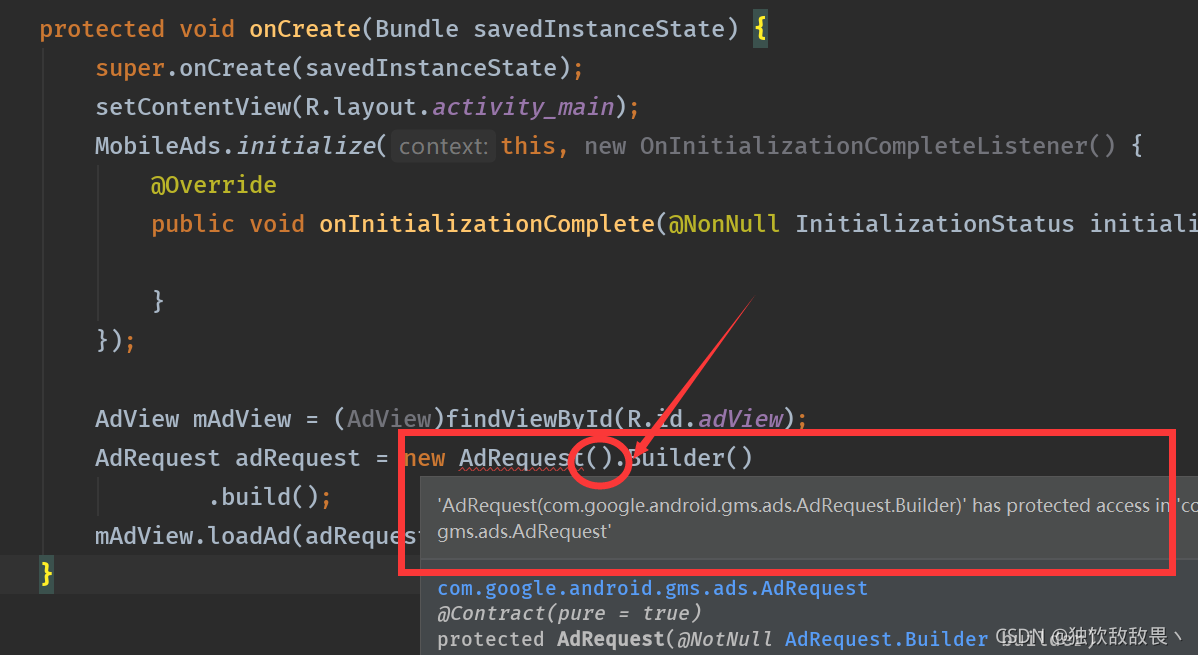
一开始我一直在纠结这个报错,后来才发现,AdRequest后面不用加括号。也算长个记性吧
Bug2: 两个id
这里一共有两个id,一个id是应用级id,是加在Manifest文件中的,另外一个id是控件级id,是加在控件的属性上的。
前者是

后者是

官方文档说的测试id,是后者,而不是Manifest中的

演示结果
我在广告控件里加了个TextView

效果如下

3.插页式广告demo
上面是横幅广告,是谷歌官方推荐新手学的,我用的是插页式广告。我把官方文档的demo摘取下来了。在这里我把他分析一下
xml中还是官方文档当中的布局,我这里只显示MainActivity中的
布局是这样的,最上面是广告,下面有个TextView,左下角是个Button,右下角是个TextView

大体流程是这样:首先启动Activity,执行生命周期函数,然后在onCreate中进行初始化和广告对象InterstitialAd的赋值,然后利用倒计时工具CountDownTimer,倒计时3s后(期间右下角的TextView会更新剩余时间,从3s开始,直到0s),左边的Button才显示出来。点击Button的时候,会先判断广告对象是否为null,如果不为null,就显示广告,如果为null,就重新加载广告,然后倒计时3s,结束后,显示按钮。
注意点1
在这里我做了个测试,就是切换到广告页面和切回MainActivity,发现分别调用了onPause和onResume。所以我猜测,广告页面不是新的Activity,切回的时候,会调用Activity的生命周期函数onResume
执行效果如下
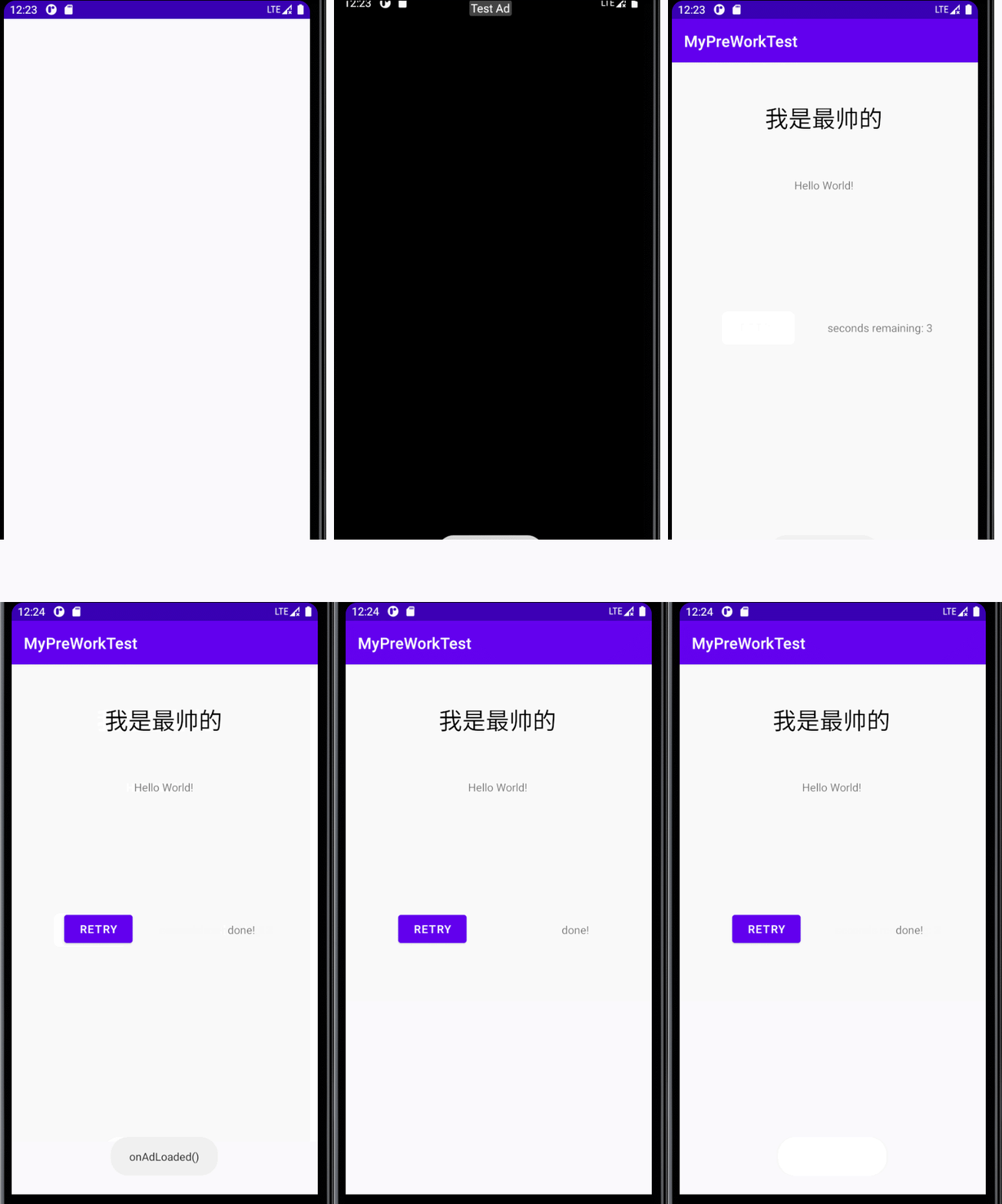
执行过程中,日志打印以及分析如下

注意点2
切回MainActivity的时候,广告对象InterstitialAd又为null了。我猜测是调用广告页面的时候,即调用show方法的时候,会对广告对象赋值为null。
MainActivity的完整代码如下
package com.example.mypreworktest;

import androidx.annotation.NonNull;
import androidx.appcompat.app.AppCompatActivity;

import android.os.Bundle;
import android.os.CountDownTimer;
import android.util.Log;
import android.view.View;
import android.widget.Button;
import android.widget.TextView;
import android.widget.Toast;

import com.google.android.gms.ads.AdError;
import com.google.android.gms.ads.AdRequest;
import com.google.android.gms.ads.AdView;
import com.google.android.gms.ads.FullScreenContentCallback;
import com.google.android.gms.ads.LoadAdError;
import com.google.android.gms.ads.MobileAds;
import com.google.android.gms.ads.initialization.InitializationStatus;
import com.google.android.gms.ads.initialization.OnInitializationCompleteListener;
import com.google.android.gms.ads.interstitial.InterstitialAd;
import com.google.android.gms.ads.interstitial.InterstitialAdLoadCallback;

public class MainActivity extends AppCompatActivity {

    private static final String TAG = "MyActivity";
    private static final String AD_UNIT_ID = "ca-app-pub-3940256099942544/1033173712";
    private static final long GAME_LENGTH_MILLISECONDS = 3000;//总时长

    private InterstitialAd interstitialAd;
    private CountDownTimer countDownTimer;
    private Button retryButton;
    private boolean gameIsInProgress;
    private long timerMilliseconds;
    @Override
    protected void onCreate(Bundle savedInstanceState) {

        super.onCreate(savedInstanceState);
        setContentView(R.layout.activity_main);
        Log.i(TAG, "onCreate");
        // Initialize the Mobile Ads SDK.
        MobileAds.initialize(this, new OnInitializationCompleteListener() {

            @Override
            public void onInitializationComplete(InitializationStatus initializationStatus) {
    }
        });

        loadAd();

        // Create the "retry" button, which tries to show an interstitial between game plays.
        retryButton = findViewById(R.id.retry_button);
        retryButton.setVisibility(View.INVISIBLE);
        retryButton.setOnClickListener(new View.OnClickListener() {

            @Override
            public void onClick(View view) {

                showInterstitial();
            }
        });

        startGame();
    }

    public void loadAd() {

        AdRequest adRequest = new AdRequest.Builder().build();

        //插页广告 加载
        InterstitialAd.load(
                this,
                AD_UNIT_ID,
                adRequest,
                new InterstitialAdLoadCallback() {

                    @Override
                    public void onAdLoaded(@NonNull InterstitialAd interstitialAd) {

                        // The mInterstitialAd reference will be null until
                        // an ad is loaded.
                        // 翻译: 在此之前,interstitialAd都为null,此时才被加载
                        MainActivity.this.interstitialAd = interstitialAd;
                        Log.i(TAG, "onAdLoaded");
                        Toast.makeText(MainActivity.this, "onAdLoaded()", Toast.LENGTH_SHORT).show();

                        //FullScreenContentCallback 处理与展示 InterstitialAd 相关的事件
                        interstitialAd.setFullScreenContentCallback(
                                new FullScreenContentCallback() {

                                    @Override
                                    public void onAdDismissedFullScreenContent() {

                                        // Called when fullscreen content is dismissed.
                                        // Make sure to set your reference to null so you don't show it a second time.
                                        // 翻译: 确保将引用设置为null,这样就不会再次显示它
                                        MainActivity.this.interstitialAd = null;
                                        Log.d("TAG", "The ad was dismissed.");
                                    }

                                    @Override
                                    public void onAdFailedToShowFullScreenContent(AdError adError) {

                                        // Called when fullscreen content failed to show.
                                        // Make sure to set your reference to null so you don't
                                        // show it a second time.
                                        //翻译: 同上
                                        MainActivity.this.interstitialAd = null;
                                        Log.d("TAG", "The ad failed to show.");
                                    }

                                    @Override
                                    public void onAdShowedFullScreenContent() {

                                        // Called when fullscreen content is shown.
                                        Log.d("TAG", "The ad was shown.");
                                    }
                                });
                    }

                    @Override
                    public void onAdFailedToLoad(@NonNull LoadAdError loadAdError) {

                        // Handle the error
                        Log.i(TAG, loadAdError.getMessage());
                        interstitialAd = null;

                        String error =
                                String.format(
                                        "domain: %s, code: %d, message: %s",
                                        loadAdError.getDomain(), loadAdError.getCode(), loadAdError.getMessage());
                        Toast.makeText(
                                MainActivity.this, "onAdFailedToLoad() with error: " + error, Toast.LENGTH_SHORT)
                                .show();
                    }
                });
    }

    private void createTimer(final long milliseconds) {

        // Create the game timer, which counts down to the end of the level
        // and shows the "retry" button.
        //翻译: 它倒计时到级别的末尾,并显示“重试”按钮。
        if (countDownTimer != null) {

            countDownTimer.cancel();
        }

        final TextView textView = findViewById(R.id.timer);

        countDownTimer = new CountDownTimer(milliseconds, 1000) {

            @Override
            public void onTick(long millisUnitFinished) {

                timerMilliseconds = millisUnitFinished;
                Log.i(TAG, millisUnitFinished + "ms");
                textView.setText("seconds remaining: " + ((millisUnitFinished / 1000) + 1));
            }

            @Override
            public void onFinish() {

                gameIsInProgress = false;
                textView.setText("done!");
                retryButton.setVisibility(View.VISIBLE);
            }
        };
    }

    @Override
    protected void onStart() {

        Log.i(TAG, "onStart");
        super.onStart();
    }

    @Override
    protected void onRestart() {

        Log.i(TAG, "onRestart");
        super.onRestart();
    }

    @Override
    public void onResume() {

        // Start or resume the game.
        super.onResume();
        Log.i(TAG, "onResume,此时广告为: "+ interstitialAd);
        if (gameIsInProgress) {

            resumeGame(timerMilliseconds);
        }
    }

    @Override
    public void onPause() {

        // Cancel the timer if the game is paused.
        Log.i(TAG, "onPause");
        countDownTimer.cancel();
        super.onPause();
    }

    private void showInterstitial() {

        // Show the ad if it's ready. Otherwise toast and restart the game.
        if (interstitialAd != null) {

            interstitialAd.show(this);
        } else {

            Toast.makeText(this, "Ad did not load", Toast.LENGTH_SHORT).show();
            startGame();
        }
    }

    private void startGame() {

        // Request a new ad if one isn't already loaded, hide the button, and kick off the timer.
        if (interstitialAd == null) {

            loadAd();
        }

        retryButton.setVisibility(View.INVISIBLE);
        resumeGame(GAME_LENGTH_MILLISECONDS);
    }

    private void resumeGame(long milliseconds) {

        Log.i(TAG, "resumeGame");
        // Create a new timer for the correct length and start it.
        gameIsInProgress = true;
        timerMilliseconds = milliseconds;
        createTimer(milliseconds);
        countDownTimer.start();
    }
}
版权声明
本文为[独饮敌敌畏丶]所创,转载请带上原文链接,感谢
https://blog.csdn.net/afdafvdaa/article/details/121207539
边栏推荐
- oracle通过触发器和序列来定义自增主键,并且设置定时任务每秒钟插入一条数据到目标表
- Binder机制原理
- ACFS文件系统创建扩大缩小等配置步骤
- Typical application scenarios of alicloud log service SLS
- Apprentissage par composantes
- oracle视图相关
- error 403 In most cases, you or one of your dependencies are requesting解决
- 基於ECS搭建雲上博客(雲小寶碼上送祝福,免費抽iphone13任務詳解)
- SQL中 with函数的详解与用法
- Exception record-5
猜你喜欢
iTOP4412 HDMI显示(4.0.3_r1)

iTOP4412 LCD背光驱动(PWM)
接口幂等性问题

Encapsulate a set of project network request framework from 0

Build a cloud blog based on ECS (polite experience)

Explore how @ modelandview can forward data and pages through the source code
Construire un blog Cloud basé sur ECS (bénédiction sur le Code Cloud Xiaobao, explication détaillée de la tâche iphone13 gratuite)

Practice using polardb and ECs to build portal websites

记录webView显示空白的又一坑

oracle通过触发器和序列来定义自增主键,并且设置定时任务每秒钟插入一条数据到目标表
随机推荐
窗口分析函数LAST_VALUE,FIRST_VALUE,lag,lead
基于ECS搭建云上博客(体验有礼)
Abnormal record-18
RAC环境数据库节点参数设置不当导致监听无法连接问题排查
Abnormal record-21
Exception record-8
Redis practice notes and source code analysis
oracle通过触发器和序列来定义自增主键,并且设置定时任务每秒钟插入一条数据到目标表
npm ERR code 500解决
Abnormal record-16
记录webView显示空白的又一坑
Exception record-14
oracle数据库将多个列的查询结果集合并到一行中
oracle创建表空间和修改用户默认表空间
this.getOptions is not a function
个人博客网站搭建
Exception record-7
Dolphinscheduler集成Flink任务踩坑记录
Oracle redo log产生量大的查找思路与案例
iTOP4412内核反复重启