当前位置:网站首页>SDN学习之Opendaylight浅析(二)
SDN学习之Opendaylight浅析(二)
2022-04-22 16:48:00 【亨格瑞】
上一篇讲了ODL的基本认识和安装,这一篇主要讲讲ODL内部的使用,ODL控制器是MD-SAL机制,MD代表服务是以模型驱动,的,这个模型简单来说就是yang模型,早在2003年,IETF成立了一个NETCONF工作组,提出一种基于XML的网络配置管理协议,也就是NETCONF(Network Configuration Protocol),因为该协议的配置功能非常强大,同时兼顾监控和故障管理,安全验证和访问控制,所以得到业界的一致认可,所以广泛采用netconfig来配置网络。NETCONF协议分为传输层、RPC层、操作层和内容层。其中,内容层是唯一没有标准化的层,于是一种新的建模语言YANG产生了,它的目标是对NETCONF数据模型、操作进行建模,覆盖NETCONF协议的操作层和内容层,yang模型据我的理解可以看作是定义一个数据对象的,对象中包含各种结构的属性,这一部分篇幅所限,我不对yang模型进行讲解,以后可以专门写一个文章进行讲解。
要学习ODL的MD-SAL,有三个方面的内容需要掌握:
1.RPC
2.notification
3.datastore
其实这三点都与yang模型有一定的联系,下面结合代码进行分析和讲解。
1.RPC
RPC代表一个输入输出的函数调用过程,是有一个请求和返回的消息对,RPC首先要在yang文件中定义,例如:
 rpc connect-device {
        input {
            leaf device-id {
                description "the ip to execute mtr";
                type string;
            }
            leaf device-ip {
                description "the url of dst";
                type string;
            }
            leaf username {
                description "the url of dst";
                type string;
            }
            leaf password {
                description "the url of dst";
                type string;
            }
            leaf device-port {
                description "the uuid of device";
                type string;
            }
            leaf connection-type {
                description "Type of connection, true for tcp only";
                type string;
                default "false";
            }
            leaf protocol {
                description "the uuid of device";
                type string;
                default "ssh";
            }
            leaf schemaless {
                description "the uuid of device";
                type string;
                default "false";
            }
            leaf excluded-tls-versions {
                description "the uuid of device";
                type string;
                default "";
            }

        }

        output {
             leaf result {
                 description "total result";
                 type string;
            }
        }
    }
列如上面就定义了一个连接设备的RPC调用,这个yang模型会在编译之后会生成binding接口,可以供我们提供实现。
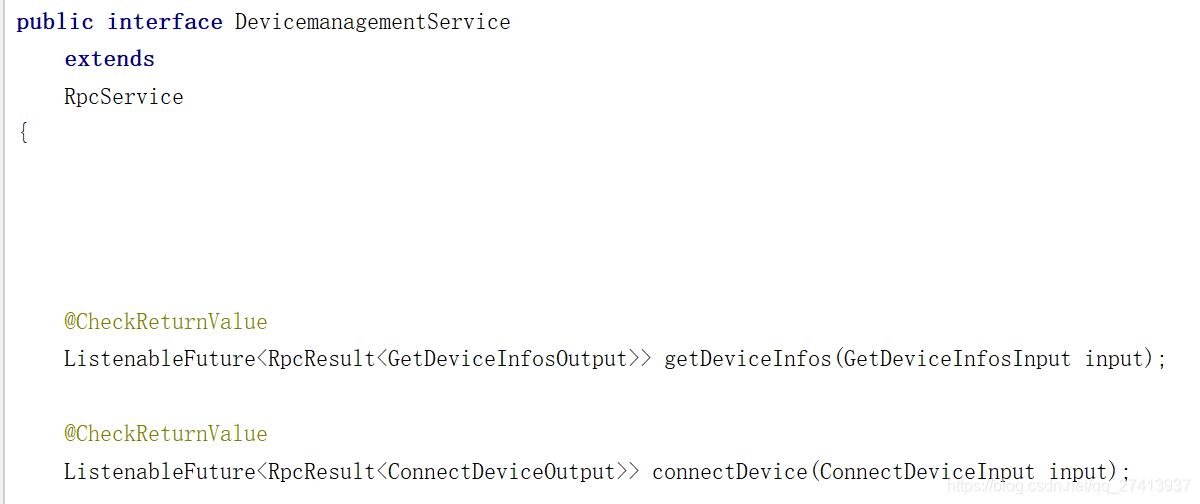
对每个RPC Method解析Input入参,实现RPC Method的业务逻辑,构造RPC Output,封装成future返回。我们可以自己书写代码实现接口
@Override
	public ListenableFuture<RpcResult<ConnectDeviceOutput>> connectDevice(ConnectDeviceInput input) {
		// TODO Auto-generated method stub

		String deviceIp = input.getDeviceIp();
		String devicePort = input.getDevicePort();
		String connectionType = input.getConnectionType();
		String schemaless = input.getSchemaless();
		String protocol = input.getProtocol();
		String username = input.getUsername();
		String password = input.getPassword();
		String excludedTlsVersions = input.getExcludedTlsVersions();
		String deviceId = input.getDeviceId();

		if (!NetconfCommandUtils.isIpValid(deviceIp) || !NetconfCommandUtils.isPortValid(devicePort)) {
			return RpcResultBuilder.<ConnectDeviceOutput>failed().withResult(new ConnectDeviceOutputBuilder().setResult(
					"\"Invalid IP:\" + deviceIp + \" or Port:\" + devicePort + \"Please enter a valid entry to proceed.\""))
					.buildFuture();
		}

		final boolean isTcpOnly = connectionType.equals("true");
		final boolean isSchemaless = schemaless.equals("true");

		final NetconfNodeBuilder netconfNodeBuilder = new NetconfNodeBuilder();
		netconfNodeBuilder.setHost(new Host(new IpAddress(new Ipv4Address(deviceIp))))
				.setPort(new PortNumber(Integer.decode(devicePort))).setTcpOnly(isTcpOnly).setSchemaless(isSchemaless);

		if (isTcpOnly || protocol.equalsIgnoreCase("ssh")) {
			if (Strings.isNullOrEmpty(username) || Strings.isNullOrEmpty(password)) {
				return RpcResultBuilder.<ConnectDeviceOutput>failed()
						.withResult(new ConnectDeviceOutputBuilder()
								.setResult("Empty Username:" + username + " or Password:" + password
										+ ". In TCP or SSH mode, you must provide valid username and password."))
						.buildFuture();

			}
			final Credentials credentials = new LoginPasswordBuilder().setPassword(password).setUsername(username)
					.build();
			netconfNodeBuilder.setCredentials(credentials);
			if (!isTcpOnly) {
				netconfNodeBuilder.setProtocol(new ProtocolBuilder().setName(Name.SSH).build());
			}
		} else if (protocol.equalsIgnoreCase("tls")) {
			TlsCase tlsCase = null;
			if (!Strings.isNullOrEmpty(excludedTlsVersions)) {
				tlsCase = new TlsCaseBuilder().setTls(
						new TlsBuilder().setExcludedVersions(Arrays.asList(excludedTlsVersions.split(","))).build())
						.build();
			}
			netconfNodeBuilder.setProtocol(new ProtocolBuilder().setName(Name.TLS).setSpecification(tlsCase).build());
		} else {
			return RpcResultBuilder.<ConnectDeviceOutput>failed()
					.withResult(new ConnectDeviceOutputBuilder()
							.setResult("Invalid protocol: " + protocol + ". Only SSH and TLS are supported."))
					.buildFuture();
		}

		try {
			FluentFuture<? extends @NonNull CommitInfo> future = service.connectDeviceSync(netconfNodeBuilder.build(),
					deviceId);
			future.get(DELAYTIME, TimeUnit.MILLISECONDS);
		} catch (TimeoutException e) {
			// TODO Auto-generated catch block
			return RpcResultBuilder.<ConnectDeviceOutput>failed()
					.withResult(new ConnectDeviceOutputBuilder().setResult(e.getMessage())).buildFuture();
		} catch (Exception e) {
			return RpcResultBuilder.<ConnectDeviceOutput>failed()
					.withResult(new ConnectDeviceOutputBuilder().setResult(e.getMessage())).buildFuture();
		}

		final String message = "Netconf connector added succesfully";
		return RpcResultBuilder.success(new ConnectDeviceOutputBuilder().setResult(message)).buildFuture();

	}
同时在blueprint上注册RPC实现。
  <bean id="devicemanagementImpl"
    class="com.ctg.netcontrol.impl.DevicemanagementImpl">
    <argument ref="commanders" />
    <argument ref="mountPointService" />
    <argument ref="dataBroker" />
  </bean>
<odl:rpc-implementation ref="devicemanagementImpl" />
这样就可以提供RPC服务,假如要调用RPC服务,也可以在blueprint里面上注册RPC调用。
<odl:rpc-service id="virtdevmanagerService" interface="org.opendaylight.yang.gen.v1.urn.opendaylight.params.xml.ns.yang.virtdevmanager.rev190225.VirtdevmanagerService"/>RPC调用还有一定的讲究,例如采用同步,异步调用,这个以后有时间再分析。
2.Notifications
notifications是ODL另一种信息传递形式,采用发布和订阅的方式,其实还有另一种对datachange的订阅监听,这种使用到data broker传递给订阅者。
首先依然是yang模型的定义,例如:

同样经过编译后会生成接口,主要是一个listener接口和notification的builder接口,用于监听和构建notification:

例如,作为发布者的时候,需要构建出notification,利用notificationpublishservice的publish方法发布出去


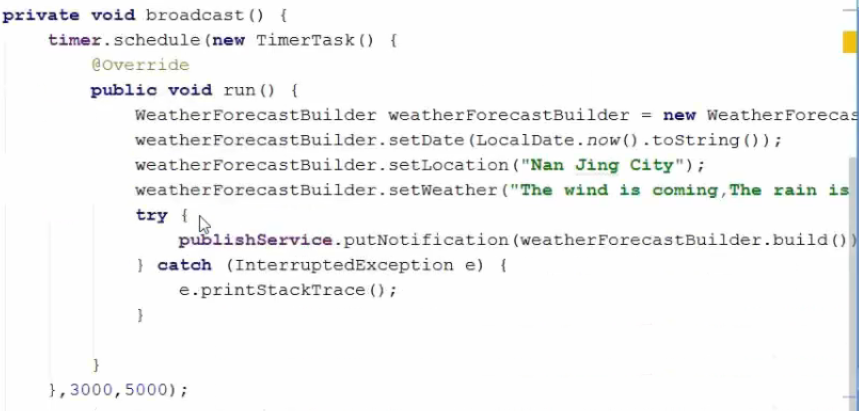

publishservice具有两个方法,putNotification:将消息投递到队列后才返回。表明消息已经投递成功了。这个是同步的方式。如果消息队列满了,则会一直阻塞直到消息队列有空闲将消息投递后才返回。
offerNotification:立即返回。后台线程负责将消息投递到消息队列。投递成功则返回设置成功。如果消息队列满,则会一直阻塞,直到投递成功为止。这个方法会立即返回ListenableFuture,可以通过callBack方式检测其是否成功还是失败。
offerNotifiation(xxx,int var2,…):这个方法也是立即返回。不同于第二个的是,如果消息队列满,不会一直阻塞,在超时时间到达后如果还没投递消息,则设置失败。

而假如作为订阅者,则需要在blueprint里面注册listener:

然后在listener里面实现监听到通知后的处理逻辑:

订阅者在处理消息时,如果处理消息时间过长,尽量开辟一个新的线程来处理消息。否则会卡住消息的发布者,因为消息发布者是将消息投递到一个消息队列的。如果处理消息时间长,消息队列容易满,进而造成消息发布者阻塞住。
消息投递也是有顺序的。不会因为前一个消息没投递出去,后面的消息投递出去了。而datastore的datachange notify则是没有顺序的。它会并发地发出多个消息,无任何顺序。
3.DataStore
datastore是一个树状结构保存在内存中的数据,可以看作ODL的数据库,计算变化集并且维护commit handlers,notification listeners和实际数据之间的关系。要获取服务的话首先需要在blueprint里面定义。
 <reference id="dataBroker"
    interface="org.opendaylight.controller.md.sal.binding.api.DataBroker"
    odl:type="default" />
datastore是以事务进行操作,因为其本身就相当于数据库,所以进行事务操作很好理解,简要说明一下。事务(transaction)在资料里面说是整体数据树的一致性快照,相当于将要应用于数据树的一系列原子操作集,也就是这个事务同样具有原子性,
例如创建事务

事务中可以存在多个子操作,最后利用submit操作一并提交。

Put操作:全新的操作。如果数据不存在,则会创建。如果数据已经存在了,则会完全替换掉。
Merge操作:如果之前没有数据则会写进去。如果之前有数据,新的也有数据,则会更新。如果之前有数据,新的没有数据,则不会发生任何变化。
LogicalDatastoreType是区分操作的数据树类型,主要分为operational和configuration两种数据树,InstanceIdentifier是用来标识数据树上面的要操作的数据,可以看作树节点,而dataobject是节点的返回数据类型,一般事务操作后可以返回Optional类型的对象,利用get()方法获取到返回数据。

可以利用get获取dataobject,当然也能利用future来构建回调函数。


版权声明
本文为[亨格瑞]所创,转载请带上原文链接,感谢
https://blog.csdn.net/qq_27413937/article/details/104148164
边栏推荐
- Scripy framework advanced learning
- 国美新动作“真选”“严选”赋能 多维度护航品质消费
- Network public opinion monitoring system
- Code implementation of sequence table
- 坚持做正确的事情
- Random talk on homology strategy (SOP) and cross domain resource sharing (CORS)
- Gome retail takes advantage of the east wind of digital economy to create a "boat body" consumption experience
- 【滤波与卷积(二)】
- RT thread studio workspace encoding is set to UTF-8
- NFT 平台安全指南
猜你喜欢

Domain driven model DDD (III) -- using saga to manage transactions

详述 CHARTEVENTS 检查记录表(十)
![[interview ordinary people vs Expert Series] please talk about the network quadruple](/img/a9/0132b879b9d18d14d2aed0e002eee1.png)
[interview ordinary people vs Expert Series] please talk about the network quadruple
frp反向代理

MySQL日志

解决并发问题方案流程及原理总结(表单重复提交问题)

敬語 謙譲

【Appium】有道云app的unittest框架简单移植及驱动文件的设计

numpy基础大全(创建、索引、常用函数)

京东一面:子线程如何获取父线程 ThreadLocal 的值?我蒙了。。。
随机推荐
运维自动化之ansible--(playbook模式)
MySQL日志
C determines whether the database return record is a null DbNull class DbNull Value. Equals(row[fieldName]
Crashsight general function & feature function introduction
NFT platform security guide
双向循环链表创建
AQS source code reading
What are the functional problems of UI testing- Ze zhongyun test
【Appium】有道云app的unittest框架简单移植及驱动文件的设计
7 capabilities of data analysis: sorting out data needs
[appium] simple transplantation of unittest framework of Youdao cloud app and design of driver file
蓝桥杯练习020
Numpy Fundamentals (creation, index, common functions)
NFT 平台安全指南
面向全球市场,PlatoFarm今日登录HUOBI等全球四大平台
Blue Bridge Cup practice 019
remix连接测试链,连接Arbiturm二层网络
Code implementation of sequence table
蓝桥杯练习019
Web security tool burp_ Suite installation and use tutorial (professional version)