当前位置:网站首页>JS页面刷新方法汇总
JS页面刷新方法汇总
2022-04-22 09:25:00 【华为云】
在项目开发过程中,需要实现刷新页面。经过学习,发现下面这条语句就可以轻松实现。
location.reload(); // 刷新页面
有关刷新页面的其它方法,具体学习内容如下,有需要的朋友可以参考下。
本文介绍下,用js刷新当前页面的几种方法,包括reload方法、replace方法、自动刷新方法等。
如何实现刷新当前页面呢?借助js你将无所不能。
1.reload 方法
该方法强迫浏览器刷新当前页面。
语法:location.reload([bForceGet])
参数: bForceGet, 可选参数, 默认为 false,从客户端缓存里取当前页。true, 则以 GET 方式,从服务端取最新的页面, 相当于客户端点击 F5(“刷新”)
2. replace 方法
该方法通过指定URL替换当前缓存在历史里(客户端)的项目,因此当使用replace方法之后,你不能通过“前进”和“后退”来访问已经被替换的URL。
语法: location.replace(URL)
通常使用: location.reload()或者是 history.go(0)来做。
此方法类似客户端点F5刷新页面,所以页面method="post"时,会出现"网页过期"的提示。
因为Session的安全保护机制。
当调用location.reload() 方法时, aspx页面此时在服务端内存里已经存在, 因此必定是IsPostback 的。
如果有这种应用: 需要重新加载该页面,也就是说期望页面能够在服务端重新被创建,期望是 Not IsPostback 的。
这里,location.replace()就可以完成此任务。被replace的页面每次都在服务端重新生成。
代码:location.replace(location.href);
返回并刷新页面:
location.replace(document.referrer);
document.referrer //前一个页面的URL
不要用 history.go(-1),或 history.back();来返回并刷新页面,这两种方法不会刷新页面。
附:
Javascript刷新页面的几种方法:
代码如下:
history.go(0) location.reload() location=location location.assign(location) document.execCommand('Refresh') window.navigate(location) location.replace(location) document.URL=location.href自动刷新页面的方法
1. 页面自动刷新
把如下代码加入<head>区域中
代码如下:
<meta http-equiv="refresh" content="20">
其中20指每隔20秒刷新一次页面.
2. 页面自动跳转
把如下代码加入<head>区域中
代码如下:
<meta http-equiv="refresh" content="20;url=http://www.jb51.net">其中20指隔20秒后跳转到http://www.jb51.net页面
3. 页面自动刷新js版
代码如下:
4. JS刷新框架的脚本语句
代码如下:
//刷新包含该框架的页面用 <script language=JavaScript> parent.location.reload();</script>//子窗口刷新父窗口<script language=JavaScript> self.opener.location.reload();</script>( 或 <a href="javascript:opener.location.reload()">刷新</a> )//刷新另一个框架的页面用 <script language=JavaScript> parent.另一FrameID.location.reload();</script>如果想关闭窗口时刷新或想开窗时刷新,在<body>中调用以下语句即可。
代码如下:
<body onload="opener.location.reload()"> 开窗时刷新<body onUnload="opener.location.reload()"> 关闭时刷新<script language="javascript">window.opener.document.location.reload()</script>一、先来看一个简单的例子:
下面以三个页面分别命名为frame.html、top.html、bottom.html为例来具体说明如何做。
frame.html 由上(top.html)下(bottom.html)两个页面组成,代码如下:
代码如下:
<!DOCTYPE HTML PUBLIC "-//W3C//DTD HTML 4.0 Transitional//EN"> <HTML> <HEAD> <TITLE> frame </TITLE> </HEAD> <frameset rows="50%,50%"> <frame name=top src="top.html"> <frame name=bottom src="bottom.html"> </frameset> </HTML> 现在假设top.html (即上面的页面) 有七个button来实现对bottom.html (即下面的页面) 的刷新,可以用以下七种语句,哪个好用自己看着办了。
top.html 页面的代码如下:
代码如下:
<!DOCTYPE HTML PUBLIC "-//W3C//DTD HTML 4.0 Transitional//EN"> <HTML> <HEAD> <TITLE> top.html </TITLE> </HEAD> <BODY> <input type=button value="刷新1" onclick="window.parent.frames[1].location.reload()"><br> <input type=button value="刷新2" onclick="window.parent.frames.bottom.location.reload()"><br> <input type=button value="刷新3" onclick="window.parent.frames['bottom'].location.reload()"><br> <input type=button value="刷新4" onclick="window.parent.frames.item(1).location.reload()"><br> <input type=button value="刷新5" onclick="window.parent.frames.item('bottom').location.reload()"><br> <input type=button value="刷新6" onclick="window.parent.bottom.location.reload()"><br> <input type=button value="刷新7" onclick="window.parent['bottom'].location.reload()"><br> </BODY> </HTML> 下面是bottom.html页面源代码,为了证明下方页面的确被刷新了,在装载完页面弹出一个对话框。
代码如下:
<!DOCTYPE HTML PUBLIC "-//W3C//DTD HTML 4.0 Transitional//EN"> <HTML> <HEAD> <TITLE> bottom.html </TITLE> </HEAD> <BODY onload="alert('我被加载了!')"> <h1>This is the content in bottom.html.</h1> </BODY> </HTML> 解释一下:
代码如下:
1.window指代的是当前页面,例如对于此例它指的是top.html页面。
2.parent指的是当前页面的父页面,也就是包含它的框架页面。例如对于此例它指的是framedemo.html。
3.frames是window对象,是一个数组。代表着该框架内所有子页面。
4.item是方法。返回数组里面的元素。
5.如果子页面也是个框架页面,里面还是其它的子页面,那么上面的有些方法可能不行。
附:
Javascript刷新页面的几种方法:
1 history.go(0) 2 location.reload() 3 location=location 4 location.assign(location) 5 document.execCommand('Refresh') 6 window.navigate(location) 7 location.replace(location) 8 document.URL=location.href 二、自动刷新页面
1.页面自动刷新:把如下代码加入<head>区域中
<meta http-equiv="refresh" content="20">
其中20指每隔20秒刷新一次页面.
2.页面自动跳转:把如下代码加入<head>区域中
<meta http-equiv="refresh" content="20;url=http://www.jb51.net">
其中20指隔20秒后跳转到http://www.jb51.net页面
3.页面自动刷新js版
[注:如需引入外部Js需刷新才能执行]
三、java在写Servler,Action等程序时,要操作返回页面的话(如谈出了窗口,操作完成以后,关闭当前页面,刷新父页面)
代码如下:
PrintWriter out = response.getWriter();out.write("<script type=\"text/javascript\">");//子窗口刷新父窗口out.write("self.opener.location.reload();");//关闭窗口out.write("window.opener=null;");out.write("window.close();");out.write("</script>");四、JS刷新框架的脚本语句
1.如何刷新包含该框架的页面用
代码如下:
<script language=JavaScript>parent.location.reload();</script>2.子窗口刷新父窗口
代码如下:
<script language=JavaScript>self.opener.location.reload();</script>3.如何刷新另一个框架的页面用 (上面的实例以说明了)
代码如下:
语句1. window.parent.frames[1].location.reload(); 语句2. window.parent.frames.bottom.location.reload(); 语句3. window.parent.frames["bottom"].location.reload(); 语句4. window.parent.frames.item(1).location.reload(); 语句5. window.parent.frames.item('bottom').location.reload(); 语句6. window.parent.bottom.location.reload(); 语句7. window.parent['bottom'].location.reload(); 4.如果想关闭窗口时刷新或者想开窗时刷新的话,在<body>中调用以下语句即可。
<body onload="opener.location.reload()">
开窗时刷新
<body onUnload="opener.location.reload()">
关闭时刷新
代码如下:
<script language="javascript">window.opener.document.location.reload()</script>版权声明
本文为[华为云]所创,转载请带上原文链接,感谢
https://bbs.huaweicloud.com/blogs/349093
边栏推荐
- How to ensure the consistency between cache and database (super detailed case)
- L3-007 天梯地图 (30 分)(条件dij
- ShardingSphere简介与分表使用
- 编写一个简单的考试程序,在控制台完成出题、答题的交互。试题(Question)分为单选(SingleChoice)和多选( MultiChoice)两种。
- Online yaml to properties tool
- word写毕设常见格式问题
- C 标准库 - <time.h>
- 如何在mysql数据表中添加邮箱email
- MySQL-on duplicate key upate/case when语法使用
- Oracle 18C RAC installation grid execution script root SH error, prcr-1013: unable to start resource ora ons
猜你喜欢
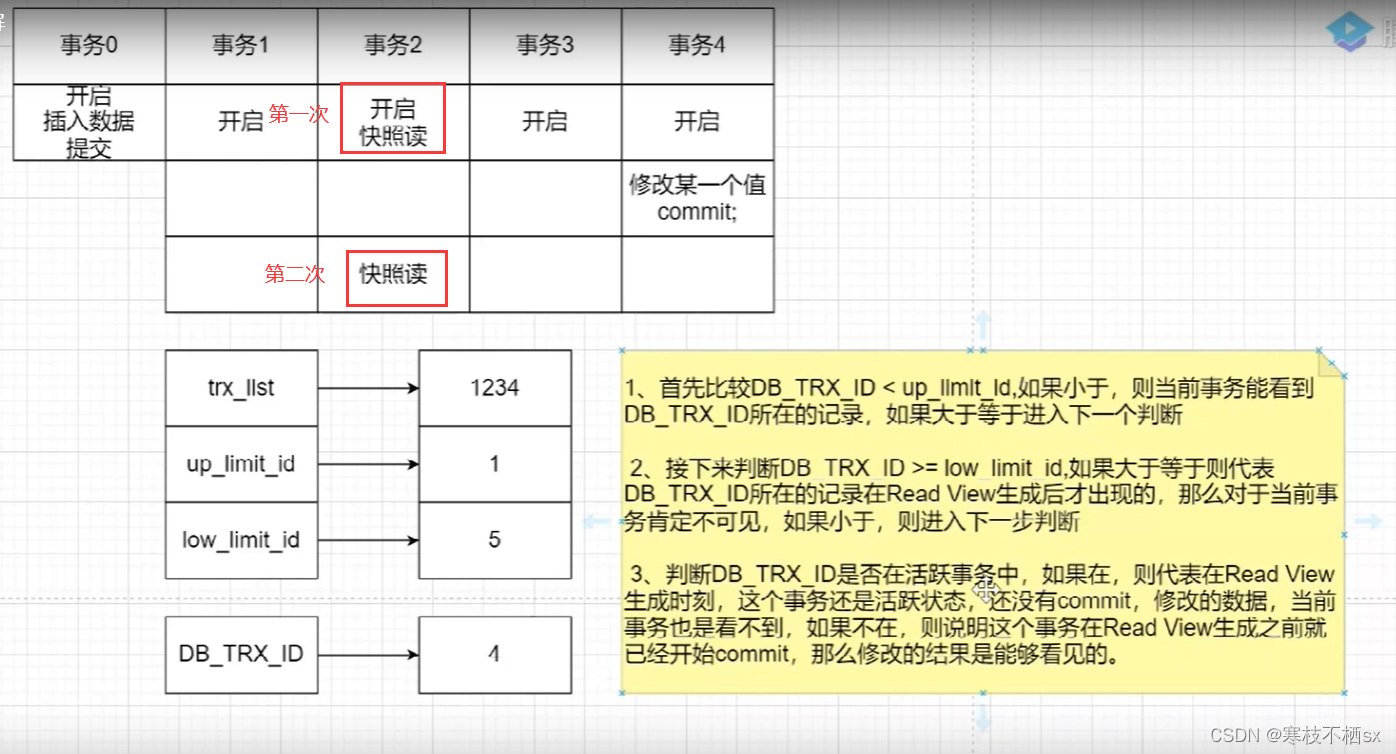
Understand the first snapshot read and the second snapshot read of the same transaction in MySQL mvcc - Notes

server 2019服务器可用内存是实际内存的一半

(CVPR-2014)通过预测 10,000 个类别的深度学习人脸表示

Examples of cmake basic knowledge II: single file, multiple files, dynamic and static library and use

APP优化及积分榜进阶下篇【MUI+Flask+MongoDB】
理解MySQL的MVCC同一个事务第一次快照读和第二次快照读——笔记

Oracle 18C RAC installation grid execution script root SH error, prcr-1013: unable to start resource ora ons

MySQL on duplicate key update / case when syntax

How to build an observable system that can "evolve continuously"| QCon

在线CSV转YAML工具
随机推荐
APP优化及积分榜进阶下篇【MUI+Flask+MongoDB】
杰理之通常影响CPU性能测试结果的因素有:【篇】
mysql用source命令导入sql出现报错 觉得应该是编码问题 不知道该怎么解决
从键盘中随意输入一串字符,统计并输出该字符串中各字符(数字、大写字母、小写字母、标点符号等)各自出现的次数。用面向对像的思想实现。
hyperscan --- 2 编译
How to ensure the consistency between cache and database (super detailed case)
How to calculate the maximum switching frequency of MOS tube - Kia MOS tube
word写毕设常见格式问题
基于MOSFET控制的大范围连续可调(0~45V) 的小功率稳压电源设计实例
Kernel pwn 基础教程之 Heap Overflow
ShardingSphere简介与分表使用
Using docker to build LNMP + redis development environment suitable for thinkphp5
MOS tube and MOS tube driving circuit case analysis - Kia MOS tube
Separate linked list (create two empty linked lists)
如何在mysql数据表中添加邮箱email
2022起重机司机(限桥式起重机)考试题库及在线模拟考试
pytorch模型加载跑测试集和训练过程中跑测试集结果不一致的问题?
yolov5 口罩检测flask部署
I/O知识点总结
unity之动态批处理和静态批处理