当前位置:网站首页>Discuz! Forum program installation + template configuration tutorial
Discuz! Forum program installation + template configuration tutorial
2022-08-09 19:44:00 【V13807970340】
Discuz!Forum program installation+Template configuration tutorial
Linux系统安装方法:
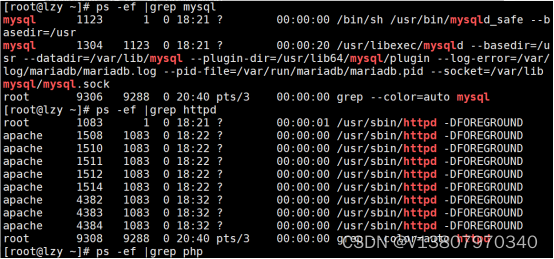
第一步:检查是否安装apache mysql php
ps -ef |grep httpd
ps -ef |grep mysql
ps -ef |grep php
第二步:下载Discuz到服务器并解压(建议从官网下载最新版本)
wget http://download.comsenz.com/DiscuzX/3.2/Discuz_X3.2_SC_UTF8.zip
unzip Discuz_X3.2_SC_UTF8.zip
第三步:将upload这个目录下的所有文件上传到 /var/www/html/目录.

更改文件及文件夹权限:

在正式安装 Discuzbefore the forum,Check that the following configuration is complete(完成跳过,Otherwise complete the operation)
1、修正目录文件权限检查,关闭selinux即可.如下命令可临时关闭seLinux.

2、永久关闭selinux 需编辑配置文件/etc/selinux/config,设置SELINUX=disabled,重启系统后生效.

3、修正mysql_connect(),安装php-mysql模块,重启apache服务,刷新网页,函数依赖性检查正常.

第四步:在浏览器中输入网址http://103.88.32.180:80/install (LAMP服务器IP:103.88.32.180The port is added behind because the default is to be used80The port is empty,所以改为99,).
阅读授权协议后点击“我同意”,系统会自动检查环境,如下图所示.


- 点击“下一步”,选择“全新安装 Discuz! X (含 UCenter Server)”,如下图所示.

2、点击“下一步”,进入安装数据库的界面,设置数据库信息及管理员信息.(yum安装LAMP环境时已创建数据库newdb并授权root)

3、点击“下一步”,系统会自动安装数据库直至完毕.安装成功后,出现Discuz! 安装向导界面,如下图所示.

4.点击“您的论坛已完成安装,点此访问”,进入论坛界面,如下图.

第五步:管理Discuz论坛网站
1、输入账号,密码,验证码,登录.

- 点击管理中心,进入管理中心登录界面.

- Also available via URLhttp:// 103.88.32.180:99/admin.php进入管理中心登录界面.

- 登录管理中心,提示删除install/index.php文件.

- 删除提示文件.
rm -rf /var/www/html/install/index.php
- 刷新网页
- Click the Apps tab,可以管理(启用、关闭、更新、安装)插件.The installation is the same as remember to install the higher version.
Windows系统安装方法:
- 浏览器搜索discuzGo to the official website to download the latest version of the program.
下载好之后,把uploadThe sub-files in the folder are placedwwwdirectory or space.(这里www里面建了一个discuz的目录,Simply add the folder name when accessing) 
浏览器输入localhost或者你的域名,找到discuz目录(wwwCreate your own directory)Press Enter to start the installation program.
Fill in the name and password of your own database,Fill in the administrator login account password,然后提交,等待安装即可.
安装完成之后,Log in with the administrator password you just set,http://localhost/discuz/admin进入后台(域名后面加个admin即可),Generally, the default foreground is not needed,Then replace the template.Operate directly in the background:Just follow the steps below.
需要登录官网,Just follow the steps to register,Then find a template that you like,Click to switch to your own 适合的版本,然后点击安装.


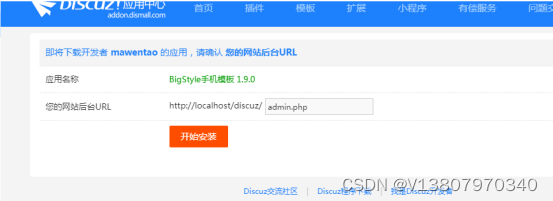

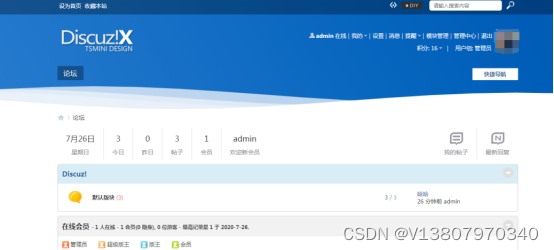
5.After installation, you will see the installed template,然后使用.

6. 然后就是,Post to try it out.This thing is useless locally,Because it is a forum,space must be placed,A domain name is required in order for someone to visit and reply to a post.
If you like it, remember to like and follow me. I am Chi Wang Aisi,That's all for today's sharing. See you next time!
边栏推荐
- .NET 6学习笔记(4)——解决VS2022中Nullable警告
- 反转链表的多种写法(武器库了属于是)
- openEuler Xiong Wei: How do you view the SIG organization model in the open source community?
- JVM内存模型和结构详解(五大模型图解)
- 体验远超Hue,这才是技术人员最喜欢的SQL工具
- BSN季度版本2022年8月31日迭代更新预告
- leetcode/链表中环的入口节点
- 2022小米运维开发笔试1
- Fees and inquiry methods of futures account opening exchanges
- GoFrame缓冲输出到客户端Flush()
猜你喜欢





随机推荐
如何仿造一个websocket请求?
A49 - ESP8266建立AP传输XPT2046AD数据WIFI模块
在 .NET MAUI 中如何更好地自定义控件
逻辑越权和水平垂直越权支付篡改,验证码绕过,接口
字节也开始缩招了...
微软 .NET Core 3.1 年底将结束支持,请升级到.NET 6
kafka 通过 jdbc 从oracle抓取数据
融云 x N 世界:构建无限用户实时交互的「元宇宙会场」
为了高性能、超大规模的模型训练,这个组合“出道”了
openEuler 熊伟:如何看待开源社区中的 SIG 组织模式?
那些关于DOM的常见Hook封装(二)
mysql generates random name, mobile number, date
ceph2
重谈联想5G编码投票事件
AI基础环境搭建和设置总文
LeetCode 413.等差数列划分
CryoEM粒子(Particle)类型预测的数据集构建
.NET静态代码织入——肉夹馍(Rougamo) 发布1.1.0
mysql生成随机姓名、手机号、日期
vr虚拟仿真样板间极大节省出样成本-深圳华锐视点