当前位置:网站首页>申请CA证书的步骤
申请CA证书的步骤
2022-04-23 00:29:00 【CodeMartain】

我们再日常使用的系统中会用到很多签名的地方,
再win中 控制台输入certmgr.msc

随机查看证书—


OpenSSL
OpenSSL—安全套接字协议
在计算机网络上,OpenSSL是一个开放源代码的软件库包,应用程序可以使用这个包来进行安全通信,避免窃听,同时确认另一端连接者的身份。这个包广泛被应用在互联网的网页服务器上。
几个关键词—
- CSR
证书签名请求文件
- CRT
证书
- key
私钥
以上知识一些基础的内容,我们再来说OpenSSL,首先他是一个协议—安全套接字协议,他的核心就是通过加密传输时的数据来保证信息不被非法窃取,保护用户隐私;
申请CA证书
openssl通过加密算法来实现.
openssl下载–linux版
下载之后安装openssl,安装后的目录

通过start.bat启动openssl
在D盘key文件夹下生成密钥文件
C:\Users\Gavin>openssl genrsa -des3 -out d:/key/server.key
Enter PEM pass phrase:
Verifying - Enter PEM pass phrase:
私钥文件—
生成私钥,需要提供一个至少4位,最多1023位的密码

由私钥创建待签名的证书----即公钥
C:\Users\Gavin>openssl.exe req -new -key d:/key/server.key -out d:/key/pub.csr
依次输入国家,地区,城市,组织,组织单位,Common Name和Email,如果要支持https,Common Name应该与域名保持一致,否则会引起浏览器警告。

最后 生成的文件

查看证书内容—
C:\Users\Gavin>openssl.exe req -text -in d:/key/pub.csr -noout
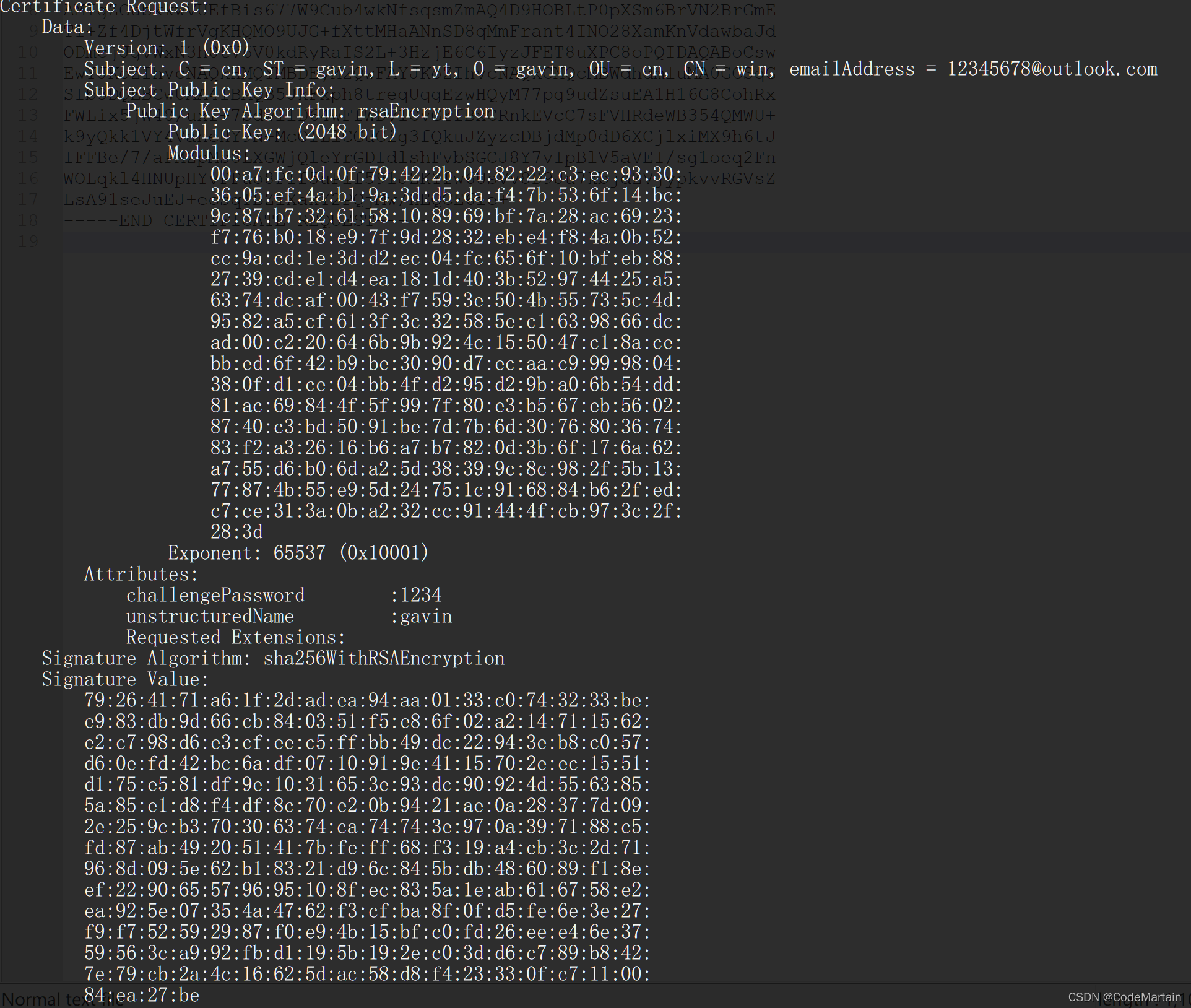
以上申请证书的准备工作就做好了
自建CA
创建CA密钥
C:\Users\Gavin>openssl.exe genrsa -out D:/key/gavinca.key 2048
#默认长度也是2048
生成CA待签名证书
C:\Users\Gavin>openssl.exe req -new -key  d:/key/gavinca.key -out d:/key/gavinca.csr
You are about to be asked to enter information that will be incorporated
into your certificate request.
What you are about to enter is what is called a Distinguished Name or a DN.
There are quite a few fields but you can leave some blank
For some fields there will be a default value,
If you enter '.', the field will be left blank.
-----
Country Name (2 letter code) [AU]:cn
State or Province Name (full name) [Some-State]:cn
Locality Name (eg, city) []:cn
Organization Name (eg, company) [Internet Widgits Pty Ltd]:cn
Organizational Unit Name (eg, section) []:cn
Common Name (e.g. server FQDN or YOUR name) []:cn
Email Address []:cn

Please enter the following 'extra' attributes
to be sent with your certificate request
A challenge password []:cn
An optional company name []:cn
生成CA根证书
C:\Users\Gavin>openssl.exe x509 -req -in d:/key/gavinca.csr -extensions  v3_ca -signkey d:/key/gavinca.key -out d:/key/gavinca.crt
Warning: ignoring -extensions option without -extfile
Certificate request self-signature ok
subject=CN = cn, ST = gavin, L = cn, O = future, OU = cn, CN = cn, emailAddress = cn


实际上我们的证书不需要存储到本地计算机,而是在浏览器中存储区会有相应的证书
以edge为例子---->>
设置---->>管理证书


所以https的加密传输需要网站支持----->>申请CA证书
小结—>>
申请CA证书的步骤;
- 1,生成自己的私钥
- 2,根据私钥生成公钥
生成该公钥需要携带一些信息— - 3,申请CA证书
模拟https加密流程
- 准备好密钥及证书
服务器端准备-----
准备一个私钥
C:\Users\Gavin>openssl genrsa -des3  -out d:/key/server.key
Enter PEM pass phrase: #加密server.key
Verifying - Enter PEM pass phrase:
根据私钥生成一个公钥—即待签名的证书
C:\Users\Gavin>openssl req -new -key d:/key/server.key -out d:/key/pub.csr
Enter pass phrase for d:/key/server.key:
You are about to be asked to enter information that will be incorporated
into your certificate request.
What you are about to enter is what is called a Distinguished Name or a DN.
There are quite a few fields but you can leave some blank
For some fields there will be a default value,
If you enter '.', the field will be left blank.
-----
Country Name (2 letter code) [AU]:CN
State or Province Name (full name) [Some-State]:SD
Locality Name (eg, city) []:YTL
Organization Name (eg, company) [Internet Widgits Pty Ltd]:YTL
Organizational Unit Name (eg, section) []:YTL
Common Name (e.g. server FQDN or YOUR name) []:TYL
Email Address []:[email protected]

Please enter the following 'extra' attributes
to be sent with your certificate request
A challenge password []:1234
An optional company name []:YTL
生成CA证书–
C:\Users\Gavin>openssl.exe x509 -req -in d:/key/pub.csr -extensions  v3_ca -signkey d:/key/server.key -out d:/key/server.crt
Enter pass phrase for d:/key/server.key:
Warning: ignoring -extensions option without -extfile
Certificate request self-signature ok
subject=C = CN, ST = SD, L = YT, O = CodeM, OU = CODE, CN = Gavin, emailAddress = 12345678@hah.com
生成的证书还没有得到认证,因此无效的,没有 被信任.

需要对证书进行签名后才能内使用,这里就不用大机构来认证了,自己整一个CA进行认证;
- CA认证跟证书申请
----csr的过程类似:
准备CA的密钥:
C:\Users\Gavin>openssl.exe genrsa -out d:/key/serverca.key 2048
生成待签名的证书----公钥:
C:\Users\Gavin>openssl.exe req -new -key  d:/key/serverca.key -out d:/key/serverca.csr
You are about to be asked to enter information that will be incorporated
into your certificate request.
What you are about to enter is what is called a Distinguished Name or a DN.
There are quite a few fields but you can leave some blank
For some fields there will be a default value,
If you enter '.', the field will be left blank.
-----
Country Name (2 letter code) [AU]:USA
String too long, must be at most 2 bytes long
Country Name (2 letter code) [AU]:UK
State or Province Name (full name) [Some-State]:LD
Locality Name (eg, city) []:LD
Organization Name (eg, company) [Internet Widgits Pty Ltd]:LD
Organizational Unit Name (eg, section) []:LD
Common Name (e.g. server FQDN or YOUR name) []:KD
Email Address []:LDLDKD@haha.com

Please enter the following 'extra' attributes
to be sent with your certificate request
A challenge password []:1234
An optional company name []:LD
生成CA根证书
C:\Users\Gavin>openssl.exe x509 -req -in d:/key/serverca.csr -extensions v3_ca -signkey d:/key/serverca.key -out d:/key/serverca.crt
Warning: ignoring -extensions option without -extfile
Certificate request self-signature ok
subject=C = LD, ST = LD, L = LD, O = LD, OU = LD, CN = LD, emailAddress = 1234567@haha.com
对根证书进行签名
C:\Users\Gavin>openssl x509 -days 365 -req -in d:/key/pub.csr -extensions v3_req -CAkey d:/key/serverca.key -CA d:/key/serverca.crt -CAcreateserial -out d:/key/server.crt
Warning: ignoring -extensions option without -extfile
Certificate request self-signature ok
subject=C = CN, ST = SD, L = YTL, O = YTL, OU = YTL, CN = TYL, emailAddress = 12345678@YTL.COM
#x509 协议 ,days 有效期 -req 请求 ---即由服务器的公钥要经过ca的私钥serverca.key ca公钥(证书) 认证(加密/解密)生成 经过认证的证书
再看CA颁发的证书—即服务器证书经过CA认证后的

有了证书之后,还需要注册到系统中
安装证书即可;

再次查看证书状态

至此证书申请和认证完毕;
https 加密的使用
注意:Common Name,可以写自己的名字或者域名,如果要支持https,Common Name应该与域名保持一致,否则依旧会引起浏览器警告。
CA证书的应用---->> 如果网站要对外提供服务就需要对网站进行认证

版权声明
本文为[CodeMartain]所创,转载请带上原文链接,感谢
https://blog.csdn.net/weixin_54061333/article/details/124264602
边栏推荐
- Introduction and usage of connector and analysis of + + and -- operators
- JS - process and split the data of consecutive months
- ArcGIS 城市生活区用地适宜性评价(四)
- ArcMAP 使用绘图工具添加注记
- (转)Aspose.words介绍
- MySQL -- database foundation
- EL2521模块控制步进驱动器
- 倍福NC轴走速度模式
- TiDB 在连锁快餐企业丨海量交易与实时分析的应用探索
- [image classification] - come on, let's do this bowl of efficientnet combat (pytoch)
猜你喜欢

我和TiDB的故事 | 毫无准备地不期而遇,却想说与你相遇好幸运

ArcGIS 城市生活区用地适宜性评价(一)

(转)WinSCP(SSH的FTP客户端)如何生成密钥登陆linu
三菱MR-JE-C伺服应用详细介绍

MySQL运行workbench报错TRunTimeError
倍福EL6631和西门子1200做Profinet主从通信
(to) excel 2016 does not have enough memory or disk space to open excel
Research Progress on remote sensing of vegetation phenological parameters (good article sharing)

Analysis and application of conditional compilation

Nodejs + Express login authentication and registration
随机推荐
MySQL -- operation of database
MySQL -- database foundation
Beifu NC axis travel speed mode
ArcGIS urban living area land suitability evaluation (III)
我和TiDB的故事 | 毫无准备地不期而遇,却想说与你相遇好幸运
[classification de l'image] - Venez et séchez ce bol d'efficientnet
Analytic hierarchy process software operation steps (Yaahp)
Research Progress on remote sensing of vegetation phenological parameters (good article sharing)
Differences of lake water color, water environment and hydrological remote sensing
CAS unified identity authentication (III): external independent configuration
将 AWS S3 数据迁移至 TiDB Cloud 集群
(transfer) Aspose Words introduction
三菱MR-JE-C伺服应用详细介绍
[image classification] reproduce senet with the shortest code. Xiaobai must be collected (keras, tensorflow2. X)
(transfer) Aspose Word programming guide DOM tree recognition, the relationship between each layer structure
倍福NC轴走速度模式
(turn) how is word2016 compatible with MathType
ArcGIS 城市生活区用地适宜性评价(二)
Componentwillunmount uninstall components
湖泊的水色、水环境、水文遥感的区别