当前位置:网站首页>ROS series (I): rapid installation of ROS
ROS series (I): rapid installation of ROS
2022-04-23 03:37:00 【Yi Lanjun】
Ubuntu After installation , Can be installed ROS The operating system , The general steps are as follows :
- To configure ubuntu Software and updates for ;
- Set installation source ;
- Set up key;
- install ;
- Configure environment variables .
1 To configure ubuntu Software and updates for
To configure ubuntu Software and updates for , Allow installation of non certified software .
Start by opening “ Software and updates ” Dialog box , The details can be found in Ubuntu Search... In the search button .
After opening, configure according to the following figure ( Make sure that... Is checked "restricted", “universe,” and “multiverse.”)

2 Set installation source
Official default installation source :
sudo sh -c 'echo "deb http://packages.ros.org/ros/ubuntu $(lsb_release -sc) main" > /etc/apt/sources.list.d/ros-latest.list'
Or the installation source from Tsinghua University in China
sudo sh -c '. /etc/lsb-release && echo "deb http://mirrors.tuna.tsinghua.edu.cn/ros/ubuntu/ `lsb_release -cs` main" > /etc/apt/sources.list.d/ros-latest.list'
PS:
- After returning , You may need to enter the administrator password
- It is recommended to use domestic resources , Faster installation .
3 Set up key
sudo apt-key adv --keyserver 'hkp://keyserver.ubuntu.com:80' --recv-key C1CF6E31E6BADE8868B172B4F42ED6FBAB17C654
4 install
First, it needs to be updated apt( It used to be apt-get, Official recommended use apt Instead of apt-get),apt It is used to search from Internet warehouse 、 install 、 upgrade 、 Tools for uninstalling software or operating system .
sudo apt update
wait for …
then , Then install the required type of ROS:ROS Multiple types :Desktop-Full、Desktop、ROS-Base. Here are some commonly used Desktop-Full( The official recommendation ) install : ROS, rqt, rviz, robot-generic libraries, 2D/3D simulators, navigation and 2D/3D perception.
sudo apt install ros-noetic-desktop-full
wait for …( More time-consuming )
Friendship tips : Because of the Internet , Cause connection timeout , Installation may fail , As shown below :
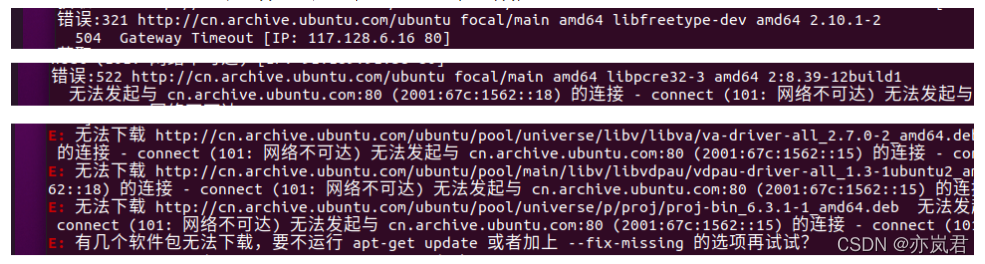
Can be called multiple times to update and Installation command , Until success .
5 Configure environment variables
Configure environment variables , Convenient at any time Used in terminal ROS.
echo "source /opt/ros/noetic/setup.bash" >> ~/.bashrc
source ~/.bashrc
6 uninstall
sudo apt remove ros-noetic-*
Be careful : stay ROS edition noetic There is no need to build package dependencies in , No, rosdep Related installation and configuration of .
7 Installation build depends on
stay noetic When originally released , Slightly different from other historical versions : No installation build depends on this step . With noetic Continuously improve , The official complemented this operation .
- First, install the relevant tools that the build depends on
sudo apt install python3-rosdep python3-rosinstall python3-rosinstall-generator python3-wstool build-essential
- initialization rosdep
sudo rosdep init
rosdep update
If all goes well ,rosdep The print results of initialization and update are as follows :

however , stay rosdep On initialization , Most of them throw exceptions .
reason :
Overseas resources are blocked .
solve :
Baidu or google Search for , There are many solutions (https://github.com/ros/rosdistro/issues/9721), It's a pity that ubuntu20.04 Next , Collective failure .
New ideas : Back up relevant resources to gitee, modify rosdep Source code , Relocate resources .
Realization :
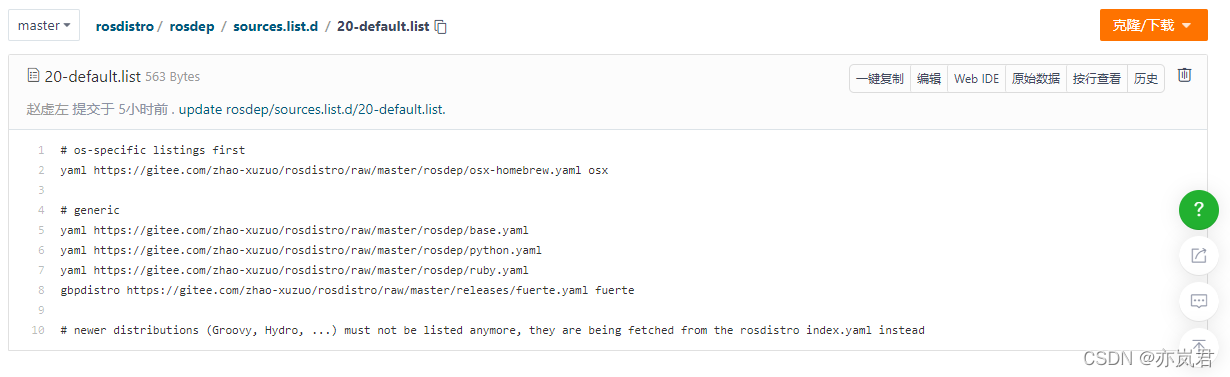
1. First open the resource backup path :https://gitee.com/zhao-xuzuo/rosdistro, open rosdistro/rosdep/sources.list.d/20-default.list Keep the file for standby ( Mainly reuse URL Part of :gitee.com/zhao-xuzuo/rosdistro/raw/master).
2. Get into "/usr/lib/python3/dist-packages/" lookup rosdep neutralization raw.githubusercontent.com Related content , Call the command :
find . -type f | xargs grep "raw.githubusercontent"
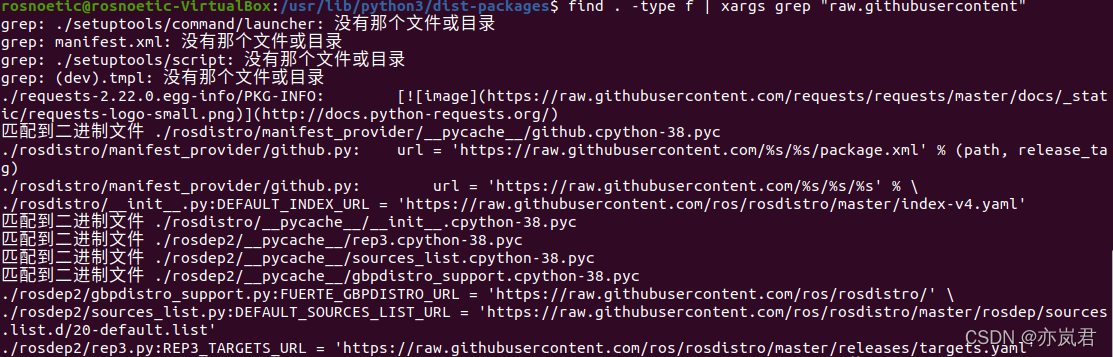
3. Modify related documents , There are mainly : ./rosdistro/init.py、./rosdep2/gbpdistro_support.py、./rosdep2/sources_list.py 、./rosdep2/rep3.py. have access to sudo gedit Command to modify the file :
In the document URL Content , If it is :raw.githubusercontent.com/ros/rosdistro/master Replace with steps 1 Prepared in gitee.com/zhao-xuzuo/rosdistro/raw/master that will do .
The modification is complete , Execute the command again :
sudo rosdep init
rosdep update
It can be realized normally rosdep Initialization and update of .
版权声明
本文为[Yi Lanjun]所创,转载请带上原文链接,感谢
https://yzsam.com/2022/04/202204220602231931.html
边栏推荐
- 2022 团体程序设计天梯赛 模拟赛 L2-3 浪漫侧影 (25 分)
- Batch download of files ---- compressed and then downloaded
- Unity knowledge points (common core classes)
- 7-3 poly width
- The content of the website is prohibited from copying, pasting and saving as JS code
- C-10 program error correction (recursive function): number to character
- The art of concurrent programming (6): explain the principle of reentrantlock in detail
- Section 2 map and structure in Chapter 6
- MySQL is completely uninstalled and MySQL service is cleaned up
- Common net HP UNIX system FTP server listfiles returns null solution.
猜你喜欢

Unity basics 2

2022 团体程序设计天梯赛 模拟赛 L2-4 哲哲打游戏 (25 分)

变量、常量、运算符
The art of concurrent programming (6): explain the principle of reentrantlock in detail
you need to be root to perform this command
C interface
On the principle of concurrent programming and the art of notify / Park

AWS from entry to actual combat: creating accounts
Supersocket is Use in net5 - startup
Key point detection of human hand based on mediapipe
随机推荐
Abstract classes, interfaces and common keywords
Idea debug debugging tutorial
Deep learning notes (II) -- principle and implementation of activation function
Notes sur l'apprentissage profond (Ⅱ) - - Principe et mise en oeuvre de la fonction d'activation
Use of rotary selector wheelpicker
The art of concurrent programming (3): an in-depth understanding of the principle of synchronized
浅学一下I/O流和File类文件操作
Initial experience of talent plan learning camp: communication + adhering to the only way to learn open source collaborative courses
Test questions and some space wars
Wechat applet cloud database value assignment to array error
PYMOL-note
Commonly used classes
According to the category information and coordinate information of the XML file, the category area corresponding to the image is pulled out and stored in the folder.
批量下載文件----壓縮後再下載
Key point detection of human hand based on mediapipe
Visual programming - Experiment 2
Design and implementation of redis (1): understand data structures and objects
Unity knowledge points (ugui)
Openvino only supports Intel CPUs of generation 6 and above
C-11 problem h: treasure chest 2