当前位置:网站首页>Protobuf use
Protobuf use
2022-04-23 07:50:00 【[struggling]】
Protobuf Use
Protobuf The concept of not doing is here , Those who read this article should know , If you don't understand, you can check it yourself .
There are three steps
First step : Download configuration Protobuf Environmental Science
Protobuf github Download link
There are various versions of package, Remember to choose release, Find the right version according to your needs
What I use here is Protocol Buffers v3.0.0 Version 3.0.0 link
Drop down to find Assets The label expands as follows

I was in Windows Operation on the system , So I choose to download protoc-3.0.0-win32.zip Find after unzipping bin There's a... Under the folder protoc.exe, In environment variable path add to protoc.exe Location path , Then open the cmd Command line cd To protoc.exe In the directory , Then input protoc --version Can correctly display protobuf Version on OK 了

The second step : Use Protobuf Generate scripts for the corresponding language
Create a folder , Create a new... In the folder xxx.proto file , Edit as follows apc.proto
syntax = "proto3";
message ABC{


   string name = 1;

   string message_name = 2;

};
first line syntax = “proto3”; Specify that you are using proto3 grammar
message ABC Specify a class , The name of the class is ABC
*.proto You can also refer to each other , newly build ddd.proto Edit as follows
syntax = "proto3";
import "apc.proto";
message Npc
{

    string damage = 1;

	int32 range = 2;

	ABC abc = 3;
};
import “apc.proto”; significance : stay ddd.proto Import abc.proto
Can be in ddd.proto Use in ABC The class
Start generating corresponding language Such as C++、C#、Java
Generate C++, Command line input
protoc.exe -I=F:\Protobuf\proto --cpp_out=F:\Protobuf\Out F:\Protobuf\proto\apc.proto

-I=F:\Protobuf\proto Appoint *.proto File path : Be careful :-I yes Horizontal bar and Capital I
–cpp_out=F:\Protobuf\Out Specifies that the exported is C++ file , Export path is F:\Protobuf\Out
Last F:\Protobuf\proto\apc.proto Indicates which one needs to be exported .proto file
The export result is a .h And a .cc file apc.pb.cc apc.pb.h
Generate C# , Command line input
protoc.exe -I=F:\Protobuf\proto --csharp_out=F:\Protobuf\Out F:\Protobuf\proto\apc.proto
The export result is a .cs file Apc.cs
Generate Java, Command line input
protoc.exe -I F:\Protobuf\proto --java_out=F:\Protobuf\Out F:\Protobuf\proto\apc.proto
The export result is a .java file Apc.java
Three times , The final generated file is as follows

The third step : How to use the generated in the project C++、Java、 and C#
I mainly use C# Language , Need to be in Assets Find below C# Corresponding Package : protobuf-csharp-3.0.0.zip perhaps protobuf-csharp-3.0.0.tar.gz, These two are the same , I downloaded it protobuf-csharp-3.0.0.zip
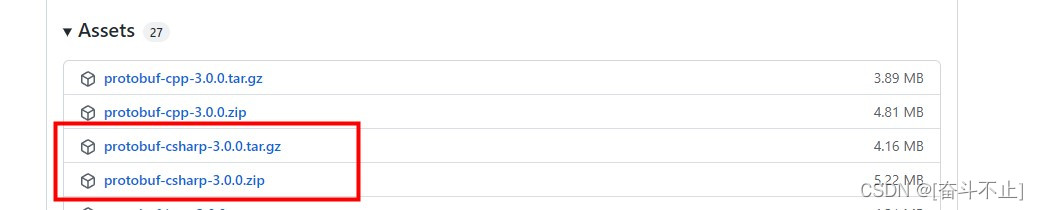
download protobuf-csharp-3.0.0.zip After decompression , Directory as follows

Find the file by Directory protobuf-3.0.0\csharp\src\Google.Protobuf.sln

And then use Visual Studio open Google.Protobuf.sln, I use it VS2017
The following options Google.protobuf -> Right mouse button -> Generate

After successful generation, it will be in the following path :protobuf-3.0.0\csharp\src\Google.Protobuf\bin\Release\net45
Three files Google.Protobuf.dll ,Google.Protobuf.pdb , Google.Protobuf.xml

Put these three files into your own project , I was in Unity Use in , Need to put in Plugins In the folder
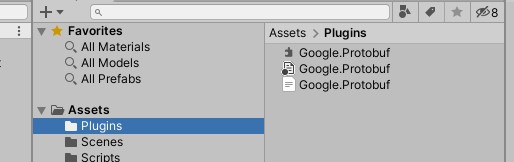
At the same time, we need to Generated in step 2 C# file Apc.cs When it comes to Unity Just one script directory in the ,
C# The code is called as follows
    void Start()
    {

        //  Instantiate objects
        ABC aBC = new ABC();
        aBC.Name = "123";
        aBC.MessageName = "ABC";

        //  Serialize the object to  byte  Array
        byte[] byteData = Serialize(aBC);

        //  Deserialization , take  byte  Array   Convert back to   Class object
        ABC ddd = Deserialize<ABC>(byteData);
        Debug.LogError(ddd.Name + " " + ddd.MessageName);
    }

    //  serialize : take  protobuf  Class object to  byte  Array
    public static byte[] Serialize(IMessage msg)
    {

        using (MemoryStream ms = new MemoryStream())
        {

            CodedOutputStream outPut = new CodedOutputStream(ms);
            outPut.WriteMessage(msg);
            outPut.Flush();
            byte[] byteData = ms.ToArray();
            return byteData;
        }
    }

    //  Deserialization : take  byte  Array   Convert to   Corresponding  protobuf  Class object
    public static T Deserialize<T>(byte[] byteData) where T : IMessage, new()
    {

        CodedInputStream stream = new CodedInputStream(byteData);
        T msg = new T();
        stream.ReadMessage(msg);
        return msg;
    }
Be careful : The third step is to download and compile the corresponding... According to your own language Package and Use .proto Generate corresponding language Script
版权声明
本文为[[struggling]]所创,转载请带上原文链接,感谢
https://yzsam.com/2022/04/202204230627004677.html
边栏推荐
猜你喜欢

中间人环境mitmproxy搭建

Django uses MySQL database to solve error reporting

C# 多个矩形围成的多边形标注位置的问题

关于U盘数据提示RAW,需要格式化,数据恢复笔记

对复杂字典Dictionary&lt;T1,T2&gt;排序问题

Scrapy 修改爬虫结束时统计数据中的时间为当前系统时间

SQL sorts string numbers

Simple random roll call lottery (written under JS)

使用flask时代码无报错自动结束,无法保持连接,访问不了url。

【Unity VFX】VFX特效入门笔记-火花制作
随机推荐
Nodejs (four) character reading
Teach-Repeat-Replan: A Complete and Robust System for Aggressive Flight in Complex Environments
向量到一个平面的投影向量
MySQL8.0 安装/卸载 教程【Window10版】
平面定义-平面方程
庄懂的TA笔记(七)<Lambert+Phong+Shadow+3EvColor+AO>
系统与软件安全研究(一)
Apache Hudi 如何加速传统的批处理模式?
How does Apache Hudi accelerate traditional batch mode?
根据某一指定的表名、列名及列值来向前或向后N条查相关列值的SQL自定义标量值函数
Dictionary & lt; T1,T2&gt; Sorting problem
ABAP CDS VIEW WITH ASSOCIATION示例
instanceof的实现原理
SVG中Path Data数据简化及文件夹所有文件批量导出为图片
Nodejs (VI) sub process operation
对js中argumens的简单理解
C # use laida criterion (3) σ Criteria) reject abnormal data (.Net reject singular values in a group of data)
js之DOM事件
给定区段范围内字符串自生成代码
C#使用拉依达准则(3σ准则)剔除异常数据(.Net剔除一组数据中的奇异值)