当前位置:网站首页>How to realize full backup and incremental backup of MySQL database
How to realize full backup and incremental backup of MySQL database
2022-08-10 16:47:00 【Yisuyun】
How to realize full backup and incremental backup of MySQL database
This article mainly introduces "MySQL database full backup and incremental backup". In daily operations, I believe manyPeople have doubts about how to realize full backup and incremental backup of MySQL database. Xiaobian has checked various materials and sorted out simple and easy-to-use operation methods. I hope to answer "How to realize full backup and incremental backup of MySQL database".The doubts help!Next, please follow the editor to learn together!
Definition
A full backup is to back up all the data and all objects in the database.
Because the data files in the MySQL server are disk-based text files, a full backup is to copy the database files, which is the easiest and fastest way.
However, the data files of the MySQL server are always open when the server is running. In order to achieve a true full backup, the MySQL database server needs to be stopped first.
In order to ensure the integrity of the data, before stopping the MySQL server, you need to execute the flush tables statement to write all the data to the data file.Students only need to understand this method, because it is not advisable to stop the database in the production environment for backup.
Use the mysqldump command to back up tables, databases, and database systems:
mysqldump [-h hostname] –u username –p password --lock-all-tables --database [tables] >filename
-h hostname, which can be omitted, indicates the local server, --lock-all-tables applies read locks on all tables of the database to be backed up (during this process, the database is strictly in read only state), --databaseThe table that needs to be backed up can be added later. If the table name is not specified, it means that the entire database is backed up.
Full backup and restore demo
Prepare a student table and build the table in the world database.
Create table:
CREATE DATABASE world;USE world;CREATE TABLE student( stuId INT(10) NOT NULL, stuName VARCHAR(10) NOT NULL, stuAge INT(10) NOT NULL, PRIMARY KEY(stuId) );
Insert Data:
INSERT INTO student(stuId, stuName, stuAge) VALUES(1, 'zhangsan', 18), (2, 'lisi', 19),(3, 'wangwu', 18);

Use the flush tables; statement to write all data to the data file:
FLUSH TABLES;
Exit the mysql environment and use the mysqldump command to make a full backup of the database world:
mysqldump -u root -p --lock-all-tables --databases world > /tmp/world.sql
Go to the /tmp directory to view the backup file:
cd /tmpls
Now, we have made a full backup of the world library, so we are not afraid of data loss.
The student table in the simulated world database is missing:
DROP TABLE student;
Confirmation form deleted
SHOW TABLES;

Use the mysql command to restore the database:
mysql -uroot -p < /tmp/world.sql
Enter the mysql environment and view the recovery results:
SHOW TABLES;
Output:
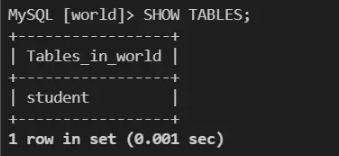
Validate table data:
SELECT * FROM student;

Incremental backup is to back up the data changed since the last full backup or incremental backup. It relies on the binary log file and needs to open the binlog log of the database.First perform a full backup of the database, and refresh the binlog log at the same time. All operations after this backup will be recorded in the newly added binlog log. We only need to back up the added binlog to realize the continuous increase of content.A perfect backup of your database too.When the database is abnormal, we can restore the latest full backup first, and then restore the incremental backup files one by one in order to achieve database recovery.
At this point, the study on "How to implement full backup and incremental backup of MySQL database" is over, and I hope to solve your doubts.The combination of theory and practice can better help everyone learn, go try it!If you want to continue to learn more relevant knowledge, please continue to pay attention to the Yisuyun website, the editor will continue to work hard to bring you more useful articles!
边栏推荐
猜你喜欢






随机推荐
shell之正则表达式及三剑客awk命令
String compression (3) short string compression
轮询以及webSocket与socket.io原理
Exchange Online审计和监控
从抖音到火山引擎——看流媒体技术演进和机会
干货:服务器网卡组技术原理与实践
异形屏为led显示行业带来更多希望
WIZnet 物联网设计大赛 - WizFi360大赛延迟通知
被大厂面试官参考的Redis笔记,堪称Redis面试天花板
不同主机收不到组播消息原因分析
MySQL command line export import database
不爱生活的段子手不是好设计师|ONES 人物
一文带你彻底拿下a,b两点间等效电阻
直播预告|从新手村到魔王城,高效默契的敏捷团队如何炼成
LeetCode-692. Top K Frequent Words
Qt 绘图和绘图设备
h5开容器,新页面返回遇到的问题
功能测试vs.非功能测试:能否非此即彼地进行选择?
PNG如何变gif?教你一招png秒变gif动图的方法
铜锁密码库