当前位置:网站首页>1320 _stm32f103 burn write programs using a serial port
1320 _stm32f103 burn write programs using a serial port
2022-08-06 02:05:00 【grey_csdn】
All learning summary: GitHub - GreyZhang/g_stm32f103: some hack for stm32f103
Before, in order to quickly upgrade the software for program testing and facilitate hacking, I tried to transplant a serial port-based BootLoader.The porting is easy and smooth, but it is found that the BootLoader is not very streamlined, and it still occupies a lot of resources.Of course, a big reason may be caused by using the driver code of the SDK.
In the past two days, try to get in touch with the STM32 version of the Arduino open source project.Nothing has started yet, I simply installed the IDE and saw a prompt, which made me think that maybe STM32F103 should have a way to directly use the serial port to burn the program by default.
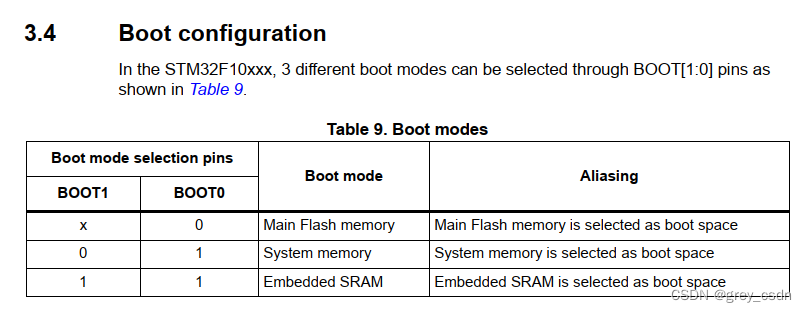
Such a Boot mode description can be found in the STM32F103 manual. When the second mode is selected, it will boot directly from a piece of system storage.This system stores and stores a program solidified by the chip factory. This program itself supports serial port and other modes for program programming.

Here is a further introduction to the role of this system storage.When ST is mass-producing chips, it will burn a special program here, which can be used to support Flash upgrades.If the serial port is used, then the clock of the UART still comes from the internal clock.Therefore, it will not have any special relationship with the crystal oscillator.Of course, this mode also supports other communication methods, but the serial port should be the most cost-effective one.However, I have some doubts. Another F103 MCU in my hand has some problems when the debugger recognizes the device ID.From the network information, it should be a clone chip. I wonder if such an MCU still supports such a function?
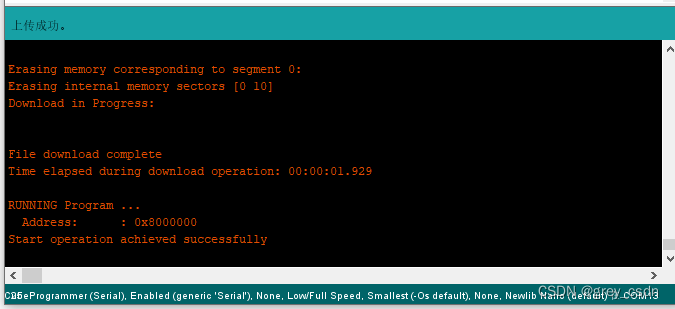
This is the process of using the above mode to call ST's programming host computer for programming.That's what I saw when I tried the STM32 version of the open source Arduino solution I mentioned earlier.
It is worth mentioning, by the way, this mode of booting and burning.If you want to enter this startup programming mode, you must first configure the pin levels of BOOT1 and BOOT0, and then you need to perform a reset operation, so that the MCU will enter the corresponding mode.At this time, if you directly use the serial port to program the program successfully, it will run directly.However, if we want the program we burned to work normally, we should modify the configuration of BOOT1 and BOOT0 again, otherwise the software will enter the program stored in this system again when the software is reset.Through the actual test, if you want to debug all the time, you can do it without resetting. When the programming is finished, there is a direct jump to the user flash execution process.But if it is reset directly without modifying the BOOTx configuration, the software will no longer run.
Next, I refer to the command script in Arduino to do a programming directly through the command line mode.Burn the serial BootLoader in front of me, and by the way, burn a LED flashing program to test whether the burning function is OK.
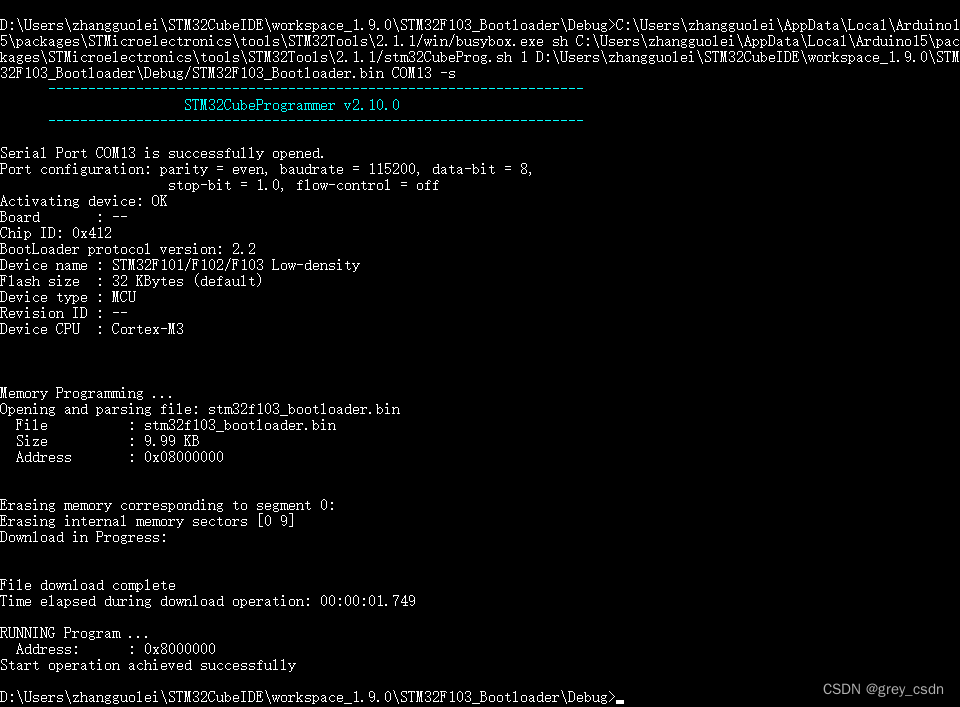
From here, the burn appears to be successful.BootLoader is also successfully burned and started, but whether the effect of startup is correct still needs to be verified.The current serial port is occupied, and it is not easy to monitor temporarily. I need to switch to a new monitoring tool and restart the program.The next operation is naturally the one mentioned above, first configure the two BOOT pins, and then reset.

From the effect of the prompt, BootLoader programming is successful.The test is actually repeating the content of the previous study notes, so I won't test it for the time being.After programming an LED flashing program, I saw the LED flashing.It seems that the several processes involved this time are all OK.
边栏推荐
- Wejo加入MONET联盟,进一步推动国际移动出行创新
- eslint和prettier实现代码格式化
- It's not my fault that programmers write programs
- typescript75 - create your own type declaration files (provide declarations for existing js)
- linux下mysql cpu占用过高问题查找思路
- 淀粉与纤维素
- 多线程-实现方式
- Wejo joins MONET alliance to further drive innovation in international mobility
- 1320_STM32F103使用串口烧写程序
- VsCode:用户代码片段 / 自定义代码片段
猜你喜欢

Two file types in typescript70-ts

LeetCode每日两题02:最长回文子串 (均1200道)

CAD一键添加审图批注、AUTOCAD——图形界线怎么设置

二级路由嵌套实现移动端案例

leetcode linked list oj question

FTX交易平台收购合规加密交易所 Bitvo,打开加拿大市场

CoCube群机器人预览→资讯剧透←

Online Question Feedback Module Actual Combat (20): Realize the function of batch exporting files to zip archives

The difference between session and cookie

Strong in the HTTP cache cache and consultation
随机推荐
民法常识总结1
快速查看Oracle数据库告警日志的存储位置
感悟2022年:玫琳凯公布今年上半年以来的奖项、里程碑和成就
IJCAI 2022 | 量化交易相关论文(附论文链接)
Soul submitted a listing application to the Hong Kong Stock Exchange and continued to develop the social metaverse track
Compose Advanced Challenge is here!Live Preview|August 7th at 19:30 pm face to face with GDE instructor
Online Question Feedback Module Actual Combat (20): Realize the function of batch exporting files to zip archives
向港交所递交招股书的Soul,如何以社交元宇宙俘获万千Z世代的心?
QT:用qt实现一个登录界面
缓存算法有哪些分类呢?
方法区、永久代、元空间
ansible command 模块
拦截器通过自定义注解来判断是否拦截
Nacos Installation Guide
Compose 进阶挑战来啦!直播预告|8 月 7 日 晚 19:30 与 GDE 导师面对面
心脑体漫画版本
VsCode:用户代码片段 / 自定义代码片段
【2023秋招】金融技术类客观题整理
C. Robot in a Hallway Educational Codeforces Round 133 (Rated for Div. 2)dp
MSTP与STP