当前位置:网站首页>【数据集转换】VOC数据集转COCO数据集·代码实现+操作步骤
【数据集转换】VOC数据集转COCO数据集·代码实现+操作步骤
2022-08-05 21:34:00 【LiBiGo】
在自己的数据集上实验时,往往需要将VOC数据集转化为coco数据集,因为这种需求所以才记录这篇文章,代码出处未知,感谢开源。
在远程服务器上测试目标检测算法需要用到测试集,最常用的是coco2014/2017和voc07/12数据集。
coco数据集的地址为http://cocodataset.org/#download
voc和coco的镜像为https://pjreddie.com/projects/pascal-voc-dataset-mirror/
一、数据集格式对比
1.1 VOC数据集
VOC_ROOT     #根目录
    ├── JPEGImages         # 存放源图,(当然图片并不一定要是**.jpg格式的,只是规定文件夹名字叫JPEGImages**);
    │     ├── aaaa.jpg
    │     ├── bbbb.jpg
    │     └── cccc.jpg
    ├── Annotations        # 存放xml文件,VOC的标注是xml格式,与JPEGImages中的图片一一对应
    │     ├── aaaa.xml
    │     ├── bbbb.xml
    │     └── cccc.xml
    └── ImageSets
        └── Main
          ├── train.txt    # txt文件中每一行包含一个图片的名称
          └── val.txt
1.2 COCO数据集
COCO_ROOT     #根目录
    ├── annotations        # 存放json格式的标注
    │     ├── instances_train2017.json
    │     └── instances_val2017.json
    └── train2017         # 存放图片文件
    │     ├── 000000000001.jpg
    │     ├── 000000000002.jpg
    │     └── 000000000003.jpg
    └── val2017
          ├── 000000000004.jpg
          └── 000000000005.jpg
1.2.3 json标注格式
与VOC一个文件一个xml标注不同,COCO所有的目标框标注都是放在一个json文件中的。
这个json文件解析出来是一个字典,格式如下:
{
  "info": info,
  "images": [image],
  "annotations": [annotation],
  "categories": [categories],
  "licenses": [license],
}
二、转换步骤
2.1 程序总体目录
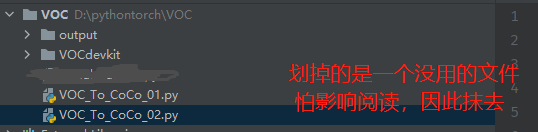

2.2 标签文件转换代码实现(xml文件转json格式)VOC_To_CoCo_01.py
这里需要运行三次,因为train.txt val.txt test.txt是三个文件,具体看注释
# VOC_To_CoCo_01.py

import os
import argparse
import json
import xml.etree.ElementTree as ET
from typing import Dict, List
import re


def get_label2id(labels_path: str) -> Dict[str, int]:
    """id is 1 start"""
    with open(labels_path, 'r') as f:
        labels_str = f.read().split()
    labels_ids = list(range(1, len(labels_str) + 1))
    return dict(zip(labels_str, labels_ids))


def get_annpaths(ann_dir_path: str = None,
                 ann_ids_path: str = None,
                 ext: str = '',
                 annpaths_list_path: str = None) -> List[str]:
    # If use annotation paths list
    if annpaths_list_path is not None:
        with open(annpaths_list_path, 'r') as f:
            ann_paths = f.read().split()
        return ann_paths

    # If use annotaion ids list
    ext_with_dot = '.' + ext if ext != '' else ''
    with open(ann_ids_path, 'r') as f:
        ann_ids = f.read().split()
    ann_paths = [os.path.join(ann_dir_path, aid + ext_with_dot) for aid in ann_ids]
    return ann_paths


def get_image_info(annotation_root, extract_num_from_imgid=True):
    path = annotation_root.findtext('path')
    if path is None:
        filename = annotation_root.findtext('filename')
    else:
        filename = os.path.basename(path)
    img_name = os.path.basename(filename)
    img_id = os.path.splitext(img_name)[0]
    if extract_num_from_imgid and isinstance(img_id, str):
        img_id = int(re.findall(r'\d+', img_id)[0])

    size = annotation_root.find('size')
    width = int(size.findtext('width'))
    height = int(size.findtext('height'))

    image_info = {
        'file_name': filename,
        'height': height,
        'width': width,
        'id': img_id
    }
    return image_info


def get_coco_annotation_from_obj(obj, label2id):
    label = obj.findtext('name')
    assert label in label2id, f"Error: {label} is not in label2id !"
    category_id = label2id[label]
    bndbox = obj.find('bndbox')
    xmin = int(bndbox.findtext('xmin')) - 1
    ymin = int(bndbox.findtext('ymin')) - 1
    xmax = int(bndbox.findtext('xmax'))
    ymax = int(bndbox.findtext('ymax'))
    assert xmax > xmin and ymax > ymin, f"Box size error !: (xmin, ymin, xmax, ymax): {xmin, ymin, xmax, ymax}"
    o_width = xmax - xmin
    o_height = ymax - ymin
    ann = {
        'area': o_width * o_height,
        'iscrowd': 0,
        'bbox': [xmin, ymin, o_width, o_height],
        'category_id': category_id,
        'ignore': 0,
        'segmentation': []  # This script is not for segmentation
    }
    return ann


def convert_xmls_to_cocojson(annotation_paths: List[str],
                             label2id: Dict[str, int],
                             output_jsonpath: str,
                             extract_num_from_imgid: bool = True):
    output_json_dict = {
        "images": [],
        "type": "instances",
        "annotations": [],
        "categories": []
    }
    bnd_id = 1  # START_BOUNDING_BOX_ID, TODO input as args ?

    for a_path in annotation_paths:
        # Read annotation xml
        ann_tree = ET.parse(a_path)
        ann_root = ann_tree.getroot()

        img_info = get_image_info(annotation_root=ann_root,
                                  extract_num_from_imgid=extract_num_from_imgid)
        img_id = img_info['id']
        output_json_dict['images'].append(img_info)

        for obj in ann_root.findall('object'):
            ann = get_coco_annotation_from_obj(obj=obj, label2id=label2id)
            ann.update({'image_id': img_id, 'id': bnd_id})
            output_json_dict['annotations'].append(ann)
            bnd_id = bnd_id + 1

    for label, label_id in label2id.items():
        category_info = {'supercategory': 'none', 'id': label_id, 'name': label}
        output_json_dict['categories'].append(category_info)

    with open(output_jsonpath, 'w') as f:
        output_json = json.dumps(output_json_dict)
        f.write(output_json)
    print('Convert successfully !')


def main():
    parser = argparse.ArgumentParser(
        description='This script support converting voc format xmls to coco format json')
    parser.add_argument('--ann_dir', type=str, default='./VOCdevkit/Annotations')
    parser.add_argument('--ann_ids', type=str, default='./VOCdevkit/ImageSets/Main/val.txt') # 这里修改 train val test 一共修改三次
    #parser.add_argument('--ann_ids', type=str, default='./VOCdevkit/ImageSets/Main/train.txt')
    #parser.add_argument('--ann_ids', type=str, default='./VOCdevkit/ImageSets/Main/test.txt')
    parser.add_argument('--ann_paths_list', type=str, default=None)
    parser.add_argument('--labels', type=str, default='./VOCdevkit/labels.txt')
    parser.add_argument('--output', type=str, default='./output/annotations/val.json') # 这里修改 train val test 一共修改三次
    #parser.add_argument('--output', type=str, default='./output/annotations/train.json')
    #parser.add_argument('--output', type=str, default='./output/annotations/test.json')
    parser.add_argument('--ext', type=str, default='xml')
    args = parser.parse_args()
    label2id = get_label2id(labels_path=args.labels)
    ann_paths = get_annpaths(
        ann_dir_path=args.ann_dir,
        ann_ids_path=args.ann_ids,
        ext=args.ext,
        annpaths_list_path=args.ann_paths_list
    )
    convert_xmls_to_cocojson(
        annotation_paths=ann_paths,
        label2id=label2id,
        output_jsonpath=args.output,
        extract_num_from_imgid=True
    )


if __name__ == '__main__':
    if not os.path.exists('./output/annotations'):
        os.makedirs('./output/annotations')
    main()
2.3 数据集图像文件copy代码实现(复制图片数据集到coco中)VOC_To_CoCo_02.py
# VOC_To_CoCo_02.py

import os
import shutil

images_file_path = './VOCdevkit/JPEGImages/'
split_data_file_path = './VOCdevkit/ImageSets/Main/'
new_images_file_path = './output/'

if not os.path.exists(new_images_file_path + 'train'):
    os.makedirs(new_images_file_path + 'train')
if not os.path.exists(new_images_file_path + 'val'):
    os.makedirs(new_images_file_path + 'val')
if not os.path.exists(new_images_file_path + 'test'):
    os.makedirs(new_images_file_path + 'test')

dst_train_Image = new_images_file_path + 'train/'
dst_val_Image = new_images_file_path + 'val/'
dst_test_Image = new_images_file_path + 'test/'

total_txt = os.listdir(split_data_file_path)
for i in total_txt:
    name = i[:-4]
    if name == 'train':
        txt_file = open(split_data_file_path + i, 'r')
        for line in txt_file:
            line = line.strip('\n')
            line = line.strip('\r')
            srcImage = images_file_path + line + '.jpg'
            dstImage = dst_train_Image + line + '.jpg'
            shutil.copyfile(srcImage, dstImage)
        txt_file.close()
    elif name == 'val':
        txt_file = open(split_data_file_path + i, 'r')
        for line in txt_file:
            line = line.strip('\n')
            line = line.strip('\r')
            srcImage = images_file_path + line + '.jpg'
            dstImage = dst_val_Image + line + '.jpg'
            shutil.copyfile(srcImage, dstImage)
        txt_file.close()
    elif name == 'test':
        txt_file = open(split_data_file_path + i, 'r')
        for line in txt_file:
            line = line.strip('\n')
            line = line.strip('\r')
            srcImage = images_file_path + line + '.jpg'
            dstImage = dst_test_Image + line + '.jpg'
            shutil.copyfile(srcImage, dstImage)
        txt_file.close()
    else:
        print("Error, Please check the file name of folder")
三、效果展示

边栏推荐
猜你喜欢


随机推荐
传感器CE测试认证检测要求
After importing the web project into idea, the blue dots of the file disappeared (web file resource root path)
ZeroMQ替代ros
关于i.MX6ULL配置GPIO
【apt time reached】error while loading shared libraries:libxxxx.so.xx.xx,共享库文件找不到,解决办法
use of arrays
"Cocos2D - X" plants vs zombies zombie create and move
【PCB开源分享】STC/IAP15W4K61S4开发板
【opencv图像处理】-- 8. 特征点检测:Harris,shi-tomasi,SIFT角点检测,关键点和描述子
C语言 const详解
全局事件总线
Server-side long polling processing mechanism of Nacos configuration center
【PCB开源分享】STC15F2K61S2开发板
杭电多校-Shinobu loves trip-(预处理+同余定理)
杭电多校-Planar graph-(最大生成树+图树关系)
你不知道的瑜伽
【KITTI】undefined reference to“YAML::detail::node_data::convert_to_map”解决办法
Pytest学习-yield后置
Flexible and easy-to-use sql monitoring script part3
String concatenation