当前位置:网站首页>Live delivery form template - automatically display pictures - automatically associate series products
Live delivery form template - automatically display pictures - automatically associate series products
2022-04-23 05:00:00 【Excel_ VBA table จ๊บ】
During live broadcast, you can directly select the category , Automatically bring out all products of this series , And automatically associate the picture of the corresponding field

Category database data format =========================================================

Commodity price database format =========================================================


Not done VBA Macro save order
A101	 Common declaration 	VBE The first level directory name of the menu
A101001	 Force declaration of variables 	Option Explicit ' Force declaration of all variables within the module
A101002	 Module private 	Option Private Module ' Mark module as private , Only useful for other modules in the same project , Don't show in macro dialog
A101003	 Strings are not case sensitive 	Option Compare Text ' Strings are not case sensitive
A101004	 The minimum subscript of the array is 1	Option Base 1 ' Specifies that the first subscript of the array is  1
A101005	 Ignore mistakes 	On Error Resume Next ' Ignore the error and continue  VBA Code , Avoid error messages
A101006	 Wrong jump 	On Error GoTo ErrorHandler ' Jump to a position in the process when an error occurs
A101007	 Recovery error prompt 	On Error GoTo 0 ' Return to normal error prompt
A101008	 No pop ups 	Application.DisplayAlerts=False ' During the execution of the program, the warning box will not be displayed
A101009	 Screen refresh 	Application.ScreenUpdating=False ' Turn off screen refresh  Application.ScreenUpdating=True ' Open screen refresh
A101010	 Disable shortcut key interrupt 	Application.Enable.CancelKey=xlDisabled ' Ban  Ctrl+Break  Stop macro function
A101011	 New workbook 	"dim wb as workbook
set wb=Workbooks.Add() ' Create a new workbook "
A101012	 Activate Workbook 	Workbooks("book1.xls").Activate ' The activation name is  book1 The workbook for
A101013	 Save workbook 	ThisWorkbook.Save ' Save workbook
A101014	 Close workbook 	ThisWorkbook.close ' Close the current workbook
A101015	 Number of worksheets 	ActiveWorkbook.Sheets.Count ' Get the number of sheets in the active workbook
A101016	 Name of the workbook 	"ActiveWorkbook.name ' Returns the name of the active workbook
ThisWorkbook.Name ' Returns the current workbook name
ThisWorkbook.FullName ' Returns the current workbook path and name "
A102	 file 	ActiveWindow.EnableResize=False ' Disable resizing the active workbook
A102001	 Traverse a folder 	Application.Window.Arrange xlArrangeStyleTiled ' Arrange workbooks as tiles
A102002	 Traverse all files and folders under the folder 	ActiveWorkbook.WindowState=xlMaximized ' Maximize the current workbook
A101017	 The dictionary States 	Set dic=CreateObject("scripting.dictionary")
A102003	 Get the last line 	"lastrow = Sheet1.Cells(Sheet1.Rows.Count, 1).End(xlUp).Row	' Get the last line "
版权声明
本文为[Excel_ VBA table จ๊บ]所创,转载请带上原文链接,感谢
https://yzsam.com/2022/04/202204230456553868.html
边栏推荐
- ApplicationContext injection bean
- Making message board with PHP + MySQL
- [database] MySQL basic operation (basic operation ~)
- Learning Android II from scratch - activity
- 机器学习---线性回归
- What is a blocking queue? What is the implementation principle of blocking queue? How to use blocking queue to implement producer consumer model?
- [2022 ICLR] Pyramid: low complexity pyramid attention for long range spatiotemporal sequence modeling and prediction
- Sword finger offer: symmetric binary tree (recursive iteration leetcode 101)
- 退出vim的方法
- Detailed explanation of hregionserver
猜你喜欢

Use model load_ state_ Attributeerror appears when dict(): 'STR' object has no attribute 'copy‘
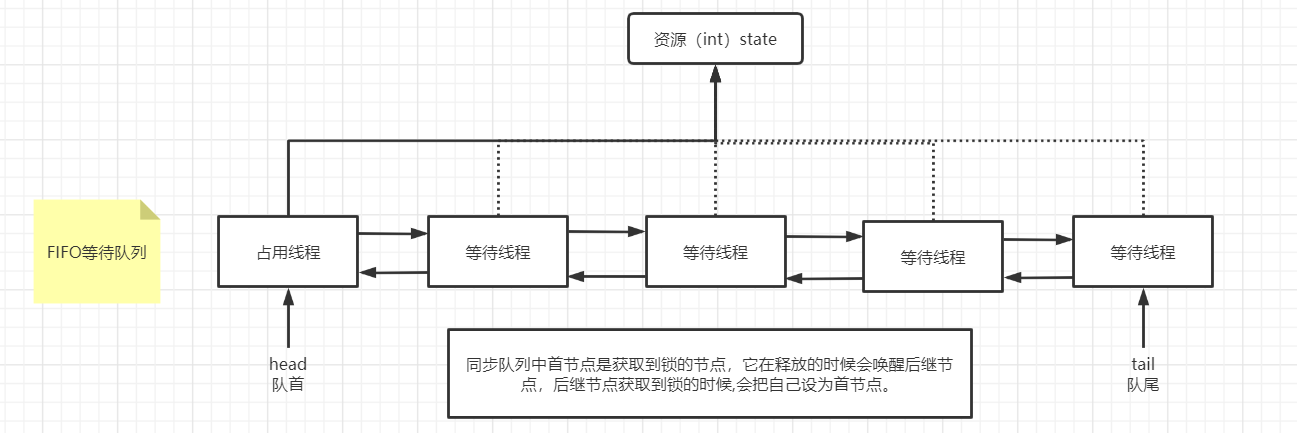
AQS source code reading

用LCR表完美测试无线充电系统中的线圈
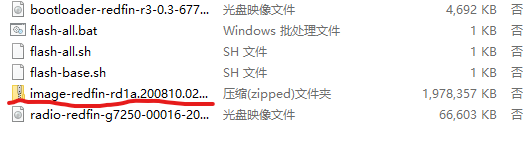
Pixel 5 5g unlocking tutorial (including unlocking BL, installing edxposed and root)

Set Chrome browser background to eye protection (eye escort / darkreader plug-in)

Deep learning notes - object detection and dataset + anchor box

Customize the navigation bar at the top of wechat applet (adaptive wechat capsule button, flex layout)
![解决ValueError: Argument must be a dense tensor: 0 - got shape [198602], but wanted [198602, 16].](/img/99/095063b72390adea6250f7b760d78c.png)
解决ValueError: Argument must be a dense tensor: 0 - got shape [198602], but wanted [198602, 16].

Learning Android from scratch -- Introduction

CLion+OpenCV identify ID number - detect ID number
随机推荐
【数据库】MySQL基本操作(基操~)
QPushbutton 槽函数被多次触发
持续集成(CI)/持续交付(CD)如何彻底改变自动化测试
Windows remote connection to redis
Innovation training (V) mid term inspection
Progress of innovation training (IV)
Wechat payment function
Thoughts on a small program
Solve valueerror: argument must be a deny tensor: 0 - got shape [198602], but wanted [198602, 16]
Informatics Aosai yibentong 1212: letters | openjudge 2.5 156: Letters
洛谷P2731骑马修栅栏
[WinUI3]編寫一個仿Explorer文件管理器
Use model load_ state_ Attributeerror appears when dict(): 'STR' object has no attribute 'copy‘
Gets all dates between two times
redis和mysql区别
PHP counts the number of files in the specified folder
COM in wine (2) -- basic code analysis
Innovation training (II) task division
Progress of innovation training (III)
Use AES encryption - reuse the wisdom of predecessors