当前位置:网站首页>【数据库】MySQL基本操作(基操~)
【数据库】MySQL基本操作(基操~)
2022-04-23 04:46:00 【明璐花生牛奶】
一、登陆mysql
命令:
mysql -uroot -pEnter password:
Welcome to the MySQL monitor. Commands end with ; or \g.
Your MySQL connection id is 8
Server version: 5.7.13 MySQL Community Server (GPL)
Copyright (c) 2000, 2016, Oracle and/or its affiliates. All rights reserved.
Oracle is a registered trademark of Oracle Corporation and/or its
affiliates. Other names may be trademarks of their respective
owners.
Type 'help;' or '\h' for help. Type '\c' to clear the current input statement.#输入密码
#欢迎界面,提示:mysql命令以“;”或者“\g”结尾
#链接mysql次数(每登陆一次,id+1)
#mysql版本
#权益
#帮助说明
二、基本语法:
1、注释方式:
mysql> SELECT 1+1; # 这个注释直到该行结束
mysql> SELECT 1+1; -- 这个注释直到该行结束
mysql> SELECT 1 /*这是一个在行中间的注释 */ + 1;
2、获得帮助:
「1」层次帮助
mysql> ? contents --注意:?和contents之间有一个空格。
结果如下:
mysql> ? contents
You asked for help about help category: "Contents"
For more information, type 'help <item>', where <item> is one of the following
categories:
Account Management
Administration
Compound Statements
Data Definition
Data Manipulation
Data Types
……
mysql> ? data types; --查看支持的数据类型
结果如下:
mysql> ? data types;
You asked for help about help category: "Data Types"
For more information, type 'help <item>', where <item> is one of the following
topics:
AUTO_INCREMENT
BIGINT
BINARY
BIT
BLOB
……
mysql> ? int --查看int类型的具体介绍
结果如下:
mysql> ? int
Name: 'INT'
Description:
INT[(M)] [UNSIGNED] [ZEROFILL]
A normal-size integer. The signed range is -2147483648 to 2147483647.
The unsigned range is 0 to 4294967295.
URL: http://dev.mysql.com/doc/refman/5.7/en/numeric-type-overview.html
练习:
查看char类型和varchar类型的说明,并分析char和varchar的存储区别。
命令如下:
mysql> ? char
Name: 'CHAR'
Description:
[NATIONAL] CHAR[(M)] [CHARACTER SET charset_name] [COLLATE
collation_name]
A fixed-length string that is always right-padded with spaces to the
specified length when stored. M represents the column length in
characters. The range of M is 0 to 255. If M is omitted, the length is
1.
*Note*:
Trailing spaces are removed when CHAR values are retrieved unless the
PAD_CHAR_TO_FULL_LENGTH SQL mode is enabled.
URL: https://dev.mysql.com/doc/refman/8.0/en/string-type-syntax.html
mysql> ? varchar
Name: 'VARCHAR'
Description:
[NATIONAL] VARCHAR(M) [CHARACTER SET charset_name] [COLLATE
collation_name]
A variable-length string. M represents the maximum column length in
characters. The range of M is 0 to 65,535. The effective maximum length
of a VARCHAR is subject to the maximum row size (65,535 bytes, which is
shared among all columns) and the character set used. For example, utf8
characters can require up to three bytes per character, so a VARCHAR
column that uses the utf8 character set can be declared to be a maximum
of 21,844 characters. See
https://dev.mysql.com/doc/refman/8.0/en/column-count-limit.html.
MySQL stores VARCHAR values as a 1-byte or 2-byte length prefix plus
data. The length prefix indicates the number of bytes in the value. A
VARCHAR column uses one length byte if values require no more than 255
bytes, two length bytes if values may require more than 255 bytes.
*Note*:
MySQL follows the standard SQL specification, and does not remove
trailing spaces from VARCHAR values.
VARCHAR is shorthand for CHARACTER VARYING. NATIONAL VARCHAR is the
standard SQL way to define that a VARCHAR column should use some
predefined character set. MySQL uses utf8 as this predefined character
set. https://dev.mysql.com/doc/refman/8.0/en/charset-national.html.
NVARCHAR is shorthand for NATIONAL VARCHAR.
URL: https://dev.mysql.com/doc/refman/8.0/en/string-type-syntax.html
区别如下:
在MySQL中,char和varchar都是用来存储字符串的,区别在于char有固定的长度,而varchar属于可变长的字符类型。
「2」快速查阅帮助
实际使用中,可以通过使用关键字进行快速查询。
执行如下命令:
mysql> ? show
mysql> ? create database;
请写出create databases命令的语法:

三、熟悉系统数据库
1、显示系统数据库
mysql> show databases;
显示结果如下(写出系统数据库名字):

2、选择mysql数据库
mysql> use mysql;

3、显示mysql数据库中所有表格
mysql> show tables;

mysqls数据库中有多少张表格?
mysql数据库里有37张不同的表格,通过show tables命令查看当前数据库中的表格
4、查看user表结构
mysql> desc user;

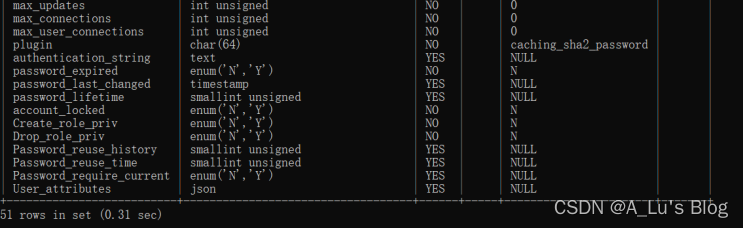
user表格有多少个字段?
有6个字段
5、通过user表查看系统的用户信息
mysql>select user from user;
user表中登记了多少个用户?请写出所有用户名。

6、执行如下命令,写出结果并解释其功能:
mysql> select host,user,password_last_changed from user;
结果:

功能:
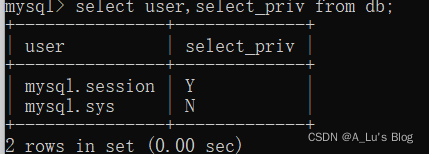
7、使用命令查看db表中所有用户(user)的查询权限(select_priv)。
命令:
四、创建数据库
创建数据库语法:create database dbname;
1、使用命令创建数据库jxgl
命令如下:

2、在jxgl数据库中创建如下表格:
Student表结构
| 字段名称 |
数据类型 |
长度 |
精度 |
小数位数 |
是否允许Null值 |
说明 |
| Sno |
Char |
10 |
0 |
0 |
否 |
学号,主码 |
| Sname |
Varchar |
8 |
0 |
0 |
是 |
姓名 |
| Ssex |
Char |
2 |
0 |
0 |
是 |
性别,取值:男或女 |
| Sbirthday |
Date |
8 |
0 |
0 |
是 |
出生日期 |
| Sdept |
Char |
16 |
0 |
0 |
是 |
系名 |
| Speciality |
Varchar |
20 |
0 |
0 |
是 |
专业名 |
创建student表命令如下:
(2)Course表(课程名称表)的表结构
| 字段名称 |
数据类型 |
长度 |
精度 |
小数位数 |
是否允许Null值 |
说明 |
| Cno |
Char |
5 |
0 |
0 |
否 |
课程号,主码 |
| Cname |
Varchar |
20 |
0 |
0 |
否 |
课程名 |
创建Course表命令如下:

(3)SC表(成绩表)的表结构
| 字段名称 |
数据类型 |
长度 |
精度 |
小数位数 |
是否允许Null值 |
说明 |
| Sno |
Char |
10 |
0 |
0 |
否 |
学号,外码 |
| Cno |
Char |
5 |
0 |
0 |
否 |
课程号,外码 |
| Degree |
Decimal |
5 |
5 |
1 |
是 |
成绩,0~100之间 |
创建SC表命令如下:

3、使用show命令显示jxgl数据库中所有的表格。
命令如下:

4、使用desc命令显示student表结构:
命令如下:
结果如下:

五、数据导入导出
1、将jxgl数据库中数据导出sql文档
输入的命令行:
cd ~/Desktop
mysqldump -u root -p jxgl> jxgl.sql
输入后会让你输入进入MySQL的密码,如果导出单张表的话在数据库名后面输入表名即可。
2、导入jxgl数据库
(1)登陆mysql服务器
mysql –uroot –p --登陆mysql服务器
mysql>create database jxgl; --创建jxgl数据库
mysql> source jxgl.sql --执行source命令(执行jxgl.sql中的sql代码)

版权声明
本文为[明璐花生牛奶]所创,转载请带上原文链接,感谢
https://blog.csdn.net/weixin_54438368/article/details/124264340
边栏推荐
- Basic operation of sequence table
- List remove an element
- Unity摄像头跟随鼠标旋转
- IDE idea automatic compilation and configuration of on update action and on frame deactivation
- Unity rawimage background seamlessly connected mobile
- What is a blocking queue? What is the implementation principle of blocking queue? How to use blocking queue to implement producer consumer model?
- FAQ of foreign lead and alliance Manager
- Kotlin. The binary version of its metadata is 1.6.0, expected version is 1.1.15.
- Arduino UNO r3+LCD1602+DHT11
- Summary of MySQL de duplication methods
猜你喜欢

Innovation training (V) configuration information
Recommended scheme of national manufactured electronic components

test
Spark FAQ sorting - must see before interview

Record your own dataset with d435i, run orbslam2 and build a dense point cloud

New terminal play method: script guidance independent of technology stack

Innovative practice of short video content understanding and generation technology in meituan

Teach you how to build the ruoyi system by Tencent cloud

Supplement 14: cmake practice project notes (to be continued 4 / 22)

Eight misunderstandings that should be avoided in data visualization
随机推荐
520. Detect capital letters
Go reflection - go language Bible learning notes
Mysql50 basic exercises
Innovation training (VI) routing
Basic operation of sequence table
Leetcode001 -- returns the subscript of the array element whose sum is target
win10, mysql-8.0.26-winx64. Zip installation
PHP+MySQL 制作留言板
QML进阶(四)-绘制自定义控件
Improving 3D object detection with channel wise transformer
拼了!两所A级大学,六所B级大学,纷纷撤销软件工程硕士点!
zynq平臺交叉編譯器的安裝
The object needs to add additional attributes. There is no need to add attributes in the entity. The required information is returned
2021数学建模国赛一等奖经验总结与分享
Better way to read configuration files than properties
La caméra Unity tourne avec la souris
Learning Android from scratch -- Introduction
Unity3d practical skills - theoretical knowledge base (I)
getprop 属性
Spark small case - RDD, spark SQL