当前位置:网站首页>【WPF】利用Ellipse或Rectangle制作圆形进度条
【WPF】利用Ellipse或Rectangle制作圆形进度条
2022-04-21 06:34:00 【阿月浑子2021】

        public MainViewModel()
        {
            Task.Run(() =>
            {
                while(true)
                {
                    Application.Current.Dispatcher.Invoke(() =>
                    {
                        double second = DateTime.Now.Second * 100 / 60;
                        ProcessValue = CalcProgress(second, 50, 12);
                        ProcessNumber = second + "%";
                    });
                }
            });
        }

        /// <summary>
        /// 计算进度条百分比
        /// </summary>
        /// <param name="progress">百分比</param>
        /// <param name="radius">圆角的度数</param>
        /// <param name="thickness">边框厚度</param>
        /// <returns></returns>
        private DoubleCollection CalcProgress(double progress, double radius, double thickness)
        {
            var r = radius - thickness / 2;
            var perimeter = 2 * Math.PI * r / thickness;
            var step = progress / 100 * perimeter;
            var result = new DoubleCollection() { step, 1000 };
            return result;
        }

        private DoubleCollection processValue;
        /// <summary>
        /// 圆形进度条数组
        /// </summary>
        public DoubleCollection ProcessValue
        {
            get { return processValue; }
            set { processValue = value;RaisePropertyChanged();}
        }

        private string processNumber;
        /// <summary>
        /// 进度
        /// </summary>
        public string ProcessNumber
        {
            get { return processNumber; }
            set { processNumber = value; RaisePropertyChanged(); }
        }
<StackPanel Orientation="Horizontal" Background="#4E59A4">
<Grid Background="Transparent">
<i:Interaction.Behaviors>
<!--MouseDragElementBehavior实现拖拽功能-->
<ei:MouseDragElementBehavior/>
</i:Interaction.Behaviors>
<Ellipse Width="100" Height="100" StrokeThickness="12" Margin="30" Stroke="Gray"/>
<Ellipse Width="100" Height="100" StrokeThickness="12" StrokeDashArray="{Binding ProcessValue}"
RenderTransformOrigin="0.5,0.5">
<Ellipse.Stroke>
<LinearGradientBrush StartPoint="0.5,0.5" EndPoint="1,1">
<GradientStop Color="Green" Offset="0"/>
<GradientStop Color="Yellow" Offset="1"/>
</LinearGradientBrush>
</Ellipse.Stroke>
<Ellipse.RenderTransform>
<RotateTransform Angle="-90"/>
</Ellipse.RenderTransform>
</Ellipse>
<TextBlock Text="{Binding ProcessNumber}" FontSize="28" Foreground="White" HorizontalAlignment="Center" VerticalAlignment="Center"/>
</Grid>
<Grid Background="Transparent" Margin="50">
<i:Interaction.Behaviors>
<ei:MouseDragElementBehavior/>
</i:Interaction.Behaviors>
<!--RadiusX、RadiusY 设置将矩形边角改为圆角时的椭圆直径-->
<Rectangle Width="100" Height="100" RadiusX="50" RadiusY="50" Stroke="Gray" StrokeThickness="12"/>
<Rectangle Width="100" Height="100" RadiusX="50" RadiusY="50" StrokeThickness="12"
StrokeDashArray="{Binding ProcessValue}" RenderTransformOrigin="0.5,0.5">
<Rectangle.Stroke>
<LinearGradientBrush StartPoint="0,0" EndPoint="1,1">
<GradientStop Color="Green" Offset="0.3"/>
<GradientStop Color="Yellow" Offset="1"/>
</LinearGradientBrush>
</Rectangle.Stroke>
<Rectangle.RenderTransform>
<RotateTransform Angle="90"/>
</Rectangle.RenderTransform>
<Rectangle.Effect>
<DropShadowEffect BlurRadius="4" ShadowDepth="0" Color="AliceBlue" Opacity="0.8"/>
</Rectangle.Effect>
</Rectangle>
<TextBlock Text="{Binding ProcessNumber}" FontSize="28" Foreground="White" VerticalAlignment="Center" HorizontalAlignment="Center"/>
</Grid>
</StackPanel>RenderTransformOrigin:渲染动画的起点
值为坐标的形式,范围(0,0)到(1,1),默认(0,0)

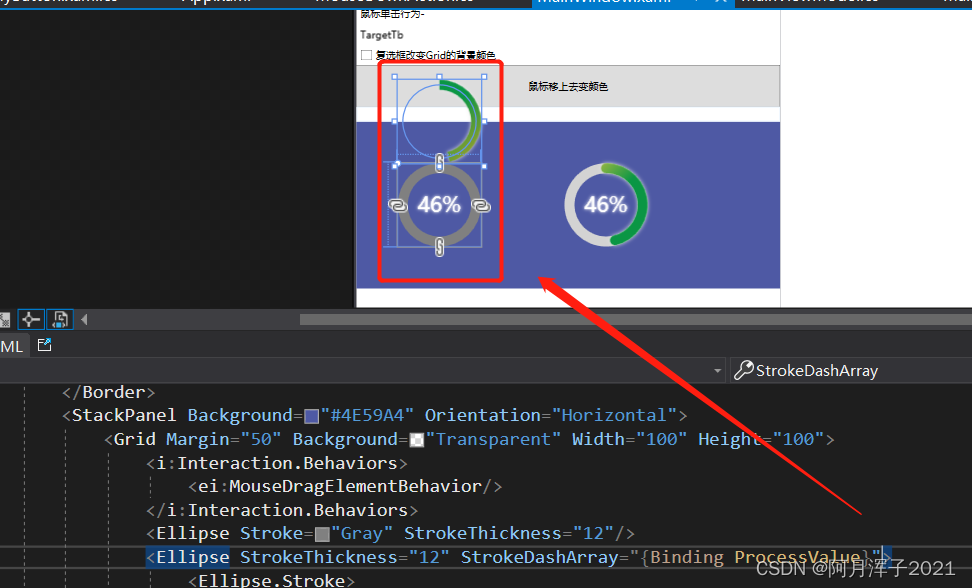
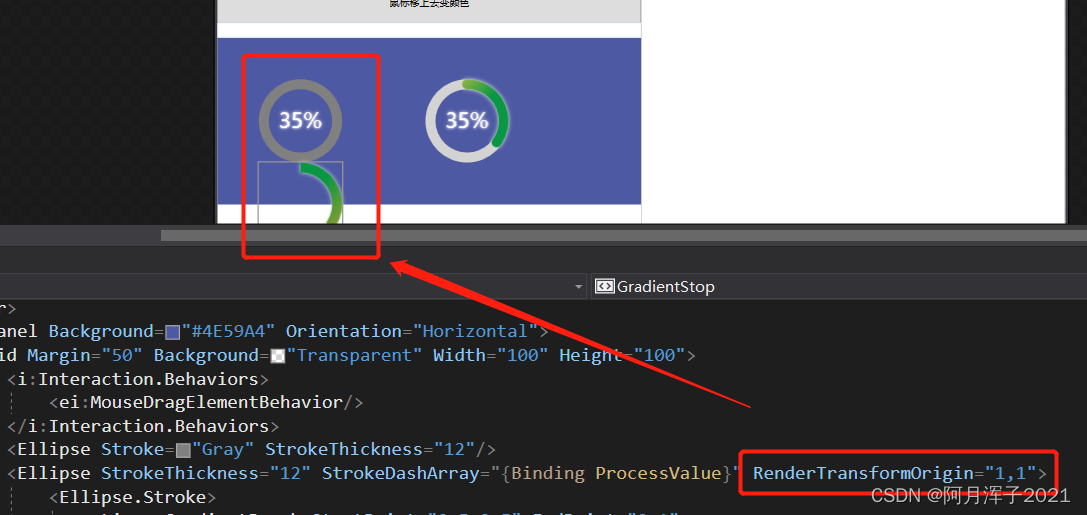
RenderTransform :变形特效,用于拉伸、旋转、扭曲一个对象


成员包括:
1. TranslateTransform:平移。 X、Y 属性设置平移距离
<Ellipse.RenderTransform>
    <TranslateTransform X="40" Y="-50"/>
</Ellipse.RenderTransform>
2. RotateTransform: 旋转。 Angle设置旋转角度,CenterX、Y设置旋转中心的坐标
<RotateTransform Angle="-86" CenterX="-10" CenterY="10"/>3. ScaleTransform : 缩放。 ScaleX、Y 设置 X 轴、Y轴缩放比例
<ScaleTransform CenterX="-10" CenterY="10" ScaleX="2" ScaleY="0.8"/>4. SkewTransform : 二维倾斜
<SkewTransform CenterX="-10" CenterY="10" AngleX="50" AngleY="-30"/>5. TransformGroup: 组合变化效果
<TransformGroup>
   <SkewTransform  CenterX="-10" CenterY="10" AngleX="50" AngleY="-30"/>
   <RotateTransform Angle="50"/>
</TransformGroup>
MatrixTransform :通过矩阵算法实现更为复杂的变形
版权声明
本文为[阿月浑子2021]所创,转载请带上原文链接,感谢
https://blog.csdn.net/weixin_56814032/article/details/122116883
边栏推荐
- 蓝桥杯——十六进制与十进制之间的转换
- 什么是WebSocket
- PE header file analysis
- 动态规划解决0/1背包问题
- 2020-12-25
- Ruiyuan power chip, ry3715, ry3750 replacement: silijie sy7208, sy7152, Xinpeng micro ap2008 Core source mp1542, mp3213. Input voltage from 2.5V to 5.5V
- Convergencewarning: linear failed to converge, increase the number of iterations
- 2020-12-24
- BGP 自动路由聚合
- NP、OSPF Stub區域
猜你喜欢

Cs5518, Mipi to dual LVDS, replacement: gm8775 of Guoteng, tc358775 of Toshiba, dual LVDS, domestic perfect replacement, DSI to dual channel LVDS, LVDS clock frequency up to 154mhz, 1920 x1200

Cjc5340,ADC,DAC,替换cs5340,数模转换器,100dB192KHz多位音频A/D转换器,音频Codec100dB192KHz多位音频A/D转换器

OSPF multi area

PIM-DM

Sorting method (1) = > bubble sorting, simple selection sorting

2020-12-25

音频功率放大器,纳芯威功放,NS4165B单通道5.3W AB\D类功放,主要替换智浦芯的CS8571、CS8871、CS5218海栎创的HAA2018

UFIDA OA vulnerability reproduction manual

NP, OSPF stub area

CS5801规格书|CS5801HDMI转EDP转换方案|HDMI转DP转接板设计,HDMI2.0转EDP1.4,支持向下兼容
随机推荐
Log4j Remote Code Execution Vulnerability verification
交换技术....
蓝桥杯——十六进制转八进制
龙讯系列:LT8912B,LT6911C,HDMI转MIPI(CSI\DSI),单通道MIPI2.DSI桥到LVDS/HDM,HDMI1.4到双端口MIPIDSI/CSI与音频数据表
ConvergenceWarning: Liblinear failed to converge, increase the number of iterations解决辦法
Blue Bridge Cup - palindromes and special palindromes
NP, OSPF Stub Area
Longxun series: lt8912b, lt6911c, HDMI to Mipi (CSI \ DSI), single channel mipi2 DSi bridge to LVDS / HDM, hdmi1 4 to dual port mipidsi/csi and audio data sheet
Cjc5340, ADC, DAC, replacement cs5340, digital to analog converter, 100db192khz multi bit audio A / D converter, audio codec100db192khz multi bit audio A / D converter
【WPF】级联Combobox
钢条切割问题最优解
Longxun series video conversion, lt9211, lt8918, functions: LVDS to bt656, LVDS to Mipi (CSI \ DSI) RGB to Mipi (DSI \ CSI) bt656 \ 601 \ 1120 to hdmi1 4\DVI
Sort method ----- > Hill sort, heap sort
PIM-DM
NP、OSPF基本配置
Error when running the project of developing wechat applet with uni app error: tourist appid
Nmap扫描和Scapy项目
Steps of connecting hbuilderx to nocturnal simulator
光华芯音频Codec大全CJC4344、CJC8988、CJC5340、CJC6811光华芯音频codec、CJC4344、CJC8988、替换顺芯ES8388、替换cs5340
Sorting method (3) = > quick sort and merge sort