当前位置:网站首页>[Embedded open source library] The use of MultiButton, an easy-to-use event-driven button driver module
[Embedded open source library] The use of MultiButton, an easy-to-use event-driven button driver module
2022-08-11 05:17:00 【Drinking water cabbage】
简介
MultiButton 是一个小巧简单易用的事件驱动型按键驱动模块,可无限量扩展按键,按键事件的回调异步处理方式可以简化你的程序结构,去除冗余的按键处理硬编码,让你的按键业务逻辑更清晰.
This chapter uses the environment:
正点原子stm32F4探索者
Code engineering uses punctual atomsHALLibrary experiment three-按键输入实验
下载
GIthub地址:https://github.com/0x1abin/MultiButton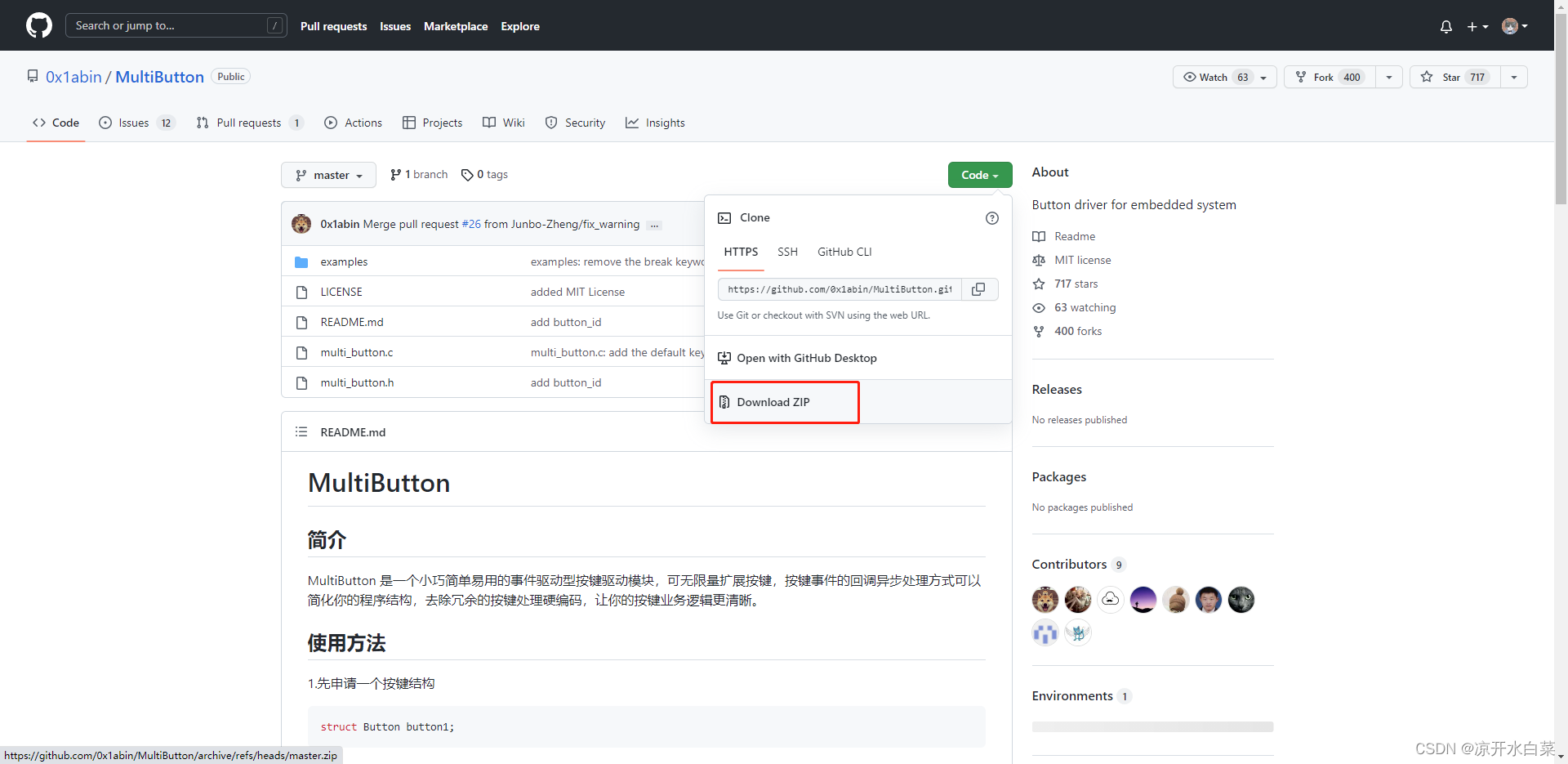
配有gitThe environment can be downloaded using the following command
git clone https://github.com/0x1abin/MultiButton.git
使用介绍
MultiButton 使用C语言实现,基于面向对象方式设计思路,每个按键对象单独用一份数据结构管理:
struct Button {

	uint16_t ticks;
	uint8_t  repeat: 4;
	uint8_t  event : 4;
	uint8_t  state : 3;
	uint8_t  debounce_cnt : 3;
	uint8_t  active_level : 1;
	uint8_t  button_level : 1;
	uint8_t  button_id;
	uint8_t  (*hal_button_Level)(uint8_t  button_id_);
	BtnCallback  cb[number_of_event];
	struct Button* next;
};
这样每个按键使用单向链表相连,依次进入 button_handler(struct Button* handle) 状态机处理,所以每个按键的状态彼此独立.
按键事件
| 事件 | 说明 |
|---|---|
| PRESS_DOWN | 按键按下,每次按下都触发 |
| PRESS_UP | 按键弹起,每次松开都触发 |
| PRESS_REPEAT | 重复按下触发,变量repeat计数连击次数 |
| SINGLE_CLICK | 单击按键事件 |
| DOUBLE_CLICK | 双击按键事件 |
| LONG_PRESS_START | 达到长按时间阈值时触发一次 |
| LONG_PRESS_HOLD | 长按期间一直触发 |
工程移植
我们将下载好的MultiButton源码中的multi_button.c和multi_button.h文件拷贝到stm32工程目录下的handware中的key文件夹下
然后我们在keil中添加该文件
代码分析
#define TICKS_INTERVAL 5 //ms 轮询间隔时间,也就是时间片
#define DEBOUNCE_TICKS 3 //MAX 8 Double-click the interval time slice
#define SHORT_TICKS (300 /TICKS_INTERVAL) // Short press the time slice
#define LONG_TICKS (1000 /TICKS_INTERVAL) // Long press the time slice
Then we can see that the polling function is constantly traversing the linked list
void button_ticks()
{

	struct Button* target;
	for(target=head_handle; target; target=target->next) {

		button_handler(target);
	}
}
From the code we can see thatbutton_startA function is a function that adds a node to a linked list(那相应的button_stopIt is to delete the function of the linked list node)
int button_start(struct Button* handle)
{

	struct Button* target = head_handle; // 头节点
	while(target) {

		if(target == handle) return -1;	//already exist.
		target = target->next; // 遍历到最后一个节点
	}
	handle->next = head_handle;// The linked list of the ring structure is connected head to tail
	head_handle = handle;
	return 0;
}

void button_stop(struct Button* handle)
{

	struct Button** curr;
	for(curr = &head_handle; *curr; ) {

		struct Button* entry = *curr;
		if (entry == handle) {

			*curr = entry->next;
// free(entry);
			return;//glacier add 2021-8-18
		} else
			curr = &entry->next;
	}
}
Key event driven enumeration
typedef enum {

	PRESS_DOWN = 0, // 按下信号
	PRESS_UP,		// Bounce the signal
	PRESS_REPEAT,	// Repeated press count,在button结构体变量中repeat存储次数
	SINGLE_CLICK,	// 单击信号
	DOUBLE_CLICK,	// 双击信号
	LONG_PRESS_START,	// Changan Signal
	LONG_PRESS_HOLD,	// It will be triggered repeatedly during the long press
	number_of_event,
	NONE_PRESS			// 未按下
}PressEvent;
typedef struct Button {

	uint16_t ticks;
	uint8_t  repeat : 4;	// Single machine times record
	uint8_t  event : 4;		// 事件
	uint8_t  state : 3;		// 状态
	uint8_t  debounce_cnt : 3;
	uint8_t  active_level : 1;  // 触发电平
	uint8_t  button_level : 1;	// 当前按键电平
	uint8_t  button_id;			// 按键id
	uint8_t  (*hal_button_Level)(uint8_t button_id_);	// The key state reading function is saved through the pointer array
	BtnCallback  cb[number_of_event];	// 回调函数数组(The registered callback function will exist here,Polling is invoked with this array)
	struct Button* next;		// Pointer to the next keystroke(链表)
}Button;
From the above analysis, we know that the first parameter of the registered button is the button node,The second parameter is the function of reading the key level,The third is the key trigger level,The fourth is the buttonid定义
void button_init(struct Button* handle, uint8_t(*pin_level)(), uint8_t active_level, uint8_t button_id);
Trigger event registration,The first parameter is the button node,The second parameter is the key event enumeration value,The third is the callback trigger function
void button_attach(struct Button* handle, PressEvent event, BtnCallback cb);
Returns the trigger type of this button node,When we do not use the callback function method, we can poll this function to determine the key event signal
PressEvent get_button_event(struct Button* handle);
multi_button.c文件中还有一个button_handlerFunctions are ustickFunction polling judgment function,This function is a method to implement each event of the button,大家可以自行阅读学习
完整使用流程
#include "sys.h"
#include "delay.h"
#include "usart.h"
#include "led.h"
#include "key.h"

#include "multi_button.h"

enum Button_IDs {

	btn1_id,
	btn2_id,
};

struct Button btn1;
struct Button btn2;

uint8_t read_button_GPIO(uint8_t button_id)
{

	// you can share the GPIO read function with multiple Buttons
	switch(button_id)
	{

		case btn1_id:
			return HAL_GPIO_ReadPin(GPIOE,GPIO_PIN_4);
		case btn2_id:
			return HAL_GPIO_ReadPin(GPIOE,GPIO_PIN_3);
		default:
			return 0;
	}
}

void BTN1_PRESS_DOWN_Handler(void* btn)
{

	//do something...
    printf("btn1 press down\r\n");
}

void BTN1_PRESS_UP_Handler(void* btn)
{

	//do something...
    printf("btn2 press up\r\n");
}

void BTN2_LONG_PRESS_START_Handler(void* btn)
{

	//do something...
    printf("btn2 press down\r\n");
}

void BTN2_DOUBLE_Click_Handler(void* btn)
{

	//do something...
    printf("btn2 press up\r\n");
}

int main(void)
{

    HAL_Init();                    	//初始化HAL库
    Stm32_Clock_Init(336,8,2,7);  	//设置时钟,168Mhz
	delay_init(168);               	//初始化延时函数
    uart_init(115200);              //初始化串口
	LED_Init();						//初始化LED
    KEY_Init();                     //初始化按键

    printf("MultiButton Test...\r\n");

	button_init(&btn1, read_button_GPIO, 0, btn1_id);
	button_init(&btn2, read_button_GPIO, 0, btn2_id);

	// Only press and talk signals are registered here,The rest of the signals can also be tested by yourself
	button_attach(&btn1, PRESS_DOWN,       BTN1_PRESS_DOWN_Handler);
	button_attach(&btn1, PRESS_UP,         BTN1_PRESS_UP_Handler);

	button_attach(&btn2, LONG_PRESS_START, BTN2_LONG_PRESS_START_Handler);
	button_attach(&btn2, DOUBLE_CLICK,     BTN2_DOUBLE_Click_Handler);

	button_start(&btn1);
	button_start(&btn2);

    while(1)
    {

        button_ticks();
        delay_ms(5);
	}
}
实验效果
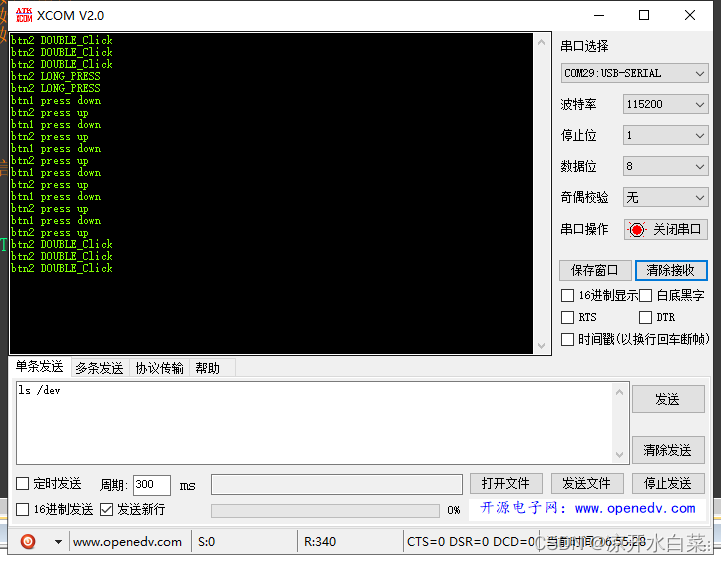
The method I use here is the callback function trigger,There is another way, that is, through the aboveget_button_eventto determine the key event state
while(1)
	{

		if(btn1_event_val != get_button_event(&btn1)) {

			btn1_event_val = get_button_event(&btn1);

			if(btn1_event_val == PRESS_DOWN) {

				//do something
			} else if(btn1_event_val == PRESS_UP) {

				//do something
			} else if(btn1_event_val == LONG_PRESS_HOLD) {

				//do something
			}
		}
	}
边栏推荐
- 交换机和路由器技术-30-标准ACL
- 群晖DS220+ 应用小笔记
- form form submission database Chinese becomes a question mark
- 用白嫖的Adobe正版软件,减少应届毕业生的慢就业、不就业等现象
- C语句:数据存储
- leetcode 9. Palindromic Numbers
- 在 关闭页面/卸载(unload)文档 之前向服务器发送请求
- 交换机和路由器技术-36-端口镜像
- In the closing pages/uninstall (unload) sends a request to the server before the document
- guava RateLimiter uniform current limit
猜你喜欢
ARM结构体系4:嵌入式硬件平台接口开发

【嵌入式开源库】MultiTimer 的使用,一款可无限扩展的软件定时器

Paper Notes: BBN: Bilateral-Branch Network with Cumulative Learning for Long-Tailed Visual Recognition

交换机和路由器技术-32-命名ACL

3 Module 2: Use of scientific research tools

网络技能树

Switch and Router Technology-29-OSPF Virtual Link

绿盾加密如何顺利切换成IP-Guard加密
Optimization is a kind of habit low starting point is the "standing near the critical"
交换机和路由器技术-26-OSPF末梢区域配置
随机推荐
【电商运营】社交媒体营销策略该如何制定?
【嵌入式开源库】MultiButton的使用,简单易用的事件驱动型按键驱动模块
交换机和路由器技术-21-RIP路由协议
Switch and Router Technology - 32 - Named ACL
leetcode 9. Palindromic Numbers
普林斯顿微积分读本05第四章--求解多项式的极限问题
guava RateLimiter均匀限流
交换机和路由器技术-36-端口镜像
MySQL事务的概念
Switches and routers technology - 24 - configure OSPF single area
你务必得明白——JSP的九大内置对象与四大域对象
async(异步)和await的使用
MySQL必知必会(初级篇)
交换机和路由器技术-33-静态NAT
绿盾加密如何顺利切换成IP-Guard加密
Core Data 多线程设计
Thymeleaf
【FPGA教程案例49】控制案例1——基于FPGA的PID控制器verilog实现
一些常见mysql入门练习
2022煤矿瓦斯检查考试题模拟考试题库及答案