当前位置:网站首页>Jenkins environment deployment, (packaging, publishing, deployment, automated testing)
Jenkins environment deployment, (packaging, publishing, deployment, automated testing)
2022-08-09 02:35:00 【Software testing automation testing】
I. Tomcat environment installation
1. Install JDK (Java environment)
JDK download address: Java Downloads | Oracle
After installation, configure the environment variables in the system environment variables:
①Add JAVA_HOME
- Variable name: JAVA_HOME
- Variable value: C:\Program Files\Java\jdk1.8.0_181 (configured according to your actual path)
②Add CLASSPATH
- Variable name: CLASSPATH
- Variable value: .;%JAVA_HOME%\lib\dt.jar;%JAVA_HOME%\lib\tools.jar; (remember there is a "." in front)
③Edit path
Find the path variable name in the system variables, double-click or click to edit, and add the following at the end
- Variable name: path
- Variable value: ;%JAVA_HOME%\bin;%JAVA_HOME%\jre\bin
2. Install Tomcat and configure its environment variables
Tomcat official website: https://tomcat.apache.org/
Select the appropriate download, for example: https://tomcat.apache.org/download-90.cgi
After downloading, unzip it and place it in a path, for example: D:\rj-AnZhuang\apache-tomcat

Then configure environment variables in system variables
①Create a new TOMCAT_HOME variable
- Variable name: TOMCAT_HOME
- Variable value: D:\rj-AnZhuang\apache-tomcat (the variable value is the tomcat decompression path we downloaded)
②Create a new CATALINA_HOME variable
- Variable name: CATALINA_HOME
- Variable value: D:\rj-AnZhuang\apache-tomcat (the variable value of CATALINA_HOME is the same as that of TOMCAT_HOME)
③Modify path
Find the path variable name in the system variables, double-click or click to edit, and add the following at the end
- Variable name: path
- Variable value: ;%CATALINA_HOME%\bin;%CATALINA_HOME%\lib
3. Start the Tomcat server
Method 1: Enter startup.bat in the cmd command window and press Enter, and run as shown in the figure below (there is no need to switch to the directory after installing the environment variable)

Method 2: Double-click to start startup.bat

4. After Tomcat is successfully started, start the browser, enter: http://localhost:8080/ in the address bar of the browser, then press Enter to enter the following screen, indicating that Tomcat has been installed correctly

Second, Jenkins installation
1.jenkins download
There are two types of Jenkins packages
- One is the setup.exe client package
- One is the war package (pay attention to the version problem, the low version will cause the project execution error)
Download address: https://jenkins.io/download/
For example, Jenkins.war download address: https://mirrors.tuna.tsinghua.edu.cn/jenkins/war-stable/2.150.3/jenkins
2. Put the installation package in the webapps folder of tomcat

3. Start jenkins (you need to enter the file administrator password when you start it for the first time, and the corresponding path is given, and you can copy the password over; the next step is to click the plug-in recommended to install on the left; the next step is to create a user)
- Restart Tomcat: startup.bat
- Enter in the browser: http://localhost:8080/jenkins/

The Jenkins environment has been installed here, you can configure Jenkins and build the job

Thanks to everyone who read my article carefully. Watching the rise and attention of fans all the way, there is always a need for gift exchanges. Although it is not very valuable, if you can use it, you can take it directly for free:
p>①More than 2000 software testing e-books (mainstream and classic books should be available)
② Software testing/automation testing standard library information (the most complete Chinese version)
③ Project source code (forty or fifty interesting and classic training projects and source code)
④ Python programming language, API interface automated testing, web automated testing, App automated testing (suitable for beginners to learn)
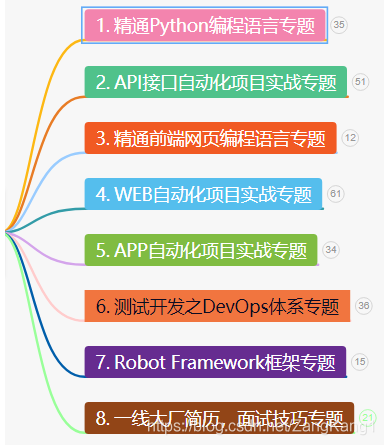

⑤ Python learning roadmap (say goodbye to inexperienced learning)
The information in the picture above is in my QQ technical exchange group (technical exchange and resource sharing, advertisements come in and interrupt you)
You can take it away by yourself, group number 953306497 (remarkThe free materials in the "csdn111") group are the essence of the author's more than ten years of testing career.There are also peer gods to exchange technology together.
边栏推荐
- 2022年自然语言处理校招社招实习必备知识点盘点分享
- Z-Game on grid
- 通过安装VNC服务器x11vnc(或vnc4server)和配置x11vnc.service实现远程通过VNC-Viewer访问VNC服务器。
- Apache站点下载大文件自动中断或者文件不完整
- YOLOV1详解——Pytorch版
- D. Tournament Countdown
- 高性能 MySQL(十二):分区表
- 时间复杂度和空间复杂度
- Open3D 随机采样
- MT4 / MQ4L entry to the master of EA tutorial lesson two (2) - - MQL language commonly used function account information commonly used functions
猜你喜欢

xml引配置文件

Duplicate class com.google.common.util.concurrent.ListenableFuture found in modules
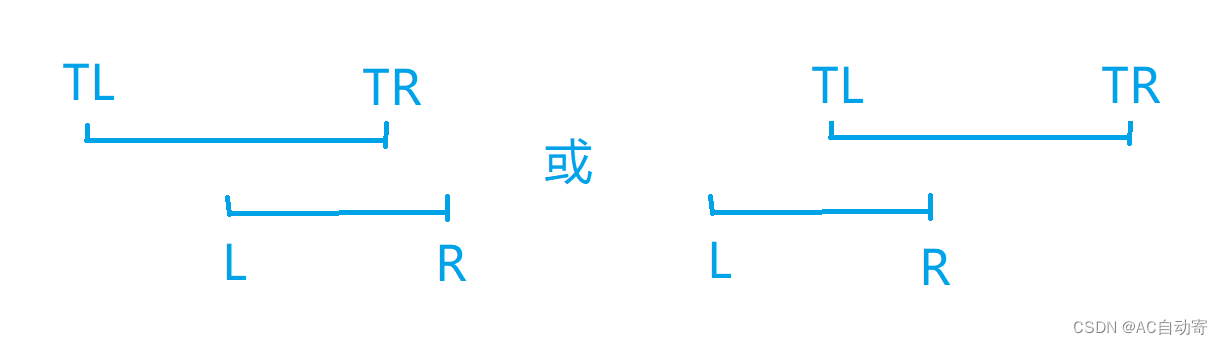
Line segment tree of knowledge

概率模型校准
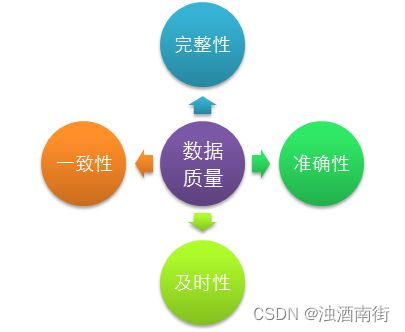
数仓第一篇:基础架构

VS2019编译boost_1_79,生成32位和64位静态库

Etcd realize large-scale application service management of actual combat

Redis - 时间序列数据类型的保存方案和消息队列实现

【电商运营】不知道怎么做网站优化?这里有你需要知道的一切!

2.1-----27. Remove elements
随机推荐
Json之JArray的使用方法
The first lesson of HNUMSC-C language
物联网未来:未来五年的预期
Tricore架构上的调试案例
1160. 拼写单词
2022 Eye Health Brand Franchise Exhibition, Beijing Vision Care Exhibition, China Ophthalmology Technology Summit
Summary of pytorch related knowledge points
终于有人把灰度发布架构设计讲明白了
Programmer's Daily Life | Daily Fun
18.flink Table/Sql API之 catlog
NPDP改版前最后一次考试!请注意
自动化测试框架总结
Likou Brush Question Record 3.1-----977. Square of ordered array
How js implements array deduplication (7 kinds)
2022年最流行的自动化测试工具有哪些?全网最全最细都在这里了
10.1-----19. Delete the Nth node from the bottom of the linked list
Duplicate class com.google.common.util.concurrent.ListenableFuture found in modules
笔算开2次方根、3次方根详细教程
普通人如何增加收入
Significance Test--Study Notes