当前位置:网站首页>Ros2 robot modeling URDF 8.2rviz2 visual mobile robot model
Ros2 robot modeling URDF 8.2rviz2 visual mobile robot model
2022-04-21 22:51:00 【Fish flavored ROS】
The author of this series of tutorials : Little fish
official account : Fish fragrance ROS
QQ Communication group :139707339
Teaching video address : Small fish B standing
Full document address : Fish fragrance ROS Official website
Copyright notice : Reprint and commercial use are prohibited unless permitted .

8.2 RVIZ2 Visual mobile robot model
Hello everyone , I'm little fish , After the last section joint and link, Let's put the simple we defined above URDF( Including body and radar ) use RVIZ2 Show it , Under the intuitive feeling , Our robot model .
URDF The steps of visualization are as follows :
- Build robot description function package
- establish
urdfFolder authoring urdf file - establish
launchFolder , To write launch file - modify
setup.pyTo configure , Compile testing
1. Create a feature pack
Get familiar , So let's create one fishbot_ws working space , Then build the function package , Select the type of package ament_python
ros2 pkg create fishbot_description --build-type ament_python
2. establish URDF file
establish URDF Folder , establish urdf file
cd fishbot_description && mkdir urdf
touch fishbot_base.urdf
The completed directory structure :
├── fishbot_description
│   ├── __init__.py
├── package.xml
├── setup.cfg
├── setup.py
└── urdf
    └── fishbot_base.urdf
edit fishbot_base.urdf
<?xml version="1.0"?>
<robot name="fishbot">

  <!-- base link -->
  <link name="base_link">
  	<visual>
      <origin xyz="0 0 0.0" rpy="0 0 0"/>
      <geometry>
		<cylinder length="0.12" radius="0.10"/>
      </geometry>
    </visual>
  </link>

  <!-- laser link -->
  <link name="laser_link">
  	<visual>
      <origin xyz="0 0 0" rpy="0 0 0"/>
      <geometry>
		<cylinder length="0.02" radius="0.02"/>
      </geometry>
      <material name="black">
      	<color rgba="0.0 0.0 0.0 0.8" />
      </material>
    </visual>
  </link>

  <!-- laser joint -->
    <joint name="laser_joint" type="fixed">
        <parent link="base_link" />
        <child link="laser_link" />
        <origin xyz="0 0 0.075" />
    </joint>

</robot>
3. establish launch file
In the catalog src/fishbot_description Create launch Folder and create a new display_rviz2.launch.py file .
mkdir launch
touch display_rviz2.launch.py
The completed directory structure :
├── fishbot_description
│   ├── __init__.py
├── launch
│   └── display_rviz2.launch.py
├── package.xml
├── setup.cfg
├── setup.py
└── urdf
    └── fishbot_base.urdf
import os
from launch import LaunchDescription
from launch.substitutions import LaunchConfiguration
from launch_ros.actions import Node
from launch_ros.substitutions import FindPackageShare


def generate_launch_description():
    package_name = 'fishbot_description'
    urdf_name = "fishbot_base.urdf"

    ld = LaunchDescription()
    pkg_share = FindPackageShare(package=package_name).find(package_name)
    urdf_model_path = os.path.join(pkg_share, f'urdf/{
      urdf_name}')

    robot_state_publisher_node = Node(
        package='robot_state_publisher',
        executable='robot_state_publisher',
        arguments=[urdf_model_path]
        )

    joint_state_publisher_node = Node(
        package='joint_state_publisher_gui',
        executable='joint_state_publisher_gui',
        name='joint_state_publisher_gui',
        arguments=[urdf_model_path]
        )

    rviz2_node = Node(
        package='rviz2',
        executable='rviz2',
        name='rviz2',
        output='screen',
        )

    ld.add_action(robot_state_publisher_node)
    ld.add_action(joint_state_publisher_node)
    ld.add_action(rviz2_node)

    return ld
To visualize the model, you need three nodes to participate
joint_state_publisher_guiResponsible for publishing robot joint data information , adoptjoint_statesTopic Publishingrobot_state_publisher_nodeResponsible for publishing robot model informationrobot_description, And willjoint_statesData conversion tf Information Deliveryrviz2_nodeResponsible for displaying the information of the robot
Here we use joint_state_publisher_gui and robot_state_publisher Two bags , If your system does not have these two packages installed , It can be installed by hand :
sudo apt install ros-$ROS_DISTRO-joint-state-publisher-gui ros-$ROS_DISTRO-robot-state-publisher
joint_state_publisher_gui, There is also a brother calledjoint_state_publisherThe difference between the two lies injoint_state_publisher_guiWhen running, an interface will pop up , It can be operated through the interface URDF Active joints in
4. modify setup.py
Import head
from glob import glob
import os
Add directory installation
('share/ament_index/resource_index/packages',
['resource/' + package_name]),
('share/' + package_name, ['package.xml']),
complete
from setuptools import setup
from glob import glob
import os

package_name = 'fishbot_description'

setup(
    name=package_name,
    version='0.0.0',
    packages=[package_name],
    data_files=[
        ('share/ament_index/resource_index/packages',
            ['resource/' + package_name]),
        ('share/' + package_name, ['package.xml']),
        (os.path.join('share', package_name, 'launch'), glob('launch/*.launch.py')),
        (os.path.join('share', package_name, 'urdf'), glob('urdf/**')),
    ],
    install_requires=['setuptools'],
    zip_safe=True,
    maintainer='root',
    maintainer_email='[email protected]',
    description='TODO: Package description',
    license='TODO: License declaration',
    tests_require=['pytest'],
    entry_points={

        'console_scripts': [
        ],
    },
)
5. Compile testing
compile
colcon build
Run the test
source install/setup.bash
ros2 launch fishbot_description display_rviz2.launch.py
add to robotmodel modular , Choose... Separately link The name is as follows , You can see the model display of the robot

Now look at the node diagram

Here you can refer to graph theory launch The relationship between the three nodes started in the file .
Then open the TF modular , Look at the coordinate system of the robot
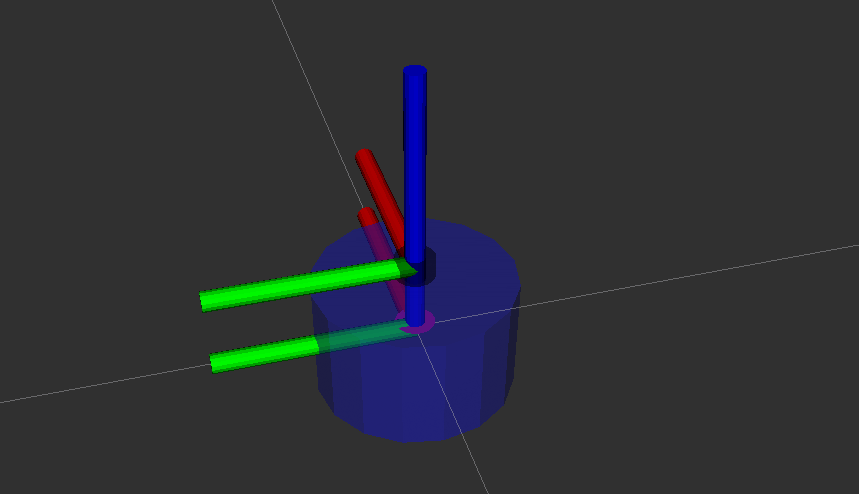
6. This section exercises
practice 1: Try changing the robot's body color to blue , Transparency is 50%(0.1 0.1 1.0 0.5)
practice 2: Try to URDF Add imu_link And use imu_joint Fix it above the center of the car body 2cm,imu The geometry used is box. Length, width and height are 2cm
Result display :

Technical communication && Ask for help :
-
WeChat official account and exchange group : Fish fragrance ROS
-
Xiaoyu wechat :AiIotRobot
-
QQ Communication group :139707339
-
copyright protection : Joined “ Knights of rights ”(rightknights.com) Copyright protection plan of
The authors introduce :
I'm little fish , Senior players in Robotics , Now a one legged robot Algorithm Engineer in Shenzhen
Junior high school learning programming , High school began to contact robots , During the University, playing robot related competitions to achieve monthly income 2W+( The prize money for the competition )
Currently outputting Robot Learning Guide 、 Notes to the paper 、 Work experience , Welcome to pay attention to little fish , Exchange technology together , Learning robots
版权声明
本文为[Fish flavored ROS]所创,转载请带上原文链接,感谢
https://yzsam.com/2022/04/202204212035270532.html
边栏推荐
- Apache Flink系列-④有状态函数
- 【中南林业科技大学】【陈】第六周创新题素数
- L1-064 AI core code valued at 100 million (20 points)
- Deploying wikijs using Helm
- Dynamic programming: complete knapsack problem
- 7.2.3 multiple representations of posture, quaternion, Euler angle, rotation matrix and axis angle ros2 in hands on Robotics
- POI Point of interesting.
- 方法的重载
- 黑盒测试-数据的读取与输出方式
- 事件分发机制流程图,程序员翻身之路
猜你喜欢

PyQt5+OpenCV操作本地摄像头
Review questions and answers of building materials and structures in 2022 first-class registered architect examination
L3-1 then don't worry (30 points) - pit point, test point analysis
![[matlab] matlab drawing operation skills](/img/ec/65c822e54847fcc8d799218499542c.png)
[matlab] matlab drawing operation skills
![[pytorch] common functions](/img/ff/db57ec07bb3b2fb14ea1e2424cea0a.jpg)
[pytorch] common functions
事件分发机制Android,大厂Android面试总结 详细解答

Module 3: Outsourcing student management system - architecture design document

Dynamic programming: complete knapsack problem

TensorFlow 2.8 安装
Recursive stack with the help of classical recursive tree
随机推荐
VOS7.03安装及源码命令
1141: C language training - a hundred dollars and a hundred chickens_ Pruning cycle
L1-056 guess the number (20 points)
Event distribution mechanism Android, Android interview summary of large manufacturers, detailed answers
Keil package common chip high-speed download address, including historical version, pay close attention to my quick collection
2022-04-21: given a blacklist containing non repeating integers in [0, n), write a function to return a random integer not in the blacklist from [0, n)
JUNHE shares: the revenue growth in 2021 was steady, and the export performance of benefited products reached a new high
L1-064 AI core code valued at 100 million (20 points)
【FPGA的基础学习-------OV7725摄像头模块】
期货开户在手机上办理安全吗?需要线下办理吗?
Analysis on the underlying principle of MySQL transaction and isolation level
Is it really safe to outsource model training? New research: outsourcers may implant backdoors to control bank lending
Analysts believe that Samsung Galaxy Z fold 4 and Z flip 4 may be cheaper than their previous products
[RL] deeply understand the use of gradient descent in tabular learning (MC / TD)
循环队列与扩容
当贝X3色彩对比度好不好,新3.1版本色彩接近原图
[summary of some tips and shortcut keys in MATLAB]
Sorting methods (8 kinds) detailed explanation 7 - counting sorting
MySQL read / write separation
Fine grained emotion analysis practice