当前位置:网站首页>Canvas series tutorial 01 - line, triangle, polygon, rectangle, palette
Canvas series tutorial 01 - line, triangle, polygon, rectangle, palette
2022-04-22 11:59:00 【Chaoyang 39】
Drawing steps
-
html Add canvas label , Usually need to specify id width( Default 300px) height( Default 150px)
<canvas id="canvas" width="200" height="150" style="border:1px dashed gray;"></canvas>The width and height must be within HTML In the definition of , Can't be in CSS In the definition of ( Unable to get canvas Object to get the correct width and height )
-
obtain canvas object
var cnv = document.getElementById("canvas");You can get by defining a DOM Functions of object elements $$(id), Reduce the amount of duplicate code
function $$(id){ return document.getElementById(id); } var cnv = $$("canvas"); -
Get context object context
var cxt = cnv.getContext("2d"); -
Began to draw
cxt.moveTo(50, 100);
cxt.lineTo(150, 50);
cxt.stroke();
A straight line
| Method | explain |
|---|---|
| moveTo(x1, y1) | Move the brush to the target position (x1, y1) |
| lineTo(x2, y2) | Describe the movement trajectory of the brush : From the current position of the brush , Draw a straight line until the end position (x2, y2) |
| stroke() | Draw line |
//  The starting point
cxt.moveTo(x1, y1);
//  End
cxt.lineTo(x2, y2);
//  attachment
cxt.stroke();
Multiple lines
cxt.moveTo(50,50);
cxt.lineTo(100,50);
cxt.moveTo(50,100);
cxt.lineTo(100,100);
cxt.stroke();

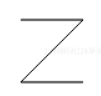
cxt.moveTo(50,50);
cxt.lineTo(100,50);
cxt.lineTo(50,100)
cxt.lineTo(100,100);
cxt.stroke();
triangle
 cxt.moveTo(50, 100);
 cxt.lineTo(150, 50);
 cxt.lineTo(150, 100);
 cxt.lineTo(50, 100);
 cxt.stroke();

polygon
Like a triangle , need moveTo,lineTo,stroke Drawing , Like the arrow :
arrow
            cxt.moveTo(40, 60);
            cxt.lineTo(100, 60);
            cxt.lineTo(100, 30);
            cxt.lineTo(150, 75);
            cxt.lineTo(100, 120);
            cxt.lineTo(100, 90);
            cxt.lineTo(40, 90);
            cxt.lineTo(40, 60);
            cxt.stroke();

Regular polygon
According to the characteristics of regular polygon , You can encapsulate a function that specially draws regular polygons
        /* * n: Express n Edge shape  * dx、dy: Express n The coordinates of the center of the edge  * size: Express n The size of the edge  */
        function createPolygon(cxt, n, dx, dy, size) {

            cxt.beginPath();
            var degree = (2 * Math.PI )/ n;
            for (var i = 0; i < n; i++) {

                 var x = Math.cos(i * degree);
                 var y = Math.sin(i * degree);
                 cxt.lineTo(x * size + dx, y * size + dy);
            }
            cxt.closePath();
        }
- cxt.beginPath() Used to start a new path
- cxt.closePath() Used to close the path .
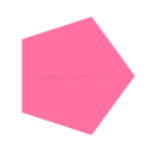
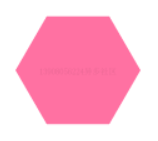
The effect is as follows :
            createPolygon(cxt, 3, 100, 75, 50);
            cxt.fillStyle = "HotPink";
            cxt.fill();

createPolygon(cxt, 4, 100, 75, 50);

createPolygon(cxt, 5, 100, 75, 50);
createPolygon(cxt, 6, 100, 75, 50);
Five-pointed star
cxt.beginPath();
for (var i = 0; i < 5; i++) {

cxt.lineTo(Math.cos((18 + i * 72) * Math.PI / 180) * 50 + 100,
          -Math.sin((18 + i * 72) * Math.PI / 180) * 50 + 100);
cxt.lineTo(Math.cos((54 + i * 72) * Math.PI / 180) * 25 + 100,
          -Math.sin((54 + i * 72) * Math.PI / 180) * 25 + 100);
}
cxt.closePath();
cxt.stroke();

rectangular
Stroke rectangle
cxt.strokeStyle =  Property value ;
cxt.strokeRect(x,y,width,height);
here strokeStyle Must be in strokeRect Before ( Before drawing , You need to select a brush first )
strokeStyle Used to specify the line style , Attribute values can be color values 、 Gradients and patterns
cxt.strokeStyle = "#FF0000";            // Hex color value
cxt.strokeStyle = "red";                // Color keywords
cxt.strokeStyle = "rgb(255,0,0)";       //rgb Color value
cxt.strokeStyle = "rgba(255,0,0,0.8)";  //rgba Color value
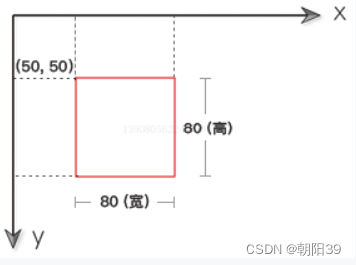
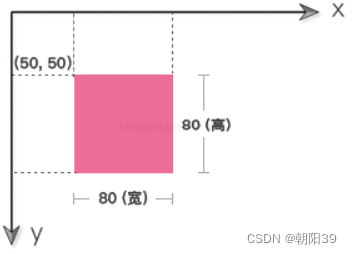
strokeRect The schematic diagram of the method is as follows ,(x,y) Is the coordinates of the upper left corner of the rectangle ,width Is the width of the rectangle 、height Is the height of the rectangle

 cxt.strokeStyle = "red";
 cxt.strokeRect(50, 50, 80, 80);
or
cxt.strokeStyle="red";
cxt.rect(50,50,80,80);
cxt.stroke();
rect() After call , It doesn't draw a rectangle . You also need to call stroke() perhaps fill() Method , Will draw the rectangle .
Filled rectangle
cxt.fillStyle= Property value ;
cxt.fillRect(x, y, width, height);
here fillStyle Must be in fillRect Before ( Before drawing , You need to select a brush first )
fillStyle Used to specify the fill pattern , Attribute values can be color values 、 Gradients and patterns
fillRect The schematic diagram of the method is as follows ,(x,y) Is the coordinates of the upper left corner of the rectangle ,width Is the width of the rectangle 、height Is the height of the rectangle

cxt.fillStyle = "HotPink";
cxt.fillRect(50, 50, 80, 80);
or
cxt.fillStyle="HotPink";
cxt.rect(50,50,80,80);
cxt.fill();
Draw through multiple lines ( Not recommended )
 cxt.moveTo(50, 100);
 cxt.lineTo(50,50);
 cxt.lineTo(150, 50);
 cxt.lineTo(150, 100);
 cxt.lineTo(50, 100);
 cxt.stroke();

Empty rectangle
cxt.clearRect(x, y, width, height);
That is, the effect of hollowed out rectangle
cxt.fillStyle = "HotPink";
cxt.fillRect(50, 50, 80, 80);
cxt.clearRect(60, 60, 50, 50);

Empty the whole canvas
cxt.clearRect(0, 0, cnv.width, cnv.height);
palette
Checkered palette
            for (var i = 0; i < 6; i++) {

                 for (var j = 0; j < 6; j++) {

                     cxt.fillStyle = "rgb(" + Math.floor(255 - 42.5 * i) + "," + Math.floor(255 - 42.5 * j) + ",0)";
                      cxt.fillRect(j * 25, i * 25, 25, 25);
                 }
            }

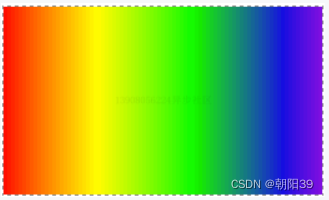
Gradient palette
 var r = 255, g = 0, b = 0;
 for (i = 0; i < 150; i++) {

      if (i < 25) {

            g += 10;
      } else if (i > 25 && i < 50) {

            r -= 10;
      } else if (i > 50 && i < 75) {

            g -= 10;
            b += 10;
      } else if (i >= 75 && i < 100) {

            r += 10;
      } else {

            b -= 10;
      }
      cxt.fillStyle = "rgb(" + r + "," + g + "," + b + ")";
      cxt.fillRect(3 * i, 0, 3, cnv.height);
}
版权声明
本文为[Chaoyang 39]所创,转载请带上原文链接,感谢
https://yzsam.com/2022/04/202204221159030205.html
边栏推荐
猜你喜欢

2. Flddler response shows the solution to the problem of garbled code

云中漫步-旅行到宇宙边缘

函数的栈帧理解

在VSCode中设置滑动滚轮改变字体大小

POSTGRESQL 15 的新功能,值得期待,其中两个被吐槽很久
![【深入理解TcaplusDB技术】读取列表指定位置数据接口说明——[List表]](/img/0d/1f70f1dba4e746d81eccb7ad3cea5d.png)
【深入理解TcaplusDB技术】读取列表指定位置数据接口说明——[List表]
![leetcode:508. Subtree elements with the most occurrences and [DFS records]](/img/c1/060d127dd4bf836aaee3a6c231c6fe.png)
leetcode:508. Subtree elements with the most occurrences and [DFS records]

Yunrong technology joined the dragon dragon dragon community to help the digital transformation of the financial industry

Game + NFT, another feasible scene from virtual to real

在Docker环境上使用Debezium捕获PostgreSQL 14.2中的变更数据到Kafka
随机推荐
"Open source summer" activity is hot. In the registration, rich bonuses are waiting for you to get!
NFT、GameFi、SocialFi、云存储,DFINITY 生态上最热赛道详解
Chapter 1 Introduction
Write the simplest character device driver
uniApp 学习笔记总结(一)
北汽福田与中国石化、轻程物联网组建中石化销售氢能源(北京)
Wow, it's so rich.
“开源之夏”活动火热报名中,丰厚奖金等你来拿!
Category cannot override system method?
WeChat Alipay applet payment page
What happens when you run the NPM install command?
《假如你身处被“科技制裁”的俄罗斯》之GBase篇
解决电脑连接正常,但浏览器无法打开网页的问题
【深入理解TcaplusDB技术】读取列表指定位置数据接口说明——[List表]
2021-09-17
Open new space for development with digital key
C语言小项目----> 推箱子
POSTGRESQL 15's new function is worth looking forward to, two of which make complaints about it for a long time.
POSTGRESQL 15 的新功能,值得期待,其中两个被吐槽很久
在VSCode中设置滑动滚轮改变字体大小