当前位置:网站首页>How does Microsoft solve the problem of multiple programs on PC side -- internal implementation
How does Microsoft solve the problem of multiple programs on PC side -- internal implementation
2022-04-23 03:06:00 【Dotnet cross platform】
Preface
The last time , We go through 《 quote Microsoft.VisualBasic Solve the problem of too many programs 》.
Although it is very simple , But only for WinForm Applications , And you need to refer to less commonly used Microsoft.VisualBasic Class library .
therefore , We decided to dig deep , See how it is implemented .
principle
By looking at WindowsFormsApplicationBase Of Run Method realization ( Code has been cut ):
Public Sub Run(commandLine As String())
    If Not IsSingleInstance Then
        DoApplicationModel()
    Else
        ' This is a Single-Instance application
        Dim pipeServer As NamedPipeServerStream = Nothing
        If TryCreatePipeServer(ApplicationInstanceID, pipeServer) Then
            ' --- This is the first instance of a single-instance application to run.
            Using pipeServer
                WaitForClientConnectionsAsync(pipeServer, AddressOf OnStartupNextInstanceMarshallingAdaptor, cancellationToken:=tokenSource.Token)

                DoApplicationModel()
            End Using
        Else
            Dim awaitable = SendSecondInstanceArgsAsync(ApplicationInstanceID, commandLine, cancellationToken:=tokenSource.Token).ConfigureAwait(False)
            awaitable.GetAwaiter().GetResult()
        End If
    End If 'Single-Instance application
End Sub
The whole process can be analyzed as follows :
Create a
NamedPipeServerStreamexampleIf created successfully , Then use
WaitForClientConnectionsAsyncWaiting for the 2 Connect application instancesIf the creation fails , Then use
SendSecondInstanceArgsAsyncXiang di 1 Send data to application instances
NamedPipeServerStream
Use NamedPipeServerStream Class can create named pipes .
Named pipes provide interprocess communication between a pipeline server and one or more pipeline clients . Named pipes can be unidirectional , It can also be two-way . They support message based communication , It also allows multiple clients to connect to the server process at the same time with the same pipe name .
Detailed instructions , Please refer to the official documentation 《 Use named pipes for network interprocess communication 》[1]
Realization
Let's use the console program to demonstrate :
const string pipeName = "MyIO";
const PipeOptions NamedPipeOptions = PipeOptions.Asynchronous | PipeOptions.CurrentUserOnly;

static async Task Main(string[] args)
{
    try
    {
        using (var pipeServer = new NamedPipeServerStream(
                pipeName: pipeName,
                direction: PipeDirection.In,
                maxNumberOfServerInstances: 1,
                transmissionMode: PipeTransmissionMode.Byte,
                options: NamedPipeOptions))
        {
            WaitForClientConnectionsAsync(pipeServer,str => Console.WriteLine(str));

            Console.WriteLine($"start server {args[0]}");
            Console.ReadKey();
        }
    }
    catch
    {
        await SendSecondInstanceArgsAsync(()=> $"call from {args[0]}").ConfigureAwait(false);
    }
}
It should be noted that ,WaitForClientConnectionsAsync Cannot add await, Otherwise, subsequent code cannot be executed .
WaitForClientConnectionsAsync
The implementation code is as follows :
private static async Task WaitForClientConnectionsAsync(NamedPipeServerStream pipeServer, Action<string> callback)
{
    CancellationTokenSource cancellationTokenSource = new CancellationTokenSource();
    while (true)
    {
        await pipeServer.WaitForConnectionAsync(cancellationTokenSource.Token).ConfigureAwait(false);

        try
        {
            const int bufferLength = 1024;
            var buffer = new byte[bufferLength];
            using (var stream = new MemoryStream())
            {
                while (true)
                {
                    var bytesRead = await pipeServer.ReadAsync(buffer.AsMemory(0, bufferLength), cancellationTokenSource.Token).ConfigureAwait(false);
                    if (bytesRead == 0)
                    {
                        break;
                    }
                    stream.Write(buffer, 0, bytesRead);
                }

                stream.Seek(0, SeekOrigin.Begin);

                callback(Encoding.UTF8.GetString(stream.ToArray()));
            }
        }
        finally
        {
            pipeServer.Disconnect();
        }
    }
}
Loop waiting for client connection
Read the data sent by the client , Convert to string
call
callbackProcessing strings , Here isstr => Console.WriteLine(str)Disconnect the client
SendSecondInstanceArgsAsync
The implementation code is as follows :
private static async Task SendSecondInstanceArgsAsync(Func<string> func)
{
    using (var pipeClient = new NamedPipeClientStream(
        serverName: ".",
        pipeName: pipeName,
        direction: PipeDirection.Out,
        options: NamedPipeOptions))
    {
        CancellationTokenSource cancellationTokenSource2 = new CancellationTokenSource();
        cancellationTokenSource2.CancelAfter(2500);

        await pipeClient.ConnectAsync(cancellationTokenSource2.Token).ConfigureAwait(false);

        await pipeClient.WriteAsync(Encoding.UTF8.GetBytes(func()), cancellationTokenSource2.Token).ConfigureAwait(false);
    }
}
Create client connection local pipeline service
Send to server
funcData generated ,, Here is()=> $"call from {args[0]}"
Demo
Create multiple scripts :
start " " "ConsoleApp1.exe" firstInstance

start " " "ConsoleApp1.exe" secondInstance

start " " "ConsoleApp1.exe" thirdInstance
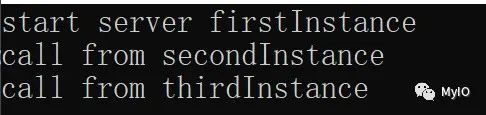
After execution , We found that the program can only be opened once .
And received data from other multiple applications :
Conclusion
Use NamedPipeServerStream relative The mutex Mutex The implementation of is complex .
But because you can communicate , Therefore, more flexible control can be achieved .
such as , The application regularly starts another instance of itself to download updates , After downloading, notify the current application and prompt the user whether to update .
Want to know more about , Please pay attention to my official account ”My IO“
Reference material
[1]
《 Use named pipes for network interprocess communication 》: https://docs.microsoft.com/zh-cn/dotnet/standard/io/how-to-use-named-pipes-for-network-interprocess-communication?WT.mc_id=DT-MVP-38491
版权声明
本文为[Dotnet cross platform]所创,转载请带上原文链接,感谢
https://yzsam.com/2022/04/202204230301333713.html
边栏推荐
- What kind of experience is it to prepare for a month to participate in ACM?
- Blazor University (12)组件 — 组件生命周期
- Thoughts on the 2022 national network security competition of the national secondary vocational group (only one idea for myself) - network security competition questions (7)
- tf. keras. layers. Inputlayer function
- 如果通过 C# 实现对象的深复制 ?
- AC & A2C & A3C
- Binary tree
- Summary of software test interview questions
- 在.NE6 WebApi中使用分布式缓存Redis
- Using stack to solve the problem of "mini parser"
猜你喜欢
![Introduction to ACM [inclusion exclusion theorem]](/img/3a/9bc2a972d7587aab51fceb8cd2b9bd.png)
Introduction to ACM [inclusion exclusion theorem]

C# 11 的这个新特性,我愿称之最强!

腾讯视频VIP会员,周卡特价9元!腾讯官方直充,会员立即生效!

LNMP MySQL allows remote access
Response processing of openfeign

Depth deterministic strategy gradient (ddpg)
Thoughts on the 2022 national network security competition of the national secondary vocational group (only one idea for myself) - network security competition questions (8)

AC & A2C & A3C
Recursion - outputs continuously increasing numbers
基于.NetCore开发博客项目 StarBlog - (1) 为什么需要自己写一个博客?
随机推荐
MYSQL03_ SQL overview, rules and specifications, basic select statements, display table structure
c#语法糖模式匹配【switch 表达式】
利用正反遍历来解决“字符的最短距离”问题
HLS / chisel practice CORDIC high performance computing complex square root
LNMP MySQL allows remote access
tf. keras. layers. MaxPooling? D function
Regular object type conversion tool - Common DOM class
How to deploy a website with only a server and no domain name?
TP5 email (2020-05-27)
Use DFS to solve the problem of "number of dictionary rows"
交换二叉树中每个结点的左和右
編碼電機PID調試(速度環|比特置環|跟隨)
Middle and rear binary tree
Niuke white moon race 5 [problem solving mathematics field]
tf. keras. layers. Embedding function
TP5 customization in extend directory succeeded and failed. Return information
求二叉树的叶子结点个数
Thoughts on the 2022 national network security competition of the national secondary vocational group (only one idea for myself) - network security competition questions (10)
微软是如何解决 PC 端程序多开问题的
Response processing of openfeign