当前位置:网站首页>手把手教會你搭建組件與應用
手把手教會你搭建組件與應用
2022-04-21 18:40:00 【實習期小潘】
在學習前先問幾個問題:

什麼是組件?
為什麼要學組件?
如何使用組件?
目錄
組件的概念
組件的定義:實現應用中局部功能代碼和資源的集合。
(代碼是指css、html、js這類文件;資源是指mp3、mp4、ttf、zip格式的內容)
組件的分類:非單文件組件(一個文件中包含有n個組件)和單文件組件(一個文件中只包含有1個組件)。

組件如圖理解
組件的好處:複用編碼,簡化項目編碼,提高運行效率。(不要有固化思維,組件不是一定給誰服務,而是“組件就是一塊磚哪裏需要往哪搬”)
模塊與組件差异對比
模塊的定義:向外提供特定功能的js程序,一般就是一個js文件。
使用模塊的原因:js文件很多很複雜
模塊的作用:複用js,簡化js的編寫,提高js運行效率。
組件的基本使用
非單文件組件
特點:一個基本的組件需要有HTML、CSS、js組合。
缺點:樣式不能跟著組件,需要重新引入。
<!-- 准備好一個容器-->
		<div id="root">
			<hello></hello>
			<hr>
			<h1>{
   {msg}}</h1>
			<hr>
			<!-- 第三步:編寫組件標簽 -->
			<school></school>
			<hr>
			<!-- 第三步:編寫組件標簽 -->
			<student></student>
		</div>

		<div id="root2">
			<hello></hello>
		</div>
	</body>

	<script type="text/javascript">
		Vue.config.productionTip = false

		//第一步:創建school組件
		const school = Vue.extend({
			template:`
				<div class="demo">
					<h2>學校名稱:{
   {schoolName}}</h2>
					<h2>學校地址:{
   {address}}</h2>
					<button @click="showName">點我提示學校名</button>
				</div>
			`,
	   // el:'#root',
//組件定義時,一定不要寫el配置項,因為最終所有的組件都要被一個vm管理,由vm决定服務於哪個容器。
			data(){
				return {
					schoolName:'尚矽穀',
					address:'北京昌平'
				}
			},
			methods: {
				showName(){
					alert(this.schoolName)
				}
			},
		})

		//第一步:創建student組件
		const student = Vue.extend({
			template:`
				<div>
					<h2>學生姓名:{
   {studentName}}</h2>
					<h2>學生年齡:{
   {age}}</h2>
				</div>
			`,
			data(){
				return {
					studentName:'張三',
					age:18
				}
			}
		})

		//第一步:創建hello組件
		const hello = Vue.extend({
			template:`
				<div>
					<h2>你好啊!{
   {name}}</h2>
				</div>
			`,
			data(){
				return {
					name:'Tom'
				}
			}
		})

		//第二步:全局注册組件
		Vue.component('hello',hello)

		//創建vm
		new Vue({
			el:'#root',
			data:{
				msg:'你好啊!'
			},
			//第二步:注册組件(局部注册)
			components:{
				school,
				student
        //components:{school:a}在components中是真正確定組件的名字
			}
		})

		new Vue({
			el:'#root2',
		})
	</script>
創建組件時注意!!!
組件定義時,一定不要寫el配置項,因為最終所有的組件都要被一個vm管理,由vm决定服務於哪個容器。 舉例如下理解:
const school = Vue.extend({
			template:`
				<div class="demo">
					<h2>學校名稱:{
   {schoolName}}</h2>
					<h2>學校地址:{
   {address}}</h2>
					<button @click="showName">點我提示學校名</button>
				</div>
			`,
// el:'#root',
//組件定義時,一定不要寫el配置項,因為最終所有的組件都要被一個vm管理,由vm决定服務於哪個容器。
			data(){
				return {
					schoolName:'尚矽穀',
					address:'北京昌平'
				}
			},
			methods: {
				showName(){
					alert(this.schoolName)
				}
			},
		})
使用組件的一些注意點
- 關於組件名
一個單詞組成:
- 首字母小寫:school
- 首字母大寫:School
多個單詞組成:
- kebab-case式命名:my-school
- CamelCase式命名:Myschool(需要Vue脚手架支持)
備注:
- 組件名盡可能回避HTML中已有的元素名稱,例如:h2、H2都不行;
- 可以使用name配置項指定組件再開發工具中呈現的名字。
- 關於組件標簽
- <school></school>或者<School></School>
- <school/>
備注:不用使用脚手架,<school/>會導致後續組件不能渲染。
- 一個簡寫方式
const school=Vue.extend(options) 可簡寫為:const school=options
組件的嵌套
當要使用組件的嵌套時,我們需要把子組件寫在父組件中,如下圖理解:

代碼中結構層次,如下圖:

代碼如下:
<body>
    <!-- 准備好一個容器-->
    <div id="root">
        <!-- <app></app>如果容器裏面如果不寫內容,那就在下面的new Vue中添加寫一個template:'<app></app>' -->

    </div>
</body>

<script type="text/javascript">
    Vue.config.productionTip = false //阻止 vue 在啟動時生成生產提示。

    //定義student組件
    const student = Vue.extend({
        name: 'student',
        template: `
				<div>
					<h2>學生姓名:{
   {name}}</h2>
					<h2>學生年齡:{
   {age}}</h2>
				</div>
			`,
        data() {
            return {
                name: '尚矽穀',
                age: 18
            }
        }
    })

    //定義school組件
    const school = Vue.extend({
        name: 'school',
        template: `
				<div>
					<h2>學校名稱:{
   {name}}</h2>
					<h2>學校地址:{
   {address}}</h2>
					<student></student>
				</div>
			`,
        data() {
            return {
                name: '尚矽穀',
                address: '北京'
            }
        },
        //注册子組件(局部)
        components: {
            student
            //這裏注册了子組件那就在template裏面添加<student></student>
        }
    })

    // 定義hello組件
    const hello = Vue.extend({
        templat: `<h1>{
   {msg}}</h1>`,
        data() {
            return {
                msg: '歡迎來到尚矽穀學習!'
            }
        }
    })

    // 定義app組件
    const app = Vue.extend({
        template: `
        <div>
        <hello></hello>
        <school></school>
        </div>
        `,
        components: {
            school,
            hello
        }
    })

    //創建vm
    new Vue({
        template: `<app></app>`,
        el: '#root',
        //注册組件(局部)
        components: {
            app
        }
    })
</script>
單文件組件的使用
特點:組件的組成應該是由HTML+CSS+Js
在VScode中是無法直接識別vue文件的所以需要在裏面安裝一個插件:Vetur (作者:Pine Wu)

在寫單文件組件時需要如下幾個文件夾裏的內容,不然無法產生效果:

注意:App.vue中的內容只會和main.js中產生效果,否則School.vue、Student.vue無法與App.vue產生效果。
main.js是入口文件;
School.vue和Student.vue裏面有模板就遍曆一遍後進行渲染到頁面;
App.vue就是用來存放School.vue和Student.vue裏面的東西。
命名時的注意點:
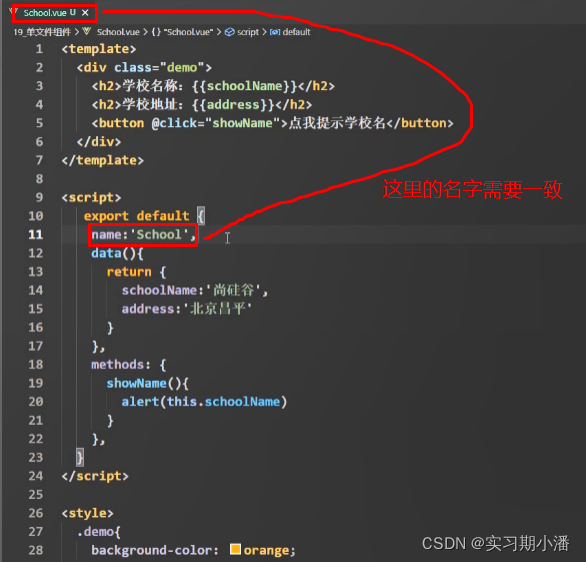
代碼如下(以下代碼需要放在脚手架中才能實現但是框架就是這樣的):
School.vue中的代碼:
<template>
	<div class="demo">
		<h2>學校名稱:{
   {name}}</h2>
		<h2>學校地址:{
   {address}}</h2>
		<button @click="showName">點我提示學校名</button>
	</div>
</template>

<script>
	 export default {
		name:'School',
		data(){
			return {
				name:'尚矽穀',
				address:'北京昌平'
			}
		},
		methods: {
			showName(){
				alert(this.name)
			}
		},
	}
</script>

<style>
	.demo{
		background-color: orange;
	}
</style>Student.vue中的代碼:
<template>
	<div>
		<h2>學生姓名:{
   {name}}</h2>
		<h2>學生年齡:{
   {age}}</h2>
	</div>
</template>

<script>
	 export default {
		name:'Student',
		data(){
			return {
				name:'張三',
				age:18
			}
		}
	}
</script>
App.vue中的代碼:
<template>
	<div>
		<School></School>
		<Student></Student>
	</div>
</template>

<script>
	//引入組件
	import School from 'School.vue'
	import Student from 'Student.vue'

	export default {
		name:'App',
		components:{
			School,
			Student
		}
	}
</script>
index.html中的代碼:
<!DOCTYPE html>
<html>

<head>
    <meta charset="UTF-8" />
    <title>練習一下單文件組件的語法</title>
</head>

<body>
    <!-- 准備一個容器 -->
    <div id="root">

    </div>
    <!-- <script type="text/javascript" src="vue.js"></script> -->
    <!-- <script type="text/javascript" src="main.js"></script> -->
</body>

</html>main.js中的代碼:
<!DOCTYPE html>
<html>

<head>
    <meta charset="UTF-8" />
    <title>練習一下單文件組件的語法</title>
</head>

<body>
    <!-- 准備一個容器 -->
    <div id="root">

    </div>
    <!-- <script type="text/javascript" src="vue.js"></script> -->
    <!-- <script type="text/javascript" src="main.js"></script> -->
</body>

</html>
總結
組件的基礎學習就是以上內容,大家可以先利用上面提供的代碼進行練習。由於還沒用上脚手架所以是不能執行的,到時候學了脚手架就能運行起來咯!可以小小期待一下後面的學習內容!

版权声明
本文为[實習期小潘]所创,转载请带上原文链接,感谢
https://yzsam.com/2022/04/202204211839102061.html
边栏推荐
- Where is the initial password for MySQL installation?
- Les produits qui ont été achetés sont de retour.
- [牛客网刷题 Day4] JZ76 删除链表中重复的结点(递归)
- SQL 数据类型
- Assignment and value of WPF RichTextBox
- ES6新特性(1)之let命令/const命令/解构赋值/Symbol/Set/WeakSet
- 零知识证明的潜在价值
- Target penetration exercise 77-dc9
- win10 uwp InkCanvas控件数据绑定
- 手撕单例模型
猜你喜欢


![[牛客网刷题 Day4] JZ76 删除链表中重复的结点(递归)](/img/d7/c8e5b575ea93ba170c994e70b4e1cb.png)


随机推荐
Essays (VI) -- tqdm progress bar shows more than one line
WPF learning notes - Overview
Find the card with equal difference (20 points) C language
Singleton mode you have to know the underlying principle
Analysis on modification and customization of appium source code for automated testing of dry goods app
My android interview resume at the end of the year
微信QQ支付宝三合一收款二维码实现原理
Advanced formula 46 of C language: function and macro analysis
干货|app自动化测试之Appium WebView 技术原理
AVL平衡二叉树及其4种旋转方式
曾經被爆買的產品又來了,求穩買他准沒錯
C#多线去对数据库进行添加操作,ManualResetEvent报The number of WaitHandles must be less than or
2021-5-1 第一天第一题
可愛的Tommy C語言
SQL 数据类型
高等数学公式(第5部分)
Can we find the next "cheese stick" product in the 2022 Q1 financial report of miaolando?
Goldfish rhca memoirs: rh358 manages DNS and DNS servers -- configuring cache name servers using unbound
统计组成的四位数 C语言
央行明确2022年支付监管工作重点,各平台企业要注意二清风险