House3D: A Rich and Realistic 3D Environment

Related tags

Deep LearningHouse3D
Overview

House3D: A Rich and Realistic 3D Environment

Yi Wu, Yuxin Wu, Georgia Gkioxari and Yuandong Tian

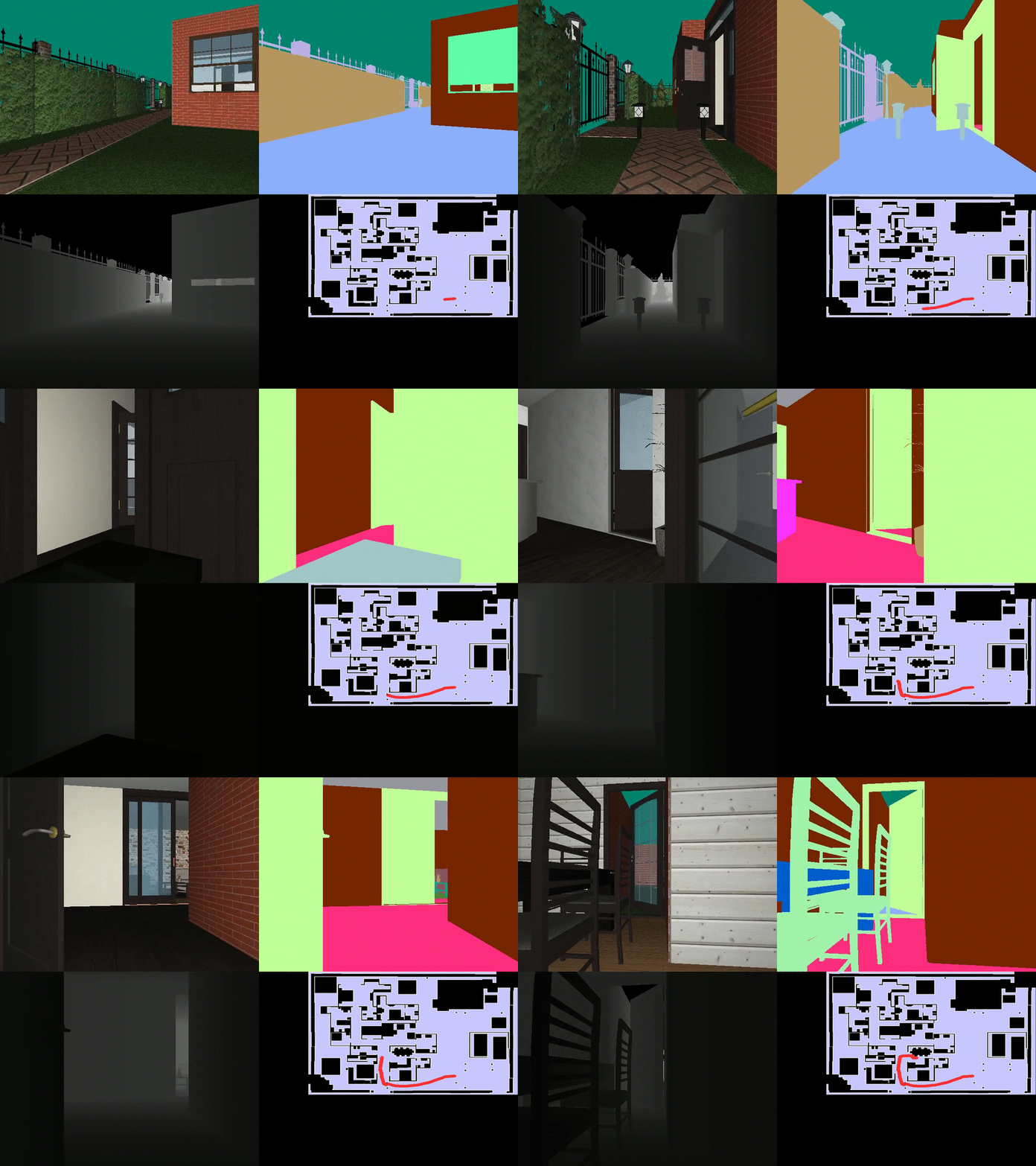
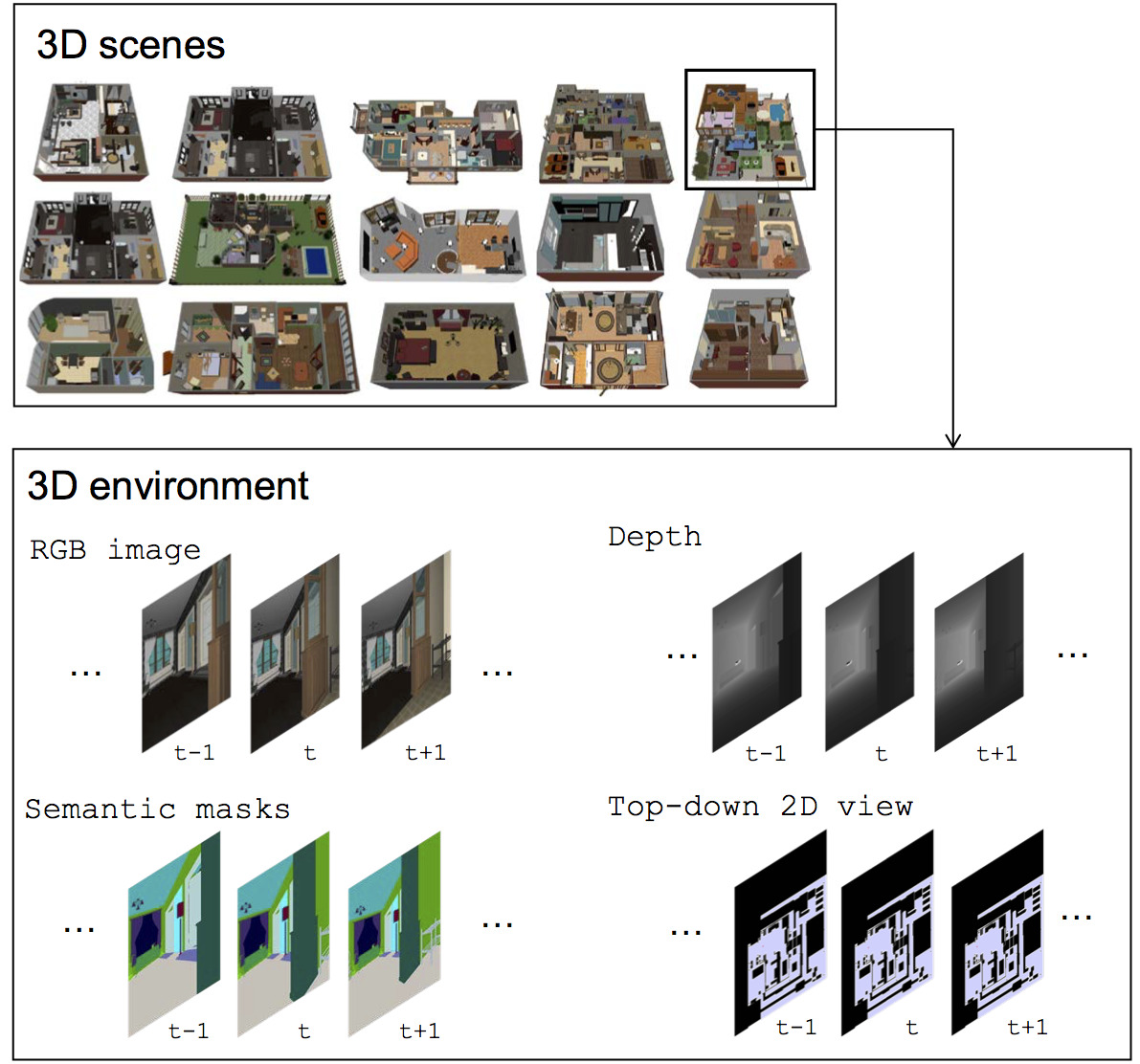
House3D is a virtual 3D environment which consists of thousands of indoor scenes equipped with a diverse set of scene types, layouts and objects sourced from the SUNCG dataset. It consists of over 45k indoor 3D scenes, ranging from studios to two-storied houses with swimming pools and fitness rooms. All 3D objects are fully annotated with category labels. Agents in the environment have access to observations of multiple modalities, including RGB images, depth, segmentation masks and top-down 2D map views. The renderer runs at thousands frames per second, making it suitable for large-scale RL training.

Usage instructions can be found at INSTRUCTION.md

Existing Research Projects with House3D

A. RoomNav (paper)

Yi Wu, Yuxin Wu, Georgia Gkioxari, Yuandong Tian

In this work we introduce a concept learning task, RoomNav, where an agent is asked to navigate to a destination specified by a high-level concept, e.g. dining room. We demonstrated two neural models: a gated-CNN and a gated-LSTM, which effectively improve the agent's sensitivity to different concepts. For evaluation, we emphasize on generalization ability and show that our agent can generalize across environments due to the diverse and large-scale dataset.

B. Embodied QA (project page | EQA paper | NMC paper)

Abhishek Das, Samyak Datta, Georgia Gkioxari, Stefan Lee, Devi Parikh, Dhruv Batra

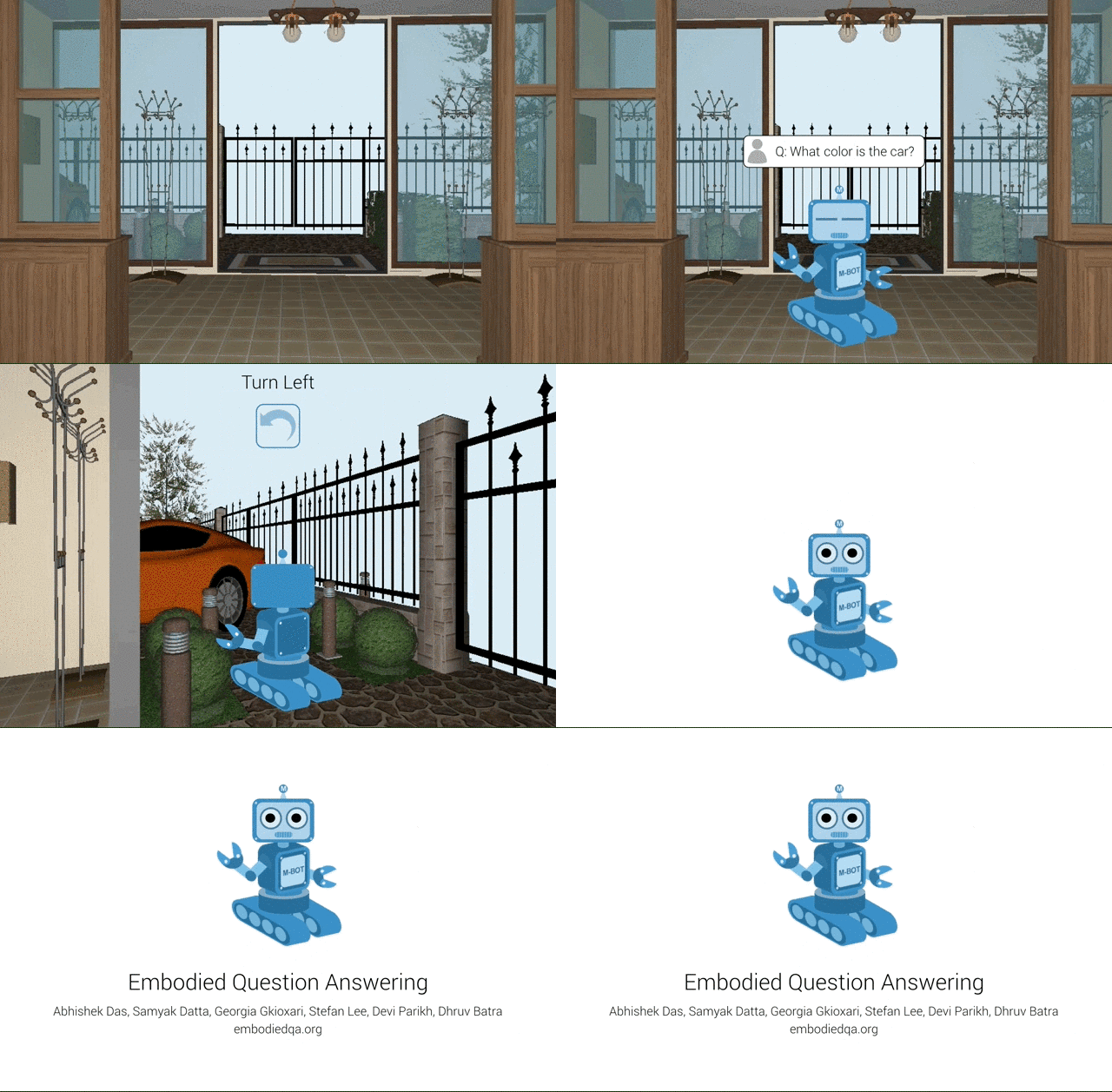
Embodied Question Answering is a new AI task where an agent is spawned at a random location in a 3D environment and asked a natural language question ("What color is the car?"). In order to answer, the agent must first intelligently navigate to explore the environment, gather information through first-person (egocentric) vision, and then answer the question ("orange").

Citation

If you use our platform in your research, you can cite us with:

@article{wu2018building,
  title={Building generalizable agents with a realistic and rich 3D environment},
  author={Wu, Yi and Wu, Yuxin and Gkioxari, Georgia and Tian, Yuandong},
  journal={arXiv preprint arXiv:1801.02209},
  year={2018}
}

License

House3D is released under the Apache 2.0 license.

Comments
  • Error occurred when compile to build objrender

    Error occurred when compile to build objrender

    when I runing SYSTEM=conda.linux PYTHON_CONFIG=/home/zjw/anaconda3/envs/LG/bin/python-config make -j It comes that: /usr/include/glm/detail/type_vec3.inl:86:33: error: invalid static_cast from type ‘const glm::detail::tvec3<float, (glm::precision)0u>’ to type ‘float’ /usr/include/glm/detail/type_vec3.inl:86:33: error: invalid static_cast from type ‘const glm::detail::tvec3<float, (glm::precision)0u>’ to type ‘float’

    make: *** [build/objview-suncg.o] Error 1 make: *** [build/suncg/render.o] Error 1

    opened by Zzmonica 43
  • error: ERROR::FRAMEBUFFER: Framebuffer is not complete! ErrorCode=36061

    error: ERROR::FRAMEBUFFER: Framebuffer is not complete! ErrorCode=36061

    I am using the docker to run House3D so I guess there is no build issues. When I run python3 test-rendering.py $TEST_HOUSE or ./renderer/test-rectangle.bin headless the error error: ERROR::FRAMEBUFFER: Framebuffer is not complete! ErrorCode=36061 occur.

    The output of ./debug-build.sh is as follow:

    PATH:
    /usr/local/sbin:/usr/local/bin:/usr/sbin:/usr/bin:/sbin:/bin
    
    CPATH:
    
    
    PKG_CONFIG_PATH:
    
    
    LIBRARY_PATH:
    
    
    LD_LIBRARY_PATH:
    /usr/lib/x86_64-linux-gnu:/usr/lib/i386-linux-gnu:/usr/local/nvidia/lib:/usr/local/nvidia/lib64
    
    PYTHONPATH:
    
    
    ldconfig:
    	libEGL_nvidia.so.0 (libc6,x86-64) => /usr/lib/x86_64-linux-gnu/libEGL_nvidia.so.0
    	libEGL_nvidia.so.0 (libc6) => /usr/lib/i386-linux-gnu/libEGL_nvidia.so.0
    	libEGL_mesa.so.0 (libc6,x86-64) => /usr/lib/x86_64-linux-gnu/libEGL_mesa.so.0
    	libEGL_mesa.so.0 (libc6) => /usr/lib/i386-linux-gnu/libEGL_mesa.so.0
    	libEGL.so.1 (libc6,x86-64) => /usr/lib/x86_64-linux-gnu/libEGL.so.1
    	libEGL.so.1 (libc6) => /usr/lib/i386-linux-gnu/libEGL.so.1
    	libEGL.so (libc6,x86-64) => /usr/lib/x86_64-linux-gnu/libEGL.so
    	libEGL.so (libc6) => /usr/lib/i386-linux-gnu/libEGL.so
    + pkg-config --cflags --libs glfw3
    -lglfw
    + '[' '!' '' ']'
    + pkg-config --cflags --libs libglvnd
    
    + pkg-config --cflags --libs egl
    -I/usr/include/libdrm -lEGL
    + which find
    /usr/bin/find
    + which pkg-config
    /usr/bin/pkg-config
    + which python3-config
    /usr/bin/python3-config
    + python3-config --includes --ldflags
    -I/usr/include/python3.6m -I/usr/include/python3.6m
    -L/usr/lib/python3.6/config-3.6m-x86_64-linux-gnu -L/usr/lib -lpython3.6m -lpthread -ldl  -lutil -lm  -Xlinker -export-dynamic -Wl,-O1 -Wl,-Bsymbolic-functions
    + '[' ']'
    + g++ --version
    g++ (Ubuntu 7.4.0-1ubuntu1~18.04.1) 7.4.0
    Copyright (C) 2017 Free Software Foundation, Inc.
    This is free software; see the source for copying conditions.  There is NO
    warranty; not even for MERCHANTABILITY or FITNESS FOR A PARTICULAR PURPOSE.
    
    + '[' -f ../House3D/objrender.so ']'
    + '[' -f objview.bin ']
    

    The output of ./test-rectangle.bin egl is :

    [EGL] Detected 1 devices. Using device 0
    ----------- OpenGL Context Info --------------
    GL Version: 4.5.0 NVIDIA 384.130
    GLSL Version: 4.50 NVIDIA
    Vendor: NVIDIA Corporation
    Renderer: GeForce GTX 1060 6GB/PCIe/SSE2


    The output of ./test-rectangle.bin headless is:

    ----------- OpenGL Context Info --------------
    GL Version: 3.3.0 NVIDIA 384.130
    GLSL Version: 3.30 NVIDIA via Cg compiler
    Vendor: NVIDIA Corporation
    Renderer: GeForce GTX 1060 6GB/PCIe/SSE2
    ----------------------------------------------
    error: ERROR::FRAMEBUFFER: Framebuffer is not complete! ErrorCode=36061


    Many thanks!

    opened by weihaosky 13
  • Error in running objview-offline.bin

    Error in running objview-offline.bin

    Hi, I am getting the following error when I run objview-offline.bin.

    [EGL] Detected 0 devices. Using device 0 assertion "device < numDevices" failed, in EGLContext, (gl/glContext.cc:137) Aborted (core dumped)

    Here's the output of debug_build.sh

    PATH:
    /root/anaconda3/bin:/usr/local/nvidia/bin:/usr/local/cuda/bin:/u
    sr/local/sbin:/usr/local/bin:/usr/sbin:/usr/bin:/sbin:/bin
    
    CPATH:
    
    
    PKG_CONFIG_PATH:
    
    
    LIBRARY_PATH:
    /usr/local/cuda/lib64/stubs:
    
    LD_LIBRARY_PATH:
    /root/anaconda3/lib:/usr/local/nvidia/lib:/usr/local/nvidia/lib64
    
    + pkg-config --cflags --libs glew
    Package glew was not found in the pkg-config search path.
    Perhaps you should add the directory containing `glew.pc'
    to the PKG_CONFIG_PATH environment variable
    No package 'glew' found
    + pkg-config --cflags --libs glfw3
    -I/usr/include/libdrm -lglfw
    + '[' '!' '' ']'
    + pkg-config --cflags --libs libglvnd
    Package libglvnd was not found in the pkg-config search path.
    Perhaps you should add the directory containing `libglvnd.pc'
    to the PKG_CONFIG_PATH environment variable
    No package 'libglvnd' found
    + pkg-config --cflags --libs egl
    -I/usr/include/libdrm -lEGL
    + which find
    /usr/bin/find
    + which pkg-config
    /usr/bin/pkg-config
    + which python-config
    /usr/bin/python-config
    + python-config --includes --ldflags
    -I/usr/include/python2.7 -I/usr/include/x86_64-linux-gnu/python2.7
    -L/usr/lib/python2.7/config-x86_64-linux-gnu -L/usr/lib -lpython2.7 -lpthread -ldl  -lutil -lm  -Xlinker -export-dynamic -Wl,-O1 -Wl,-Bsymbolic-functions
    + '[' ']'
    + g++ --version
    g++ (Ubuntu 5.4.0-6ubuntu1~16.04.6) 5.4.0 20160609
    Copyright (C) 2015 Free Software Foundation, Inc.
    This is free software; see the source for copying conditions.  There is NO
    warranty; not even for MERCHANTABILITY or FITNESS FOR A PARTICULAR PURPOSE.
    
    + '[' -f ../House3D/objrender.so ']'
    + ldd ../House3D/objrender.so
            linux-vdso.so.1 =>  (0x00007ffefcbbc000)
            libpng16.so.16 => /root/anaconda3/lib/libpng16.so.16 (0x00007f9c7ea50000)
            libGL.so.1 => /usr/local/nvidia/lib64/libGL.so.1 (0x00007f9c7e7ac000)
            libEGL.so.1 => /usr/local/nvidia/lib64/libEGL.so.1 (0x00007f9c7e59a000)
            libX11.so.6 => /usr/lib/x86_64-linux-gnu/libX11.so.6 (0x00007f9c7e260000)
            libglfw.so.3 => /usr/lib/x86_64-linux-gnu/libglfw.so.3 (0x00007f9c7e04a000)
            libjpeg.so.9 => /root/anaconda3/lib/libjpeg.so.9 (0x00007f9c7de0e000)
            libpython3.6m.so.1.0 => /root/anaconda3/lib/libpython3.6m.so.1.0 (0x00007f9c7d8c9000)
            libpthread.so.0 => /lib/x86_64-linux-gnu/libpthread.so.0 (0x00007f9c7d6ac000)
            libstdc++.so.6 => /root/anaconda3/lib/libstdc++.so.6 (0x00007f9c7d372000)
            libm.so.6 => /lib/x86_64-linux-gnu/libm.so.6 (0x00007f9c7d069000)
            libgcc_s.so.1 => /root/anaconda3/lib/libgcc_s.so.1 (0x00007f9c7ce57000)
            libc.so.6 => /lib/x86_64-linux-gnu/libc.so.6 (0x00007f9c7ca8d000)
            /lib64/ld-linux-x86-64.so.2 (0x00007f9c7ef87000)
            libz.so.1 => /root/anaconda3/lib/./libz.so.1 (0x00007f9c7c876000)
            libdl.so.2 => /lib/x86_64-linux-gnu/libdl.so.2 (0x00007f9c7c672000)
            libGLX.so.0 => /usr/local/nvidia/lib64/libGLX.so.0 (0x00007f9c7c442000)
            libGLdispatch.so.0 => /usr/local/nvidia/lib64/libGLdispatch.so.0 (0x00007f9c7c174000)
            libxcb.so.1 => /root/anaconda3/lib/libxcb.so.1 (0x00007f9c7bf4b000)
            librt.so.1 => /lib/x86_64-linux-gnu/librt.so.1 (0x00007f9c7bd43000)
            libXrandr.so.2 => /usr/lib/x86_64-linux-gnu/libXrandr.so.2 (0x00007f9c7bb38000)
            libXinerama.so.1 => /usr/lib/x86_64-linux-gnu/libXinerama.so.1 (0x00007f9c7b935000)
            libXi.so.6 => /usr/lib/x86_64-linux-gnu/libXi.so.6 (0x00007f9c7b725000)
            libXxf86vm.so.1 => /usr/lib/x86_64-linux-gnu/libXxf86vm.so.1 (0x00007f9c7b51f000)
            libXcursor.so.1 => /usr/lib/x86_64-linux-gnu/libXcursor.so.1 (0x00007f9c7b315000)
            libutil.so.1 => /lib/x86_64-linux-gnu/libutil.so.1 (0x00007f9c7b112000)
            libXext.so.6 => /usr/lib/x86_64-linux-gnu/libXext.so.6 (0x00007f9c7af00000)
            libXau.so.6 => /usr/lib/x86_64-linux-gnu/libXau.so.6 (0x00007f9c7acfc000)
            libXrender.so.1 => /usr/lib/x86_64-linux-gnu/libXrender.so.1 (0x00007f9c7aaf2000)
            libXfixes.so.3 => /usr/lib/x86_64-linux-gnu/libXfixes.so.3 (0x00007f9c7a8ec000)


    I am using Anaconda 3 inside a docker on a Ubuntu16 system with 2 Nvidia GPUs.

    opened by devendrachaplot 12
  • Error when running test-rendering.py

    Error when running test-rendering.py

    Error message:

    error: Failed to get function pointer of eglQueryDevicesEXT/eglGetPlatformDisplayEXT! Maybe EGL extensions are unsupported.
    

    On Ubuntu 14.04. Exactly followed the instructions. glfw3 and glm were installed at /usr/local. Build command

    PYTHON_CONFIG=python3-config make
    

    Output of debug-build.sh

    PATH:
    /home/hzjiang/.nvm/versions/node/v8.9.4/bin:/usr/local/cuda/bin:/usr/local/cuda/bin:/usr/local/bin:/usr/sbin:/usr/bin:/sbin:/bin:/usr/games:/usr/local/games:/usr/lib/jvm/java-8-oracle/bin:/usr/lib/jvm/java-8-oracle/db/bin:/usr/lib/jvm/java-8-oracle/jre/bin
    
    CPATH:
    
    
    PKG_CONFIG_PATH:
    
    
    LIBRARY_PATH:
    
    
    LD_LIBRARY_PATH:
    /usr/local/lib:/usr/local/cuda/lib:/usr/local/cuda/lib64:/usr/local/cuda/lib:/usr/local/cuda/lib64:
    
    + pkg-config --cflags --libs glew
    -I/usr/include/GL -I/usr/include/libdrm  -lGLEW -lGLU -lGL  
    + pkg-config --cflags --libs glfw3
    -I/usr/local/include  -L/usr/local/lib -lglfw  
    + [ !  ]
    + pkg-config --cflags --libs libglvnd
    Package libglvnd was not found in the pkg-config search path.
    Perhaps you should add the directory containing `libglvnd.pc'
    to the PKG_CONFIG_PATH environment variable
    No package 'libglvnd' found
    + pkg-config --cflags --libs egl
    -I/usr/include/libdrm  -lEGL  
    + which find
    /usr/bin/find
    + which pkg-config
    /usr/bin/pkg-config
    + which python-config
    /usr/bin/python-config
    + python-config --includes --ldflags
    -I/usr/include/python2.7 -I/usr/include/x86_64-linux-gnu/python2.7
    -L/usr/lib/python2.7/config-x86_64-linux-gnu -L/usr/lib -lpthread -ldl  -lutil -lm  -lpython2.7 -Xlinker -export-dynamic -Wl,-O1 -Wl,-Bsymbolic-functions
    + [ ]
    + g++ --version
    g++ (Ubuntu 4.9.4-2ubuntu1~14.04.1) 4.9.4
    Copyright (C) 2015 Free Software Foundation, Inc.
    This is free software; see the source for copying conditions.  There is NO
    warranty; not even for MERCHANTABILITY or FITNESS FOR A PARTICULAR PURPOSE.
    
    + [ -f ../House3D/objrender.so ]
    + ldd ../House3D/objrender.so
    	linux-vdso.so.1 =>  (0x00007ffc26ddb000)
    	libGL.so.1 => /usr/lib/x86_64-linux-gnu/mesa/libGL.so.1 (0x00007f5fa1fe4000)
    	libEGL.so.1 => /usr/lib/x86_64-linux-gnu/mesa-egl/libEGL.so.1 (0x00007f5fa1dbf000)
    	libX11.so.6 => /usr/lib/x86_64-linux-gnu/libX11.so.6 (0x00007f5fa1a8a000)
    	libpng16.so.16 => /usr/local/lib/libpng16.so.16 (0x00007f5fa1858000)
    	libglfw.so.3 => /usr/local/lib/libglfw.so.3 (0x00007f5fa1635000)
    	libjpeg.so.8 => /usr/lib/x86_64-linux-gnu/libjpeg.so.8 (0x00007f5fa13e0000)
    	libpthread.so.0 => /lib/x86_64-linux-gnu/libpthread.so.0 (0x00007f5fa11c2000)
    	libdl.so.2 => /lib/x86_64-linux-gnu/libdl.so.2 (0x00007f5fa0fbe000)
    	libutil.so.1 => /lib/x86_64-linux-gnu/libutil.so.1 (0x00007f5fa0dbb000)
    	libstdc++.so.6 => /usr/lib/x86_64-linux-gnu/libstdc++.so.6 (0x00007f5fa0aa8000)
    	libm.so.6 => /lib/x86_64-linux-gnu/libm.so.6 (0x00007f5fa07a2000)
    	libgcc_s.so.1 => /lib/x86_64-linux-gnu/libgcc_s.so.1 (0x00007f5fa058b000)
    	libc.so.6 => /lib/x86_64-linux-gnu/libc.so.6 (0x00007f5fa01c2000)
    	/lib64/ld-linux-x86-64.so.2 (0x00007f5fa2846000)
    	libglapi.so.0 => /usr/lib/x86_64-linux-gnu/libglapi.so.0 (0x00007f5f9ff9b000)
    	libXext.so.6 => /usr/lib/x86_64-linux-gnu/libXext.so.6 (0x00007f5f9fd89000)
    	libXdamage.so.1 => /usr/lib/x86_64-linux-gnu/libXdamage.so.1 (0x00007f5f9fb86000)
    	libXfixes.so.3 => /usr/lib/x86_64-linux-gnu/libXfixes.so.3 (0x00007f5f9f980000)
    	libX11-xcb.so.1 => /usr/lib/x86_64-linux-gnu/libX11-xcb.so.1 (0x00007f5f9f77e000)
    	libxcb-glx.so.0 => /usr/lib/x86_64-linux-gnu/libxcb-glx.so.0 (0x00007f5f9f567000)
    	libxcb-dri2.so.0 => /usr/lib/x86_64-linux-gnu/libxcb-dri2.so.0 (0x00007f5f9f362000)
    	libxcb-dri3.so.0 => /usr/lib/x86_64-linux-gnu/libxcb-dri3.so.0 (0x00007f5f9f15f000)
    	libxcb-present.so.0 => /usr/lib/x86_64-linux-gnu/libxcb-present.so.0 (0x00007f5f9ef5c000)
    	libxcb-sync.so.1 => /usr/lib/x86_64-linux-gnu/libxcb-sync.so.1 (0x00007f5f9ed56000)
    	libxcb.so.1 => /usr/lib/x86_64-linux-gnu/libxcb.so.1 (0x00007f5f9eb37000)
    	libxshmfence.so.1 => /usr/lib/x86_64-linux-gnu/libxshmfence.so.1 (0x00007f5f9e935000)
    	libXxf86vm.so.1 => /usr/lib/x86_64-linux-gnu/libXxf86vm.so.1 (0x00007f5f9e72f000)
    	libdrm.so.2 => /usr/lib/x86_64-linux-gnu/libdrm.so.2 (0x00007f5f9e521000)
    	libxcb-xfixes.so.0 => /usr/lib/x86_64-linux-gnu/libxcb-xfixes.so.0 (0x00007f5f9e31a000)
    	libwayland-client.so.0 => /usr/lib/x86_64-linux-gnu/libwayland-client.so.0 (0x00007f5f9e10d000)
    	libwayland-server.so.0 => /usr/lib/x86_64-linux-gnu/libwayland-server.so.0 (0x00007f5f9defc000)
    	libgbm.so.1 => /usr/lib/x86_64-linux-gnu/libgbm.so.1 (0x00007f5f9dcf4000)
    	libz.so.1 => /lib/x86_64-linux-gnu/libz.so.1 (0x00007f5f9dadb000)
    	librt.so.1 => /lib/x86_64-linux-gnu/librt.so.1 (0x00007f5f9d8d3000)
    	libXrandr.so.2 => /usr/lib/x86_64-linux-gnu/libXrandr.so.2 (0x00007f5f9d6c9000)
    	libXinerama.so.1 => /usr/lib/x86_64-linux-gnu/libXinerama.so.1 (0x00007f5f9d4c6000)
    	libXcursor.so.1 => /usr/lib/x86_64-linux-gnu/libXcursor.so.1 (0x00007f5f9d2bc000)
    	libXau.so.6 => /usr/lib/x86_64-linux-gnu/libXau.so.6 (0x00007f5f9d0b8000)
    	libXdmcp.so.6 => /usr/lib/x86_64-linux-gnu/libXdmcp.so.6 (0x00007f5f9ceb2000)
    	libffi.so.6 => /usr/lib/x86_64-linux-gnu/libffi.so.6 (0x00007f5f9ccaa000)
    	libXrender.so.1 => /usr/lib/x86_64-linux-gnu/libXrender.so.1 (0x00007f5f9caa0000)
    

    Any help is appreciated.

    opened by playerkk 10
  • random sample generation

    random sample generation

    I'm trying to figure out how I can multithread the loading of these houses, since the metadata (JSON) processing in house.py is taking the most amount of time when trying to iterate through a lot of houses. I was trying this code out (apologies for being a bit messy, but you can start looking @ L139 of test-samples.py). When I run this code, though, it results in a segfault as soon as I start trying to render images (L149). Do you have any idea what I could try to fix this issue?

    opened by mr-lubo 9
  • Floor/walls not rendered, camera only rotates in test-env.py

    Floor/walls not rendered, camera only rotates in test-env.py

    I am using the provided Dockerfile and running test-env.py on house 0a0b9b45a1db29832dd84e80c1347854

    1. Why aren't the walls/floors being rendered properly, but everything else is? screenshot from 2018-11-05 18-31-33

    2. I am running test-env.py and the camera rotates when I press h or l but doesn't move when I use wasd.

    opened by mfe7 5
  • Error while running test-rendering.py

    Error while running test-rendering.py

    I get an error when I try to run the python tests: python test-rendering.py house.obj

    [EGL] Detected 2 devices. Using device 0
    error: ERROR::FRAMEBUFFER: Framebuffer is not complete!
    

    I read the common issues, I am not running any other renderer.

    I am running House3D inside a docker.

    opened by devendrachaplot 5
  • Even faster approximate initialization

    Even faster approximate initialization

    This depends on the other diff, but I tested this with a sample of the SUNCG dataset and it seems to produce okay results. This just uses cv2 morphological operations and numpy to do some more approximate move map computation instead of trying to do fine-grained collision checking using pure python

    opened by mr-lubo 5
  • ImportError: dynamic module does not define module export function (PyInit_objrender)

    ImportError: dynamic module does not define module export function (PyInit_objrender)

    Hello, I have been building the renderer as instructed in House3D/renderer/README.md. When I tried checking whether the renderer works successfully by running python test-rendering.py (The corresponding house.obj file has already been created), I get the following results.

    [email protected]:~/House3D/tests$ export PYTHONPATH=..
    [email protected]:~/House3D/tests$ python test-rendering.py /home/kbkim/suncg_data/house/00065ecbdd7300d35ef4328ffe871505/house.obj
    Traceback (most recent call last):
      File "test-rendering.py", line 12, in <module>
        from House3D import objrender, create_default_config
      File "/home/kbkim/House3D/House3D/__init__.py", line 6, in <module>
        from .core import Environment, MultiHouseEnv
      File "/home/kbkim/House3D/House3D/core.py", line 17, in <module>
        from .objrender import RenderMode
    ImportError: dynamic module does not define module export function (PyInit_objrender)
    Error in sys.excepthook:
    Traceback (most recent call last):
      File "/usr/lib/python3/dist-packages/apport_python_hook.py", line 63, in apport_excepthook
        from apport.fileutils import likely_packaged, get_recent_crashes
      File "/usr/lib/python3/dist-packages/apport/__init__.py", line 5, in <module>
        from apport.report import Report
      File "/usr/lib/python3/dist-packages/apport/report.py", line 30, in <module>
        import apport.fileutils
      File "/usr/lib/python3/dist-packages/apport/fileutils.py", line 23, in <module>
        from apport.packaging_impl import impl as packaging
      File "/usr/lib/python3/dist-packages/apport/packaging_impl.py", line 23, in <module>
        import apt
      File "/usr/lib/python3/dist-packages/apt/__init__.py", line 23, in <module>
        import apt_pkg
    ModuleNotFoundError: No module named 'apt_pkg'
    
    Original exception was:
    Traceback (most recent call last):
      File "test-rendering.py", line 12, in <module>
        from House3D import objrender, create_default_config
      File "/home/kbkim/House3D/House3D/__init__.py", line 6, in <module>
        from .core import Environment, MultiHouseEnv
      File "/home/kbkim/House3D/House3D/core.py", line 17, in <module>
        from .objrender import RenderMode
    ImportError: dynamic module does not define module export function (PyInit_objrender)
    

    As for the missing module 'apt_pkg', I have not found any other solution than apt-get install python-apt (as described here), which has not changed my error message either.

    I have Python 3.6.7, and cv2.__version__ gives '4.0.0'.

    The OS, NVidia driver versions are as follows.

    [email protected]:~$ lsb_release -a
    No LSB modules are available.
    Distributor ID: Ubuntu
    Description:    Ubuntu 16.04.5 LTS
    Release:        16.04
    Codename:       xenial
    [email protected]:~/House3D/tests$ nvidia-smi
    Mon Jan 14 16:57:03 2019
    +-----------------------------------------------------------------------------+
    | NVIDIA-SMI 384.130                Driver Version: 384.130                   |
    |-------------------------------+----------------------+----------------------+
    | GPU  Name        Persistence-M| Bus-Id        Disp.A | Volatile Uncorr. ECC |
    | Fan  Temp  Perf  Pwr:Usage/Cap|         Memory-Usage | GPU-Util  Compute M. |
    |===============================+======================+======================|
    |   0  TITAN V             On   | 00000000:18:00.0 Off |                  N/A |
    | 36%   51C    P8    33W / 250W |      0MiB / 12058MiB |      0%      Default |
    +-------------------------------+----------------------+----------------------+
    |   1  TITAN V             On   | 00000000:3B:00.0 Off |                  N/A |
    | 40%   57C    P8    36W / 250W |      0MiB / 12058MiB |      0%      Default |
    +-------------------------------+----------------------+----------------------+
    |   2  TITAN V             On   | 00000000:86:00.0 Off |                  N/A |
    | 38%   54C    P8    29W / 250W |      0MiB / 12058MiB |      0%      Default |
    +-------------------------------+----------------------+----------------------+
    |   3  TITAN V             On   | 00000000:AF:00.0 Off |                  N/A |
    | 41%   58C    P8    33W / 250W |      0MiB / 12058MiB |      0%      Default |
    +-------------------------------+----------------------+----------------------+
    
    +-----------------------------------------------------------------------------+
    | Processes:                                                       GPU Memory |
    |  GPU       PID   Type   Process name                             Usage      |
    |=============================================================================|
    |  No running processes found                                                 |
    +-----------------------------------------------------------------------------+
    

    Running debug-build.sh gives the following output.

    [email protected]:~/House3D/renderer$ ./debug-build.sh
    PATH:
    /home/kbkim/bin:/home/kbkim/.local/bin:/usr/local/cuda-9.0/bin:/usr/local/sbin:/usr/local/bin:/usr/sbin:/usr/bin:/sbin:/bin:/usr/games:/usr/local/games:/snap/bin
    
    CPATH:
    
    
    PKG_CONFIG_PATH:
    
    
    LIBRARY_PATH:
    
    
    LD_LIBRARY_PATH:
    /usr/local/cuda-9.0/lib64:
    
    PYTHONPATH:
    ..
    
    ldconfig:
            libEGL_nvidia.so.0 (libc6,x86-64) => /usr/lib/nvidia-384/libEGL_nvidia.so.0
            libEGL_nvidia.so.0 (libc6) => /usr/lib32/nvidia-384/libEGL_nvidia.so.0
            libEGL.so.1 (libc6,x86-64) => /usr/lib/nvidia-384/libEGL.so.1
            libEGL.so.1 (libc6) => /usr/lib32/nvidia-384/libEGL.so.1
            libEGL.so (libc6,x86-64) => /usr/lib/x86_64-linux-gnu/libEGL.so
            libEGL.so (libc6,x86-64) => /usr/lib/nvidia-384/libEGL.so
            libEGL.so (libc6) => /usr/lib32/nvidia-384/libEGL.so
    + pkg-config --cflags --libs glfw3
    -I/usr/include/libdrm -lglfw
    + '[' '!' '' ']'
    + pkg-config --cflags --libs libglvnd
    -I/usr/local/include
    + pkg-config --cflags --libs egl
    -I/usr/include/libdrm -lEGL
    + which find
    /usr/bin/find
    + which pkg-config
    /usr/bin/pkg-config
    + which python-config
    /usr/bin/python-config
    + python-config --includes --ldflags
    -I/usr/include/python2.7 -I/usr/include/x86_64-linux-gnu/python2.7
    -L/usr/lib/python2.7/config-x86_64-linux-gnu -L/usr/lib -lpython2.7 -lpthread -ldl  -lutil -lm  -Xlinker -export-dynamic -Wl,-O1 -Wl,-Bsymbolic-functions
    + '[' ']'
    + g++ --version
    g++ (Ubuntu 5.4.0-6ubuntu1~16.04.11) 5.4.0 20160609
    Copyright (C) 2015 Free Software Foundation, Inc.
    This is free software; see the source for copying conditions.  There is NO
    warranty; not even for MERCHANTABILITY or FITNESS FOR A PARTICULAR PURPOSE.
    
    + '[' -f ../House3D/objrender.so ']'
    + ldd ../House3D/objrender.so
            linux-vdso.so.1 =>  (0x00007ffc1d558000)
            libGL.so.1 => /usr/local/lib/libGL.so.1 (0x00007fa83a6ec000)
            libEGL.so.1 => /usr/lib/nvidia-384/libEGL.so.1 (0x00007fa83a4e7000)
            libX11.so.6 => /usr/lib/x86_64-linux-gnu/libX11.so.6 (0x00007fa83a1ad000)
            libpng12.so.0 => /lib/x86_64-linux-gnu/libpng12.so.0 (0x00007fa839f87000)
            libglfw.so.3 => /usr/lib/x86_64-linux-gnu/libglfw.so.3 (0x00007fa839d71000)
            libjpeg.so.8 => /usr/lib/x86_64-linux-gnu/libjpeg.so.8 (0x00007fa839b18000)
            libpython2.7.so.1.0 => /usr/lib/x86_64-linux-gnu/libpython2.7.so.1.0 (0x00007fa839589000)
            libpthread.so.0 => /lib/x86_64-linux-gnu/libpthread.so.0 (0x00007fa83936c000)
            libstdc++.so.6 => /usr/lib/x86_64-linux-gnu/libstdc++.so.6 (0x00007fa838fea000)
            libm.so.6 => /lib/x86_64-linux-gnu/libm.so.6 (0x00007fa838ce0000)
            libgcc_s.so.1 => /lib/x86_64-linux-gnu/libgcc_s.so.1 (0x00007fa838aca000)
            libc.so.6 => /lib/x86_64-linux-gnu/libc.so.6 (0x00007fa838700000)
            /lib64/ld-linux-x86-64.so.2 (0x000056458ad58000)
            libGLX.so.0 => /usr/local/lib/libGLX.so.0 (0x00007fa8384c3000)
            libGLdispatch.so.0 => /usr/local/lib/libGLdispatch.so.0 (0x00007fa838208000)
            libdl.so.2 => /lib/x86_64-linux-gnu/libdl.so.2 (0x00007fa838004000)
            libxcb.so.1 => /usr/lib/x86_64-linux-gnu/libxcb.so.1 (0x00007fa837de1000)
            libz.so.1 => /lib/x86_64-linux-gnu/libz.so.1 (0x00007fa837bc7000)
            librt.so.1 => /lib/x86_64-linux-gnu/librt.so.1 (0x00007fa8379bf000)
            libXrandr.so.2 => /usr/lib/x86_64-linux-gnu/libXrandr.so.2 (0x00007fa8377b3000)
            libXinerama.so.1 => /usr/lib/x86_64-linux-gnu/libXinerama.so.1 (0x00007fa8375b0000)
            libXi.so.6 => /usr/lib/x86_64-linux-gnu/libXi.so.6 (0x00007fa8373a0000)
            libXxf86vm.so.1 => /usr/lib/x86_64-linux-gnu/libXxf86vm.so.1 (0x00007fa837199000)
            libXcursor.so.1 => /usr/lib/x86_64-linux-gnu/libXcursor.so.1 (0x00007fa836f8f000)
            libutil.so.1 => /lib/x86_64-linux-gnu/libutil.so.1 (0x00007fa836d8c000)
            libXau.so.6 => /usr/lib/x86_64-linux-gnu/libXau.so.6 (0x00007fa836b87000)
            libXdmcp.so.6 => /usr/lib/x86_64-linux-gnu/libXdmcp.so.6 (0x00007fa836981000)
            libXext.so.6 => /usr/lib/x86_64-linux-gnu/libXext.so.6 (0x00007fa83676e000)
            libXrender.so.1 => /usr/lib/x86_64-linux-gnu/libXrender.so.1 (0x00007fa836564000)
            libXfixes.so.3 => /usr/lib/x86_64-linux-gnu/libXfixes.so.3 (0x00007fa83635e000)
    

    Thank you in advance.
    opened by lionminhu 4
  • Error: cannot reslove

    Error: cannot reslove "Assertion "glGetString(GL_VERSION)" FAILED" after trying all possible issue

    1. ubuntu 16.04 with nvidia 1080Ti, 396.44
    sudo apt install libglfw3-dev libglm-dev libx11-dev libegl1-mesa-dev libpng-dev libjpeg-dev
    cd
    git clone https://github.com/NVIDIA/libglvnd && cd libglvnd
    ./autogen.sh && ./configure --disable-egl
    make -j && sudo make install -j
    
    PATH:
    /usr/local/sbin:/usr/local/bin:/usr/sbin:/usr/bin:/sbin:/bin:/usr/games:/usr/local/games:/home/jiayi/.local/bin
    
    CPATH:
    
    
    PKG_CONFIG_PATH:
    
    
    LIBRARY_PATH:
    
    
    LD_LIBRARY_PATH:
    
    
    PYTHONPATH:
    
    
    + pkg-config --cflags --libs glfw3
    -I/usr/include/libdrm -lglfw
    + '[' '!' '' ']'
    + pkg-config --cflags --libs libglvnd
    -I/usr/local/include
    + pkg-config --cflags --libs egl
    -I/usr/include/libdrm -lEGL
    + which find
    /usr/bin/find
    + which pkg-config
    /usr/bin/pkg-config
    + which python-config
    /usr/bin/python-config
    + python-config --includes --ldflags
    -I/usr/include/python2.7 -I/usr/include/x86_64-linux-gnu/python2.7
    -L/usr/lib/python2.7/config-x86_64-linux-gnu -L/usr/lib -lpython2.7 -lpthread -ldl  -lutil -lm  -Xlinker -export-dynamic -Wl,-O1 -Wl,-Bsymbolic-functions
    + '[' ']'
    + g++ --version
    g++ (Ubuntu 5.4.0-6ubuntu1~16.04.10) 5.4.0 20160609
    Copyright (C) 2015 Free Software Foundation, Inc.
    This is free software; see the source for copying conditions.  There is NO
    warranty; not even for MERCHANTABILITY or FITNESS FOR A PARTICULAR PURPOSE.
    
    + '[' -f ../House3D/objrender.so ']'
    + ldd ../House3D/objrender.so
    	linux-vdso.so.1 =>  (0x00007ffea73cc000)
    	libGL.so.1 => /usr/lib/nvidia-396/libGL.so.1 (0x00007fc093a5e000)
    	libEGL.so.1 => /usr/lib/nvidia-396/libEGL.so.1 (0x00007fc093858000)
    	libX11.so.6 => /usr/lib/x86_64-linux-gnu/libX11.so.6 (0x00007fc09351e000)
    	libpng12.so.0 => /lib/x86_64-linux-gnu/libpng12.so.0 (0x00007fc0932f8000)
    	libglfw.so.3 => /usr/lib/x86_64-linux-gnu/libglfw.so.3 (0x00007fc0930e2000)
    	libjpeg.so.8 => /usr/lib/x86_64-linux-gnu/libjpeg.so.8 (0x00007fc092e89000)
    	libpython2.7.so.1.0 => /usr/lib/x86_64-linux-gnu/libpython2.7.so.1.0 (0x00007fc0928fa000)
    	libpthread.so.0 => /lib/x86_64-linux-gnu/libpthread.so.0 (0x00007fc0926dd000)
    	libstdc++.so.6 => /usr/lib/x86_64-linux-gnu/libstdc++.so.6 (0x00007fc09235b000)
    	libm.so.6 => /lib/x86_64-linux-gnu/libm.so.6 (0x00007fc092051000)
    	libgcc_s.so.1 => /lib/x86_64-linux-gnu/libgcc_s.so.1 (0x00007fc091e3b000)
    	libc.so.6 => /lib/x86_64-linux-gnu/libc.so.6 (0x00007fc091a71000)
    	/lib64/ld-linux-x86-64.so.2 (0x000055d4ef045000)
    	libnvidia-tls.so.396.44 => /usr/lib/nvidia-396/tls/libnvidia-tls.so.396.44 (0x00007fc09186c000)
    	libnvidia-glcore.so.396.44 => /usr/lib/nvidia-396/libnvidia-glcore.so.396.44 (0x00007fc08fb9d000)
    	libXext.so.6 => /usr/lib/x86_64-linux-gnu/libXext.so.6 (0x00007fc08f98b000)
    	libdl.so.2 => /lib/x86_64-linux-gnu/libdl.so.2 (0x00007fc08f786000)
    	libGLdispatch.so.0 => /usr/lib/nvidia-396/libGLdispatch.so.0 (0x00007fc08f4b8000)
    	libxcb.so.1 => /usr/lib/x86_64-linux-gnu/libxcb.so.1 (0x00007fc08f296000)
    	libz.so.1 => /lib/x86_64-linux-gnu/libz.so.1 (0x00007fc08f07b000)
    	librt.so.1 => /lib/x86_64-linux-gnu/librt.so.1 (0x00007fc08ee73000)
    	libXrandr.so.2 => /usr/lib/x86_64-linux-gnu/libXrandr.so.2 (0x00007fc08ec68000)
    	libXinerama.so.1 => /usr/lib/x86_64-linux-gnu/libXinerama.so.1 (0x00007fc08ea64000)
    	libXi.so.6 => /usr/lib/x86_64-linux-gnu/libXi.so.6 (0x00007fc08e854000)
    	libXxf86vm.so.1 => /usr/lib/x86_64-linux-gnu/libXxf86vm.so.1 (0x00007fc08e64e000)
    	libXcursor.so.1 => /usr/lib/x86_64-linux-gnu/libXcursor.so.1 (0x00007fc08e443000)
    	libutil.so.1 => /lib/x86_64-linux-gnu/libutil.so.1 (0x00007fc08e240000)
    	libXau.so.6 => /usr/lib/x86_64-linux-gnu/libXau.so.6 (0x00007fc08e03b000)
    	libXdmcp.so.6 => /usr/lib/x86_64-linux-gnu/libXdmcp.so.6 (0x00007fc08de35000)
    	libXrender.so.1 => /usr/lib/x86_64-linux-gnu/libXrender.so.1 (0x00007fc08dc2b000)
    	libXfixes.so.3 => /usr/lib/x86_64-linux-gnu/libXfixes.so.3 (0x00007fc08da24000)
    
    1. after typing command unset DISPLAY
    ➜  renderer git:(master) unset DISPLAY
    ➜  renderer git:(master) ./test-rectangle.bin egl     
    [EGL] Detected 8 devices. Using device 0
    assertion "glGetString(GL_VERSION)" failed, in printInfo, (gl/glContext.cc:92)
    [1]    52092 abort (core dumped)  ./test-rectangle.bin egl
    ➜  renderer git:(master) ./test-rectangle.bin headless
    error: Cannot connect to DISPLAY!
    ➜  renderer git:(master) 
    

    More info:

    ➜  renderer git:(master) ./objview-offline.bin /data/.share/suncg/house/bd4d249bb93e43e023f7fa2ff30fa0b1/house.obj
    [EGL] Detected 8 devices. Using device 0
    assertion "glGetString(GL_VERSION)" failed, in printInfo, (gl/glContext.cc:92)
    [1]    52610 abort (core dumped)  ./objview-offline.bin 
    

    and use ssh -X command:

    ➜  ~ glxinfo
    name of display: localhost:11.0
    X Error of failed request:  BadValue (integer parameter out of range for operation)
      Major opcode of failed request:  155 (GLX)
      Minor opcode of failed request:  24 (X_GLXCreateNewContext)
      Value in failed request:  0x0
      Serial number of failed request:  35
      Current serial number in output stream:  36
    

    I also try to install virtualGL as one issue suggested, however it seems unsuccessful in my machine. I'm so confused that I only type the command listed in README.md but failed to build. I have reinstalled all the dependency but no promising things happened. Any help?

    opened by Trinkle23897 4
  • error while running Dockerfile

    error while running Dockerfile

    hi, I've just run the Dockerfile in ubuntu 14.04 system with nvida gpu, and got following error in the terminal:

    [dep]test-rectangle.cpp ... Packge gl was not found in the pkg-config serach path. Perhaps you should add the directory containing 'gl.pc' to the PKG_CONFIG_PATH environment variable No package 'gl' found Packge egl was not found in the pkg-config serach path. Perhaps you should add the directory containing 'egl.pc' to the PKG_CONFIG_PATH environment variable No package 'x11' found Packge x11 was not found in the pkg-config serach path. Perhaps you should add the directory containing 'x11.pc' to the PKG_CONFIG_PATH environment variable No package 'x11' found [dep]objvie-offline.cpp ... Packge gl was not found in the pkg-config serach path. Perhaps you should add the directory containing 'gl.pc' to the PKG_CONFIG_PATH environment variable No package 'gl' found Packge egl was not found in the pkg-config serach path. Perhaps you should add the directory containing 'egl.pc' to the PKG_CONFIG_PATH environment variable No package 'x11' found Packge x11 was not found in the pkg-config serach path. Perhaps you should add the directory containing 'x11.pc' to the PKG_CONFIG_PATH environment variable No package 'x11' found ...

    I already installed opencv and related libraries, and the 'gl.pc', 'egl.pc', 'x11.pc' these files have been copied to the pkg-config serach path. Still it reports these error. Thanks in advance

    opened by wwwqqqqq 4
  • Target $I$ for the Gated-LSTM baseline

    Target $I$ for the Gated-LSTM baseline

    Hello, I have been trying to implement the Gated-LSTM baseline according to the descriptions in the RoomNav paper (link), but I am confused with the some of the notations.

    From Section 5.2.2 (for Gated-LSTM): image

    The symbol $I$ is used to denote the target instruction. This same symbol was used in Section 5.1.2 (for Gated-CNN) to denote the target instruction prior to conversion to an embedding vector $y$: image

    So if we were to follow the same notation as in Section 5.1.2, we would have to feed the one-hot vector $I$ (and not the embedding vector) as input to the gated fusion module and the LSTM for the Gated-LSTM.

    However, the Figure 2 seems to imply that it is in fact the embedding vector that is fed into the gated fusion and the LSTM: image

    Could you clarify whether the target $I$ for Gated-LSTM baseline is meant to be the one-hot vector or the embedding vector?

    Thank you in advance.

    opened by lionminhu 4
  • meet error: ERROR::FRAMEBUFFER: Framebuffer is not complete! ErrorCode=36061 when execute test-rendering.py

    meet error: ERROR::FRAMEBUFFER: Framebuffer is not complete! ErrorCode=36061 when execute test-rendering.py

    when I execute test-rendering.py, I meet error:error: ERROR::FRAMEBUFFER: Framebuffer is not complete! ErrorCode=36061 1.Nvidia GTX 1080Ti,Ubuntu16.04; 2.I build by docker; 3.When I execute cd /House3D/tests && python3 test-rendering.py $TEST_HOUSE --interactive,Error occur:ERROR::FRAMEBUFFER: Framebuffer is not complete! ErrorCode=36061; And i find error occur when it execute "api = objrender.RenderAPI(w=600, h=450, device=0)"(ln13) 4.after i execute debug-build.sh,result: PATH: /usr/local/sbin:/usr/local/bin:/usr/sbin:/usr/bin:/sbin:/bin

    CPATH:

    PKG_CONFIG_PATH:

    LIBRARY_PATH:

    LD_LIBRARY_PATH: /usr/lib/x86_64-linux-gnu:/usr/lib/i386-linux-gnu:/usr/local/nvidia/lib:/usr/local/nvidia/lib64

    PYTHONPATH:

    DISPLAY: :0

    ldconfig: libEGL_nvidia.so.0 (libc6,x86-64) => /usr/lib/x86_64-linux-gnu/libEGL_nvidia.so.0 libEGL_nvidia.so.0 (libc6) => /usr/lib/i386-linux-gnu/libEGL_nvidia.so.0 libEGL_mesa.so.0 (libc6,x86-64) => /usr/lib/x86_64-linux-gnu/libEGL_mesa.so.0 libEGL_mesa.so.0 (libc6) => /usr/lib/i386-linux-gnu/libEGL_mesa.so.0 libEGL.so.1 (libc6,x86-64) => /usr/lib/x86_64-linux-gnu/libEGL.so.1 libEGL.so.1 (libc6) => /usr/lib/i386-linux-gnu/libEGL.so.1 libEGL.so (libc6,x86-64) => /usr/lib/x86_64-linux-gnu/libEGL.so libEGL.so (libc6) => /usr/lib/i386-linux-gnu/libEGL.so

    • pkg-config --cflags --libs glfw3 -lglfw

    • '[' '!' '' ']'

    • pkg-config --cflags --libs libglvnd

    • pkg-config --cflags --libs egl -I/usr/include/libdrm -lEGL

    • which find /usr/bin/find

    • which pkg-config /usr/bin/pkg-config

    • which python3-config /usr/bin/python3-config

    • python3-config --includes --ldflags -I/usr/include/python3.6m -I/usr/include/python3.6m -L/usr/lib/python3.6/config-3.6m-x86_64-linux-gnu -L/usr/lib -lpython3.6m -lpthread -ldl -lutil -lm -Xlinker -export-dynamic -Wl,-O1 -Wl,-Bsymbolic-functions

    • '[' ']'

    • g++ --version g++ (Ubuntu 7.4.0-1ubuntu1~18.04.1) 7.4.0 Copyright (C) 2017 Free Software Foundation, Inc. This is free software; see the source for copying conditions. There is NO warranty; not even for MERCHANTABILITY or FITNESS FOR A PARTICULAR PURPOSE.

    • '[' -f ../House3D/objrender.so ']'

    • ldd ../House3D/objrender.so linux-vdso.so.1 (0x00007ffc6c9dd000) libGL.so.1 => /usr/lib/x86_64-linux-gnu/libGL.so.1 (0x00007f852d3f4000) libEGL.so.1 => /usr/lib/x86_64-linux-gnu/libEGL.so.1 (0x00007f852d1e0000) libX11.so.6 => /usr/lib/x86_64-linux-gnu/libX11.so.6 (0x00007f852cea8000) libpng16.so.16 => /usr/lib/x86_64-linux-gnu/libpng16.so.16 (0x00007f852cc76000) libglfw.so.3 => /usr/lib/x86_64-linux-gnu/libglfw.so.3 (0x00007f852ca59000) libjpeg.so.8 => /usr/lib/x86_64-linux-gnu/libjpeg.so.8 (0x00007f852c7f1000) libpython3.6m.so.1.0 => /usr/lib/x86_64-linux-gnu/libpython3.6m.so.1.0 (0x00007f852c13f000) libpthread.so.0 => /lib/x86_64-linux-gnu/libpthread.so.0 (0x00007f852bf20000) libstdc++.so.6 => /usr/lib/x86_64-linux-gnu/libstdc++.so.6 (0x00007f852bb97000) libm.so.6 => /lib/x86_64-linux-gnu/libm.so.6 (0x00007f852b7f9000) libgcc_s.so.1 => /lib/x86_64-linux-gnu/libgcc_s.so.1 (0x00007f852b5e1000) libc.so.6 => /lib/x86_64-linux-gnu/libc.so.6 (0x00007f852b1f0000) /lib64/ld-linux-x86-64.so.2 (0x00007f852d984000) libGLX.so.0 => /usr/lib/x86_64-linux-gnu/libGLX.so.0 (0x00007f852afbf000) libGLdispatch.so.0 => /usr/lib/x86_64-linux-gnu/libGLdispatch.so.0 (0x00007f852ad09000) libdl.so.2 => /lib/x86_64-linux-gnu/libdl.so.2 (0x00007f852ab05000) libxcb.so.1 => /usr/lib/x86_64-linux-gnu/libxcb.so.1 (0x00007f852a8dd000) libz.so.1 => /lib/x86_64-linux-gnu/libz.so.1 (0x00007f852a6c0000) librt.so.1 => /lib/x86_64-linux-gnu/librt.so.1 (0x00007f852a4b8000) libXrandr.so.2 => /usr/lib/x86_64-linux-gnu/libXrandr.so.2 (0x00007f852a2ad000) libXinerama.so.1 => /usr/lib/x86_64-linux-gnu/libXinerama.so.1 (0x00007f852a0aa000) libXxf86vm.so.1 => /usr/lib/x86_64-linux-gnu/libXxf86vm.so.1 (0x00007f8529ea4000) libXcursor.so.1 => /usr/lib/x86_64-linux-gnu/libXcursor.so.1 (0x00007f8529c9a000) libexpat.so.1 => /lib/x86_64-linux-gnu/libexpat.so.1 (0x00007f8529a68000) libutil.so.1 => /lib/x86_64-linux-gnu/libutil.so.1 (0x00007f8529865000) libXau.so.6 => /usr/lib/x86_64-linux-gnu/libXau.so.6 (0x00007f8529661000) libXdmcp.so.6 => /usr/lib/x86_64-linux-gnu/libXdmcp.so.6 (0x00007f852945b000) libXext.so.6 => /usr/lib/x86_64-linux-gnu/libXext.so.6 (0x00007f8529249000) libXrender.so.1 => /usr/lib/x86_64-linux-gnu/libXrender.so.1 (0x00007f852903f000) libXfixes.so.3 => /usr/lib/x86_64-linux-gnu/libXfixes.so.3 (0x00007f8528e39000) libbsd.so.0 => /lib/x86_64-linux-gnu/libbsd.so.0 (0x00007f8528c24000)

    opened by gitwld 6
  • The SUNCG dataset is not available now

    The SUNCG dataset is not available now

    As discussed in:

    • https://github.com/minosworld/minos/issues/159
    • https://github.com/shurans/SUNCGtoolbox/issues/32
    • https://github.com/HoME-Platform/home-platform/issues/30

    All links are dead for the dataset.

    opened by hzxie 7
  • Cache houses

    Cache houses

    Hi, How can we go about caching houses? I see there is a reference to a script named cache_houses.py, but I don't see it in the repo. It will be very helpful because currently the MultiHouseEnv takes forever to load with more than 5 houses or so.

    Best, Amanjit

    opened by amanjitsk 0
  • How to get and set the fx and fy of the camera from the test-rendering?

    How to get and set the fx and fy of the camera from the test-rendering?

    Is there any way to get or set the parameter of the camera in test-rendering (python file). And the which kind of device in parser.add_argument('--device', type=int, default=0) can be set?

    opened by jiajialu1995 2
  • Step on multiple environment in parallel

    Step on multiple environment in parallel

    Hi, thanks for open sourcing this code.

    I am wondering whether we can load multiple environments and then step on them in parallel? It will be extremely useful to accelerate the data loading process.

    thanks!

    opened by jwyang 8
Owner
Meta Research
Meta Research
Source code for PairNorm (ICLR 2020)

PairNorm Official pytorch source code for PairNorm paper (ICLR 2020) This code requires pytorch_geometric=1.3.2 usage For SGC, we use original PairNo

62 Dec 08, 2022
UAV-Networks-Routing is a Python simulator for experimenting routing algorithms and mac protocols on unmanned aerial vehicle networks.

UAV-Networks Simulator - Autonomous Networking - A.A. 20/21 UAV-Networks-Routing is a Python simulator for experimenting routing algorithms and mac pr

0 Nov 13, 2021
GluonMM is a library of transformer models for computer vision and multi-modality research

GluonMM is a library of transformer models for computer vision and multi-modality research. It contains reference implementations of widely adopted baseline models and also research work from Amazon

42 Dec 02, 2022
Official implementation of Representer Point Selection via Local Jacobian Expansion for Post-hoc Classifier Explanation of Deep Neural Networks and Ensemble Models at NeurIPS 2021

Representer Point Selection via Local Jacobian Expansion for Classifier Explanation of Deep Neural Networks and Ensemble Models This repository is the

Yi(Amy) Sui 2 Dec 01, 2021
2021-MICCAI-Progressively Normalized Self-Attention Network for Video Polyp Segmentation

2021-MICCAI-Progressively Normalized Self-Attention Network for Video Polyp Segmentation Authors: Ge-Peng Ji*, Yu-Cheng Chou*, Deng-Ping Fan, Geng Che

Ge-Peng Ji (Daniel) 85 Dec 30, 2022
MinkLoc3D-SI: 3D LiDAR place recognition with sparse convolutions,spherical coordinates, and intensity

MinkLoc3D-SI: 3D LiDAR place recognition with sparse convolutions,spherical coordinates, and intensity Introduction The 3D LiDAR place recognition aim

16 Dec 08, 2022
Code for Efficient Visual Pretraining with Contrastive Detection

Code for DetCon This repository contains code for the ICCV 2021 paper "Efficient Visual Pretraining with Contrastive Detection" by Olivier J. Hénaff,

DeepMind 56 Nov 13, 2022
[ICCV'21] NEAT: Neural Attention Fields for End-to-End Autonomous Driving

NEAT: Neural Attention Fields for End-to-End Autonomous Driving Paper | Supplementary | Video | Poster | Blog This repository is for the ICCV 2021 pap

254 Jan 02, 2023
A pytorch implementation of Reading Wikipedia to Answer Open-Domain Questions.

DrQA A pytorch implementation of the ACL 2017 paper Reading Wikipedia to Answer Open-Domain Questions (DrQA). Reading comprehension is a task to produ

Runqi Yang 394 Nov 08, 2022
Six - a Python 2 and 3 compatibility library

Six is a Python 2 and 3 compatibility library. It provides utility functions for smoothing over the differences between the Python versions with the g

Benjamin Peterson 919 Dec 28, 2022
A programming language written with python

Kaoft A programming language written with python How to use A simple Hello World: c="Hello World" c Output: "Hello World" Operators: a=12

1 Jan 24, 2022
Replication Package for "An Empirical Study of the Effectiveness of an Ensemble of Stand-alone Sentiment Detection Tools for Software Engineering Datasets"

Replication Package for "An Empirical Study of the Effectiveness of an Ensemble of Stand-alone Sentiment Detection Tools for Software Engineering Data

2 Oct 06, 2022
A Pytorch Implementation of Source Data-free Domain Adaptation for a Faster R-CNN

A Pytorch Implementation of Source Data-free Domain Adaptation for a Faster R-CNN Please follow Faster R-CNN and DAF to complete the environment confi

2 Jan 12, 2022
Code for our ICCV 2021 Paper "OadTR: Online Action Detection with Transformers".

Code for our ICCV 2021 Paper "OadTR: Online Action Detection with Transformers".

66 Dec 15, 2022
Physics-informed Neural Operator for Learning Partial Differential Equation

PINO Physics-informed Neural Operator for Learning Partial Differential Equation Abstract: Machine learning methods have recently shown promise in sol

107 Jan 02, 2023
My implementation of Image Inpainting - A deep learning Inpainting model

Image Inpainting What is Image Inpainting Image inpainting is a restorative process that allows for the fixing or removal of unwanted parts within ima

Joshua V Evans 1 Dec 12, 2021
Robust Self-augmentation for NER with Meta-reweighting

Robust Self-augmentation for NER with Meta-reweighting

Lam chi 17 Nov 22, 2022
EMNLP'2021: Simple Entity-centric Questions Challenge Dense Retrievers

EntityQuestions This repository contains the EntityQuestions dataset as well as code to evaluate retrieval results from the the paper Simple Entity-ce

Princeton Natural Language Processing 119 Sep 28, 2022
Fast Soft Color Segmentation

Fast Soft Color Segmentation

3 Oct 29, 2022
Simple PyTorch hierarchical models.

A python package adding basic hierarchal networks in pytorch for classification tasks. It implements a simple hierarchal network structure based on feed-backward outputs.

Rajiv Sarvepalli 5 Mar 06, 2022