




termplotlib is a Python library for all your terminal plotting needs.

Overview

termplotlib

PyPi Version PyPI pyversions GitHub stars PyPi downloads

gh-actions codecov LGTM Code style: black

termplotlib is a Python library for all your terminal plotting needs. It aims to work like matplotlib.

Line plots

For line plots, termplotlib relies on gnuplot. With that installed, the code

import termplotlib as tpl
import numpy as np

x = np.linspace(0, 2 * np.pi, 10)
y = np.sin(x)

fig = tpl.figure()
fig.plot(x, y, label="data", width=50, height=15)
fig.show()

produces

    1 +---------------------------------------+
  0.8 |    **     **                          |
  0.6 |   *         **           data ******* |
  0.4 | **                                    |
  0.2 |*              **                      |
    0 |                 **                    |
      |                                   *   |
 -0.2 |                   **            **    |
 -0.4 |                     **         *      |
 -0.6 |                              **       |
 -0.8 |                       **** **         |
   -1 +---------------------------------------+
      0     1    2     3     4     5    6     7

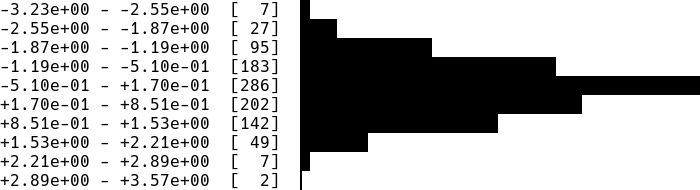
Horizontal histograms

import termplotlib as tpl
import numpy as np

rng = np.random.default_rng(123)
sample = rng.standard_normal(size=1000)
counts, bin_edges = np.histogram(sample)

fig = tpl.figure()
fig.hist(counts, bin_edges, orientation="horizontal", force_ascii=False)
fig.show()

produces
hist1

Horizontal bar charts are covered as well. This

import termplotlib as tpl

fig = tpl.figure()
fig.barh([3, 10, 5, 2], ["Cats", "Dogs", "Cows", "Geese"], force_ascii=True)
fig.show()

produces

Cats   [ 3]  ************
Dogs   [10]  ****************************************
Cows   [ 5]  ********************
Geese  [ 2]  ********

Vertical histograms

import termplotlib as tpl
import numpy as np

rng = np.random.default_rng(123)
sample = rng.standard_normal(size=1000)
counts, bin_edges = np.histogram(sample, bins=40)
fig = tpl.figure()
fig.hist(counts, bin_edges, grid=[15, 25], force_ascii=False)
fig.show()

produces

hist2

Tables

Support for tables has moved over to termtables.

Installation

termplotlib is available from the Python Package Index, so simply do

pip install termplotlib

to install.

Testing

To run the termplotlib unit tests, check out this repository and type

pytest

Similar projects

Comments
  •  width = max([len(line) for c in self._content for line in c]) No content in figure

    width = max([len(line) for c in self._content for line in c]) No content in figure

    import termplotlib as tpl
    import numpy
    
    x = numpy.linspace(0, 2 * numpy.pi, 10)
    y = numpy.sin(x)
    
    fig = tpl.figure()
    fig.plot(x, y, label="data", width=50, height=15)
    fig.show()
    

    after run this piece of code ,there are error ,

    if self._width is None:
    ---> 33             width = max([len(line) for c in self._content for line in c])
         34             width += padding_lr
         35         else:
    

    did you come up with this problem?

    opened by hudengjunai 10
  • Figure.table fails if stdout does not have an `encoding` attribute

    Figure.table fails if stdout does not have an `encoding` attribute

    I ran into this issue when using asciiplotlib in a celery worker where celery replaces sys.stdout with a proxy object called LoggingProxy which does not have an encoding attribute. This seems to be valid as far as the python documentation goes so probably asciiplotlib should check if the attribute exists? The specific line that causes problem

    asciiplotlib/table.py in _get_border_chars at line 31

            border_chars = None
        elif isinstance(border_style, list):
            assert len(border) == 11
            border_chars = border
        else:
            if sys.stdout.encoding in ["UTF-8", "UTF8"] and not force_ascii: # Here
                border_chars = {
                    "thin": ["─", "│", "┌", "┐", "└", "┘", "├", "┤", "┬", "┴", "┼"],
                    "rounded": ["─", "│", "╭", "╮", "╰", "╯", "├", "┤", "┬", "┴", "┼"],
                    "thick": ["━", "┃", "┏", "┓", "┗", "┛", "┣", "┫", "┳", "┻", "╋"],
                    "double": ["═", "║", "╔", "╗", "╚", "╝", "╠", "╣", "╦", "╩", "╬"],
    
    opened by alexjg 7
  • Add float formatting in `barh.py`

    Add float formatting in `barh.py`

    This adds a formatting similar to what is already implemented for the integers when using float in barh :

    Before :

    Water  [3.05]  *************
    Milk   [10.1]  ****************************************
    Juice  [5.00756]  ********************
    

    After:

    Water  [ 3.05000]  *************
    Milk   [10.10000]  ****************************************
    Juice  [ 5.00756]  ********************
    

    Each float value now uses the same width producing a better alignment of the bars.

    Test script:

    import termplotlib as tpl
    data = ([3.05, 10.1, 5.00756], ['Water', 'Milk', 'Juice'])
    fig = tpl.figure()
    fig.barh(*data, force_ascii=True)
    fig.show()
    
    opened by ghost 5
  • Displays meaningless numbers when NaNs are present

    Displays meaningless numbers when NaNs are present

    NaNs seem to mess up asciiplotlib The following:

    import asciiplotlib as apl
    from numpy import arange
    
    fig = apl.figure()
    fig.plot([100,101,102,103,104], [0,1,float("nan"), float("nan"),4])
    fig.show()
    

    Produces:

      120 +-----------+----------+-----------+----------+----------+-----------+
          |                                                                    |
          |                                                                    |
      100 +*******                                                             +
          |  **** ****                                                         |
          |      ***  ****                                                     |
       80 +         ****  ****                                                 +
          |             ****  ****                                             |
          |                 ***   ****                                         |
       60 +                    ****   ***                                      +
          |                        ***   ****                                  |
          |                           ****   ****                              |
          |                               ***    ****                          |
       40 +                                  ****    ****                      +
          |                                      ***     ****                  |
          |                                         ****     ****              |
       20 +                                             ****     ****          +
          |                                                 ***      *         |
          |                                                    ****   *        |
        0 +-----------+----------+-----------+----------+----------**----------+
          0           20         40          60         80        100         120
    

    Interestingly, the x values affect the behavior, too. Using [0,1,2,3,4] for x instead produces a much more innocent-looking plot. Very strange.

    opened by tgbrooks 5
  • FileNotFoundError: [WinError 2] The system cannot find the file specified

    FileNotFoundError: [WinError 2] The system cannot find the file specified

    When trying to run the first example in the readme,

    import asciiplotlib as apl
    import numpy
    
    x = numpy.linspace(0, 2 * numpy.pi, 10)
    y = numpy.sin(x)
    
    fig = apl.figure()
    fig.plot(x, y, label="data", width=50, height=15)
    fig.show()
    

    I get the following error;

    Traceback (most recent call last):
      File "cliplot.py", line 26, in <module>
        fig.plot(x, y, label="data", width=50, height=15)
      File "C:\Users\uqasnosw\AppData\Local\Continuum\Miniconda3\envs\python36\lib\site-packages\asciiplotlib\figure.py", line 63, in plot
        self._content.append(plot(*args, **kwargs))
      File "C:\Users\uqasnosw\AppData\Local\Continuum\Miniconda3\envs\python36\lib\site-packages\asciiplotlib\plot.py", line 24, in plot
        stderr=subprocess.PIPE,
      File "C:\Users\uqasnosw\AppData\Local\Continuum\Miniconda3\envs\python36\lib\subprocess.py", line 709, in __init__
        restore_signals, start_new_session)
      File "C:\Users\uqasnosw\AppData\Local\Continuum\Miniconda3\envs\python36\lib\subprocess.py", line 997, in _execute_child
        startupinfo)
    FileNotFoundError: [WinError 2] The system cannot find the file specified
    

    I'm using Python 3.6 on Windows 10 64-bit.

    opened by aaronsnoswell 5
  • [Question] GPL License

    [Question] GPL License

    Forgive the mundane question but does the GPLv3 allow me to use termplotlib as a dependency in my BSD open-source project? Or does this require re-licensing my project under GPL? This is a fantastic project 👍 good job.

    opened by danieljfarrell 4
  • FileNotFoundError: [WinError 2] The system cannot find the file specified

    FileNotFoundError: [WinError 2] The system cannot find the file specified

    Dear nschloe, your lib sounds nice! I got a different error in that code.. Any idea?

    Traceback (most recent call last):
      File ".\app.py", line 51, in <module>
        fig.plot(x, y)
      File "mypath\env\lib\site-packages\termplotlib\figure.py", line 64, in plot
        self._content.append(plot(*args, **kwargs))
      File "mypath\env\lib\site-packages\termplotlib\plot.py", line 22, in plot
        stderr=subprocess.PIPE,
      File "mypath\appdata\local\programs\python\python37\Lib\subprocess.py", line 800, in __init__
        restore_signals, start_new_session)
      File "mypath\appdata\local\programs\python\python37\Lib\subprocess.py", line 1207, in _execute_child
        startupinfo)
    FileNotFoundError: [WinError 2] The system cannot find the file specified
    
    opened by mscampos92 4
  • Handle strings in horizontal histogram bins

    Handle strings in horizontal histogram bins

    Hello, thank you for making this.

    Long story:

    In my use case I had a Pandas dataframe (DF) containing 1 panda series. This series had been created by resample a two series DF with dates and occurrences

    The resampling is like an histogram binning: it add all occurrences by frequency. e.g (series with dates as index):

    12:00 -> 17
    12:30 -> 21
    13:00 -> 11
    

    (^this is greatly simplified)

    TL;DR

    I want to have something like this:

    2020-04-11 23:00:00  [  28]  ▎
    2020-04-11 23:30:00  [  29]  ▎
    2020-04-12 00:00:00  [1299]  █████████████▌
    2020-04-12 00:30:00  [2637]  ███████████████████████████▍
    2020-04-12 01:00:00  [ 996]  ██████████▍
    2020-04-12 01:30:00  [ 404]  ████▎
    2020-04-12 02:00:00  [ 557]  █████▊
    

    or something like that And maybe be able to format dates

    What I changed

    In my code I needed to change this line https://github.com/nschloe/termplotlib/blob/9827634d1a7049ca430506532bb048241788ad38/termplotlib/hist.py#L48

    to this:

        if show_bin_edges:
            if type(bin_edges[0]) != int:
                labels = [str(d) for d in bin_edges]
            else:
                labels = [
                    "{:+.2e} - {:+.2e}".format(bin_edges[k], bin_edges[k + 1])
                    for k in range(len(bin_edges) - 1)
                ]
    

    (I find it more readable to have just one side of the interval btw)

    Advantage:

    I could provide termplotlib.figure.hist() these equal length "lists":

    counts = DF.series # ≡ list of occurences (or int list)
    bin_edges = DF.series.index # ≡ list of dates
    

    Feature request

    Handle any types of bins dates (e.g. python datetimes; numpy datetimes64, ...) and their formats ?

    As this might be too painful I think the str() could do most of it.

    Thank you for reading Regards

    opened by thenger 4
  • Unittests failing

    Unittests failing

    Does this inly work with Python 3? :(

    ==================================== ERRORS ====================================
    _____________________ ERROR collecting test/test_figure.py _____________________
    ImportError while importing test module '/home/bla/Downloads/asciiplotlib/test/test_figure.py'.
    Hint: make sure your test modules/packages have valid Python names.
    Traceback:
    test/test_figure.py:3: in <module>
        import asciiplotlib as apl
    /usr/local/lib/python2.7/dist-packages/asciiplotlib/__init__.py:14: in <module>
        from .figure import Figure, figure
    /usr/local/lib/python2.7/dist-packages/asciiplotlib/figure.py:5: in <module>
        from .table import table
    /usr/local/lib/python2.7/dist-packages/asciiplotlib/table.py:3: in <module>
        from collections.abc import Sequence
    E   ImportError: No module named abc
    
    opened by benlarsendk 4
  • IndexError: list index out of range error in vertical hist

    IndexError: list index out of range error in vertical hist

    Amazing lib thanx alot @nschloe !

    I am facing the following error (I am also pasting the arrays i am using for histogram and bins that might help you i guess):

    Traceback (most recent call last):
      File "paura_lite.py", line 30, in <module>
        fig.hist(X2, freqs2, grid=[25, 25], force_ascii=False)
      File "/usr/local/lib/python3.6/site-packages/termplotlib/figure.py", line 56, in hist
        self._content.append(hist(*args, **kwargs))
      File "/usr/local/lib/python3.6/site-packages/termplotlib/hist.py", line 22, in hist
        force_ascii=force_ascii,
      File "/usr/local/lib/python3.6/site-packages/termplotlib/hist.py", line 123, in hist_vertical
        if row[pos] == 8 and (pos + 1 == len(row) or row[pos + 1] > 0):
    IndexError: list index out of range
    

    X2 and freqs2 are respectively (plotting the same arrays with either plot or horizontal histogram works just fine fyi

    [124.41883839  35.41717879  31.53559882  28.65272995  21.51772978
      18.91799348  17.13384018  16.4547271   15.12907567  12.27610031
      12.89634676  10.55464499  10.1385237    9.76782805   8.12663877
       7.21406045   5.71375229   4.28627088   3.3031431    2.84735662]
    [   0.  200.  400.  600.  800. 1000. 1200. 1400. 1600. 1800. 2000. 2200.
     2400. 2600. 2800. 3000. 3200. 3400. 3600. 3800. 4000.]
    
    
    opened by tyiannak 3
  • widht and height arguments of plot non working?

    widht and height arguments of plot non working?

    Hello, I just discovered this lib, this is very useful for servers without graphical interface! thanks a lot for the work.

    I just can't make the widht and height arguments of plot function work :

    (python 3.7.3)

    >>> prof
    array([-2.        , -2.        , -1.77777778, -1.77777778, -1.55555556,
           -1.55555556, -1.33333333, -1.33333333, -1.11111111, -1.11111111,
           -0.88888889, -0.88888889, -0.66666667, -0.66666667, -0.44444444,
           -0.44444444, -0.22222222, -0.22222222, -0.        , -0.        ,
            0.        ,  0.        ,  0.22222222,  0.22222222,  0.44444444,
            0.44444444,  0.66666667,  0.66666667,  0.88888889,  0.88888889,
            1.11111111,  1.11111111,  1.33333333,  1.33333333,  1.55555556,
            1.55555556,  1.77777778,  1.77777778,  2.        ,  2.        ])
    >>> fig = tplt.figure()
    >>> fig.plot(range(len(prof)), prof, width=len(prof), height=20)
    >>> fig.show()
    
        2 +--------+-------+--------+--------+-------+--------+-------+----***-+
          |                                                            ****    |
      1.5 +                                                         ***        +
          |                                                     ****           |
          |                                                  ***               |
        1 +                                               ***                  +
          |                                           ****                     |
      0.5 +                                        ***                         +
          |                                    ****                            |
        0 +                              ******                                +
          |                             *                                      |
          |                          ***                                       |
     -0.5 +                      ****                                          +
          |                   ***                                              |
       -1 +                ***                                                 +
          |            ****                                                    |
          |         ***                                                        |
     -1.5 +     ****                                                           +
          |  ***                                                               |
       -2 ***------+-------+--------+--------+-------+--------+-------+--------+
          0        5       10       15       20      25       30      35       40
    

    It seems that the plot uses the defaut values for widht and height of the figure. Maybe I did something wrong?

    opened by TitouanGendron 3
  • Add headers for user readability

    Add headers for user readability

    The horizontal view is useful if we're aware of the context (category, count) but it's missing the context of headers for application users.

    Right now, I imagine the user has to get that working

    Instead of just this,

    Cats   [ 3]  ************
    Dogs   [10]  ****************************************
    Cows   [ 5]  ********************
    Geese  [ 2]  ********
    

    add a header:

    Animals  Count
    Cats     [ 3]   ************
    Dogs     [10]   ****************************************
    Cows     [ 5]   ********************
    Geese    [ 2]   ********
    
    opened by deeTEEcee 0
Releases(v0.3.9)
Owner
Nico Schlömer
Mathematics, numerical analysis, scientific computing, Python. Always interested in new problems.
Nico Schlömer
100 Days of Code The Complete Python Pro Bootcamp for 2022

100-Day-With-Python 100 Days of Code - The Complete Python Pro Bootcamp for 2022. In this course, I spend with python language over 100 days, and I up

Rajdip Das 8 Jun 22, 2022
Visualize data of Vietnam's regions with interactive maps.

Plotting Vietnam Development Map This is my personal project that I use plotly to analyse and visualize data of Vietnam's regions with interactive map

1 Jun 26, 2022
DALLE-tools provided useful dataset utilities to improve you workflow with WebDatasets.

DALLE tools DALLE-tools is a github repository with useful tools to categorize, annotate or check the sanity of your datasets. Installation Just clone

11 Dec 25, 2022
The open-source tool for building high-quality datasets and computer vision models

The open-source tool for building high-quality datasets and computer vision models. Website • Docs • Try it Now • Tutorials • Examples • Blog • Commun

Voxel51 2.4k Jan 07, 2023
Graphing communities on Twitch.tv in a visually intuitive way

VisualizingTwitchCommunities This project maps communities of streamers on Twitch.tv based on shared viewership. The data is collected from the Twitch

Kiran Gershenfeld 312 Jan 07, 2023
Visualise Ansible execution time across playbooks, tasks, and hosts.

ansible-trace Visualise where time is spent in your Ansible playbooks: what tasks, and what hosts, so you can find where to optimise and decrease play

Mark Hansen 81 Dec 15, 2022
Realtime Web Apps and Dashboards for Python and R

H2O Wave Realtime Web Apps and Dashboards for Python and R New! R Language API Build and control Wave dashboards using R! New! Easily integrate AI/ML

H2O.ai 3.4k Jan 06, 2023
matplotlib: plotting with Python

Matplotlib is a comprehensive library for creating static, animated, and interactive visualizations in Python. Check out our home page for more inform

Matplotlib Developers 16.7k Jan 08, 2023
Generate a roam research like Network Graph view from your Notion pages.

Notion Graph View Export Notion pages to a Roam Research like graph view.

Steve Sun 214 Jan 07, 2023
Gesture controlled media player

Media Player Gesture Control Gesture controller for media player with MediaPipe, VLC and OpenCV. Contents About Setup About A tool for using gestures

Atharva Joshi 2 Dec 22, 2021
A python visualization of the A* path finding algorithm

A python visualization of the A* path finding algorithm. It allows you to pick your start, end location and make obstacles and then view the process of finding the shortest path. You can also choose

Kimeon 4 Aug 02, 2022
A set of three functions, useful in geographical calculations of different sorts

GreatCircle A set of three functions, useful in geographical calculations of different sorts. Available for PHP, Python, Javascript and Ruby. Live dem

72 Sep 30, 2022
This component provides a wrapper to display SHAP plots in Streamlit.

streamlit-shap This component provides a wrapper to display SHAP plots in Streamlit.

Snehan Kekre 30 Dec 10, 2022
A programming language built on top of Python to easily allow Swahili speakers to get started with programming without ever knowing English

pyswahili A programming language built over Python to easily allow swahili speakers to get started with programming without ever knowing english pyswa

Jordan Kalebu 72 Dec 15, 2022
Visualization Website by using Dash and Heroku

Visualization Website by using Dash and Heroku You can visit the website https://payroll-expense-analysis.herokuapp.com/ In this project, I am interes

YF Liu 1 Jan 14, 2022
Pydrawer: The Python package for visualizing curves and linear transformations in a super simple way

pydrawer 📐 The Python package for visualizing curves and linear transformations in a super simple way. ✏️ Installation Install pydrawer package with

Dylan Tintenfich 56 Dec 30, 2022
Analytical Web Apps for Python, R, Julia, and Jupyter. No JavaScript Required.

Dash Dash is the most downloaded, trusted Python framework for building ML & data science web apps. Built on top of Plotly.js, React and Flask, Dash t

Plotly 17.9k Dec 31, 2022
These data visualizations were created as homework for my CS40 class. I hope you enjoy!

Data Visualizations These data visualizations were created as homework for my CS40 class. I hope you enjoy! Nobel Laureates by their Country of Birth

9 Sep 02, 2022
Arras.io Highest Scores Over Time Bar Chart Race

Arras.io Highest Scores Over Time Bar Chart Race This repo contains a python script (make_racing_bar_chart.py) that can generate a csv file which can

Road 2 Jan 16, 2022
CPG represent!

CoolPandasGroup CPG represent! Arianna Brandon Enne Luan Tracie Project requirements: use Pandas to clean and format datasets use Jupyter Notebook to

Enne 3 Feb 07, 2022