📚 A collection of Jupyter notebooks for learning and experimenting with OpenVINO 👓

Overview

📚 OpenVINO Notebooks

🚧 Notebooks are currently in beta. We plan to publish a stable release this summer. Please submit issues on GitHub, start a discussion or join our Unofficial Developer Discord Server* to stay in touch.

A collection of ready-to-run Python* notebooks for learning and experimenting with OpenVINO developer tools. The notebooks are meant to provide an introduction to OpenVINO basics and teach developers how to leverage our APIs for optimized deep learning inference in their applications.

💻 Getting Started

The notebooks are designed to run almost anywhere — your laptop, a cloud VM, or even a Docker container. Here's what you need to get started:

  • CPU (64-bit)
  • Windows*, Linux* or macOS*
  • Python* 3.6-3.8

Before you proceed to the Installation Guide, please review the detailed System Requirements below.

⚙️ System Requirements

The table below lists the supported operating systems and Python versions required to run the OpenVINO notebooks.

Supported Operating System Python* Version (64-bit)
Ubuntu* 18.04 LTS, 64-bit 3.6, 3.7, 3.8
Ubuntu* 20.04 LTS, 64-bit 3.6, 3.7, 3.8
Red Hat* Enterprise Linux* 8, 64-bit 3.6, 3.8
CentOS* 7, 64-bit 3.6, 3.7, 3.8
macOS* 10.15.x versions 3.6, 3.7, 3.8
Windows 10*, 64-bit Pro, Enterprise or Education editions 3.6, 3.7, 3.8
Windows Server* 2016 or higher 3.6, 3.7, 3.8

📝 Installation Guide

NOTE: If OpenVINO is installed globally, please do not run any of these commands in a terminal where setupvars.bat or setupvars.sh are sourced. For Windows, we recommend using Command Prompt (cmd.exe), not PowerShell.

Step 1: Clone the Repository

git clone https://github.com/openvinotoolkit/openvino_notebooks.git

Step 2: Create a Virtual Environment

# Linux and macOS may require typing python3 instead of python
cd openvino_notebooks
python -m venv openvino_env

Step 3: Activate the Environment

For Linux and macOS:

source openvino_env/bin/activate

For Windows:

openvino_env\Scripts\activate

Step 4: Install the Packages

Installs OpenVINO tools and dependencies like Jupyter Lab:

# Upgrade pip to the latest version.
# Use pip's legacy dependency resolver to avoid dependency conflicts
python -m pip install --upgrade pip
pip install -r requirements.txt --use-deprecated=legacy-resolver

Step 5: Install the virtualenv Kernel in Jupyter

python -m ipykernel install --user --name openvino_env

Step 6: Launch the Notebooks!

# To launch a single notebook
jupyter notebook <notebook_filename>

# To launch all notebooks in Jupyter Lab
jupyter lab notebooks

In Jupyter Lab, select a notebook from the file browser using the left sidebar. Each notebook is located in a subdirectory within the notebooks directory.

🧹 Cleaning Up

Shut Down Jupyter Kernel

To end your Jupyter session, press Ctrl-c. This will prompt you to Shutdown this Jupyter server (y/[n])? enter y and hit Enter.

Deativate Virtual Environment

To deactivate your virtualenv, simply run deactivate from the terminal window where you activated openvino_env. This will deactivate your environment.

To reactivate your environment, simply repeat Step 3 from the Install Guide.

Delete Virtual Environment (Optional)

To remove your virtual environment, simply delete the openvino_env directory:

On Linux and macOS:

rm -rf openvino_env

On Windows:

rmdir /s openvino_env

Remove openvino_env Kernel from Jupyter

jupyter kernelspec remove openvino_env

⚠️ Troubleshooting

  • On Ubuntu, if you see the error "libpython3.7m.so.1.0: cannot open shared object file: No such object or directory" please install the required package using apt install libpython3.7-dev

  • If you get an ImportError, doublecheck that you installed the kernel in Step 5. If necessary, choose the openvinoenv kernel from the _Kernel->Change Kernel menu)

  • On Linux and macOS you may need to type python3 instead of python when creating your virtual environment

  • On Linux and macOS you may need to install pip and/or python-venv (depending on your Linux distribution)

  • On Windows, if you have installed multiple versions of Python, use py -3.7 when creating your virtual environment to specify a supported version (in this case 3.7)

  • On Fedora*, Red Hat and Amazon* Linux you may need to install the OpenGL (Open Graphics Library) to use OpenCV. Please run yum install mesa-libGL before launching the notebooks.

  • For macOS systems with Apple* M1, please see community discussion about using Rosetta* 2.


* Other names and brands may be claimed as the property of others.

Comments
  • 406 Human Pose Estimation 3D

    406 Human Pose Estimation 3D

    3D Human Pose Estimation with OpenVINO

    This demo contains 3D multi-person pose estimation demo. Intel OpenVINO™ backend can be used for fast inference on CPU. It is based on Lightweight OpenPose and Single-Shot Multi-Person 3D Pose Estimation From Monocular RGB papers.
    The implementation of this demo starts with the ideas I originally wrote about in my blog There are two options involved in this pull request. One is to use WebGL, which interacts with the browser, and the other is to use the less dependent OpenCV, which implements a basic 3D visual library.

    406-human-pose-estimation-3d

    threejs This demo allows you to use the mouse to change the angle of view from which you view an object.

    406-opencv-human-pose-estimation-3d

    OpenCV This example allows you to use the keyboard to move your camera and press ESC to exit.(You need to set use_popup=True firstly)

    new notebook 
    opened by spencergotowork 34
  • Added pose estimation live demo

    Added pose estimation live demo

    I fixed a lot of things, added documentation and removed big files from the git history. Hence, I create a new PR.

    The picture has the proper licence, as it comes from COCO - https://cocodataset.org/#explore?id=166392

    new notebook 
    opened by adrianboguszewski 22
  • 222 Image Colorization using OpenVINO model tutorial notebook

    222 Image Colorization using OpenVINO model tutorial notebook

    This PR adds demo notebook for grayscale image colorization using colorization-v2 model from Open Model Zoo

    Pending Tasks:

    • [x] - ~~Handle video input to colorize~~
    • [x] - Add explanation (markdown) to the notebook cells
    • [x] - Complete README.md
    • [x] - Follow up with suggestions and reviews
    gsoc wip 
    opened by Davidportlouis 18
  • Add comparison of INT8 and FP32 models

    Add comparison of INT8 and FP32 models

    Added the following features to PyTorch and Tensorflow quantization aware training notebooks

    • fine-tuning of float32 model the same way as int8 model is finetuned
    • accuracy comparison between fine-tuned int8 and fine-tuned float32 models

    Note: nbval fails, however it also seems to fail for the main branch

    opened by nikita-savelyevv 15
  • Add PaddleGAN AnimeGAN notebook

    Add PaddleGAN AnimeGAN notebook

    AnimeGAN notebook with model from https://github.com/PaddlePaddle/PaddleGAN

    Convert PaddleGAN model to ONNX and then to IR, and show inference results.

    PaddlePaddle requirements are installed in the notebook, with !pip. This requires that users activated the openvino_env environment and kernel - which they do if they follow our instructions.

    Converting this model was not completely straightforward. I added some steps to the notebook that show how to go about this, for example to do predictor.run?? to show the source of the function, to see how to preprocess and postprocess the model output.

    image

    This is a Draft PR - a README should be added and the descriptions in the notebook should be updated before merging.

    The notebook currently fails in the CI for Windows. I'll look into that - it seems to be a resource issue. It works on my Windows laptop.

    opened by helena-intel 15
  • ssdlite_mobilenet_v2.xml cannot be opened!

    ssdlite_mobilenet_v2.xml cannot be opened!

    Describe the bug I followed notebook 401-object-detection and it works. Then I wanted to reuse the converted model within a python script with the same command line : ie_core = Core() model = ie_core.read_model(model=root + converted_model_path) where "root" is path to openvino_notebooks

    But I get openvino_notebooks/notebooks/401-object-detection-webcam/model/public/ssdlite_mobilenet_v2/FP16/ssdlite_mobilenet_v2.xml cannot be opened!

    Expected behavior I hope I can reuse the converted model from my script

    Screenshots If applicable, add screenshots to help explain your problem.

    Installation instructions (Please mark the checkbox) [ x ] I followed the installation guide at https://github.com/openvinotoolkit/openvino_notebooks#-installation-guide to install the notebooks. I did it twice !

    ** Environment information ** Pip version: 22.1 OpenVINO source: /home/fenaux/openvino_env/lib/python3.9/site-packages/openvino OpenVINO IE version: 2022.1.0-7019-cdb9bec7210-releases/2022/1 OpenVINO environment activated: OK Jupyter kernel installed for openvino_env: NOT OK Python version: 3.9 OK OpenVINO pip package installed: OK OpenVINO import succeeds: OK OpenVINO development tools installed: OK OpenVINO not installed globally: OK No broken requirements: OK

    Thanks for your help

    opened by fenaux 13
  • Webcam Hello World

    Webcam Hello World

    Here is a webcam version of hello world. It uses the same model as the 001-hello-world but we use a webcam feed as the input. The main issue is how we can do CI with this at all, and that's why I'm thinking we have to put this under a 4xx series as it will have hardware dependencies.

    However, I will push a pull request here and see what we think about it and so at least I have this somewhere. :)

    opened by raymondlo84 12
  • 	223-text-prediction

    223-text-prediction

    Interactive Text Prediction with OpenVINO

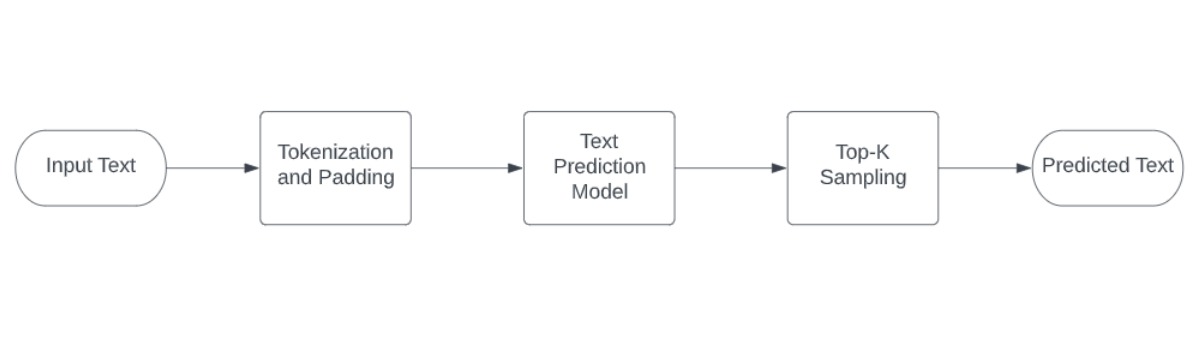
    This is a demo for text prediction using gpt-2 model The complete pipeline of this demo's notebook is shown below.

    image2


    This is an interactive demonstration in which the user can type text into the input bar and generate predicted text. This procedure can be repeated as many times as the user desires.

    image3

    gsoc wip 
    opened by dwipddalal 11
  • [GSOC] 226-yolo-v4-tf object detection notebook.

    [GSOC] 226-yolo-v4-tf object detection notebook.

    A notebook that implements Yolo-v4-tiny-tf and yolo-v4-tf. Compared to the 401 object detection notebook, changes had to be made to the output processing to find bounding boxes and to resize the image while preserving the aspect ratio for improved performance. yolov4 model

    What's left: Some documentation / explanation.

    Something I found that needs to be confirmed is that Cx, Cy (cell index) and w, h (bounding box width/height), from the documentation, needs to have order changed to Cy, Cx and h, w respectively. Converted model input documentation should also become B, H, W, C, instead of B, C, H, W which gives an error. Whether or not the input is BGR or RGB isn't too clear yet considering the model goes by original input for dimensions.

    Edit: New Documentation is consistent with the current inputs I have. So BHWC is correct (using BGR).

    gsoc wip 
    opened by thavens 11
  • Known Issues with OpenVINO 2022.3 + OpenVINO Notebooks

    Known Issues with OpenVINO 2022.3 + OpenVINO Notebooks

    Here is a list of known issues for using OpenVINO 2022.3 and OpenVINO Notebooks. You can compile and obtain the 2022.3 from here.

    https://github.com/openvinotoolkit/openvino/wiki

    Known issues (Ubuntu 22.04 + Python 3.10):

    1. Python 3.10 and torch 1.8.1 dependencies is conflicting. (ERROR: Could not find a version that satisfies the requirement torch==1.8.1+cpu)
    2. PaddlePaddle 2.2 is also conflicting/missing. (ERROR: Could not find a version that satisfies the requirement paddlepaddle==2.2.*)
    3. Tensorflow 2.5.3 (ERROR: Could not find a version that satisfies the requirement tensorflow==2.5.3)
    opened by raymondlo84 10
  • Fix Deprecation/Future Warnings in Notebook 211-Speech-to-Text

    Fix Deprecation/Future Warnings in Notebook 211-Speech-to-Text

    In the committed version, Imports are at the top of the notebook.

    • librosa.filters.mel in audio_to_mel

      FutureWarning: Pass sr=16000, n_fft=512 as keyword args. From version 0.10 passing these as positional arguments will result in an error.

    Question

    The original pull requeset did NOT add librosa (the audio analysis package used here) into requirements.txt or .docker/Pipfile. Is it on purpose? Should I tell how to install it in the notebook?

    opened by YDX-2147483647 10
  • not able to read my custom model .xml file

    not able to read my custom model .xml file

    im using yolov7 226 yolo optimisation notebook,

    i trained my model using yolov7x.cfg which has 40 classes, I did all respectivate changes according to model .

    i am able to generate -onnx & .XML file , its inference is also working but when I was planning for converting it into int8 format . I'm not able to load it

    from openvino.runtime import Core
    core = Core()
    # read converted model
    model = core.read_model('model/best_veh_withbgnew.xml')
    # load model on CPU device
    compiled_model = core.compile_model(model, 'CPU')


    I'm getting this error

    ---------------------------------------------------------------------------
    RuntimeError                              Traceback (most recent call last)
    <ipython-input-10-db161e3ad74f> in <module>
          2 core = Core()
          3 # read converted model
    ----> 4 model = core.read_model('model/best_veh_withbgnew.xml')
          5 # load model on CPU device
          6 compiled_model = core.compile_model(model, 'CPU')
    
    RuntimeError: Check 'false' failed at C:\Jenkins\workspace\private-ci\ie\build-windows-vs2019\b\repos\openvino\src\frontends\common\src\frontend.cpp:54:
    Converting input model
    Incorrect weights in bin file!
    
    
    opened by akashAD98 1
  • 226-yolov7-optimization on Ubuntu

    226-yolov7-optimization on Ubuntu

    When I run this notebook on Ubuntu with a successful setup of the virtual env and requirements.txt install...the kernel dies on my machine half way through every time...would you have tips to try?

    Its this block of code towards the end...where it does run I can see the process go from 0 to 100% but after a 100% is met the Kernel dies and I cant make it any further.

    mp, mr, map50, map, maps, num_images, labels = test(data=data, model=compiled_model, dataloader=dataloader, names=NAMES)
    # Print results
    s = ('%20s' + '%12s' * 6) % ('Class', 'Images', 'Labels', 'Precision', 'Recall', '[email protected]', '[email protected]:.95')
    print(s)
    pf = '%20s' + '%12i' * 2 + '%12.3g' * 4  # print format
    print(pf % ('all', num_images, labels, mp, mr, map50, map))
    

    Any options to try greatly appreciated.

    opened by bbartling 22
  • Duplicated images in the repository

    Duplicated images in the repository

    I found there are many duplicates in the repository e.g coco.jpg. It increases cloning time and space usage. It would be good to create a "central directory" with images and videos to use across all notebooks.

    I propose:

    1. Create the "data" dir in the root dir
    2. Move all images and videos from specific notebooks, remove duplicates
    3. Update links to media in all notebooks
    4. Update contributing guide
    enhancement 
    opened by adrianboguszewski 1
Releases(v0.1.0)
Owner
OpenVINO Toolkit
OpenVINO Toolkit
计算机视觉中用到的注意力模块和其他即插即用模块PyTorch Implementation Collection of Attention Module and Plug&Play Module

PyTorch实现多种计算机视觉中网络设计中用到的Attention机制,还收集了一些即插即用模块。由于能力有限精力有限,可能很多模块并没有包括进来,有任何的建议或者改进,可以提交issue或者进行PR。

PJDong 599 Dec 23, 2022
scAR (single-cell Ambient Remover) is a package for data denoising in single-cell omics.

scAR scAR (single cell Ambient Remover) is a package for denoising multiple single cell omics data. It can be used for multiple tasks, such as, sgRNA

19 Nov 28, 2022
AugMix: A Simple Data Processing Method to Improve Robustness and Uncertainty

AugMix Introduction We propose AugMix, a data processing technique that mixes augmented images and enforces consistent embeddings of the augmented ima

Google Research 876 Dec 17, 2022
disentanglement_lib is an open-source library for research on learning disentangled representations.

disentanglement_lib disentanglement_lib is an open-source library for research on learning disentangled representation. It supports a variety of diffe

Google Research 1.3k Dec 28, 2022
Source Code for Simulations in the Publication "Can the brain use waves to solve planning problems?"

Code for Simulations in the Publication Can the brain use waves to solve planning problems? Installing Required Python Packages Please use Python vers

EMD Group 2 Jul 01, 2022
Official Pytorch implementation of 6DRepNet: 6D Rotation representation for unconstrained head pose estimation.

6D Rotation Representation for Unconstrained Head Pose Estimation (Pytorch) Paper Thorsten Hempel and Ahmed A. Abdelrahman and Ayoub Al-Hamadi, "6D Ro

Thorsten Hempel 284 Dec 23, 2022
Project of 'TBEFN: A Two-branch Exposure-fusion Network for Low-light Image Enhancement '

TBEFN: A Two-branch Exposure-fusion Network for Low-light Image Enhancement Codes for TMM20 paper "TBEFN: A Two-branch Exposure-fusion Network for Low

KUN LU 31 Nov 06, 2022
Generative Adversarial Text to Image Synthesis

Text To Image Synthesis This is a tensorflow implementation of synthesizing images. The images are synthesized using the GAN-CLS Algorithm from the pa

Hao 575 Jan 08, 2023
CTRMs: Learning to Construct Cooperative Timed Roadmaps for Multi-agent Path Planning in Continuous Spaces

CTRMs: Learning to Construct Cooperative Timed Roadmaps for Multi-agent Path Planning in Continuous Spaces This is a repository for the following pape

17 Oct 13, 2022
Text-to-Image generation

Generate vivid Images for Any (Chinese) text CogView is a pretrained (4B-param) transformer for text-to-image generation in general domain. Read our p

THUDM 1.3k Dec 29, 2022
A modular active learning framework for Python

Modular Active Learning framework for Python3 Page contents Introduction Active learning from bird's-eye view modAL in action From zero to one in a fe

modAL 1.9k Dec 31, 2022
This repository is an unoffical PyTorch implementation of Medical segmentation in 3D and 2D.

Pytorch Medical Segmentation Read Chinese Introduction:Here! Recent Updates 2021.1.8 The train and test codes are released. 2021.2.6 A bug in dice was

EasyCV-Ellis 618 Dec 27, 2022
Official code for paper "ISNet: Costless and Implicit Image Segmentation for Deep Classifiers, with Application in COVID-19 Detection"

Official code for paper "ISNet: Costless and Implicit Image Segmentation for Deep Classifiers, with Application in COVID-19 Detection". LRPDenseNet.py

Pedro Ricardo Ariel Salvador Bassi 2 Sep 21, 2022
Neural Turing Machine (NTM) & Differentiable Neural Computer (DNC) with pytorch & visdom

Neural Turing Machine (NTM) & Differentiable Neural Computer (DNC) with pytorch & visdom Sample on-line plotting while training(avg loss)/testing(writ

Jingwei Zhang 269 Nov 15, 2022
The official implementation of the research paper "DAG Amendment for Inverse Control of Parametric Shapes"

DAG Amendment for Inverse Control of Parametric Shapes This repository is the official Blender implementation of the paper "DAG Amendment for Inverse

Elie Michel 157 Dec 26, 2022
Out-of-boundary View Synthesis towards Full-frame Video Stabilization

Out-of-boundary View Synthesis towards Full-frame Video Stabilization Introduction | Update | Results Demo | Introduction This repository contains the

25 Oct 10, 2022
The materials used in the SaxonJS tutorial presented at Declarative Amsterdam, 2021

SaxonJS-Tutorial-2021, version 1.0.4 Last updated on 4 November, 2021. Table of contents Background Prerequisites Starting a web server Running a Java

Saxonica 11 Oct 23, 2022
Dataset and codebase for NeurIPS 2021 paper: Exploring Forensic Dental Identification with Deep Learning

Repository under construction. Example dataset, checkpoints, and training/testing scripts will be avaible soon! 💡 Collated best practices from most p

4 Jun 26, 2022
Pose Detection and Machine Learning for real-time body posture analysis during exercise to provide audiovisual feedback on improvement of form.

Posture: Pose Tracking and Machine Learning for prescribing corrective suggestions to improve posture and form while exercising. This repository conta

Pratham Mehta 10 Nov 11, 2022
Run object detection model on the Raspberry Pi

Using TensorFlow Lite with Python is great for embedded devices based on Linux, such as Raspberry Pi.

Dimitri Yanovsky 6 Oct 08, 2022