Scene Representation Networks


This is the official implementation of the NeurIPS submission "Scene Representation Networks: Continuous 3D-Structure-Aware Neural Scene Representations"
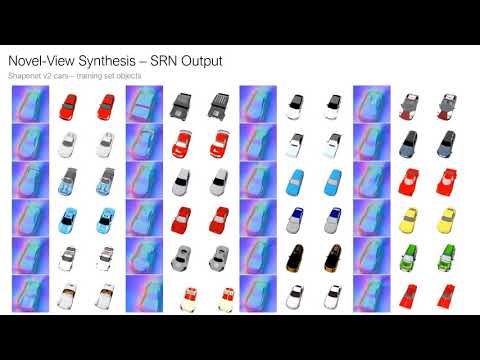
Scene Representation Networks (SRNs) are a continuous, 3D-structure-aware scene representation that encodes both geometry and appearance. SRNs represent scenes as continuous functions that map world coordinates to a feature representation of local scene properties. By formulating the image formation as a neural, 3D-aware rendering algorithm, SRNs can be trained end-to-end from only 2D observations, without access to depth or geometry. SRNs do not discretize space, smoothly parameterizing scene surfaces, and their memory complexity does not scale directly with scene resolution. This formulation naturally generalizes across scenes, learning powerful geometry and appearance priors in the process.
Usage
Installation
This code was tested with python 3.7 and pytorch 1.2. I recommend using anaconda for dependency management. You can create an environment with name "srns" with all dependencies like so:
conda env create -f environment.yml
This repository depends on a git submodule, pytorch-prototyping. To clone both the main repo and the submodule, use
git clone --recurse-submodules https://github.com/vsitzmann/scene-representation-networks.git
High-Level structure
The code is organized as follows:
- dataio.py loads training and testing data.
- data_util.py and util.py contain utility functions.
- train.py contains the training code.
- test.py contains the testing code.
- srns.py contains the core SRNs model.
- hyperlayers.py contains implementations of different hypernetworks.
- custom_layers.py contains implementations of the raymarcher and the DeepVoxels U-Net renderer.
- geometry.py contains utility functions for 3D and projective geometry.
- util.py contains misc utility functions.
Pre-Trained models
There are pre-trained models for the shapenet car and chair datasets available, including tensorboard event files of the full training process.
Please download them here.
The checkpoint is in the "checkpoints" directory - to load weights from the checkpoint, simply pass the full path to the checkpoint to the "--checkpoint_path" command-line argument.
To inspect the progress of how I trained these models, run tensorboard in the "events" subdirectory.
Data
Four different datasets appear in the paper:
- Shapenet v2 chairs and car classes.
- Shepard-Metzler objects.
- Bazel face dataset.
Please download the datasets here.
Rendering your own datasets
I have put together a few scripts for the Blender python interface that make it easy to render your own dataset. Please find them here.
Coordinate and camera parameter conventions
This code uses an "OpenCV" style camera coordinate system, where the Y-axis points downwards (the up-vector points in the negative Y-direction), the X-axis points right, and the Z-axis points into the image plane. Camera poses are assumed to be in a "camera2world" format, i.e., they denote the matrix transform that transforms camera coordinates to world coordinates.
The code also reads an "intrinsics.txt" file from the dataset directory. This file is expected to be structured as follows (unnamed constants are unused):
f cx cy 0.
0. 0. 0.
1.
img_height img_width
The focal length, cx and cy are in pixels. Height and width are the resolution of the image.
Training
See python train.py --help for all train options. Example train call:
python train.py --data_root [path to directory with dataset] \
                --val_root [path to directory with train_val dataset] \
                --logging_root [path to directory where tensorboard summaries and checkpoints should be written to]
To monitor progress, the training code writes tensorboard summaries every 100 steps into a "events" subdirectory in the logging_root.
For experiments described in the paper, config-files are available that configure the command-line flags according to the settings in the paper. You only need to edit the dataset path. Example call:
[edit train_configs/cars.yml to point to the correct dataset and logging paths]
python train.py --config_filepath train_configs/cars.yml
Testing
Example test call:
python test.py --data_root [path to directory with dataset] ] \
               --logging_root [path to directoy where test output should be written to] \
               --num_instances [number of instances in training set (for instance, 2433 for shapenet cars)] \
               --checkpoint [path to checkpoint]
Again, for experiments described in the paper, config-files are available that configure the command-line flags according to the settings in the paper. Example call:
[edit test_configs/cars.yml to point to the correct dataset and logging paths]
python test.py --config_filepath test_configs/cars_training_set_novel_view.yml
Misc
Citation
If you find our work useful in your research, please cite:
@inproceedings{sitzmann2019srns,
	author = {Sitzmann, Vincent
	          and Zollh{\"o}fer, Michael
	          and Wetzstein, Gordon},
	title = {Scene Representation Networks: Continuous 3D-Structure-Aware Neural Scene Representations},
	booktitle = {Advances in Neural Information Processing Systems},
	year={2019}
}
Submodule "pytorch_prototyping"
The code in the subdirectory "pytorch_prototyping" comes from a library of custom pytorch modules that I use throughout my research projects. You can find it here.
Contact
If you have any questions, please email Vincent Sitzmann at [email protected].

 1 Jan 18, 2022
 1 Dec 26, 2021
 1 Oct 27, 2021
 18 Dec 10, 2022
 70 Dec 28, 2022
 1 Jan 15, 2022
 6 Oct 08, 2022
 39 Dec 24, 2022
 16 Dec 14, 2022
 5 Apr 23, 2022
 111 Dec 06, 2022
 131 Oct 21, 2022
 17 Dec 08, 2022
 17 Dec 16, 2022
 2k Jan 07, 2023
 87 Oct 19, 2022
 0 Jan 08, 2022
 24 Dec 09, 2022
 49 Dec 01, 2022
 125 Jan 03, 2023