当前位置:网站首页>JMETER的JDBC配置方法
JMETER的JDBC配置方法
2022-04-22 06:38:00 【松勤软件测试】
[TOC]
##### JDBC Request配置
在jmeter进行服务器压测时,有时候需要我们进行数据库的连接,数据库数据的读取,这里就介绍一下jdbc的使用,本文以Mysql5.7为例进行说明数据库的操作方法
###### 添加需要的驱动jar包
使用不同的数据库,Mysql数据库时需要使用mysql的驱动进行连接,其他数据库需要不同的jar包进行操作。
- 1. 下载Mysql数据库驱动
| Connector/J version | Mysql Version | Jdk required for Compilation |
| ------------------- | ------------- | ---------------------------- |
| 5.1 | 5.6 \5.7 \8.0 | Jdk 5.0 and Jdk8.0 or higher |
| 8.0 | 5.6\5.7\8.0 | Jdk8.0 or higher |
**注**:一切以官网为准,详情可参考https://dev.mysql.com/doc/connector-j/5.1/en/connector-j-versions.html
由于数据库是mysql5.7所以我下载了一下8.0的驱动

下载时注意,如果是windows版本的jmeter则下载zip包,Linux系统的则选择tar.gz
平台选择platform independent
- 2. 解压后的jar包复制到jmeter的根目录的lib目录下
- 3. 新建数据库连接
**参数说明**:
**Variable name**:数据库的连接池名称,在Jdbc request可以进行对应填写
**Database URL**:数据库url,jdbc:mysql://ip:mysql监听的端口号/数据库名称, 如: jdbc:mysql://localhost:3306/test
**username**:连接数据库的用户名
**password**:连接数据库的密码
**Validation Query**:选择固定select 1
###### Jdbc Request请求
Sample----->JDBC Request进行添加
参数说明:
**Variable Name**:连接数据库的数据库名与Config中的保持一致
**Query type**:选择Selected Statement
**Query**:填写sql语句
##### JDBC Request参数化
###### 方法一:使用用户变量的形式进行传递参数
- 1. 在Test Plan中定义一个变量
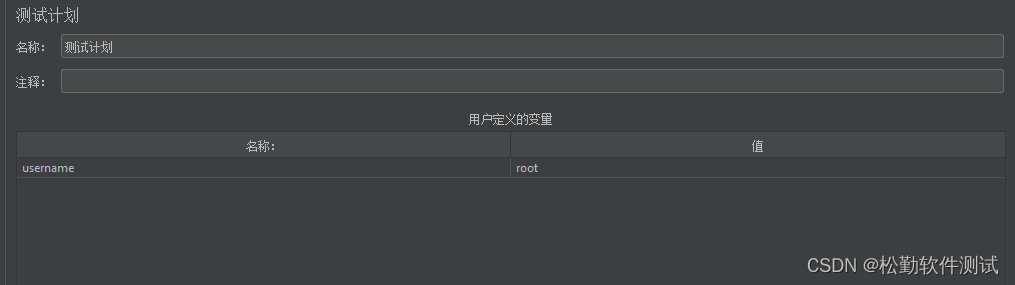
2. sql query 中使用${变量名称}的方式进行引用

###### 方法二:使用占位符进行传递参数
使用?作为占位符,多个参数使用,进行分割

版权声明
本文为[松勤软件测试]所创,转载请带上原文链接,感谢
https://blog.csdn.net/SQtester/article/details/124245959
边栏推荐
- JSON相关
- JMeter simulates get requests
- monkey
- easyui的combobox实现三级查询
- MYSQL_从精通到放弃目录
- Shiping information was listed in the panorama of China's network security market in 2021
- doc、pdf转换为swf文件预览
- The practical paper of Shiping information and data security compliance testing was selected into the Chinese core journals
- Android interview
- IK word splitter - easy to use
猜你喜欢

How to connect Kunlun on state │ G series screen with Siemens 300 domestic MPI adapter

JMeter post request

Focus on scientific and technological innovation 𞓜 Shiping information appears in the technology roadshow of science and innovation China - special session on information technology and security

ADB advanced commands
monkey
adb 高级部分命令
Figure 2022 work plan of industrial Internet special working group
实验5 组件及事件处理

JMeter performance indicator monitoring: CPU, memory, disk, network

ADB logcat log
随机推荐
Leaders of Hangzhou commercial password Application Association and their delegation visited Shiping for information exchange
easyui的combobox实现三级查询
Focus on scientific and technological innovation 𞓜 Shiping information appears in the technology roadshow of science and innovation China - special session on information technology and security
小公司不会发正式 offer
Web automation: how to send JS instructions in 8.2 selenium
MATLAB中的小技巧
ui自动化登录绕过验证码
JMeter simulates get requests
Navicat mistakenly deleted the connection. How to restore the database
带有支付功能的产品测试
web问题定位:F12,如何找到对应接口
MYSQL_从精通到放弃目录
China network security industry panorama of ccsip 2021 listed by Shiping information
JS dynamically merge cells
TP5 多条件where查询(使用PHP变量)
OpenFeign之响应处理
ADB command summary
数据驱动pytest1
Web automation: 6 Operation of selenium drop-down selection box - Select
【ncnn】——param中-23300的意思