当前位置:网站首页>kvm虚拟机出现启动不了,NOT available,PV大于分区
kvm虚拟机出现启动不了,NOT available,PV大于分区
2022-08-09 21:35:00 【金shell】
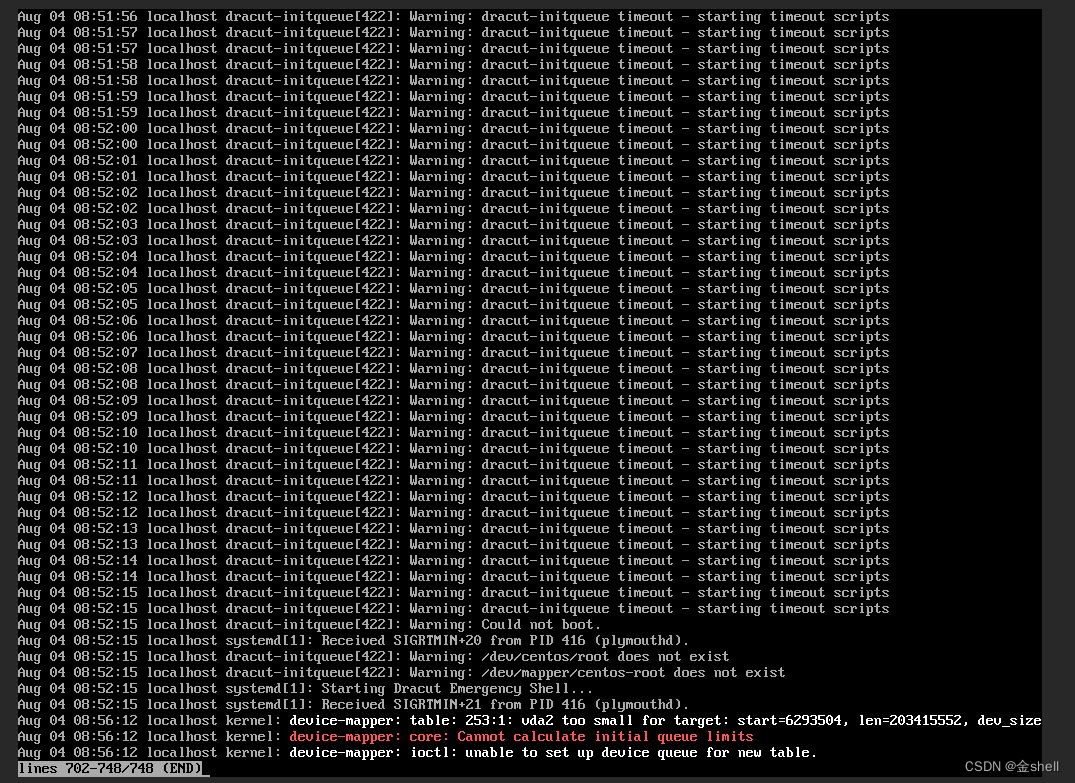
[email protected]:/mnt/user/domains/centos7gnome# lvdisplay
WARNING: Device /dev/nbd0p2 has size of 60815360 sectors which is smaller than corresponding PV size of 209713152 sectors. Was device resized?
WARNING: One or more devices used as PVs in VG centos have changed sizes.
— Logical volume —
LV Path /dev/centos/swap
LV Name swap
VG Name centos
LV UUID PzmI1T-EsXO-EODD-B2gf-1ks2-4D3W-JUURGB
LV Write Access read/write
LV Creation host, time localhost, 2022-02-19 15:39:45 +0800
LV Status available
open 0
LV Size 3.00 GiB
Current LE 768
Segments 1
Allocation inherit
Read ahead sectors auto
- currently set to 256
Block device 254:0
— Logical volume —
LV Path /dev/centos/root
LV Name root
VG Name centos
LV UUID CUedtr-rcMs-kH1t-WnMS-oIy1-j07P-2i3vyI
LV Write Access read/write
LV Creation host, time localhost, 2022-02-19 15:39:45 +0800
LV Status NOT available
LV Size <97.00 GiB
Current LE 24831
Segments 1
Allocation inherit
Read ahead sectors auto
[email protected]:/mnt/user/domains/centos7gnome# lvchange -a y /dev/centos/root
WARNING: Device /dev/nbd0p2 has size of 60815360 sectors which is smaller than corresponding PV size of 209713152 sectors. Was device resized?
WARNING: One or more devices used as PVs in VG centos have changed sizes.
device-mapper: reload ioctl on (254:1) failed: Invalid argument
命令参考
kvm盘更改大小
qemu-img resize vdisk1.img -10G

 modprobe nbd max_part=8
 modinfo nbd
 网络挂载
 qemu-nbd --connect=/dev/nbd0 vdisk1.img
ls /dev/nbd0*
lsblk
nbd0 43:0 0 110G 0 disk
├─nbd0p1 43:1 0 1G 0 part
└─nbd0p2 43:2 0 45.6G 0 part
#下面的警告是因为创建的PV在 分区2上,但是PV却比分区大,所以报警
[email protected]:~# lvdisplay
WARNING: Device /dev/nbd0p2 has size of 189307051 sectors which is smaller than corresponding PV size of 220198912 sectors. Was device resized?
WARNING: One or more devices used as PVs in VG centos have changed sizes.
— Logical volume —
LV Path /dev/centos/root
LV Name root
VG Name centos
LV UUID CUedtr-rcMs-kH1t-WnMS-oIy1-j07P-2i3vyI
LV Write Access read/write
LV Creation host, time localhost, 2022-02-19 15:39:45 +0800
LV Status NOT available
LV Size <97.00 GiB
[email protected]:~# lvdisplay
— Logical volume —
LV Path /dev/centos/root
LV Name root
VG Name centos
LV UUID CUedtr-rcMs-kH1t-WnMS-oIy1-j07P-2i3vyI
LV Write Access read/write
LV Creation host, time localhost, 2022-02-19 15:39:45 +0800
LV Status NOT available
LV Size <97.00 GiB
Current LE 24831
Segments 1
Allocation inherit
Read ahead sectors auto
调整分区2,增大分区
[email protected]:~# parted /dev/nbd0
GNU Parted 3.3
Using /dev/nbd0
Welcome to GNU Parted! Type ‘help’ to view a list of commands.
(parted) resizepart
Partition number? 2
End? [98.0GB]? 150G
(parted) quit
Information: You may need to update /etc/fstab.
激活LV
[email protected]:~# lvchange -ay /dev/centos/root
ca参考
https://unix.stackexchange.com/questions/668491/how-can-i-fix-lvm-pv-size-after-a-botched-encrypted-partition-shrinking
[email protected]:~# qemu-nbd --disconnect /dev/nbd0
/dev/nbd0 disconnected
[email protected]:~# lsblk
NAME MAJ:MIN RM SIZE RO TYPE MOUNTPOINT
nbd0 43:0 0 230G 0 disk
├─nbd0p1 43:1 0 1G 0 part
└─nbd0p2 43:2 0 138.7G 0 part
├─centos-root 253:0 0 97G 0 lvm /mnt
└─centos-swap 253:1 0 1G 0 lvm
// 下面 不加参数 --shrink 一样会减去空间,所以只需要执行一次就好
[email protected]:~# qemu-img resize /data/centos7gnome/vdisk1.img -80G
WARNING: Image format was not specified for ‘/data/centos7gnome/vdisk1.img’ and probing guessed raw.
Automatically detecting the format is dangerous for raw images, write operations on block 0 will be restricted.
Specify the ‘raw’ format explicitly to remove the restrictions.
qemu-img: warning: Shrinking an image will delete all data beyond the shrunken image’s end. Before performing such an operation, make sure there is no important data there.
qemu-img: warning: Using the --shrink option will suppress this message. Note that future versions of qemu-img may refuse to shrink images without this option.
Image resized.
[email protected]:~# qemu-img resize --shrink /data/centos7gnome/vdisk1.img -80G
WARNING: Image format was not specified for ‘/data/centos7gnome/vdisk1.img’ and probing guessed raw.
Automatically detecting the format is dangerous for raw images, write operations on block 0 will be restricted.
Specify the ‘raw’ format explicitly to remove the restrictions.
Image resized.
[email protected]:~# qemu-nbd --connect=/dev/nbd0 /data/centos7gnome/vdisk1.img
WARNING: Image format was not specified for ‘/data/centos7gnome/vdisk1.img’ and probing guessed raw.
Automatically detecting the format is dangerous for raw images, write operations on block 0 will be restricted.
Specify the ‘raw’ format explicitly to remove the restrictions.
[email protected]:~# lsblk
NAME MAJ:MIN RM SIZE RO TYPE MOUNTPOINT
nbd0 43:0 0 70G 0 disk
├─nbd0p1 43:1 0 1G 0 part
└─nbd0p2 43:2 0 138.7G 0 part
├─centos-root 253:0 0 97G 0 lvm /mnt
└─centos-swap 253:1 0 1G 0 lvm
vda 252:0 0 100G 0 disk
├─vda1 252:1 0 512M 0 part /boot/efi
└─vda2 252:2 0 99.5G 0 part /
vdb 252:16 0 300G 0 disk
└─vdb1 252:17 0 300G 0 part /data
[email protected]:~# qemu-
qemu-img qemu-io qemu-make-debian-root qemu-nbd
[email protected]:~# qemu-img info /data/centos7gnome/vdisk1.img
image: /data/centos7gnome/vdisk1.img
file format: raw
virtual size: 70 GiB (75161927680 bytes)
disk size: 26.8 GiB
[email protected]:~# qemu-nbd --disconnect /dev/nbd0
/dev/nbd0 disconnected
[email protected]:~# qemu-img resize /data/centos7gnome/vdisk1.img +70G
WARNING: Image format was not specified for ‘/data/centos7gnome/vdisk1.img’ and probing guessed raw.
Automatically detecting the format is dangerous for raw images, write operations on block 0 will be restricted.
Specify the ‘raw’ format explicitly to remove the restrictions.
Image resized.
[email protected]:~# qemu-nbd --disconnect /dev/nbd0
/dev/nbd0 disconnected
[email protected]:~# lsblk
NAME MAJ:MIN RM SIZE RO TYPE MOUNTPOINT
nbd0 43:0 0 70G 0 disk
├─nbd0p1 43:1 0 1G 0 part
└─nbd0p2 43:2 0 138.7G 0 part
├─centos-root 253:0 0 97G 0 lvm /mnt
└─centos-swap 253:1 0 1G 0 lvm
vda 252:0 0 100G 0 disk
├─vda1 252:1 0 512M 0 part /boot/efi
└─vda2 252:2 0 99.5G 0 part /
vdb 252:16 0 300G 0 disk
└─vdb1 252:17 0 300G 0 part /data
上面删减过头了,又加了70G,但是不识别,我重启了一下,重新挂载,可以了
reboot
[email protected]:~# modprobe nbd max_part=8
[email protected]:~# modinfo nbd
filename: /lib/modules/5.15.0-43-generic/kernel/drivers/block/nbd.ko
license: GPL
description: Network Block Device
srcversion: 731761EF8701CE7664A4043
depends:
retpoline: Y
intree: Y
name: nbd
vermagic: 5.15.0-43-generic SMP mod_unload modversions
sig_id: PKCS#7
signer: Build time autogenerated kernel key
sig_key: 7A:F3:57:B7:E5:14:B9:79:D9:12:51:C0:FF:1B:69:A6:3E:17:29:B3
sig_hashalgo: sha512
signature: 80:36:B3:26:15:71:36:53:89:1A:2F:45:9F:3E:33:98:16:07:0A:E8:
B5:F9:A6:52:36:92:0A:02:0C:E7:8D:C4:5A:87:DE:6C:B6:47:B9:58:
26:22:40:E8:68:C4:B9:B3:B1:B1:59:B6:F3:A7:88:CC:EA:0C:6C:45:
F5:2D:4E:70:0A:07:A9:65:23:A6:BA:2F:94:69:C3:94:D8:7F:06:09:
52:5F:F5:E4:8A:70:1E:6B:F3:AB:2E:F8:06:6A:43:59:58:7F:82:B1:
E5:83:4D:3A:D9:38:07:B5:1E:60:68:EB:35:21:CF:13:03:2E:FF:26:
64:ED:AD:B6:8C:A1:11:88:5C:0E:3B:79:2A:B1:9A:27:55:E4:D3:40:
AF:0D:A4:40:30:39:57:F8:34:45:B9:28:92:12:6B:6E:C7:90:1D:29:
AA:87:A2:38:B3:A6:DF:03:D6:EC:88:D8:07:25:8E:38:BE:5E:6B:6A:
DC:EE:F4:23:F8:DE:E6:5B:A7:28:D9:FA:3B:74:2F:D7:40:7D:97:D2:
DB:28:2F:2C:AF:DB:AF:07:FA:DD:F2:0C:5E:68:33:F9:58:81:EF:02:
5E:53:BB:F2:61:CC:7B:BE:2F:7A:B1:92:E7:42:70:35:5D:15:49:F3:
52:0D:88:4A:AE:B1:8F:D0:A8:C1:B8:F2:BB:E8:AD:6D:E9:2E:D5:51:
25:5E:FD:F7:0E:9D:12:BA:70:91:4C:24:B5:A6:14:06:19:2F:B8:A7:
4F:DC:9D:A2:C0:D0:47:B0:81:97:F0:26:A0:DF:11:BD:0C:DE:73:8A:
E2:02:31:23:9A:1D:9C:AD:B9:85:F6:D1:BA:52:15:8A:59:97:C7:3D:
CD:83:31:1B:DE:9A:39:9A:A2:47:7A:58:EB:8C:2B:25:87:48:6E:2E:
FE:2E:66:ED:1B:AE:CF:EF:2A:E4:C5:0C:1A:98:61:15:77:27:09:9E:
82:58:B4:86:D4:07:F4:F4:EB:8E:C6:FE:B5:B1:0F:CA:D4:E3:7F:26:
CB:87:69:69:AC:3B:93:F9:8C:3B:7A:F4:07:FB:3A:A3:B2:09:F3:21:
6E:00:BD:61:5D:AE:5A:23:91:CA:1B:E8:B0:29:38:83:84:80:DD:61:
AB:43:C1:82:40:86:E3:40:DE:11:08:A5:90:00:9C:A2:2E:C8:F1:96:
93:0B:7A:B0:EF:2F:C0:AE:67:6E:CA:7A:BA:5B:C9:AE:B9:4B:8E:6A:
FF:B9:DD:9F:C8:3B:08:01:4F:28:11:B8:D2:E7:2A:F2:FC:E8:FA:34:
BE:D4:30:CF:56:87:C9:AA:0D:30:F0:19:83:A2:BC:7A:90:4D:30:EE:
CE:33:0C:94:60:41:39:91:14:F5:4C:4C
parm: nbds_max:number of network block devices to initialize (default: 16) (int)
parm: max_part:number of partitions per device (default: 16) (int)
[email protected]:~# qemu-nbd --connect=/dev/nbd0 /data/centos7gnome/vdisk1.img
WARNING: Image format was not specified for ‘/data/centos7gnome/vdisk1.img’ and probing guessed raw.
Automatically detecting the format is dangerous for raw images, write operations on block 0 will be restricted.
Specify the ‘raw’ format explicitly to remove the restrictions.
[email protected]:~# lsblk
NAME MAJ:MIN RM SIZE RO TYPE MOUNTPOINT
nbd0 43:0 0 140G 0 disk
├─nbd0p1 43:1 0 1G 0 part
└─nbd0p2 43:2 0 138.7G 0 part
├─centos-root 253:0 0 97G 0 lvm
└─centos-swap 253:1 0 1G 0 lvm
vda 252:0 0 100G 0 disk
├─vda1 252:1 0 512M 0 part /boot/efi
└─vda2 252:2 0 99.5G 0 part /
vdb 252:16 0 300G 0 disk
└─vdb1 252:17 0 300G 0 part /data
[email protected]:~# lvdisplay
— Logical volume —
LV Path /dev/centos/root
LV Name root
VG Name centos
LV UUID CUedtr-rcMs-kH1t-WnMS-oIy1-j07P-2i3vyI
LV Write Access read/write
LV Creation host, time localhost, 2022-02-19 15:39:45 +0800
LV Status available
open 0
LV Size <97.00 GiB
Current LE 24831
Segments 1
Allocation inherit
Read ahead sectors auto
- currently set to 256
Block device 253:0
— Logical volume —
LV Path /dev/centos/swap
LV Name swap
VG Name centos
LV UUID MpdAnz-8fCp-ghjW-FduO-QsPQ-lmvS-0tpptx
LV Write Access read/write
LV Creation host, time ubuntu20, 2022-08-05 11:28:12 +0800
LV Status available
open 0
LV Size 1.00 GiB
Current LE 256
Segments 1
Allocation inherit
Read ahead sectors auto
- currently set to 256
Block device 253:1
[email protected]:~# mount /dev/centos/
root swap
[email protected]:~# mount /dev/centos/root /mnt/
[email protected]:~# ls /mnt/
.autorelabel dev/ lib/ mnt/ proc/ root/ srv/ usr/ yum/
bin/ etc/ lib64/ opt/ ql/ run/ sys/ var/
boot/ home/ media/ patch/ .Recycle_bin/ sbin/ tmp/ www/
[email protected]:~# ls /mnt/www/
这样LV 就能正常使用了,虚拟机也可以开机了
参考https://blog.csdn.net/zhongbeida_xue/article/details/81914357
修复指定分区
fsck -y /dev/VolGroup00/LogVol0
… …
Free blocks count wrong (5069553, counted=5070543).
Fix? yes
/dev/mapper/VolGroup00-LogVol00: ***** FILE SYSTEM WAS MODIFIED *****
/dev/mapper/VolGroup00-LogVol00: 79036/5744640 files (0.7% non-contiguous), 672049/5742592 blocks
边栏推荐
- Beat the interviewer, the CURD system can also make technical content
- DSPE-PEG-PDP,DSPE-PEG-OPSS,磷脂-聚乙二醇-巯基吡啶可减少肽的免疫原性
- WPF中加载并使用图像资源
- cadence中复制一部分PCB到另一个PCB中去
- tki-tree 树组件控制默认展开第几层数据
- Word文档怎么输入无穷大符号∞
- 基于光通信的6G水下信道建模综述
- Ali Ermi: Without accept, can a TCP connection be established?
- MySQL Notes-06 Basic SQL Operations
- Optimization of SQL Statements and Indexes
猜你喜欢

线性表的定义和基本操作

DSPE-PEG-Azide,DSPE-PEG-N3,磷脂-聚乙二醇-叠氮可和DBCO直接反应
DSPE-PEG-Azide, DSPE-PEG-N3, phospholipid-polyethylene glycol-azide can react directly with DBCO

How to fix Windows 11 not finding files

蓝牙模块的分类和对应的属性特点
Word怎么制作双面席卡?使用Word制作双面席卡方法

How are data integration APIs key to enterprise digital transformation?
一千以内的水仙花数

Access control knowledge
消防安全培训|“蓝朋友”,开课了!
随机推荐
Prometheus Operator 自定义监控添加redis explorer
微软word怎么转换成pdf文件?微软word转换为pdf格式的方法
Two methods of implementing inverted strings in C language
visual studio 2022调试技巧介绍
[Essay] To the friends of the 19th issue
基于Docker构建MySQL主从复制数据库
cad图纸怎么复制到word文档里面?Word里插CAD图怎么弄?
别叫我玩,我要考PMP:考PMP选择机构需要了解的那些事儿
【随笔】致19期的小伙伴们
LED闪烁 闪灯芯片IC 手电筒IC 闪灯控制IC 闪烁IC流水灯
Application of Acrel5000web Energy Consumption System in a College-Susie Week
力扣383-赎金信——哈希映射数组法
Unity_物体自转
MySQL跨表、多表更新SQL语句总结
Wps下划线怎么弄?Wps添加下划线的最全方法
windos安装Mysql8.0,及解决重新登录异常问题 ERROR 1045 (28000)
Unity2D_背景粒子效果
NetCore路由的Endpoint模式
Jensen (琴生) 不等式
Ankerui supports Ethernet communication, profibus communication embedded energy meter APM guiding technical requirements-Susie Week