当前位置:网站首页>五个路由守卫的使用
五个路由守卫的使用
2022-04-23 05:54:00 【MiMenge】
什么是路由守卫?
可以简单理解为路由组件的’门卫’,在进入某个路由的过程中必须先离开自己的守卫,通过其他路由的守卫才能访问到其他路由。
全局路由守卫
在全局配置的守卫路由,所有的路由导航都会受到全局路由守卫的影响
- 全局前置路由守卫
在路由导航的过程中, 页面在跳转之前会进入到前置路由守卫
路由切换之前触发,可以控制路由的切换行为
beforeEach(to, from, next){}
     参数: to 保存了切换的目标路由的信息
          from 保存了切换的起始路由的信息
          next 控制路由导航切换是否被拦截
-
全局后置路由守卫
后置路由守卫, 路由导航切换之后触发,可以在路由切换成功之后触发,切换后无需next
afterEach(to, from){}参数 to 保存了切换的目标路由的信息 from 保存了切换的起始路由的信息 -
全局路由守卫可以结合meta使用
meta {} 以键值对的方式保存自定义信息,可以与路由守卫搭配使用
独享路由守卫
beforeEnter(to, from, next){}
在单独路由配置中使用,单独控制路由行为,和全局前置路由守卫类似
测试 — 跳转指定路由需要校验token,没有则拦截
import Router from 'vue-router';

import Vue from 'vue';

Vue.use(Router);

const routes = [{

    path: '/',
    name: 'index',
    component: () => import('../views/index'),

    // 建立路由守卫规则
    meta: {
     isA: false }

}, {

    path: '/about',
    name: 'about',
    component: () => import('../views/about'),

    meta: {
     isA: true }
}, {

    path: '/self',
    name: 'self',
    component: () => import('../views/self'),

    meta: {
     isA: false }
}, {

    path: '/route',
    name: 'route',
    component: () => import('../views/route'),
    meta: {
     isA: false },
    // 路由独享守卫
    // brforeEnter(to, from, next) {

    // console.log(to, from, next());
    // // 这个路由单独的校验规则
    // },
}]


const router = new Router({

    mode: 'history',
    routes,
})

// 全局前置路由守卫

// 实例 - -- 若是不包含token则不能跳转
router.beforeEach((to, from, next) => {

    // console.log(to, from, to.meta.isA);

    // 根据路由进行拦截
    if (to.meta && to.meta.isA) {


        // 判断是否有token,没有则拦截跳转
        if (!localStorage.getItem('token')) {

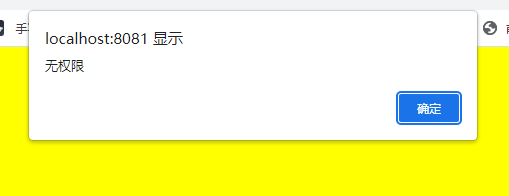
            alert('无权限')
            return;
        }

        next();

    } else {

        next()
    }
});


// 全局后置路由守卫
router.afterEach((to, from) => {


    console.log(to, from);

    document.title = to.name;
});

export default router;
拦截
跳转成功后
可以更改对应的title
组件守卫
和全局路由守卫的使用类似,不过此守卫只针对于单个组件
	进入组件守卫---进入组件之前触发
    beforeRouteEnter(to, from, next){}

    离开组件守卫---离开组件之后触发
    beforeRouteLeave(to, from, next){}
- 测试
export default {

  name: "Route",
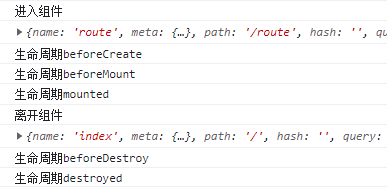
  // 组件守卫----进入组件时触发---先于生命周期钩子触发
  beforeRouteEnter(to, from, next) {

    console.log("进入组件");
    next();
  },

  // 组件守卫---离开组件时触发---先于即将销毁钩子(beforedestroy)触发
  beforeRouteLeave(to, from, next) {

    console.log("离开组件");
    next();
  },

  beforeMount() {

    console.log("生命周期beforeMount");
  },

  mounted() {

    console.log("生命周期mounted");
  },

  deactivated() {

    console.log("生命周期deactivated");
  },

  activated() {

    console.log("生命周期activated");
  },

  beforeCreate() {

    console.log("生命周期beforeCreate");
  },

  beforeDestroy() {

    console.log("生命周期beforeDestroy");
  },

  destroyed() {

    console.log("生命周期destroyed");
  },
进入和离开组件route
版权声明
本文为[MiMenge]所创,转载请带上原文链接,感谢
https://blog.csdn.net/m0_53584564/article/details/124178835
边栏推荐
- FOC SVPWM函数PWMC_SetPhaseVoltage解析
- 约瑟夫序列 线段树 O(nlogn)
- 时间戳转格式化日期
- token详解以及应用原理
- FOC 单电阻采样 位置环控制伺服电机
- PN结、二极管原理详解与应用
- [stepping on the pit] MELD in win11 wsl2 cannot be used normally. Problem repair
- Eigen 库常用基本用法 备忘
- Notes on advanced points of C language 4
- Vs can be compiled, but there will be a red underline to indicate the problem of undefined identifiers
猜你喜欢






随机推荐
查漏补缺(四)
[learn] HF net training
Detailed explanation and application principle of token
JS高频面试题
JS中的this指向
Makefile foundation, common functions and general makefile
Node数据流
C语言代码规范
Assembler 32-bit unsigned addition calculator
VHDL 有限状态机(FSM) 代码示例
Notes on advanced points of C language 4
_findnext 报错
基于VGG对五种类别图片的迁移学习
C语言 #和##的使用
卷积神经网络实现CIFAR100数据集分类
CUDA环境安装
undefined reference to `Nabo::NearestNeighbourSearch
js根据名字将数组对象中名字相同的项组成一个相同的数组
Detailed explanation and application of PN junction and diode principle
HDU-Tunnel Warfare