当前位置:网站首页>基于UiAutomator2+PageObject模式开展APP自动化测试实战
基于UiAutomator2+PageObject模式开展APP自动化测试实战
2022-08-10 10:57:00 【51CTO】
前言
在上一篇《 APP自动化测试框架-UiAutomator2基础》中,重点介绍了uiautomator2的项目组成、运行原理、环境搭建及元素定位等基础入门知识,本篇将介绍如何基于uiautomator2设计PageObject模式(以下简称PO模式)、开展移动APP的自动化测试实践。
一、PO模式简介
1.起源
PO模式是国外大神Martin Fowler于2013年提出来的一种设计模式,其基本思想是强调代码逻辑和业务逻辑相分离。 https://martinfowler.com/bliki/PageObject.html

2.PO六大原则

翻译成中文就是:
- 公共方法表示页面提供的服务
- 尽量不要暴露页面的内部实现
- 页面中不要加断言,断言加载
- 方法返回另外的页面对象
- 不需要封装全部的页面元素
- 相同的行为、不同的结果,需要封装成不同的方法
3.PO设计模式分析
- 用Page Object表示UI
- 减少重复样本代码
- 让变更范围控制在Page Object内
- 本质是面向对象编程
4.PO封装的主要组成元素
- Driver对象:完成对WEB、Android、iOS、接口的驱动
- Page对象:完成对页面的封装
- 测试用例:调用Page对象实现业务并断言
- 数据封装:配置文件和数据驱动
- Utils:其他功能/工具封装,改善原生框架不足
5.业内常见的分层模型

1)四层模型
- Driver层完成对webdriver常用方法的二次封装,如:定位元素方法;
- Elements层:存放元素属性值,如图标、按钮的resourceId、className等;
- Page层:存放页面对象,通常一个UI界面封装一个对象类;
- Case层:调用各个页面对象类,组合业务逻辑、形成测试用例;
2)三层模型(推荐)
四层模型与三层模型唯一的区别就是将Page层与Elements层存放在一起,各个页面对象文件同时包含当前页面中各个图标、按钮的resourceId、className等属性值,以便随时调用;
二、GUI自动化测试二三事
1.什么是自动化
自动化顾名思义就是把人对软件的操作行为通过代码或工具转换为机器执行测试的过程或实践。
2.为什么要做自动化
这个可说的内容就太多了,不做过多赘述,详情可参照我整理的《软件测试52讲》课堂笔记中的内容:

3.什么样的项目适合做自动化
- 需求稳定,不会频繁变更(尤其是GUI测试,页面布局及元素不能频繁变化)
- 研发和维护周期长,需要频繁执行回归测试
- 手工测试无法实现或成本高,需要用自动化代替实现
- 需要重复运行的测试场景
- ......
三、APP自动化测试实战
1.设计项目结构

2.封装BasePage
即Driver层,对uiautomator2进行二次封装,所有Page类都会直接或间接继承BasePage
       # coding:utf-8


       DEFAULT_SECONDS

       =

       10


       class

       BasePage(

       object):


       """


        第一层:对uiAutomator2进行二次封装,定义一个所有页面都继承的BasePage


        封装uiAutomator2基本方法,如:元素定位,元素等待,导航页面等


        不需要全部封装,用到多少就封装多少


        """


       def

       __init__(

       self,

       device):


       self.

       d

       =

       device


       def

       by_id(

       self,

       id_name):


       """通过id定位单个元素"""


       try:


       self.

       d.

       implicitly_wait(

       DEFAULT_SECONDS)


       return

       self.

       d(

       resourceId

       =

       id_name)


       except

       Exception

       as

       e:


       print(

       "页面中没有找到id为%s的元素"

       %

       id_name)


       raise

       e


       def

       by_id_matches(

       self,

       id_name):


       """通过id关键字匹配定位单个元素"""


       try:


       self.

       d.

       implicitly_wait(

       DEFAULT_SECONDS)


       return

       self.

       d(

       resourceIdMatches

       =

       id_name)


       except

       Exception

       as

       e:


       print(

       "页面中没有找到id为%s的元素"

       %

       id_name)


       raise

       e


       def

       by_class(

       self,

       class_name):


       """通过class定位单个元素"""


       try:


       self.

       d.

       implicitly_wait(

       DEFAULT_SECONDS)


       return

       self.

       d(

       className

       =

       class_name)


       except

       Exception

       as

       e:


       print(

       "页面中没有找到class为%s的元素"

       %

       class_name)


       raise

       e


       def

       by_text(

       self,

       text_name):


       """通过text定位单个元素"""


       try:


       self.

       d.

       implicitly_wait(

       DEFAULT_SECONDS)


       return

       self.

       d(

       text

       =

       text_name)


       except

       Exception

       as

       e:


       print(

       "页面中没有找到text为%s的元素"

       %

       text_name)


       raise

       e


       def

       by_class_text(

       self,

       class_name,

       text_name):


       """通过text和class多重定位某个元素"""


       try:


       self.

       d.

       implicitly_wait(

       DEFAULT_SECONDS)


       return

       self.

       d(

       className

       =

       class_name,

       text

       =

       text_name)


       except

       Exception

       as

       e:


       print(

       "页面中没有找到class为%s、text为%s的元素"

       % (

       class_name,

       text_name))


       raise

       e


       def

       by_text_match(

       self,

       text_match):


       """通过textMatches关键字匹配定位单个元素"""


       try:


       self.

       d.

       implicitly_wait(

       DEFAULT_SECONDS)


       return

       self.

       d(

       textMatches

       =

       text_match)


       except

       Exception

       as

       e:


       print(

       "页面中没有找到text为%s的元素"

       %

       text_match)


       raise

       e


       def

       by_desc(

       self,

       desc_name):


       """通过description定位单个元素"""


       try:


       self.

       d.

       implicitly_wait(

       DEFAULT_SECONDS)


       return

       self.

       d(

       description

       =

       desc_name)


       except

       Exception

       as

       e:


       print(

       "页面中没有找到desc为%s的元素"

       %

       desc_name)


       raise

       e


       def

       by_xpath(

       self,

       xpath):


       """通过xpath定位单个元素【特别注意:只能用d.xpath,千万不能用d(xpath)】"""


       try:


       self.

       d.

       implicitly_wait(

       DEFAULT_SECONDS)


       return

       self.

       d.

       xpath(

       xpath)


       except

       Exception

       as

       e:


       print(

       "页面中没有找到xpath为%s的元素"

       %

       xpath)


       raise

       e


       def

       by_id_text(

       self,

       id_name,

       text_name):


       """通过id和text多重定位"""


       try:


       self.

       d.

       implicitly_wait(

       DEFAULT_SECONDS)


       return

       self.

       d(

       resourceId

       =

       id_name,

       text

       =

       text_name)


       except

       Exception

       as

       e:


       print(

       "页面中没有找到resourceId、text为%s、%s的元素"

       % (

       id_name,

       text_name))


       raise

       e


       def

       find_child_by_id_class(

       self,

       id_name,

       class_name):


       """通过id和class定位一组元素,并查找子元素"""


       try:


       self.

       d.

       implicitly_wait(

       DEFAULT_SECONDS)


       return

       self.

       d(

       resourceId

       =

       id_name).

       child(

       className

       =

       class_name)


       except

       Exception

       as

       e:


       print(

       "页面中没有找到resourceId为%s、className为%s的元素"

       % (

       id_name,

       class_name))


       raise

       e


       def

       is_text_loc(

       self,

       text):


       """定位某个文本对象(多用于判断某个文本是否存在)"""


       return

       self.

       by_text(

       text_name

       =

       text)


       def

       is_id_loc(

       self,

       id):


       """定位某个id对象(多用于判断某个id是否存在)"""


       return

       self.

       by_id(

       id_name

       =

       id)


       def

       fling_forward(

       self):


       """当前页面向上滑动"""


       return

       self.

       d(

       scrollable

       =

       True).

       fling.

       vert.

       forward()


       def

       swipe_up(

       self):


       """当前页面向上滑动,步长为10"""


       return

       self.

       d(

       scrollable

       =

       True).

       swipe(

       "up",

       steps

       =

       10)


       def

       swipe_down(

       self):


       """当前页面向下滑动,步长为10"""


       return

       self.

       d(

       scrollable

       =

       True).

       swipe(

       "down",

       steps

       =

       10)


       def

       swipe_left(

       self):


       """当前页面向左滑动,步长为10"""


       return

       self.

       d(

       scrollable

       =

       True).

       swipe(

       "left",

       steps

       =

       10)


       def

       swipe_right(

       self):


       """当前页面向右滑动,步长为10"""


       return

       self.

       d(

       scrollable

       =

       True).

       swipe(

       "right",

       steps

       =

       10)
- 1.
- 2.
- 3.
- 4.
- 5.
- 6.
- 7.
- 8.
- 9.
- 10.
- 11.
- 12.
- 13.
- 14.
- 15.
- 16.
- 17.
- 18.
- 19.
- 20.
- 21.
- 22.
- 23.
- 24.
- 25.
- 26.
- 27.
- 28.
- 29.
- 30.
- 31.
- 32.
- 33.
- 34.
- 35.
- 36.
- 37.
- 38.
- 39.
- 40.
- 41.
- 42.
- 43.
- 44.
- 45.
- 46.
- 47.
- 48.
- 49.
- 50.
- 51.
- 52.
- 53.
- 54.
- 55.
- 56.
- 57.
- 58.
- 59.
- 60.
- 61.
- 62.
- 63.
- 64.
- 65.
- 66.
- 67.
- 68.
- 69.
- 70.
- 71.
- 72.
- 73.
- 74.
- 75.
- 76.
- 77.
- 78.
- 79.
- 80.
- 81.
- 82.
- 83.
- 84.
- 85.
- 86.
- 87.
- 88.
- 89.
- 90.
- 91.
- 92.
- 93.
- 94.
- 95.
- 96.
- 97.
- 98.
- 99.
- 100.
- 101.
- 102.
- 103.
- 104.
- 105.
- 106.
- 107.
- 108.
- 109.
- 110.
- 111.
- 112.
- 113.
- 114.
- 115.
- 116.
- 117.
- 118.
- 119.
- 120.
- 121.
- 122.
- 123.
- 124.
- 125.
- 126.
- 127.
- 128.
- 129.
- 130.
- 131.
3.定义各个页面Page
所有页面Page类都继承BasePage。根据PO模式六大原则之一的“不需要封装全部的页面元素”,用到多少页面元素就封装多少。例如:当前待测APP有3个界面,则定义3个页面Page:
- home_page.py
- chat_page.py
- group_page.py
1)home_page.py
       # coding:utf-8


       from

       pages.

       u2_base_page

       import

       BasePage


       class

       HomePage(

       BasePage):


       def

       __init__(

       self,

       device):


       super(

       YueYunHome,

       self).

       __init__(

       device)


       self.

       msg_icon

       =

       "com.zhoulesin.imuikit2:id/icon_msg"


       self.

       friend_icon

       =

       "com.zhoulesin.imuikit2:id/icon_friend"


       self.

       find_icon

       =

       "com.zhoulesin.imuikit2:id/icon_find"


       self.

       mine_icon

       =

       "com.zhoulesin.imuikit2:id/icon_mine"


       self.

       add_icon

       =

       "com.zhoulesin.imuikit2:id/iv_chat_add"


       self.

       create_group_btn

       =

       "com.zhoulesin.imuikit2:id/ll_create_group"


       self.

       chat_list

       =

       "com.zhoulesin.imuikit2:id/rv_message_list"


       self.

       chat_list_child

       =

       "com.zhoulesin.imuikit2:id/ll_content"


       def

       msg_icon_obj(

       self):


       """会话图标"""


       return

       self.

       by_id(

       id_name

       =

       self.

       msg_icon)


       def

       click_msg_icon(

       self):


       """点击底部会话图标"""


       return

       self.

       by_id(

       id_name

       =

       self.

       msg_icon).

       click()


       def

       click_friend_icon(

       self):


       """点击底部通讯录图标"""


       return

       self.

       by_id(

       id_name

       =

       self.

       friend_icon).

       click()


       def

       click_find_icon(

       self):


       """点击底部发现图标"""


       return

       self.

       by_id(

       id_name

       =

       self.

       find_icon).

       click()


       def

       click_mine_icon(

       self):


       """点击底部我的图标"""


       return

       self.

       by_id(

       id_name

       =

       self.

       mine_icon).

       click()


       def

       click_add_icon(

       self):


       """点击右上角+号图标"""


       return

       self.

       by_id(

       id_name

       =

       self.

       add_icon).

       click()


       def

       click_create_group_btn(

       self):


       """点击右上角+号图标"""


       return

       self.

       by_id(

       id_name

       =

       self.

       create_group_btn).

       click()
- 1.
- 2.
- 3.
- 4.
- 5.
- 6.
- 7.
- 8.
- 9.
- 10.
- 11.
- 12.
- 13.
- 14.
- 15.
- 16.
- 17.
- 18.
- 19.
- 20.
- 21.
- 22.
- 23.
- 24.
- 25.
- 26.
- 27.
- 28.
- 29.
- 30.
- 31.
- 32.
- 33.
- 34.
- 35.
- 36.
- 37.
- 38.
- 39.
- 40.
- 41.
- 42.
- 43.
2)chat_page.py
       # coding:utf-8


       from

       pages.

       u2_base_page

       import

       BasePage


       class

       ChatPage(

       BasePage):


       def

       __init__(

       self,

       device):


       super(

       SingleChat,

       self).

       __init__(

       device)


       self.

       msg_icon

       =

       "com.zhoulesin.imuikit2:id/icon_msg"


       self.

       friend_icon

       =

       "com.zhoulesin.imuikit2:id/icon_friend"


       self.

       find_icon

       =

       "com.zhoulesin.imuikit2:id/icon_find"


       self.

       mine_icon

       =

       "com.zhoulesin.imuikit2:id/icon_mine"


       self.

       content

       =

       "com.zhoulesin.imuikit2:id/et_content"


       self.

       send_button

       =

       "com.zhoulesin.imuikit2:id/btn_send"


       self.

       more_button

       =

       "com.zhoulesin.imuikit2:id/btn_more"


       self.

       album_icon

       =

       "com.zhoulesin.imuikit2:id/photo_layout"


       self.

       finish_button

       =

       "com.zhoulesin.imuikit2:id/btn_ok"


       def

       open_chat_by_name(

       self,

       name):


       """根据会话名打开会话"""


       return

       self.

       by_text(

       text_name

       =

       name).

       click()


       def

       send_text(

       self,

       text):


       """发送文本消息"""


       return

       self.

       by_id(

       id_name

       =

       self.

       content).

       send_keys(

       text)


       def

       click_send_button(

       self):


       """点击发送按钮"""


       return

       self.

       by_id(

       id_name

       =

       self.

       send_button).

       click()


       def

       click_bottom_side(

       self):


       """点击会话界面底部区域、唤起键盘"""


       return

       self.

       d.

       click(

       0.276,

       0.973)


       def

       click_more_button(

       self):


       """点击+号按钮"""


       return

       self.

       by_id(

       id_name

       =

       self.

       more_button).

       click()


       def

       album_icon_obj(

       self):


       """相册图标"""


       return

       self.

       by_id(

       id_name

       =

       self.

       album_icon)


       def

       click_album_icon(

       self):


       """点击相册图标打开相册"""


       return

       self.

       by_id(

       id_name

       =

       self.

       album_icon).

       click()


       def

       select_picture(

       self,

       range_int):


       """点击相册中的图片选择图片"""


       return

       self.

       by_xpath(


       '//*[@resource-id="com.zhoulesin.imuikit2:id/recycler"]/android.widget.FrameLayout[%d]'

       %

       range_int).

       click()


       def

       click_finish_button(

       self):


       """点击完成按钮、发送图片"""


       return

       self.

       by_id(

       id_name

       =

       self.

       finish_button).

       click()
- 1.
- 2.
- 3.
- 4.
- 5.
- 6.
- 7.
- 8.
- 9.
- 10.
- 11.
- 12.
- 13.
- 14.
- 15.
- 16.
- 17.
- 18.
- 19.
- 20.
- 21.
- 22.
- 23.
- 24.
- 25.
- 26.
- 27.
- 28.
- 29.
- 30.
- 31.
- 32.
- 33.
- 34.
- 35.
- 36.
- 37.
- 38.
- 39.
- 40.
- 41.
- 42.
- 43.
- 44.
- 45.
- 46.
- 47.
- 48.
- 49.
- 50.
- 51.
- 52.
- 53.
3)group_page.py
       from

       pages.

       u2_base_page

       import

       BasePage


       class

       GroupPage(

       BasePage):


       def

       __init__(

       self,

       device):


       super().

       __init__(

       device)


       self.

       friend_list

       =

       "com.zhoulesin.imuikit2:id/rv_friend_list"


       self.

       friend_list_child

       =

       "com.zhoulesin.imuikit2:id/iv_select"


       self.

       confirm_btn

       =

       "com.zhoulesin.imuikit2:id/tv_confirm"


       self.

       more_icon

       =

       "com.zhoulesin.imuikit2:id/img_right"


       self.

       group_name

       =

       "群聊名称"


       self.

       group_name_edit_context

       =

       "com.zhoulesin.imuikit2:id/et_group_name"


       self.

       finish_btn

       =

       "com.zhoulesin.imuikit2:id/tv_btn"


       self.

       group_icon

       =

       "com.zhoulesin.imuikit2:id/ll_my_group"


       self.

       group_list

       =

       "com.zhoulesin.imuikit2:id/rv_group_list"


       self.

       group_list_child

       =

       "com.zhoulesin.imuikit2:id/name"


       def

       select_group_member(

       self):


       """选择群成员,全部选择"""


       friend_list

       =

       self.

       by_id(

       self.

       friend_list).

       child(

       resourceId

       =

       self.

       friend_list_child)


       for

       i

       in

       range(

       len(

       friend_list)):


       friend_list[

       i].

       click()


       def

       click_confirm_btn(

       self):


       """点击确认按钮"""


       return

       self.

       by_id(

       id_name

       =

       self.

       confirm_btn).

       click()


       def

       click_more_icon(

       self):


       """点击群聊设置中右上角的更多图标"""


       return

       self.

       by_id(

       id_name

       =

       self.

       more_icon).

       click()


       def

       modify_group_name(

       self,

       group_name):


       """点击群聊设置中右上角的更多图标"""


       self.

       by_text(

       self.

       group_name).

       click()


       self.

       by_id(

       self.

       group_name_edit_context).

       send_keys(

       group_name)


       self.

       by_id(

       self.

       finish_btn).

       click()


       def

       click_group_icon(

       self):


       """点击群组图标,进入群组列表"""


       return

       self.

       by_id(

       self.

       group_icon).

       click()
- 1.
- 2.
- 3.
- 4.
- 5.
- 6.
- 7.
- 8.
- 9.
- 10.
- 11.
- 12.
- 13.
- 14.
- 15.
- 16.
- 17.
- 18.
- 19.
- 20.
- 21.
- 22.
- 23.
- 24.
- 25.
- 26.
- 27.
- 28.
- 29.
- 30.
- 31.
- 32.
- 33.
- 34.
- 35.
- 36.
- 37.
- 38.
- 39.
- 40.
4.编写测试用例
测试用例实际上是调用各个页面对象组合成的一个业务逻辑集合,中间再加入一些控制结构(选择结构if...else、循环结构for)、断言等,就形成了最终的测试用例。
       # coding:utf-8


       import

       random


       import

       uiautomator2

       as

       u2


       from

       pages.

       home_page

       import

       HomePage


       from

       pages.

       chat_page

       import

       ChatPage


       class

       TestYueYun:


       def

       setup(

       self):


       device

       =

       'tkqkssgirgaipblj'

       # 设备序列号


       apk

       =

       'com.zhoulesin.imuikit2'

       # 包名


       self.

       d

       =

       u2.

       connect(

       device)


       self.

       d.

       app_start(

       apk)


       self.

       home

       =

       HomePage(

       self.

       d)


       self.

       chat

       =

       ChatPage(

       self.

       d)


       def

       test_send_msg(

       self):


       """测试发送文本消息"""


       self.

       home.

       click_msg_icon()

       # 点击底部消息图标,进入主页


       self.

       chat.

       open_chat_by_name(

       "张三")

       # 点开名为“张三”的联系人会话


       self.

       chat.

       click_bottom_side()

       # 点击底部区域,唤起键盘


       self.

       chat.

       send_text(

       "开始发送消息...")

       # 输入框输入文字


       self.

       chat.

       click_send_button()

       # 点击发送按钮


       for

       i

       in

       range(

       1,

       10):

       # 发送10条消息:1-10,范围及发送的内容也可以自定义


       self.

       chat.

       send_text(

       i)


       self.

       chat.

       click_send_button()


       self.

       chat.

       send_text(

       "测试完成!")


       self.

       chat.

       click_send_button()


       # 返回主页


       while

       not

       self.

       home.

       msg_icon_obj().

       exists():


       self.

       d.

       press(

       "back")


       def

       test_send_picture(

       self):


       """测试发送图片"""


       self.

       home.

       click_msg_icon()

       # 点击底部消息图标,进入主页


       self.

       chat.

       open_chat_by_name(

       "群聊一")

       # 点开名为“群聊一”的会话


       self.

       chat.

       click_bottom_side()

       # 点击底部区域,唤起键盘


       self.

       chat.

       send_text(

       "测试发送图片...")

       # 输入框输入文字


       self.

       chat.

       click_send_button()

       # 点击发送(+)号按钮,弹出相册选项


       for

       i

       in

       range(

       2):

       # 发送图标的次数


       # 判断当相册图标不存在时,点击(+)号从键盘模式切换为选择图片视频等


       if

       not

       self.

       chat.

       album_icon_obj().

       exists():


       self.

       chat.

       click_more_button()


       self.

       chat.

       click_album_icon()

       # 点击相册图标,进入相册选择图片


       for

       a

       in

       range(

       3):

       # 一次性选择3张图片


       # 从相册child子列表中指定范围内随机选择3张图片


       self.

       chat.

       select_picture(

       range_int

       =

       random.

       randint(

       1,

       20))


       self.

       chat.

       click_finish_button()

       # 点击发送按钮,发送图片


       if

       not

       self.

       chat.

       album_icon_obj().

       exists():


       self.

       chat.

       click_more_button()


       self.

       chat.

       send_text(

       "测试完成!")


       self.

       chat.

       click_send_button()


       # 返回主页


       while

       not

       self.

       home.

       msg_icon_obj().

       exists():


       self.

       d.

       press(

       "back")
- 1.
- 2.
- 3.
- 4.
- 5.
- 6.
- 7.
- 8.
- 9.
- 10.
- 11.
- 12.
- 13.
- 14.
- 15.
- 16.
- 17.
- 18.
- 19.
- 20.
- 21.
- 22.
- 23.
- 24.
- 25.
- 26.
- 27.
- 28.
- 29.
- 30.
- 31.
- 32.
- 33.
- 34.
- 35.
- 36.
- 37.
- 38.
- 39.
- 40.
- 41.
- 42.
- 43.
- 44.
- 45.
- 46.
- 47.
- 48.
- 49.
- 50.
- 51.
- 52.
- 53.
- 54.
- 55.
- 56.
5.运行效果
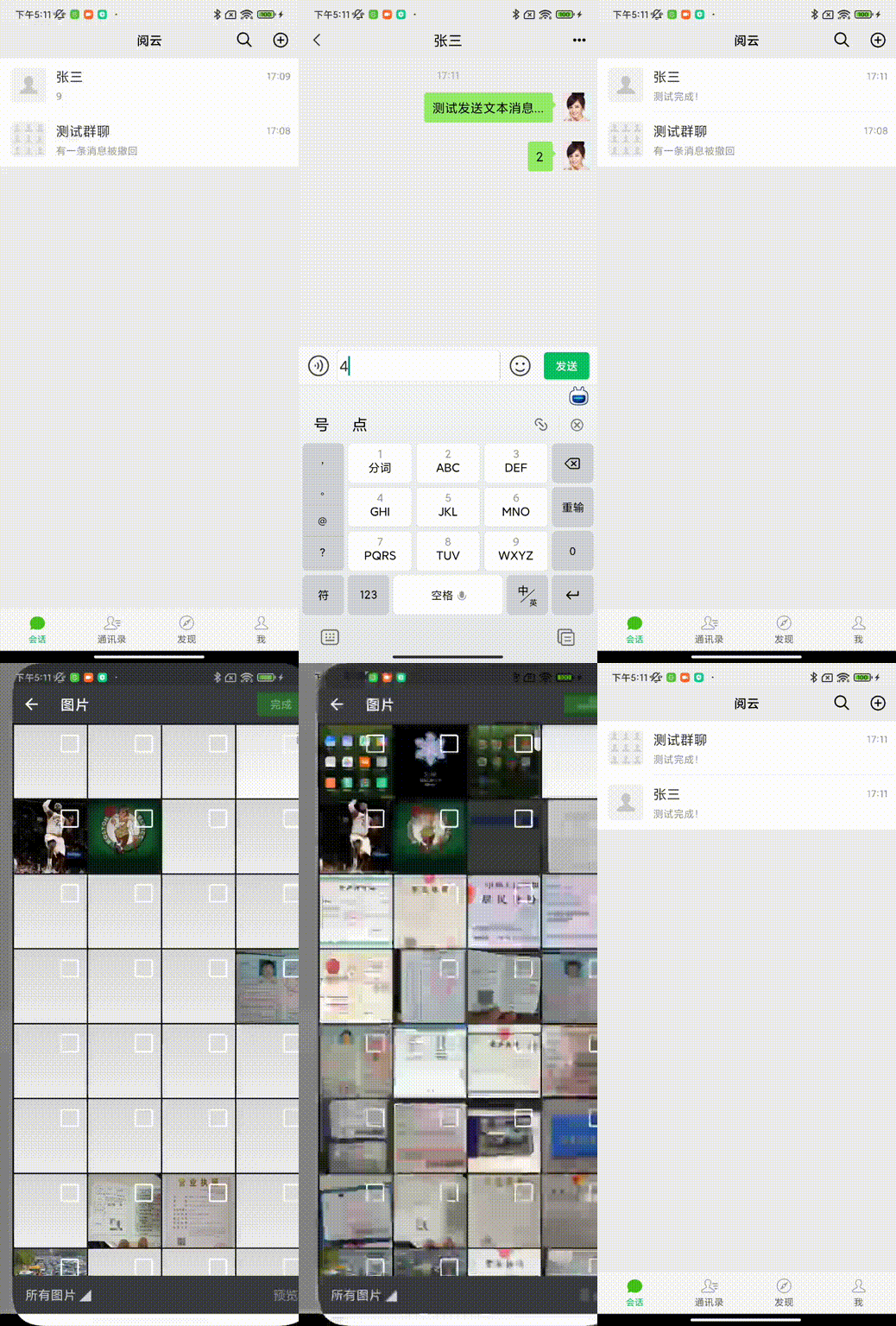
小结
以上就是利用uiautomator2结合PO模式测试移动端APP的一次实践,介绍了:
- PO模式相关概念:六大原则、设计模式、PO封装元素组成、业内常见的分层模型
- GUI自动化测试:为什么要做自动化即自动化的利弊、什么样的项目适合做自动化
- APP自动化测试实践:如何设计项目结构、封装页面基类、定义页面对象、编写测试用例
当然,你还可以借助业内常见的一些PO库,如page_objects,从而更加简便地设计测试框架、组织用例等,但核心思想一直不变,都是为了实现代码逻辑和业务逻辑分离,从而达到灵活复用、以不变应万变的目的。
更多测试开发实战干货,欢迎扫码关注!

边栏推荐
猜你喜欢

【勇敢饭饭,不怕刷题之链表】链表反转的几种情况

What is an abstract class

Get started quickly and conquer three different distributed architecture calling schemes
今天面了个腾讯拿38K出来的大佬,让我见识到了基础的天花板

CPU多级缓存与缓存一致性

Alibaba最新神作!耗时182天肝出来1015页分布式全栈手册太香了

接口定义与实现

Emulate stm32 directly with proteus - the programmer can be completely discarded

2022年裁员潮,失业程序员何去何从?

基于UiAutomator2+PageObject模式开展APP自动化测试实战

随机推荐
Codeforces 814 C. An impassioned circulation of affection (dp)
"Time Series Database" uses cassandra to scan time series data
LeetCode_628_三个数的最大乘积
Programmers pursue technology to consolidate basic learning route suggestions
ISO9001在讲什么?过程方法和风险思维
2022年裁员潮,失业程序员何去何从?
学长告诉我,大厂MySQL都是通过SSH连接的
接口定义与实现
Weilai-software development engineer side record
HDU 1520 Anniversary party (树型dp)
8月份DB-Engines 数据库排行榜最新战况
OSSCore 开源解决方案介绍
【勇敢饭饭,不怕刷题之链表】链表倒数节点问题
动作捕捉系统用于室内组合定位技术研究
用proteus直接仿真stm32-可以完全丢弃编程器
Pycharm终端出现PS问题、conda或activate不是内部命令问题..
技能大赛训练题:组策略一
开发模式对测试的影响
L2 applications from a product perspective: why is it a playground?
Hangdian Multi-School-Loop-(uncertainty greedy + line segment tree)