当前位置:网站首页>可视化之路(十一)matplotlib颜色详解
可视化之路(十一)matplotlib颜色详解
2022-04-23 06:17:00 【小猪猪家的大猪猪】
可视化之路(十一)matplotlib颜色详解
一.前言
matplotlib库是当前最为流行的数据可视化库,他支持相当多的颜色选择,接下来将详细介绍matplotlib库支持的各种颜色输入。
二.支持的颜色
-
2.1封闭区间 [0, 1] 中浮点值的 RGB 或 RGBA(红、绿、蓝、alpha)元组。
举例:(0.1, 0.2, 0.54),(0.1, 0.5, 0.2, 0.6)
-
不区分大小写的十六进制 RGB 或 RGBA 字符串。
举例:’#0f0f0f’或者’#0f0f0f80’
-
不区分大小写的 RGB 或 RGBA 字符串等效于重复字符的十六进制速记。
举例:’#abc’ 作为 ‘#aabbcc’和’#fb1’ 作为 ‘#ffbb11’
-
灰度值的闭区间浮点值的字符串表示形式。
- 0 :作为黑色
- 1:作为白色
- 0.8 :作为浅灰色
-
一些基本颜色的单字符速记符号。
'b'如蓝色'g'作为绿色'r'作为红色'c'作为青色'm'洋红色'y'作为黄色'k'作为黑色'w'作为白色
-
不区分大小写的 X11/CSS4 颜色名称,(不含空格)
举例:
'aquamarine'和'mediumseagreen' -
来自xkcd 的不区分大小写的颜色名称, 带有
'xkcd:'前缀。举例:
'xkcd:sky blue'和'xkcd:eggshell' -
来自“T10”分类调色板的不区分大小写的 Tableau 颜色。
'tab:blue''tab:orange''tab:green''tab:red''tab:purple''tab:brown''tab:pink''tab:gray''tab:olive''tab:cyan'
-
“CN”颜色规范。
'C0''C1'
matplotlib计算透明度公式:
R G B n e w = R G B b e l o w ∗ ( 1 − α ) + R G B a r t i s t ∗ α RGB_{new} = RGB_{below} * (1 - \alpha) + RGB_{artist} * \alpha RGBnew=RGBbelow∗(1−α)+RGBartist∗α
三.实例
3.1X11/CSS4 与 xkcd 颜色对比
完整代码:
import matplotlib.colors as mcolors
import matplotlib.patches as mpatch
import matplotlib.pyplot as plt

overlap = {
    name for name in mcolors.CSS4_COLORS
           if f'xkcd:{
      name}' in mcolors.XKCD_COLORS}

fig = plt.figure(figsize=[9, 5])
ax = fig.add_axes([0, 0, 1, 1])

n_groups = 3
n_rows = len(overlap) // n_groups + 1

for j, color_name in enumerate(sorted(overlap)):
    css4 = mcolors.CSS4_COLORS[color_name]
    xkcd = mcolors.XKCD_COLORS[f'xkcd:{
      color_name}'].upper()

    # Pick text colour based on perceived luminance.
    rgba = mcolors.to_rgba_array([css4, xkcd])
    luma = 0.299 * rgba[:, 0] + 0.587 * rgba[:, 1] + 0.114 * rgba[:, 2]
    css4_text_color = 'k' if luma[0] > 0.5 else 'w'
    xkcd_text_color = 'k' if luma[1] > 0.5 else 'w'

    col_shift = (j // n_rows) * 3
    y_pos = j % n_rows
    text_args = dict(fontsize=10, weight='bold' if css4 == xkcd else None)
    ax.add_patch(mpatch.Rectangle((0 + col_shift, y_pos), 1, 1, color=css4))
    ax.add_patch(mpatch.Rectangle((1 + col_shift, y_pos), 1, 1, color=xkcd))
    ax.text(0.5 + col_shift, y_pos + .7, css4,
            color=css4_text_color, ha='center', **text_args)
    ax.text(1.5 + col_shift, y_pos + .7, xkcd,
            color=xkcd_text_color, ha='center', **text_args)
    ax.text(2 + col_shift, y_pos + .7, f' {
      color_name}', **text_args)

for g in range(n_groups):
    ax.hlines(range(n_rows), 3*g, 3*g + 2.8, color='0.7', linewidth=1)
    ax.text(0.5 + 3*g, -0.3, 'X11/CSS4', ha='center')
    ax.text(1.5 + 3*g, -0.3, 'xkcd', ha='center')

ax.set_xlim(0, 3 * n_groups)
ax.set_ylim(n_rows, -1)
ax.axis('off')

plt.show()
效果如下:

3.2CN颜色选择
Matplotlib 在绘制时将“CN”颜色转换为 RGBA。完整代码如下:
import numpy as np
import matplotlib.pyplot as plt
import matplotlib as mpl

th = np.linspace(0, 2*np.pi, 128)


def demo(sty):
    mpl.style.use(sty)
    fig, ax = plt.subplots(figsize=(3, 3))

    ax.set_title('style: {!r}'.format(sty), color='C0')

    ax.plot(th, np.cos(th), 'C1', label='C1')
    ax.plot(th, np.sin(th), 'C2', label='C2')
    ax.legend()


demo('default')
demo('seaborn')
效果如下:


四.参考
版权声明
本文为[小猪猪家的大猪猪]所创,转载请带上原文链接,感谢
https://blog.csdn.net/pcx171/article/details/122233271
边栏推荐
猜你喜欢

关于短视频平台框架搭建与技术选型探讨

Patrol inspection intercom communication system in power industry

传输层重要知识(面试,复试,期末)

使用compressorjs压缩图片,优化功能,压缩所有格式的图片

Gather, unsqueeze and other operators when PTH is converted to onnx
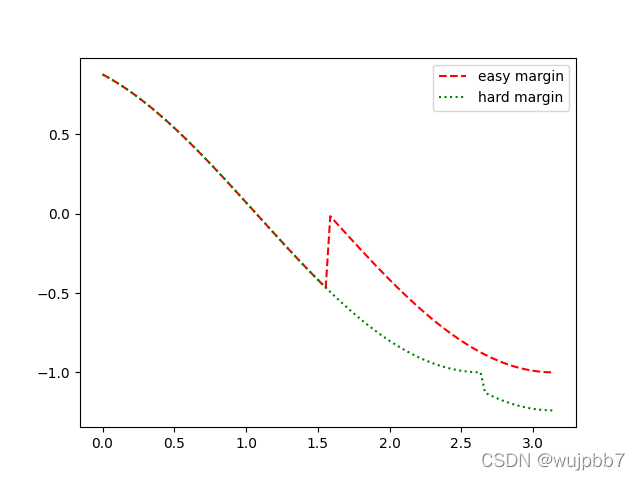
Draw margin curve in arcface
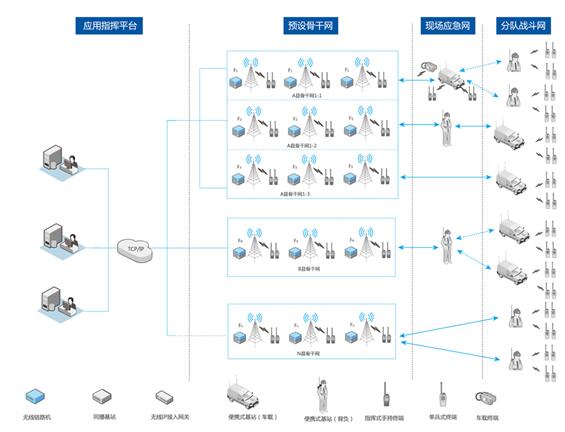
Urban emergency management - urban emergency communication command and dispatching system

AUTOSAR从入门到精通100讲(八十六)-UDS服务基础篇之2F

EMMC/SD学习小记

基于openmv的无人机Apriltag动态追踪降落完整项目资料(labview+openmv+apriltag+正点原子四轴)
随机推荐
美摄助力百度“度咔剪辑”,让知识创作更容易
DMR system solution of Kaiyuan MINGTING hotel of Fengqiao University
自组网灵活补盲|北峰油气田勘测解决方案
【无标题】PID控制TT编码器电机
美摄科技起诉天目传媒使用火山引擎侵权代码的声明
SSL / TLS application example
【51单片机交通灯仿真】
armv8m(cortex m33) MPU实战
Intuitive understanding of torch nn. Unfold
SHA512/384 原理及C语言实现(附源码)
CMSIS CM3源码注解
AMBA协议学习小记
Gather, unsqueeze and other operators when PTH is converted to onnx
初探智能指针之std::shared_ptr、std::unique_ptr
GIS实战应用案例100篇(三十四)-拼接2020globeland30
连接orcale
机器视觉系列(01)---综述
南方投资大厦SDC智能通信巡更管理系统
PyTorch 19. Differences and relations of similar operations in pytorch
美摄科技云剪辑,助力哔哩哔哩使用体验再升级