当前位置:网站首页>MySQL 进阶 视图 -- 视图介绍、视图CRUD语法、检查选项(CASCADED、LOCAL)、视图的更新、视图作用、视图案例
MySQL 进阶 视图 -- 视图介绍、视图CRUD语法、检查选项(CASCADED、LOCAL)、视图的更新、视图作用、视图案例
2022-04-22 06:35:00 【CodeJiao】
文章目录
1. 视图
1.1 视图介绍
视图(View)是一种虚拟存在的表。视图中的数据并不在数据库中实际存在,行和列数据来自定义视图的查询中使用的表,并且是在使用视图时动态生成的。
通俗的讲,视图只保存了查询的SQL逻辑,不保存查询结果。所以我们在创建视图的时候,主要的工作就落在创建这条SQL查询语句上。
1.2 语法
数据准备:
# 创建student表
create table student
(
    id   int auto_increment primary key comment '主键ID',
    name varchar(10) comment '姓名',
    no   varchar(10) comment '学号'
) comment '学生表';

# 往student表里面插入数据
insert into student
values (null, '黛绮丝', '2000100101'),
       (null, '谢逊', '2000100102'),
       (null, '殷天正', '2000100103'),
       (null, '韦一笑', '2000100104');

# 创建course表
create table course
(
    id   int auto_increment primary key comment '主键ID',
    name varchar(10) comment '课程名称'
) comment '课程表';

# 往课程表里面添加数据
insert into course
values (null, 'Java'),
       (null, 'PHP'),
       (null, 'MySQL'),
       (null, 'Hadoop');

# 创建student_course中间表
create table student_course
(
    id        int auto_increment comment '主键' primary key,
    studentid int not null comment '学生ID',
    courseid  int not null comment '课程ID',
    constraint fk_courseid foreign key (courseid) references course (id),
    constraint fk_studentid foreign key (studentid) references student (id)
) comment '学生课程中间表';

# 往中间表里面插入数据
insert into student_course
values (null, 1, 1),
       (null, 1, 2),
       (null, 1, 3),
       (null, 2, 2),
       (null, 2, 3),
       (null, 3, 4);
1.2.1 创建视图
CREATE [OR REPLACE] VIEW 视图名称[(列名列表)] AS SELECT语句 [ WITH [ CASCADED | LOCAL ] CHECK OPTION ];
示例:
# 创建名为 stu_v_1 的视图:数据来源于 student 表 id <= 10 的 id, name信息
create or replace view stu_v_1 as
select id, name
from student
where id <= 10;
1.2.2 查询视图
查看创建视图语句:SHOW CREATE VIEW 视图名称;

查看视图数据:SELECT * FROM 视图名称 ...... ;
示例1:查询stu_v_1视图的创建语句
# 查询stu_v_1视图的创建语句
show create view stu_v_1;

展开后:
CREATE ALGORITHM = UNDEFINED DEFINER =`root`@`%` SQL SECURITY DEFINER VIEW `stu_v_1` AS
select `student`.`id` AS `id`, `student`.`name` AS `name`
from `student`
where (`student`.`id` <= 10);
示例2:查询stu_v_1视图里面的数据
select *
from stu_v_1;

select *
from stu_v_1
where id < 3;

说明:
如果基本表结构发生变化甚至被删除,则查询视图也会报错。
1.2.3 修改视图
方式一:CREATE [OR REPLACE] VIEW 视图名称[(列名列表)] AS SELECT语句 [ WITH [ CASCADED | LOCAL ] CHECK OPTION ]

方式二:ALTER VIEW 视图名称[(列名列表)] AS SELECT语句 [ WITH [ CASCADED | LOCAL ] CHECK OPTION ]
示例:
# 第一种方式
create or replace view stu_v_1 as
select id, name, no
from student
where id <= 10;

# 第二种方式
alter view stu_v_1 as select id, name, no
                      from student
                      where id <= 10;
1.2.4 删除视图
DROP VIEW [IF EXISTS] 视图名称 [,视图名称] ...
示例:
# 删除新创建的stu_v_1视图
drop view if exists stu_v_1;
1.2.5 插入数据说明
上述我们演示了,视图应该如何创建、查询、修改、删除,那么我们能不能通过视图来插入、更新数据呢? 接下来,做一个测试。
# 以student表id <= 10的id, name作为初始数据创建stu_v_1视图
create or replace view stu_v_1 as
select id, name
from student
where id <= 10;
# 查询视图中包含的数据
select *
from stu_v_1;
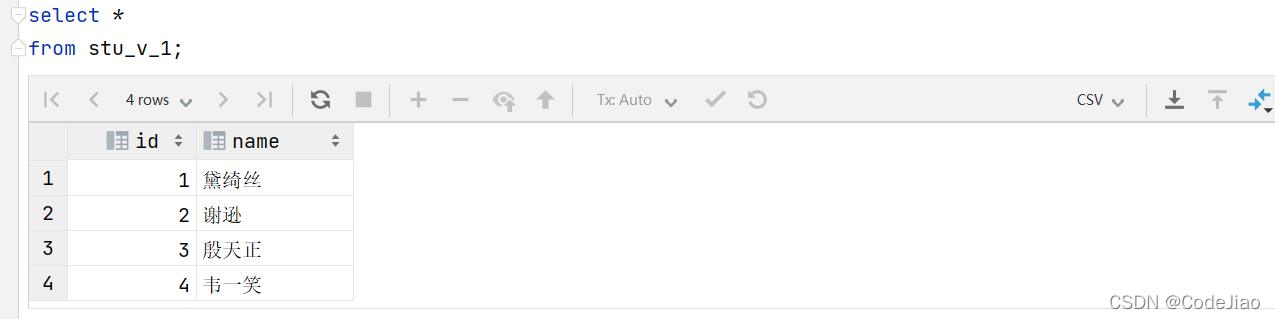
# 往视图新增2条数据
insert into stu_v_1
values (6, 'Tom'),
       (17, 'Tom22');
# 再次查询视图中包含的数据
select *
from stu_v_1;
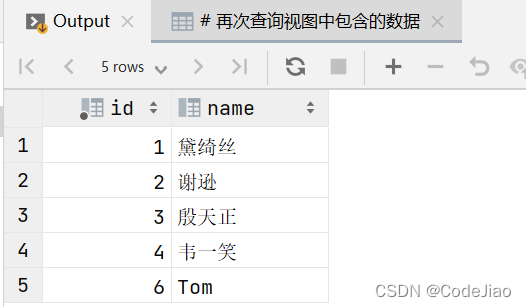
因为我们在创建视图的时候,指定的条件为 id<=10,id为17的数据,是不符合条件的,所以没有查询出来,但是这条数据确实是已经成功的插入到了基表中。
# 查询基表的数据
select *
from student;

如果我们定义视图时,如果指定了条件,然后我们在插入、修改、删除数据时,是否可以做到必须满足条件才能操作,否则不能够操作呢? 答案是可以的,这就需要借助于视图的检查选项了。
1.3 检查选项
当使用WITH CHECK OPTION子句创建视图时,MySQL会通过视图检查正在更改的每个行,例如 插入,更新,删除,以使其符合视图的定义。 MySQL允许基于另一个视图创建视图,它还会检查依赖视图中的规则以保持一致性。为了确定检查的范围,mysql提供了两个选项: CASCADED 和 LOCAL,默认值为 CASCADED 。
1.3.1 CASCADED(级联)
比如,v2视图是基于v1视图的,如果在v2视图创建的时候指定了检查选项为 cascaded,但是v1视图创建时未指定检查选项。 则在执行检查时,不仅会检查v2,还会级联检查v2的关联视图v1。

1.3.2 LOCAL(本地)
比如,v2视图是基于v1视图的,如果在v2视图创建的时候指定了检查选项为 local ,但是v1视图创建时未指定检查选项。 则在执行检查时,只会检查v2,不会检查v2的关联视图v1。

1.4 视图的更新
要使视图可更新,视图中的行与基础表中的行之间必须存在一对一的关系(1行基础表数据对应视图里面的一行数据,不会出现类似2行基础表数据对应视图里面的一行数据的情况)。如果视图包含以下任何一项,则该视图不可更新:
- 聚合函数或窗口函数(
SUM()、MIN()、MAX()、COUNT()等) DISTINCTGROUP BYHAVINGUNION或者UNION ALL
示例演示:
# 以基础表student的count()函数为基础创建视图
create view stu_v_count as
select count(*)
from student;
上述的视图中,就只有一个单行单列的数据,如果我们对这个视图进行更新或插入的,将会报错。
insert into stu_v_count
values (10);

1.5 视图作用
- 简单:视图不仅可以简化用户对数据的理解,也可以简化他们的操作。那些被经常使用的查询可以被定义为视图,从而使得用户不必为以后的操作每次指定全部的条件。
- 安全:数据库可以授权,但不能授权到数据库特定行和特定的列上。通过视图用户只能查询和修改他们所能见到的数据。(保证敏感数据的安全性)
- 数据独立:视图可帮助用户屏蔽真实表结构变化带来的影响。(当用户对数据库进行增加新的关系或添加新的字段等数据库重构行为时,会影响应用程序的运行。使用视图构造数据库重构之前的逻辑关系,可以保持用户应用程序不变,从而保持了数据逻辑独立性。)
1.6 视图案例
数据准备:
create table tb_user
(
    id         int primary key auto_increment comment '主键',
    name       varchar(50) not null comment '用户名',
    phone      varchar(11) not null comment '手机号',
    email      varchar(100) comment '邮箱',
    profession varchar(11) comment '专业',
    age        tinyint unsigned comment '年龄',
    gender     char(1) comment '性别 , 1: 男, 2: 女',
    status     char(1) comment '状态',
    createtime datetime comment '创建时间'
) comment '系统用户表';

INSERT INTO tb_user (name, phone, email, profession, age, gender, status, createtime)
VALUES ('吕布', '17799990000', '[email protected]', '软件工程', 23, '1', '6', '2001-02-02 00:00:00');
INSERT INTO tb_user (name, phone, email, profession, age, gender, status, createtime)
VALUES ('曹操', '17799990001', '[email protected]', '通讯工程', 33, '1', '0', '2001-03-05 00:00:00');
INSERT INTO tb_user (name, phone, email, profession, age, gender, status, createtime)
VALUES ('赵云', '17799990002', '[email protected]', '英语', 34, '1', '2', '2002-03-02 00:00:00');
INSERT INTO tb_user (name, phone, email, profession, age, gender, status, createtime)
VALUES ('孙悟空', '17799990003', '[email protected]', '工程造价', 54, '1', '0', '2001-07-02 00:00:00');
INSERT INTO tb_user (name, phone, email, profession, age, gender, status, createtime)
VALUES ('花木兰', '17799990004', '[email protected]', '软件工程', 23, '2', '1', '2001-04-22 00:00:00');
INSERT INTO tb_user (name, phone, email, profession, age, gender, status, createtime)
VALUES ('大乔', '17799990005', '[email protected]', '舞蹈', 22, '2', '0', '2001-02-07 00:00:00');
INSERT INTO tb_user (name, phone, email, profession, age, gender, status, createtime)
VALUES ('露娜', '17799990006', '[email protected]', '应用数学', 24, '2', '0', '2001-02-08 00:00:00');
INSERT INTO tb_user (name, phone, email, profession, age, gender, status, createtime)
VALUES ('程咬金', '17799990007', '[email protected]', '化工', 38, '1', '5', '2001-05-23 00:00:00');
INSERT INTO tb_user (name, phone, email, profession, age, gender, status, createtime)
VALUES ('项羽', '17799990008', '[email protected]', '金属材料', 43, '1', '0', '2001-09-18 00:00:00');
INSERT INTO tb_user (name, phone, email, profession, age, gender, status, createtime)
VALUES ('白起', '17799990009', '[email protected]', '机械工程及其自动 化', 27, '1', '2', '2001-08-16 00:00:00');
INSERT INTO tb_user (name, phone, email, profession, age, gender, status, createtime)
VALUES ('韩信', '17799990010', '[email protected]', '无机非金属材料工 程', 27, '1', '0', '2001-06-12 00:00:00');
INSERT INTO tb_user (name, phone, email, profession, age, gender, status, createtime)
VALUES ('荆轲', '17799990011', '[email protected]', '会计', 29, '1', '0', '2001-05-11 00:00:00');
INSERT INTO tb_user (name, phone, email, profession, age, gender, status, createtime)
VALUES ('兰陵王', '17799990012', '[email protected]', '工程造价', 44, '1', '1', '2001-04-09 00:00:00');
INSERT INTO tb_user (name, phone, email, profession, age, gender, status, createtime)
VALUES ('狂铁', '17799990013', '[email protected]', '应用数学', 43, '1', '2', '2001-04-10 00:00:00');
INSERT INTO tb_user (name, phone, email, profession, age, gender, status, createtime)
VALUES ('貂蝉', '17799990014', '[email protected]', '软件工程', 40, '2', '3', '2001-02-12 00:00:00');
INSERT INTO tb_user (name, phone, email, profession, age, gender, status, createtime)
VALUES ('妲己', '17799990015', '[email protected]', '软件工程', 31, '2', '0', '2001-01-30 00:00:00');
INSERT INTO tb_user (name, phone, email, profession, age, gender, status, createtime)
VALUES ('芈月', '17799990016', '[email protected]', '工业经济', 35, '2', '0', '2000-05-03 00:00:00');
INSERT INTO tb_user (name, phone, email, profession, age, gender, status, createtime)
VALUES ('嬴政', '17799990017', '[email protected]', '化工', 38, '1', '1', '2001-08-08 00:00:00');
INSERT INTO tb_user (name, phone, email, profession, age, gender, status, createtime)
VALUES ('狄仁杰', '17799990018', '[email protected]', '国际贸易', 30, '1', '0', '2007-03-12 00:00:00');
INSERT INTO tb_user (name, phone, email, profession, age, gender, status, createtime)
VALUES ('安琪拉', '17799990019', '[email protected]', '城市规划', 51, '2', '0', '2001-08-15 00:00:00');
INSERT INTO tb_user (name, phone, email, profession, age, gender, status, createtime)
VALUES ('典韦', '17799990020', '[email protected]', '城市规划', 52, '1', '2', '2000-04-12 00:00:00');
INSERT INTO tb_user (name, phone, email, profession, age, gender, status, createtime)
VALUES ('廉颇', '17799990021', '[email protected]', '土木工程', 19, '1', '3', '2002-07-18 00:00:00');
INSERT INTO tb_user (name, phone, email, profession, age, gender, status, createtime)
VALUES ('后羿', '17799990022', '[email protected]', '城市园林', 20, '1', '0', '2002-03-10 00:00:00');
INSERT INTO tb_user (name, phone, email, profession, age, gender, status, createtime)
VALUES ('姜子牙', '17799990023', '[email protected]', '工程造价', 29, '1', '4', '2003-05-26 00:00:00');
1.6.1 案例1
为了保证数据库表的安全性,开发人员在操作tb_user表时,只能看到的用户的基本字段,屏蔽手机号和邮箱两个字段。
# 创建视图 屏蔽手机号和邮箱两个字段
create view tb_user_view as
select id, name, profession, age, gender, status, createtime
from tb_user;
我们去查看视图里面的数据:
# 查询视图里面的数据
select *
from tb_user_view;

1.6.2 案例2
查询每个学生所选修的课程(三张表联查),这个功能在很多的业务中都有使用到,为了简化操作,定义一个视图。
# 创建视图
create view tb_stu_course_view as
select s.name student_name, s.no student_no, c.name course_name
from student s,
     student_course sc,
     course c
where s.id = sc.studentid
  and sc.courseid = c.id;
我们去查看视图里面的数据:
# 查询视图里面的数据
select *
from tb_stu_course_view;

版权声明
本文为[CodeJiao]所创,转载请带上原文链接,感谢
https://blog.csdn.net/I_r_o_n_M_a_n/article/details/124287080
边栏推荐
- The exchange meeting on the interpretation of the data security law and the application of security and confidentiality technology was successfully held in Beijing
- Product test with payment function
- WordPress personal website construction
- 递归-输出连续递增的数
- LoadRunner-性能测试工具
- How to connect Kunlun on state │ G series screen with Siemens 300 domestic MPI adapter
- LDAP user login authentication verification and query
- TCP三次握手和四次挥手
- jmeter 参数请求类型
- 八阿哥纪事【四】
猜你喜欢

jmeter_mysql 数据库连接

utgard连接opcserver报错Caused by: org.jinterop.dcom.common.JIRuntimeException: Access is denied. [0x800

ADB advanced commands
华为手机adb devices连接设备为空

jmeter 参数请求类型
Web automation: 5.2 selenium mouse operation principle: actionchains delay call
IDE-IDEA-问题

配置自动实现CURD项目
Monkey introduction operation

Understanding of transformer mechanism

随机推荐
Help 2021 Hangzhou network security publicity week | collection of wonderful activities of Shiping information
Understanding of transformer mechanism
OpenFeign的细节展示
The JMeter interface requests a security authentication solution
通用测试技术【二】测试方法
MYSQL04_算术、逻辑、位、运算符、运算符对应的习题
Shiping information has successfully passed CMMI Level 3 certification
配置表及页面信息 自动生成CURD操作页面
Web automation: 8.1 how to send JS instructions in the browser
doc、pdf转换为swf文件预览
mysql数据库,索引字符集不一致,slowsql慢查询,接口超时问题
实验5 组件及事件处理
Web automation: 4.2 selenium how to switch iframe windows (3 methods)
ADB advanced commands
Use SSS framework to build a simple dormitory management system
jmeter 参数请求类型
华为手机adb devices连接设备为空
web自动化:6.selenium下拉选择框的操作-Select
monkey
Under the window environment, VirtualBox loads the virtual machine created in the mobile hard disk