当前位置:网站首页>MySQL JDBC programming
MySQL JDBC programming
2022-04-23 02:25:00 【Bug Guo】
Catalog
The objectives of this chapter
- master
JDBCThe concept and working principle of - Learn how to use
javaMediumJDBCProgramming
Database programming prerequisites
- programing language , Such as
Java,C、C++、Pythonetc. - database , Such as
Oracle,MySQL,SQL Serveretc. - Database driver package : Different databases , Different database driver packages are provided for different programming languages , Such as :
MySQLProvidesJavaDriver packagemysql-connector-java, Need to be based onJavaoperationMySQLThat is, you need the driver package . alike , Based onJavaoperation Oracle Database is requiredOracleDatabase driver packageojdbc.
You can see that we have all the conditions for meaning !!!
We learned the programming languagejava, databaseMySQL, At this point, we only need a database driver package to complete database programming
What is a database driver package ?
In fact, each database is provided to the programming language API( function , Interface ), So that the language can realize the basic operation of the database through the driver package !!!
But each different database has its own driver package !!!
It's like you buy different printers , Need different drivers !!!
java Database programming :JDBC
But we know that java I've always been a bull !! He was born to solve cross platform problems !!!
He didn't like it when he heard it , Why , You have so many databases , Are different driver packages ! It's against
therefore java Thought of a unified plan ! Let's make a JDBC Driver packages for different databases can be docked !!!
JDBC Use
JDBC download ! We can download it from the official website !!
But we java The community has its own separate download tool , It's equivalent to a mobile app store !!
Just search and download !!!
maven The central warehouse

Use cases
How to use JDBC stay java Programming in ?
We are IDEA Operation in !
- First we need to create a project !
- Add a folder to the project , Then download the just downloaded
JDBCjar Package import project !!!
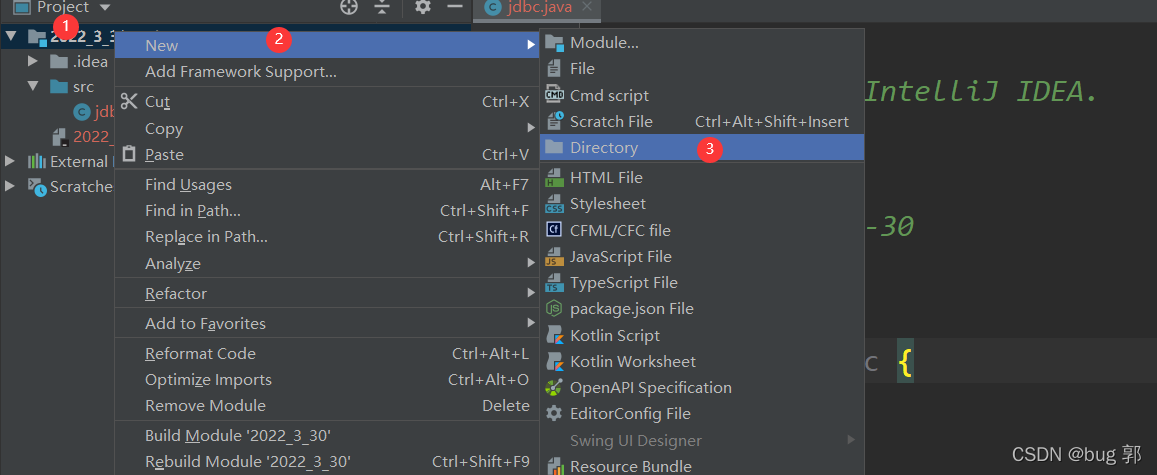
establish lib Folder , take jar The package is copied

Add as Library
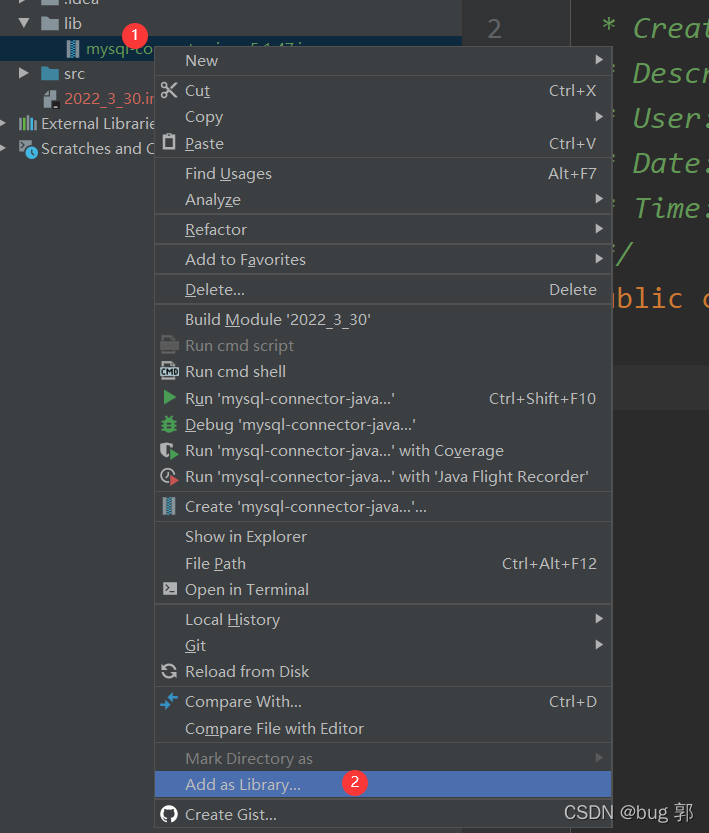
When we can see so many folders , Then we import successfully !!!

- Write code
JDBC Basic flow !
establish DataSource object , This object describes where the database server is !

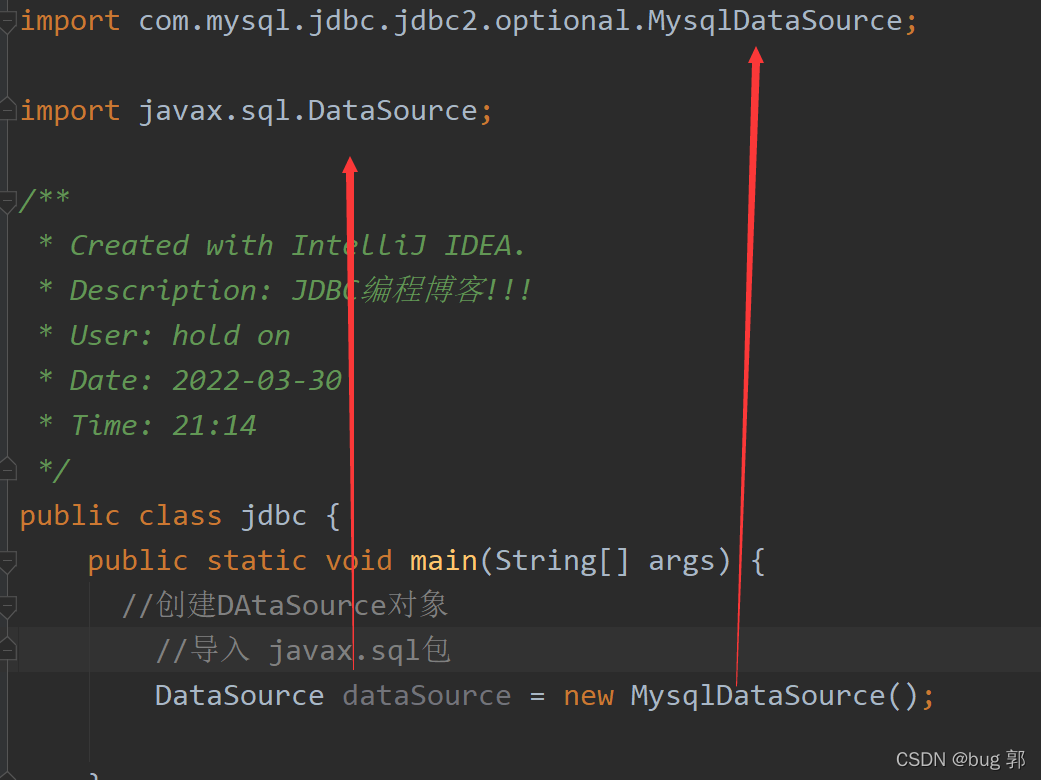
import com.mysql.jdbc.jdbc2.optional.MysqlDataSource;
import javax.sql.DataSource;
public class jdbc {

  public static void main(String[] args) {

    // establish DAtaSource object
      // Import  javax.sql package
      DataSource dataSource = new MysqlDataSource();
      // Describe where the database server is
      //  Set the address of the database
      //jdbc:mysql://127.0.0.1:3306/java_2022?characterEncoding=utf8&useSSL=false
      ((MysqlDataSource)dataSource).setUrl("jdbc:mysql://127.0.0.1:3306/java_2022?characterEncoding=utf8&useSSL=false");
      // Set the login database user name
      ((MysqlDataSource)dataSource).setUser("root");
      // Set the database login password
      ((MysqlDataSource)dataSource).setPassword("123456");
  }
}
Why our dataSource Objects need to be cast ?
Because if we just create one MysqlDataSource Object words , If we change a database, the compatibility of the code will be low , There are many places that need this ! And use type cast , Just change part of the code !
setUrl
url refer to uniform/universal resource locator Unique resource location address , It's what we usually call a website !
jdbc:mysql://127.0.0.1:3306/java_2022?characterEncoding=utf8&useSSL=false
What does this string of characters mean ?
jdbc:mysql Express mysql jdbc The website of
//127.0.0.1 mysql The host of the server is IP Address ip The address describes the location of a host on the network , We can also use localhost Instead of , Because at present, our database server and client host are the same
3306 Port number Access which program on your host ,3306 Express mysql The default port number of the server !
java_2022 The name of the database you need to access
characterEncoding=utf8 Specify character set encoding ! Or is it utf8b
&useSSL=false Whether encryption during transmission is required , Generally not encrypted
setUser
Set the username
setUser("root");
root It's the administrator user , We can also have other users
setPassword
setPasssword("123456");
This is the input Mysql The password of the server !
After writing the above code , We have already created an object !
It's like we've assigned a task !!!
But we didn't perform this task at this time
We need to connect to the database to access it !!
How to connect to the database server ?
dataSource There is a method under the object , Can be connected mysql database server !
Connection connection = dataSource.getConnection();
Notice the Connection Class is java.sql.Connection Class under package !!!
We have connected to the database, so we can operate the contents of the database !!!
String sql = "insert into student values(' Lyu3 bu4 ',101)";
We will sql The statement is written as a string !!!
PreparedStatement statement = connection.prepareStatement(sql);
utilize connection Object to create a statement object !
PreparedStatement statement = connection.prepareStatement(sql);
We will sql Pass in statement Statement object !!! But no operation was performed
int ret = statement.executeUpdate();
Execute the operation statement !!!
After this statement is executed , Then our database will execute sql sentence !!!
And our return value ret Indicates that several rows of data are affected , Just like our prompt after successful execution on the command line !!!
 We can print
 ret Value to know how many columns are affected ! Or print statement You can see the specific sql operation !!!

We will sql completion of enforcement , You also need to disconnect the database and PrepareStatement Release resources !!!
close resource
statement.close();
connection.close();
Because we connect to the database first , In the creation of statement object !
So we have to first closestatement, Again close connection!!!
For example, we turn on the washing machine , Then put the clothes !!!
After washing, take the clothes first and then turn off the washing machine !!!
We enclose the complete code !!!
import com.mysql.jdbc.jdbc2.optional.MysqlDataSource;
import javax.sql.DataSource;
import java.sql.Connection;
import java.sql.PreparedStatement;
import java.sql.SQLException;
public class jdbc {

    public static void main(String[] args) throws SQLException{

      // establish DataSource object
        // It's equivalent to assigning a task
        // Import  javax.sql package
        DataSource dataSource = new MysqlDataSource();
        // Describe where the database server is
        //  Set the address of the database
        //jdbc:mysql://127.0.0.1:3306/java_2022?characterEncoding=utf8&useSSL=false
        ((MysqlDataSource)dataSource).setUrl("jdbc:mysql://127.0.0.1:3306/java_2022?characterEncoding=utf8&useSSL=false");
        //((MysqlDataSource)dataSource).setUrl();
        // Set the login database user name
        ((MysqlDataSource)dataSource).setUser("root");
        // Set the database login password
        ((MysqlDataSource)dataSource).setPassword("123456");

        // Connect to database !  It's equivalent to performing this task
        // Maybe the database connection failed , So deal with exceptions !!!
        // there Connection Class is choice java.sql Under bag !!!!
        Connection connection = dataSource.getConnection();

        // Here we can write our database sql Code.

        // We are student  Insert Lubu's grades in the table
        // Let's start with sql character string
        String sql = "insert into student values(' Lyu3 bu4 ',101)";
        // And then sql perform
        // there PreparedStatement  It's also java.sql It's a bag !!!
        PreparedStatement statement = connection.prepareStatement(sql);

        int ret = statement.executeUpdate(); // Database addition, deletion and modification operation !!!

        //statement.executeQuery();  Database query operation !!!


        System.out.println(ret);
        System.out.println("statement:"+statement);
        // close resource
        statement.close();
        connection.close();
    }
}
PreparedStatementclass
We know we can write it directly sql And then into PreparedStatement Object to perform !
But when we need to execute multiple sql
For example, when we need to insert the score information of multiple students !
Obviously, it is not scientific to write one by one !!!
Because every sentence is only different from the name and class !!!
How to improve
Scanner scanner = new Scanner(System.in);
        String name = scanner.nextLine(); // Enter a name
        int class_ = scanner.nextInt();   // Enter class
        String sql = "insert into student values(?,?)"; // Wildcards are used for names and classes  ?  Instead of
        // And then sql perform
        // there PreparedStatement  It's also java.sql It's a bag !!!
        PreparedStatement statement = connection.prepareStatement(sql);

        statement.setString(1,name); // Pass in the name in the first column
        statement.setInt(2,class_); // Pass in the class in the second column

        int ret = statement.executeUpdate(); // Database addition, deletion and modification operation !!!

Using wildcards ? We can enter the names and classes of different people !!!
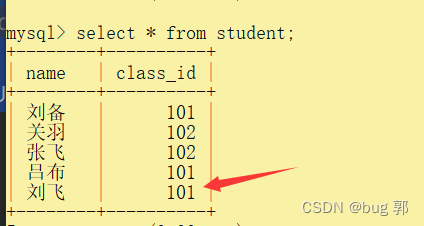
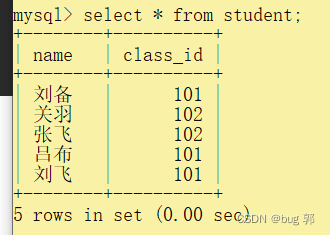
How to check the contents of a table ?
ResultSet ret = statement.executeQuery();// Database query operation !!!
utilize executeQuery(); We can return a table structure !!!
We can traverse the table structure !!!
String sql = "select * from student";
        // And then sql perform
        // there PreparedStatement  It's also java.sql It's a bag !!!
        PreparedStatement statement = connection.prepareStatement(sql);


        ResultSet ret = statement.executeQuery(); // Database query operation !!!
        // We need to save the queried data in ResultSet In the table !!!
        System.out.println("statement:"+statement);
        while (ret.next()){
     // Move the pointer cursor !!
            String name = ret.getString(1); // Get the data of the first column
            int class_ = ret.getInt(2);// Get the data of the second column
            System.out.println("name:"+name+" class:"+class_);
        }

版权声明
本文为[Bug Guo]所创,转载请带上原文链接,感谢
https://yzsam.com/2022/04/202204230222599290.html
边栏推荐
- Today will finally write system out. Println()
- Leetcode39 combined sum
- Wechat public platform test number application, authorized login function and single sign on using hbuilder X and wechat developer tools
- C # import details
- RT_ Thread ask and answer
- 每日一题冲刺大厂第十六天 NOIP普及组 三国游戏
- wordpress 调用指定页面内容详解2 get_children()
- php 2022年4月20面试题整理
- 006_ redis_ Sortedset type
- 用TensorFlow实现线性回归(包括过程中出现的问题及解决方法)
猜你喜欢

Fast and robust multi person 3D pose estimation from multiple views

The importance of ERP integration to the improvement of the company's system
009_ Redis_ Getting started with redistemplate

Heap overflow of kernel PWN basic tutorial

Gray scale range corresponding to colors (red, yellow, green, blue, purple, pink, brick red and magenta) in HSV color space

How many steps are there from open source enthusiasts to Apache directors?
005_redis_set集合
电源电路设计原来是这么回事

想体验HomeKit智能家居?不如来看看这款智能生态

012_ Access denied for user ‘root‘@‘localhost‘ (using password: YES)
随机推荐
Leetcode39 combined sum
JDBC cannot connect to MySQL, and the error is access denied for user 'root' @ '* * *' (using password: Yes)
Common formatting problems after word writing
每日一题冲刺大厂第十六天 NOIP普及组 三国游戏
89 régression logistique prédiction de la réponse de l'utilisateur à l'image de l'utilisateur
全局、獨享、局部路由守衛
【汇编语言】从最底层的角度理解“堆栈”
006_ redis_ Sortedset type
关于局域网浅谈
The importance of ERP integration to the improvement of the company's system
Talk about biology live broadcast: Dr. Wang Ziyuan, a lake view biology, exploring hepatitis B with gene therapy
Easyswool environment configuration
Day18 -- stack queue
Develop a chrome plug-in from 0 (2)
R language advanced | generalized vector and attribute analysis
007_Redis_Jedis连接池
假如404页面是这样的 | 每日趣闻
009_Redis_RedisTemplate入门
OJ daily practice - Finish
小程序 canvas 画布半圆环