当前位置:网站首页>编程记录——图片旋转函数scipy.ndimage.rotate()的简单使用和效果观察
编程记录——图片旋转函数scipy.ndimage.rotate()的简单使用和效果观察
2022-04-23 05:44:00 【umbrellalalalala】
一、矩阵上的效果
言简意赅地介绍下这个函数的使用方法:
import numpy as np
from scipy import ndimage

c = np.zeros([10, 10]).astype(int)
for i in range(10):
    for j in range(10):
        c[i][j] = 10 * i + j
d = ndimage.rotate(c, 60, reshape=False)
print(c)
print(d)
输出结果:
[[ 0  1  2  3  4  5  6  7  8  9]
 [10 11 12 13 14 15 16 17 18 19]
 [20 21 22 23 24 25 26 27 28 29]
 [30 31 32 33 34 35 36 37 38 39]
 [40 41 42 43 44 45 46 47 48 49]
 [50 51 52 53 54 55 56 57 58 59]
 [60 61 62 63 64 65 66 67 68 69]
 [70 71 72 73 74 75 76 77 78 79]
 [80 81 82 83 84 85 86 87 88 89]
 [90 91 92 93 94 95 96 97 98 99]]
[[ 0  0  7 17 27 36  0  0  0  0]
 [ 0  0 11 22 30 40 49 58  0  0]
 [ 0  6 16 25 35 44 53 62 71 80]
 [ 0 10 21 29 39 48 57 66 75 84]
 [ 5 16 24 34 43 52 61 70 79 89]
 [10 20 29 38 47 56 65 75 83 94]
 [15 24 33 42 51 60 70 78 89  0]
 [19 28 37 46 55 64 74 83 93  0]
 [ 0  0 41 50 59 69 77 88  0  0]
 [ 0  0  0  0 63 72 82 92  0  0]]
可以看出,经过d = ndimage.rotate(c, 60, reshape=False)后,d是由c逆时针旋转60度而得。
二、图片上的效果
这个方法可以使用在图片上面:
ph1 = ndimage.rotate(ph, 60, reshape=False)
plt.subplot(1, 2, 1)
plt.imshow(ph, cmap='gray')
plt.subplot(1, 2, 2)
plt.imshow(ph1, cmap='gray')
plt.show()
输出结果如下:
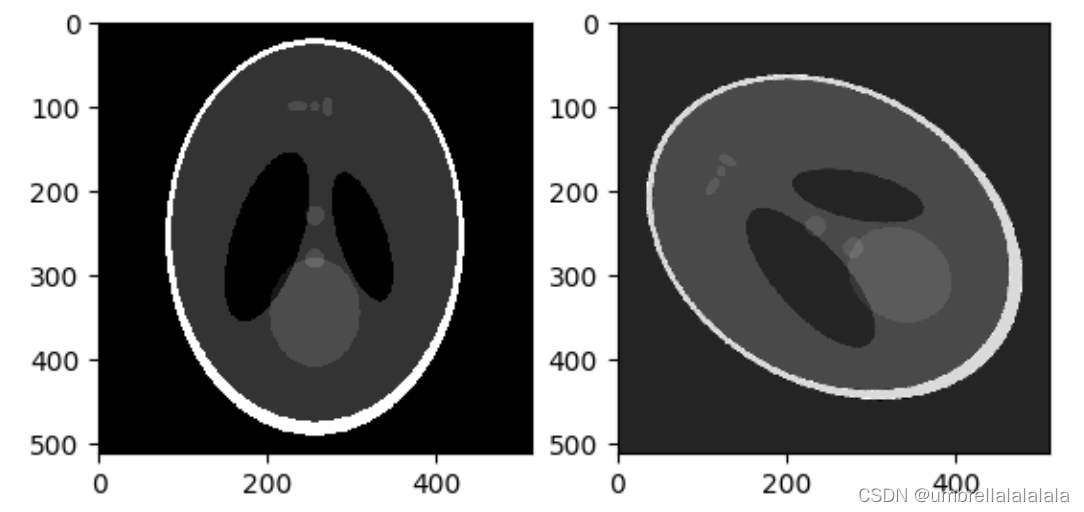
可见在调用ph1 = ndimage.rotate(ph, 60, reshape=False)后,右侧(ph1)是左侧(ph)逆时针旋转60度获得的。
版权声明
本文为[umbrellalalalala]所创,转载请带上原文链接,感谢
https://blog.csdn.net/umbrellalalalala/article/details/122042742
边栏推荐
- Shansi Valley P290 polymorphism exercise
- MySQL lock mechanism
- sklearn之 Gaussian Processes
- 解决报错:ImportError: IProgress not found. Please update jupyter and ipywidgets
- Pytorch学习记录(三):神经网络的结构+使用Sequential、Module定义模型
- poi生成excel,插入图片
- MySQL事务
- Anaconda安装PyQt5 和 pyqt5-tools后没有出现designer.exe的问题解决
- Insert picture in freemark
- Summary of redis classic interview questions 2022
猜你喜欢

给yarn配置国内镜像加速器
2 - software design principles

关于二叉树的遍历
![无监督去噪——[TMI2022]ISCL: Interdependent Self-Cooperative Learning for Unpaired Image Denoising](/img/cd/10793445e6867eeee613b6ba4b85cf.png)
无监督去噪——[TMI2022]ISCL: Interdependent Self-Cooperative Learning for Unpaired Image Denoising

Latex快速入门

Pytorch——数据加载和处理

PyQy5学习(四):QAbstractButton+QRadioButton+QCheckBox
2 - principes de conception de logiciels

Multithreading and high concurrency (3) -- synchronized principle

一文读懂当前常用的加密技术体系(对称、非对称、信息摘要、数字签名、数字证书、公钥体系)
随机推荐
PreparedStatement防止SQL注入
jdbc入门\获取数据库连接\使用PreparedStatement
Latex快速入门
2-软件设计原则
No.1.#_ 6 Navicat shortcuts
You cannot access this shared folder because your organization's security policy prevents unauthenticated guests from accessing it
Pytorch Learning record (XIII): Recurrent Neural Network
图解HashCode存在的意义
给yarn配置国内镜像加速器
JDBC工具类封装
The user name and password of users in the domain accessing the samba server outside the domain are wrong
Pytorch学习记录(七):处理数据和训练模型的技巧
2 - principes de conception de logiciels
Pyemd installation and simple use
手动删除eureka上已经注册的服务
C3P0数据库连接池使用
自定义异常类
Total score of [Huawei machine test] (how to deal with the wrong answer? Go back once to represent one wrong answer)
Opensips (1) -- detailed process of installing opensips
DBCP使用