当前位置:网站首页>Chapter 4 - understanding standard equipment documents, filters and pipelines
Chapter 4 - understanding standard equipment documents, filters and pipelines
2022-04-23 04:27:00 【Inter personal liabilities^】
Understand the standard equipment documents 、 Filters and piping
Understand the standard equipment documents
Linux Treat all input and output devices as special files
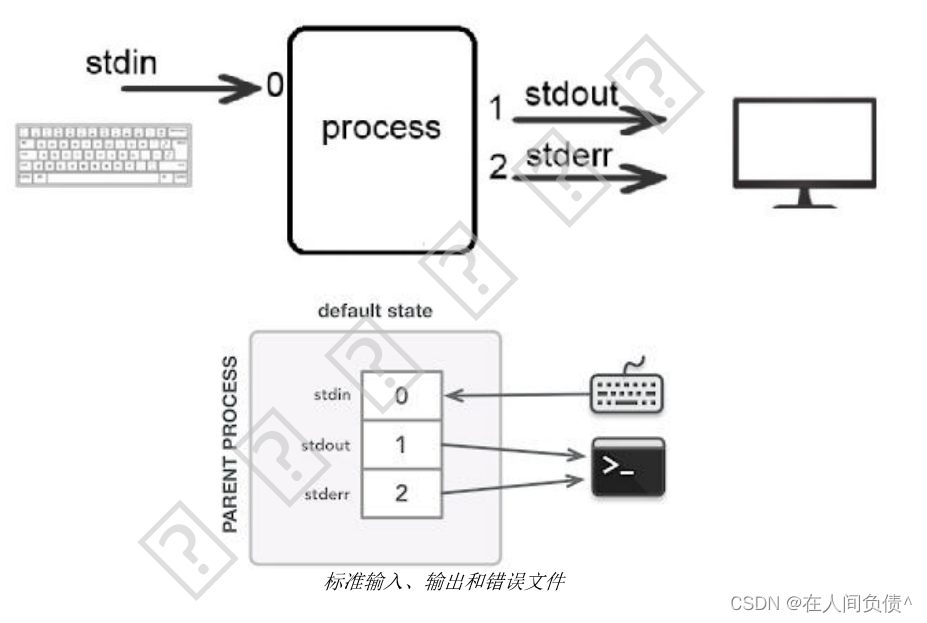
Standard input file
When you need to execute the entered command ,Shell Translate commands and use the keyboard as the default input source . The keyboard is called a standard input file .
cat When the command is followed by a file name , All lines will be displayed , If there is no filename ,cat The command gets its input from the standard input file
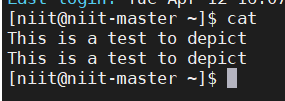
cat Command waiting for keyboard input , Enter characters from the keyboard and press Eenter Key time , The characters will be displayed on the screen
Input :
cat This is a test to depict
Output :
This is a test to depict
Enter as many lines as you want , If you want to prompt for the end , Need to press Ctrl + d key
stay Linux in , Not all commands come from standard input files ,cd Commands do not use standard input files
stay Linux in , For all open files ( Including standard documents ) Assign a number called a file descriptor . File descriptor 0 Assigned to the standard input file
Standard output file
Shell Use the display as the default output device for any command it executes . The display is called a standard output file .
issue ls On command ,Shell Execute the command and output it ( List of directories ) Occurs to the standard output file
Not all commands generate output ,mkdir The command does not use the standard output file
File descriptor 1 Represents the standard output file
Standard error file
for example :cat The command is followed by a nonexistent file name 、cp filel dirl, Yes file or dirl No authority
File descriptor 2 Indicates the standard error file
Redirect input or output
- Input redirection
- Output redirection
- Error redirection
Input redirection
cat < test1
< From a file test1 Redirect input .
cat Will file test1 Each line of is regarded as input and displayed on the display
The above command can be written through the file descriptor
cat 0< test1
0< Indicates input redirection
Output redirection
cat test1 > out_test
> Indicates redirecting output to a file out_test, Also is to cat The output of the command is written to the disk file out_test
If out_test file does not exist , First create an empty file , Write again
If out_test File exists , Then delete the previous content , Write again
cat test1 >> out_test Attach output to file out_test
Use file descriptors to write
cat test1 1> out_test
cat test1 1>> out_test
Error redirection
cat test_2 2> error-mesg
hypothesis test_2 Not in current directory , therefore , When the user tries to execute this command ,Linux An error message will be generated , Then write the error message to the file error-mesg
Use filters
A filter is a program , Get input from standard input file , Handle ( Or filtration ) It and sends the output to the standard output file
grep filter
grep The filter searches by regular expression

File name is optional , If there is no filename ,grep Wait for standard input , After entering a line ,grep Search for regular expressions in rows , If this particular expression is included, this line is displayed , On the contrary, it does not show .
Key Ctrl + d End of input
Specify regular expressions
| character | usage | Example |
|---|---|---|
| [] | Match any one of a set of characters | grep “New[abc]” |
| [] Inside plus - | Matches any one of the characters in a range | grep “New[a-c]” |
| ^ | Subsequent styles must appear at the beginning of each line | grep “^New[abc]” |
| [] Inside plus ^ | The style must not contain any characters in the specified set | grep “New[ ^ a-c]” |
| $ | The previous style must appear at the end of each line | grep “New[abc]$” |
| .( spot ) | Matches any character | grep “New.[abc]” |
| ( The backslash ) | Or the special meaning of the characters slightly followed | grep “New.[abc]” |
grep Filter options
grep Filters also have some options , Can be used to change the output of a command
- -n: Print each line that matches the style and its line number . The line number is printed at the beginning of the line .
- -c: Print the number of lines that match the style
- -v: Print all lines that do not match the style specified by the regular expression
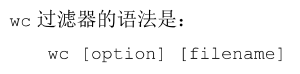
wc filter
wc Filters are used to calculate the number of lines in disk files or standard input files 、 Number of words and characters
Provide file name
wc test
Output :1 5 22 test
Said file test There is 1 That's ok 、5 A word and 22 Characters
Do not provide file name
wc wc is a filter
Press Ctrl + d Output :1 4 15
wc Filter options
| Options | describe |
|---|---|
| -l | Display row number |
| -w | Show the number of words |
| -c | Show the number of characters |
cut filter
When required from a specific command (ls or who) Extract a specific column from the output of , have access to cut filter

| Options | describe |
|---|---|
| -f | Displays the specified column |
| -c | Display the specified characters |
| -d | Specify the column delimiter .Tab Is the default column delimiter |
tr filter
- tr Filters can be used to translate one set of characters into another .
- It can also be used to delete duplicate characters .
Remove duplicate characters ( Compress )
-s Used to compress repeated characters into one character
Convert case
tr "[a-z]" "[A-Z]"
Convert lowercase characters to uppercase characters
sort filter
sort The filter arranges each line in the standard input in ascending order .
Need to enter sort command , Then enter the data to sort , Then you need to press Ctrl + d Key sort data
sort Filter options
- -r Options : In reverse order ( Descending ) Sort input
- -f Options :sort The filter is in the form of characters ASCII The order of code values is numbers 、 Input sort consisting of letters and other characters
- -n Options : In a ASCII Sequence numbers
- < filename >: Sort the contents of the specified file , Displays the rows of the file in sorted order
- +pos1 -pos2 Options : Sort files in the order of specific columns
- -t Options : Sort files based on specific column separators
- -o Options : take sort The output of the filter is saved in a disk file , Not on the standard output
Use pipes
Linux With combined filters and other commands ( for example ls) The function of , In this way, the standard output of a filter or command can be sent as standard input to another filter or command
give an example
ls > tempfile
more tempfile
Besides , Store the list of directories in a file with the first command tempfile in , This file is then more Command display content
adopt Linux Pipeline function , These two steps can be combined and executed as one command , No need to create temporary files
ls | more
A vertical bar ( | ) It's a pipe character , instructions Shell take " | " The output of the previous command is sent as input to the subsequent command
Another advantage of pipelining is that you don't have to rewrite utilities to perform complex tasks
tee command
tee The command reads standard input and writes it to standard output and files .
If the file to write data does not exist , The file will be created .
If the file already exists , Just rewrite the contents of the file .
-a Option allows you to attach new content to an existing file
版权声明
本文为[Inter personal liabilities^]所创,转载请带上原文链接,感谢
https://yzsam.com/2022/04/202204230426392769.html
边栏推荐
- [Li Hongyi 2022 machine learning spring] hw6_ Gan (don't understand...)
- Set经典小题目
- IEEE Transactions on Systems, Man, and Cybernetics: Systems(TSMC)投稿须知
- 【时序】基于 TCN 的用于序列建模的通用卷积和循环网络的经验评估
- TreeSet after class exercises
- Understand the gut organ axis, good gut and good health
- RuntimeError: output with shape [4, 1, 512, 512] doesn‘t match the broadcast shape[4, 4, 512, 512]
- VHDL implementation of 32-bit binary to BCD code
- STM32单片机ADC规则组多通道转换-DMA模式
- 在AWS控制台创建VPC(无图版)
猜你喜欢

小红书被曝整体裁员20%,大厂之间内卷也很严重
RC低通滤波器的逆系统
520.检测大写字母
Kotlin. The binary version of its metadata is 1.6.0, expected version is 1.1.15.
【NeurIPS 2019】Self-Supervised Deep Learning on Point Clouds by Reconstructing Space

【时序】基于 TCN 的用于序列建模的通用卷积和循环网络的经验评估
STM32F4单片机ADC采样及ARM-DSP库的FFT
![[mapping program design] coordinate azimuth calculation artifact (version C)](/img/2b/e640f3e2702f80d003fa3dd5c4158d.png)
[mapping program design] coordinate azimuth calculation artifact (version C)
Go反射法则
![[echart] Introduction to echart](/img/40/e057f4ac07754fe6f3500f3dc72293.jpg)
[echart] Introduction to echart
随机推荐
MYSQL去重方法汇总
Second kill all interval related problems
STM32单片机ADC规则组多通道转换-DMA模式
Xiaohongshu was exposed to layoffs of 20% as a whole, and the internal volume among large factories was also very serious
VHDL implementation of 32-bit binary to BCD code
php导出Excel表格
The latest price trend chart and trading points of London Silver
国外LEAD,联盟经理常见问答
shell wc (统计字符数量)的基本使用
Set经典小题目
STM32上μC/Shell移植与应用
Xiaomi, which has set the highest sales record of domestic mobile phones in overseas markets, paid renewed attention to the domestic market
Mysql---数据读写分离、多实例
What is software acceptance testing? What are the benefits of acceptance testing conducted by third-party software testing institutions?
Does China Mobile earn 285 million a day? In fact, 5g is difficult to bring more profits, so where is the money?
OpenCV----YOLACT实例分割模型推理
Leetcode->1 两数之和
【论文阅读】【3d目标检测】Voxel Transformer for 3D Object Detection
兼容NSR20F30NXT5G的小体积肖特基二极管
Mysql出现2013 Lost connection to MySQL server during query