当前位置:网站首页>Introduction to sap pi / PO login and basic functions
Introduction to sap pi / PO login and basic functions
2022-04-23 09:33:00 【rogerix4】
1. What is? PI/PO
- XI/PI/PO All are SAP Middleware platform launched , For multi system interface unification ( Similar to online ESB System )
- XI/PI/PO Evolution :SAP PO brief introduction :XI、PI、PO The relationship and difference between
2. Sign in PI/PO
- The login address :http://<host>:5< instance>00/dir/start/index.jsp( Such as :http://192.168.11.41:50000/dir/start/index.jsp)
- Transaction code :SPROXY You can also see the login address and port


3. PI/PO Portal Function is introduced
-
SAP PI There are four main pages Java link :
- Enterprise service repository (ESR)(Enterprise Service Repository Used to design and create object integration schemes to be used in . You can design interface objects , Mapping objects and different integration processes )
- Integration directory (ID)(Integration Directory Used to configure in Enterprise Service Repository Objects created in , And configured as Integration Engine Execute... At run time ; To configure ESR front , You need to import object services and communication channels )
- System architecture (SL)(System Landscape Manage the system architecture and all installable and installed elements )
- Configure and monitor (CM)(Configuration and Monitoring monitor SAP Integration engine in the system ,CCMS The capabilities of the integration and process monitoring infrastructure )
-
Enterprise service repository (ESR)
-
Enterprise Services Builder function ( Need to install Jdk1.8+, Otherwise start will report an error )
- Object definition management
- service object
- Data objects
- Message object
- Object mapping (Mapping)
- Complete the message mapping according to the data structure of the sender and receiver
- Graphics mapping
- Java mapping
- XSLT mapping
- ABAP mapping
- Integration process
- Object correspondence management

- Object correspondence management
- Object definition management
-
WEB UI function
- Search for ( Search service interface , Data type, etc )
- subscribe ( Subscription notification )
- management ( Management service interface , Life cycle status of data type, etc )
-
Services Registry function
- Registration and management of services
-
main interface

-
-
Integration directory (ID)
- Integration Builder function ( Need to install Jdk1.8+, Otherwise start will report an error )
- Services allow you to address the sender or receiver of a message
- According to the demand , Choose the type of service
- Business system
- Business services
- Integrated process services
- The communication channel determines the inbound and outbound processing of messages by using the adapter engine to convert external native messages to SOAP XML Format . Two types of communication channels ( Including sender channel and receiver channel )
- Sender agreement ( Decide how the integration server converts messages )
- The receiving party determines that ( Information that identifies the recipient to whom the message is to be sent )
- Interface determination ( Determine the inbound interface to send the message to, which also determines the interface mapping for processing the message )
- Recipient agreement ( Define how the receiver transforms and processes messages )
- main interface

- Integration Builder function ( Need to install Jdk1.8+, Otherwise start will report an error )
-
System architecture (SL)

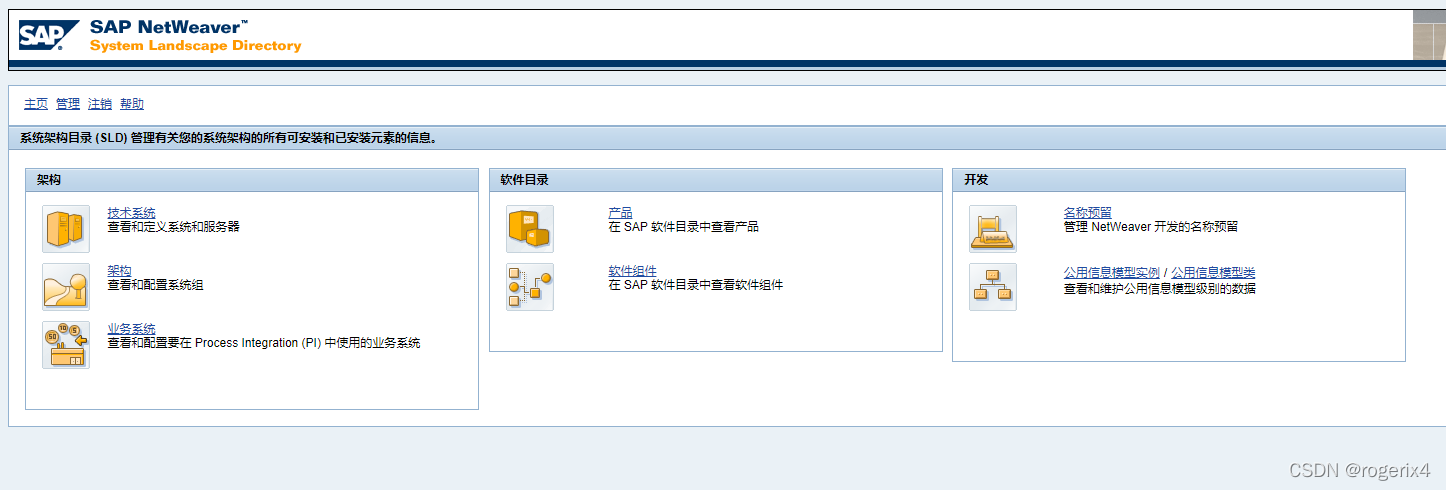
- System Landscape Directory function
- framework
- Technology system ( View defined systems and servers )
- framework ( View and configure system groups )
- Business system ( View and configure business systems for use in process integration )
- Software Directory
- product ( see SAP Products in the software catalog )
- Software components (SAP View software components in the software catalog )
- Development
- Name reserved ( Used for name retention and NW Development )
- Example of public information module / Public information model class ( View and maintain CIM Level of data )
- framework
- main interface
- System Landscape Directory function
-
Configure and monitor (CM)

- This function is biased towards configuration and management , It is mainly used for PI Server configuration and performance status monitoring ; There's not much more here
版权声明
本文为[rogerix4]所创,转载请带上原文链接,感谢
https://yzsam.com/2022/04/202204230623503725.html
边栏推荐
- Colorui solves the problem of blocking content in bottom navigation
- SQL used query statements
- GoLand debug go use - white record
- ABAP publishes OData service samples from CDs view
- Kettle experiment conversion case
- SAP debug debug for in, reduce and other complex statements
- 3、 6 [Verilog HDL] gate level modeling of basic knowledge
- Setnx command execution failed due to full redis memory
- Wechat applet catchtap = "todetail" event problem
- Detailed explanation of delete, truncate and drop principles in MySQL database
猜你喜欢
Kettle实验

Summary of wrong questions 1

个人主页软件Fenrus

Installation of data cleaning ETL tool kettle

Flink SQL realizes the integration of stream and batch

Set the maximum width of the body, but why does the background color of the body cover the whole page?
![[geek challenge 2019] havefun1](/img/8b/b15bf31771d54db25f24d630e64093.png)
[geek challenge 2019] havefun1

Yyds dry goods inventory ubuntu18 0.4 install MySQL and solve error 1698: access denied for user ''root' '@' 'localhost' '

JS DOM event

Vivo, hardware safe love and thunder
随机推荐
Summary of wrong questions 1
golang力扣leetcode 396.旋转函数
Number theory to find the sum of factors of a ^ B (A and B are 1e12 levels)
Simple understanding of arguments in JS
Little girl walking
Sql1 [geek challenge 2019]
Get trustedinstaller permission
亚马逊云科技入门资源中心,从0到1轻松上云
Two ways for flutter providers to share data
Installation of data cleaning ETL tool kettle
JS node operation, why learn node operation
JS scope, scope chain, global variables and local variables
Practice of Flink streaming batch integration in Xiaomi
SAP 101K 411k inventory change
Give the method of instantiating the object to the new object
Number of islands
Leetcode0587. 安装栅栏(difficult)
Cross domain configuration error: when allowcredentials is true, allowedorigins cannot contain the special value "*“
Secrets in buffctf file 1
ATSS(CVPR2020)