当前位置:网站首页>MySQL之2003-Can‘t connect to MySQL server on ‘localhost‘(10038)的解决办法
MySQL之2003-Can‘t connect to MySQL server on ‘localhost‘(10038)的解决办法
2022-04-21 19:41:00 【程序员超时空】
当我们打开navicat的时候,出现了这种报错提示
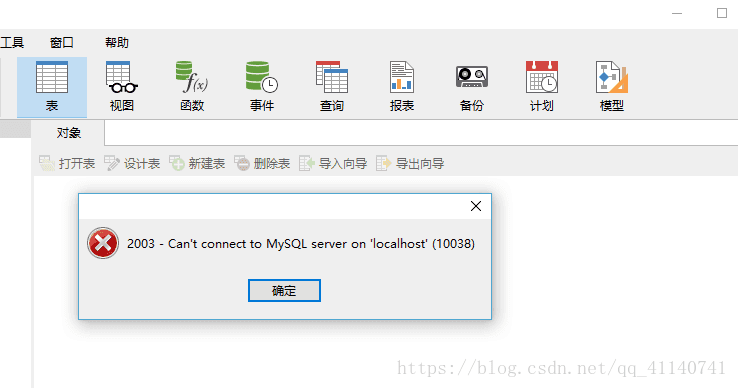
这种情况第一反应就是MySQL并没有打开,点击电脑最下方右键找到【任务管理器】,在【服务】里面找到MySQL,可以看到果然没有启动
右键一下,启动,然后再打开navicat,这时可以发现正常了???


但是如果这个还不能解决该怎么破?
在MySQL5.76之后,解压版不再包含一个data目录了,初始化安装MySQL需要使用 --initialize 或者–initialize-insecure指令
快捷键win+s搜索一下【命令提示符】,这里不建议使用快捷键win+R输入cmd来操作,因为我们需要用管理员身份运行

打开之后输入net start mysql
如果你也出现了这个问题,希望这个可以帮到你

切换到自己安装的MySQL的bin目录下 cd C:Program FilesMySQLMySQL Server 5.7in【我的是这个C盘下的这个,cd是切换的意思】
可以看到路径都不一样了

接着输入 mysqld --remove
如果出现Install/Remove of the Service Denied!证明你没有用管理员身份打开命令提示符的窗口
乖乖的用管理员身份打开吧,打开之后cd 到MySQL的bin路径输入mysqld --remove

然后查看自己的my.ini文件,如果不知道位置,给你推荐个好东西,listary搜索神器,瞬间找到自己想找的文件,这个就几兆,也很方便,使用的时候双击ctrl就可以搜索了
链接:https://pan.baidu.com/s/1c2Qi_-qNTsBsCuhXh6fNlg 密码:50ed

右键进入文件位置,更改一下里面的内容,ctrl+f找到datadir,原来路径有问题需要更改一下,反斜杠,大写的D改为d,data
datadir=C:Program FilesMySQLMySQL Server 5.7data
然后保存

接着输入mysqld --defaults-file=my.ini --initialize-insecure(复制我的,打字也辛苦,打错也难受)
什么都没有才算成功,这样

如果出现这样,就证明已经存在data文件了

找到并删除重复上步
然后输入
mysqld --install,进行MySQL服务的安装

再尝试启动MySQL服务,输入
net start mysql

输入mysql -u root -p重新连接数据库
这时的密码为空,直接回车就行

进去之后第一步先设置密码,【注意:如果打开navicat之后出现,Access denied for user ‘root’@‘localhost’ (using password:YES)或者Access denied for user ‘root’@‘localhost’ (using password:NO)的情况,data文件随机生成了一串密码,需要你重新设置,步骤也跟下面一样:】
use mysql;
update MySQL.user set authentication_string=password(‘123456’) where user=‘root’
net stop mysql;
net start mysql;
mysql -u root -p
123456
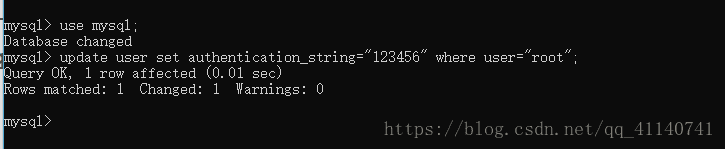
注意:在安装mysql5.7版本时,经常会遇到mysql -u root -p直接回车登陆不上的情况,原因在于5.7版本在安装时自动给了一个随机密码,需要手动在mysql目录下搜索*.err,以文本形式打开才能看到内容

再次打开navicat就可以了

版权声明
本文为[程序员超时空]所创,转载请带上原文链接,感谢
https://blog.csdn.net/m0_54864585/article/details/124321344
边栏推荐
- switch分支
- MySQL MHA high availability cluster deployment and failover
- Rapid generation of latex from excel tables
- Imea | endnote tutorial on adjusting perfect citation format (video)
- 使用CMake构建/导入目标
- The courage to face Ali
- pfSense使用证书认证配置IPsec站点到站点隧道指南
- Stm32cupeide / stm32cupemx USB link w25qxx as USB flash disk
- “最难就业季“中的大学生就业:本硕过半有着落 高职生成香饽饽
- 力扣-53.最大子数组和
猜你喜欢

MKL library matrix multiplication

Relationship between deep learning, multi machine and multi card batchsize and learning rate

fiddler抓包PC微信小程序失败的解决方案

知道创宇发布重磅战略方案,构建持续交火的实战化防御体系
Flitter Xcode packaging and publishing failed error ninety thousand one hundred and sixty-five

Use the mremoting tool to manage all remote connections
![LeetCode 山羊拉丁文[模拟 字符串] HERODING的LeetCode之路](/img/da/3761b46aec6a56f2f30e0fd91c7f42.png)
LeetCode 山羊拉丁文[模拟 字符串] HERODING的LeetCode之路

Chekine series high density lipoprotein (HDL-C) content detection scheme

Low density lipoprotein research - LDL-C content detection kit scheme

What are the factors affecting VPS website optimization?
随机推荐
leetcode541. Reverse string II
leetcode344. 反转字符串
mui选项卡怎么实现循环轮播
Fundamentals of digital electronic technology 5.1 overview of trigger and 5.2 SR latch
Using MCU Xpress to develop rt1060 (1) -- drive RGB interface LCD
What are the factors affecting VPS website optimization?
Installing MySQL 8 on Linux centos7 (simple and practical)
Interpretation of YACs in detectron 2
ParaView Glance 启动报错
《数字电子技术基础》5.1 触发器概述、5.2 SR锁存器
Delete Nan data in matrix or vector in MATLAB
一键安装ROS和rosdep(NO 墙)
OpenHarmony Sensor 模块Callback注册和回调全流程
Rapid generation of latex from excel tables
居家第二十一天的成果
高性能分布式缓存Redis--- Redis底层结构和缓存原理 --- 持续更新
Comparison of F (ab ') 2 IgG isotype in abbexa goat
leetcode344. Reverse string
C# 不能用于文件名的字符
Static link and dynamic link