当前位置:网站首页>8.3 create a mobile robot by hand in rodf robot modeling
8.3 create a mobile robot by hand in rodf robot modeling
2022-04-21 22:51:00 【Fish flavored ROS】
The author of this series of tutorials : Little fish
official account : Fish fragrance ROS
QQ Communication group :139707339
Teaching video address : Small fish B standing
Full document address : Fish fragrance ROS Official website
Copyright notice : Reprint and commercial use are prohibited unless permitted .

8.3 Start creating a mobile robot
Hello everyone , I'm little fish , In this lesson, let's work together to create a two wheel differential mobile robot fishbot, In the last section, we have installed radar on our robot , In this class, we will continue to improve our robot model .
Robots besides radar , It also needs to be IMU Acceleration sensors and wheels that can be driven , In Chapter 7, we introduced the robotics part , Two differential models have been introduced , So we also need to create two differential drive wheels and a support wheel .
So this little fish takes you to add the following parts and joints to the robot :
- IMU Sensor components and joints
- Left wheel parts and joints
- Right wheel part and joint
- Support wheel parts and joints

1. add to IMU sensor ( Last assignment )
IMU Sensors and transparency and color modification are the last lesson , Homework , Xiaoyu will take you to finish it first
practice 1: Try changing the robot's body color to blue , Transparency is 50%
(0.1 0.1 1.0 0.5)practice 2: Try to URDF Add imu_link And use imu_joint Fix it above the center of the car body 2cm,imu The geometry used is box, Length, width and height are 2cm
1.1 Change the color
Transparency modification only needs to be done in base_link Add material
<link name="base_link">
    <visual>
    	<origin xyz="0 0 0.0" rpy="0 0 0"/>
    <geometry>
    	<cylinder length="0.12" radius="0.10"/>
    </geometry>
    <material name="blue">
    	<color rgba="0.1 0.1 1.0 0.5" />
    </material>
    </visual>
</link>
1.2 add to imu
  <link name="imu_link">
  	<visual>
      <origin xyz="0 0 0.0" rpy="0 0 0"/>
      <geometry>
		    <box size="0.02 0.02 0.02"/>
      </geometry>
    </visual>
  </link>

  <!-- imu joint -->
  <joint name="imu_joint" type="fixed">
      <parent link="base_link" />
      <child link="imu_link" />
      <origin xyz="0 0 0.02" />
  </joint>
2. Add right wheel
2.1 Add joints
The joint name is right_wheel_link, The little fish is doing ros2 The wheels used in the trolley are shown in the figure below :

The width of the wheel is 4cm, The diameter is 6.4cm, The geometry is a cylinder , therefore geometry The configuration is as follows :
<geometry>
	<cylinder length="0.04" radius="0.032"/>
</geometry>
It should be noted that , The default orientation of the cylinder is upward

We can origin Of rpy Change the rotation angle of the wheel , Let it go around x Axis rotate pi/2, therefore origin The configuration is
<origin xyz="0 0 0" rpy="1.57079 0 0"/>
Change color to black , You can get the following configuration :
  <link name="right_wheel_link">
      <visual>
        <origin xyz="0 0 0" rpy="1.57079 0 0"/>
        <geometry>
          <cylinder length="0.04" radius="0.032"/>
        </geometry>
          <material name="black">
            <color rgba="0.0 0.0 0.0 0.5" />
          </material>
      </visual>
  </link>
2.2 add to joint
We fixed the center of the left wheel on the left rear of the robot
It should be noted that origin and axis Value settings
First look at origin
because base_link Is the height of 0.12, We
-
z Express child relative parent Of z The relationship on the axis , Want to fix the wheel on the lower surface of the robot , therefore
originOf z Offset down 0.12/2=0.06m( The downward sign is negative ) -
y Express child relative parent Of y The relationship on the axis ,base_link The radius of this is 0.10, So we let the wheel y Axial negative direction offset 0.10m( The left sign is negative )
-
x Express child relative parent Of x The relationship on the axis , The backward offset is x The axis is offset backward , Let's use a similar value 0.02m( The backward sign is negative )

Look again axis
The wheel turns , Which axis should it rotate on ? As can be seen from the above figure, it is around y The counterclockwise direction of the shaft , therefore axis The Settings for :
<axis xyz="0 1 0" />
  <joint name="right_wheel_joint" type="continuous">
      <parent link="base_link" />
      <child link="right_wheel_link" />
      <origin xyz="-0.02 -0.10 -0.06" />
      <axis xyz="0 1 0" />
  </joint>
3. Add left wheel
The left wheel is the mapping of the right wheel , I won't repeat
  <link name="left_wheel_link">
      <visual>
        <origin xyz="0 0 0" rpy="1.57079 0 0"/>
        <geometry>
          <cylinder length="0.04" radius="0.032"/>
        </geometry>
          <material name="black">
            <color rgba="0.0 0.0 0.0 0.5" />
          </material>
      </visual>
  </link>

  <joint name="left_wheel_joint" type="continuous">
      <parent link="base_link" />
      <child link="left_wheel_link" />
      <origin xyz="-0.02 0.10 -0.06" />
      <axis xyz="0 1 0" />
  </joint>
4. Add support wheel
The supporting wheel is fixed in front of the robot , Use a sphere , The radius uses 0.016m, The diameter of the ball is 0.032m Same radius as left and right wheels , Then offset down 0.016+0.06=0.076m, The downward value is negative , At the same time, move the support theory forward , Choose one 0.06m
The final results are as follows :
<link name="caster_link">
    <visual>
      <origin xyz="0 0 0" rpy="0 0 0"/>
      <geometry>
          <sphere radius="0.016"/>
      </geometry>
        <material name="black">
          <color rgba="0.0 0.0 0.0 0.5" />
        </material>
    </visual>
  </link>

  <joint name="caster_joint" type="fixed">
      <parent link="base_link" />
      <child link="caster_link" />
      <origin xyz="0.06 0.0 -0.076" />
  </joint>
Final URDF file :https://raw.githubusercontent.com/fishros/fishbot/master/src/fishbot_description/urdf/fishbot_base.urdf
5. test run
5.1 Compile testing
colcon build
source install/setup.bash
ros2 launch fishbot_description display_rviz2.launch.py
5.2 final result
rviz Configuration of

final result
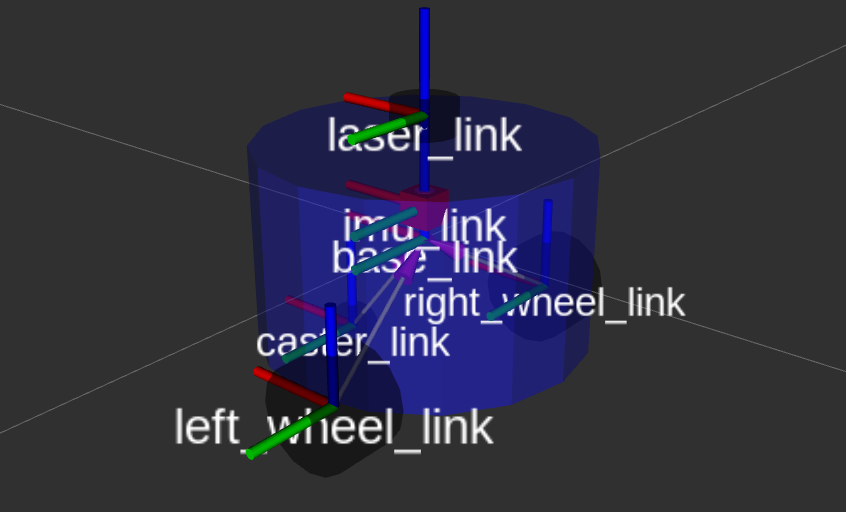
jointstate Two more sliders

Node relationship

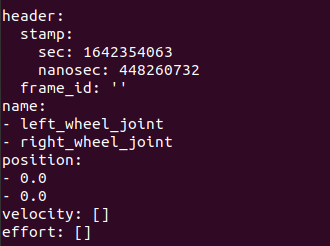
Print joint_states topic of conversation
ros2 topic echo /joint_states
5.3 adopt joint_state_gui Change joints tf Middle joint angle
stay JointStatePublisher in , Drag the slider , Observe
rviz2intfTransformation ofjoint_statesTransformation of values in

You can see that as the progress bar drags , Values in the topic and rviz2 The joints of the robot rotate synchronously ,joint_states Topics can also be sent manually , In the next class, Xiaoyu takes you to send it manually joint_states To control the rotation of robot wheels
5.4 On how to land the wheel
Although the robot model is shown , But there's a problem I don't know if you find , That is in RVIZ The robot wheels in are under the ground .
The reason is that we fixed-frame The choice is base_link,base_link Your location is already left_wheel_link and right_wheel_link Just go up , So what should we do ?
It's very simple , We added a virtual link And joints , This joint is related to base_link Connected to a , Position is located in the base_link Down just to the lower surface of the wheel .
Come on , Let us to base_link Add a parent link-base_footprint, Newly added URDF The code is as follows :
  <!-- Robot Footprint -->
  <link name="base_footprint"/>

  <joint name="base_joint" type="fixed">
    <parent link="base_footprint"/>
    <child link="base_link"/>
    <origin xyz="0.0 0.0 0.076" rpy="0 0 0"/>
  </joint>
Because it's a virtual joint , We don't have to deal with this link Describe the shape of ,joint Of origin Set to xyz="0.0 0.0 0.076" Represents the joint base_footprint Up 0.076 Namely base_link( I don't think it's easy to understand. You can see the figure below ).
Save the compilation and run the test again , Now the wheels are on the ground ~

Technical communication && Ask for help :
-
WeChat official account and exchange group : Fish fragrance ROS
-
Xiaoyu wechat :AiIotRobot
-
QQ Communication group :139707339
-
copyright protection : Joined “ Knights of rights ”(rightknights.com) Copyright protection plan of
The authors introduce :
I'm little fish , Senior players in Robotics , Now a one legged robot Algorithm Engineer in Shenzhen
Junior high school learning programming , High school began to contact robots , During the University, playing robot related competitions to achieve monthly income 2W+( The prize money for the competition )
Currently outputting Robot Learning Guide 、 Notes to the paper 、 Work experience , Welcome to pay attention to little fish , Exchange technology together , Learning robots
版权声明
本文为[Fish flavored ROS]所创,转载请带上原文链接,感谢
https://yzsam.com/2022/04/202204212035270491.html
边栏推荐
- Database exercise
- We sincerely invite you to sign up for the first openharmony developer growth plan sharing day
- Day code 300 lines learning notes day 46
- 事件分发机制Android,大厂Android面试总结 详细解答
- 3. MySQL workbench performs addition, deletion, modification and query on the table
- 自建vnc类软件注意事项
- CDGA敏捷开发的12个原则在企业数据治理中的应用
- [matlab] matlab drawing operation skills
- 2022 intermediate accounting title examination economic law practice questions and answers
- L1-058 6 turned over (15 points)
猜你喜欢

Kubernetes---ConfigMap配置管理

【ACM】46. 全排列(1. 这里需要用到前面的元素进行排列,故不用startindex(组合、分割时才用);2. 注意处理数组中元素是否重复使用的问题(使用contains函数))

Unlock openharmony technology day! The annual event is about to open!

Database exercise

Comparison between member variables and local variables

Software designer - Chapter 6: system security analysis and design

将模型训练外包真的安全吗?新研究:外包商可能植入后门,控制银行放款

Some cold thoughts behind the popularity of microservices, middle office, RPA and low code
L3-1 then don't worry (30 points) - pit point, test point analysis
6. Example of QT using MySQL
随机推荐
P1053 [NOIP2005 提高组] 篝火晚会
L1-063 fish or meat (10 points)
OS Experiment 3 [process communication]
Concept and working principle of image acquisition card
6. Example of QT using MySQL
Collection of some websites
Oracle Database 22c 管窥:_kgl_large_heap_assert_threshold 自动和手动调节
YARN线上动态资源调优
go-map
将模型训练外包真的安全吗?新研究:外包商可能植入后门,控制银行放款
当贝X3色彩对比度好不好,新3.1版本色彩接近原图
1956年高考数学
[Résumé de quelques conseils et raccourcis clavier dans MATLAB]
7.2.3 multiple representations of posture, quaternion, Euler angle, rotation matrix and axis angle ros2 in hands on Robotics
Markdown代码块支持的语言
What is the core design of Dadi's performance advantage in the cache hit scenario?
1957年高考数学题
POI Point of interesting.
The visual chart tells you whether "the world" and "the rest of life, please give more advice" have exploded or not?
Core component in opencv - input / output XML, yaml (12)