Automatic data visualization in atom with the nteract data-explorer

Overview

Data Explorer

Interactively explore your data directly in atom with hydrogen!

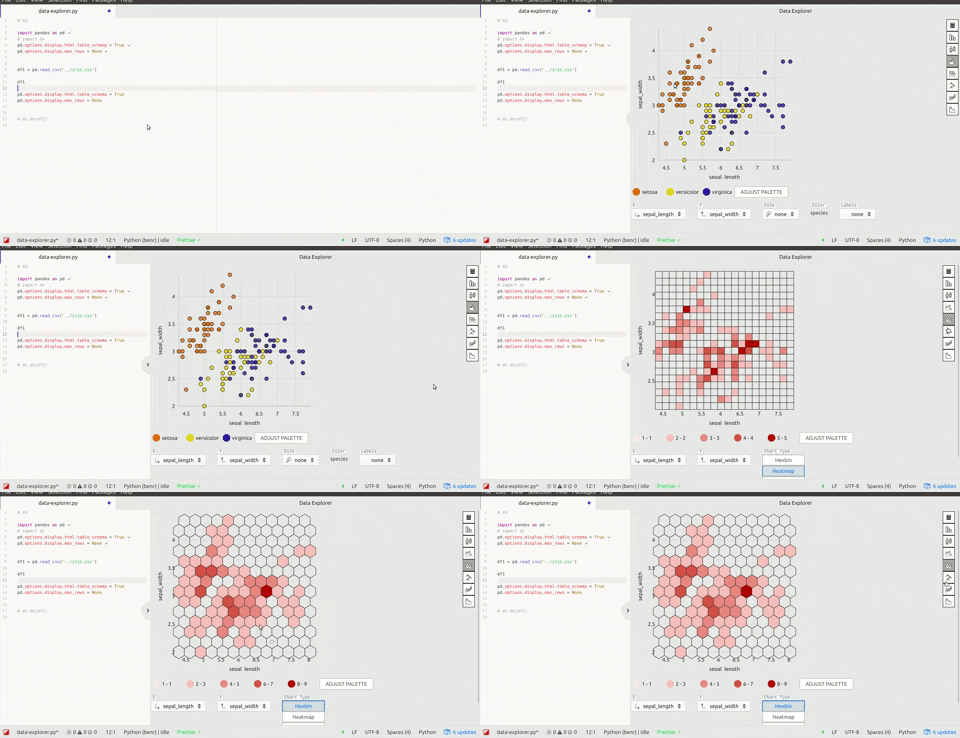
The nteract data-explorer provides automatic data visualization, so you can get a feel for your data quickly and with minimal code!

nteract data explorer in hydrogen

🚧 This is a work in progress. Please open issues and pull requests!

⚠️ As this package has some open issues with styling, the following atom themes are recommended for now:

  • 🎨 Atom One Light syntax theme
  • 🎨 Atom One Light UI theme

How to try it out:

Atom packages:

  • Install both hydrogen and the data-explorer package in atom, or in the cli:
    apm install hydrogen data-explorer

Make sure you have installed:

Then, just start a python kernel in hydrogen and run the following code:

import pandas as pd

# Enable the table_schema option in pandas, 
# data-explorer makes this snippet available with the `dx` prefix:
pd.options.display.html.table_schema = True
pd.options.display.max_rows = None

# (Your dataframe here)
iris_filename = './iris.csv'
df1 = pd.read_csv(iris_filename)

df1
Comments
  • Failed to load the data-explorer package

    Failed to load the data-explorer package

    [Enter steps to reproduce:]

    1. ...
    2. ...

    Atom: 1.32.0 x64 Electron: 2.0.9 OS: Ubuntu 16.04.5 Thrown From: data-explorer package 0.3.1

    Stack Trace

    Failed to load the data-explorer package

    At Cannot find module '@blueprintjs/select'
    
    Error: Cannot find module '@blueprintjs/select'
        at Module._resolveFilename (module.js:543:15)
        at Module._resolveFilename (/usr/share/atom/resources/electron.asar/common/reset-search-paths.js:35:12)
        at Function.get_Module._resolveFilename (/usr/share/atom/resources/app/static/<embedded>:11:154364)
        at Module.require (/app.asar/static/index.js:40:43)
        at require (/usr/share/atom/resources/app/static/<embedded>:11:145671)
        at /packages/data-explorer/node_modules/@nteract/transform-dataresource/lib/VizControls.js:20:15)
        at /packages/data-explorer/node_modules/@nteract/transform-dataresource/lib/VizControls.js:391:3)
        at Module.get_Module._compile (/usr/share/atom/resources/app/static/<embedded>:11:146381)
        at Object.value [as .js] (/usr/share/atom/resources/app/static/<embedded>:11:149928)
        at Module.load (module.js:561:32)
        at tryModuleLoad (module.js:504:12)
        at Function.Module._load (module.js:496:3)
        at Module.require (/app.asar/static/index.js:47:45)
        at require (/usr/share/atom/resources/app/static/<embedded>:11:145671)
        at /packages/data-explorer/node_modules/@nteract/transform-dataresource/lib/index.js:48:43)
        at /packages/data-explorer/node_modules/@nteract/transform-dataresource/lib/index.js:495:3)
        at Module.get_Module._compile (/usr/share/atom/resources/app/static/<embedded>:11:146381)
        at Object.value [as .js] (/usr/share/atom/resources/app/static/<embedded>:11:149928)
        at Module.load (module.js:561:32)
        at tryModuleLoad (module.js:504:12)
        at Function.Module._load (module.js:496:3)
        at Module.require (/app.asar/static/index.js:47:45)
        at require (/usr/share/atom/resources/app/static/<embedded>:11:145671)
        at /packages/data-explorer/lib/common.js:33:2)
        at /packages/data-explorer/lib/common.js:11:76)
        at Module.get_Module._compile (/usr/share/atom/resources/app/static/<embedded>:11:146381)
        at Object.value [as .js] (/usr/share/atom/resources/app/static/<embedded>:11:149928)
        at Module.load (module.js:561:32)
        at tryModuleLoad (module.js:504:12)
        at Function.Module._load (module.js:496:3)
    

    Commands

    Non-Core Packages

    data-explorer 0.3.1 
    Hydrogen 2.6.0 
    hydrogen-launcher 1.2.2 
    hydrogen-python 0.0.7 
    
    opened by cchlanger 10
  • Error compiling Less stylesheet

    Error compiling Less stylesheet

    Hi,

    When installing the data-explorer, I get this error:

    Line number: 3 '../node_modules/@blueprintjs/icons/lib/css/blueprint-icons.css' wasn't found. Tried - /home/lordflaron/.atom/packages/data-explorer/node_modules/@blueprintjs/icons/lib/css/blueprint-icons.css,/usr/lib/atom/node_modules/one-light-syntax/node_modules/@blueprintjs/icons/lib/css/blueprint-icons.css,/usr/lib/atom/node_modules/one-light-ui/node_modules/@blueprintjs/icons/lib/css/blueprint-icons.css,/usr/lib/atom/static/node_modules/@blueprintjs/icons/lib/css/blueprint-icons.css,/usr/lib/atom/node_modules/@blueprintjs/icons/lib/css/blueprint-icons.css,../node_modules/@blueprintjs/icons/lib/css/blueprint-icons.css

    Is there a missing dependency I need?

    Thank you so much!

    opened by amichuda 4
  • Unable to open

    Unable to open

    I installed it using apm command, and it can open another window with the name "data-explorer/docker-view", but nothing shows up. I just use cmd+enter to execute the current line "df".

    opened by zhangpanzhan 0
  • crash after clicking on hex plot

    crash after clicking on hex plot

    open data frame, click on hex bin plot. It shows up but then suddenly crashes.

    Atom: 1.35.1 x64 Electron: 2.0.18 OS: Microsoft Windows 10 Pro Thrown From: data-explorer package 0.6.0

    Stack Trace

    Uncaught Invariant Violation: Minified React error #31; visit https://reactjs.org/docs/error-decoder.html?invariant=31&args[]=Thu%20Dec%2013%202018%2012%3A01%3A51%20GMT-0800%20(Pacific%20Standard%20Time)&args[]= for the full message or use the non-minified dev environment for full errors and additional helpful warnings.

    At C:\Users\dominikschneider\.atom\packages\data-explorer\node_modules\react-dom\cjs\react-dom.production.min.js:248
    
    Invariant Violation: Minified React error #31; visit https://reactjs.org/docs/error-decoder.html?invariant=31&args[]=Thu%20Dec%2013%202018%2012%3A01%3A51%20GMT-0800%20(Pacific%20Standard%20Time)&args[]= for the full message or use the non-minified dev environment for full errors and additional helpful warnings. 
        at ba (/packages/data-explorer/node_modules/react-dom/cjs/react-dom.production.min.js:13:315)
        at /packages/data-explorer/node_modules/react-dom/cjs/react-dom.production.min.js:14:166)
        at Bf (/packages/data-explorer/node_modules/react-dom/cjs/react-dom.production.min.js:137:39)
        at /packages/data-explorer/node_modules/react-dom/cjs/react-dom.production.min.js:141:49)
        at /packages/data-explorer/node_modules/react-dom/cjs/react-dom.production.min.js:143:145)
        at /packages/data-explorer/node_modules/react-dom/cjs/react-dom.production.min.js:147:131
        at /packages/data-explorer/node_modules/react-dom/cjs/react-dom.production.min.js:164:72)
        at Tg (/packages/data-explorer/node_modules/react-dom/cjs/react-dom.production.min.js:181:151)
        at bi (/packages/data-explorer/node_modules/react-dom/cjs/react-dom.production.min.js:232:22)
        at ci (/packages/data-explorer/node_modules/react-dom/cjs/react-dom.production.min.js:233:284)
        at Di (/packages/data-explorer/node_modules/react-dom/cjs/react-dom.production.min.js:249:348)
        at Yh (/packages/data-explorer/node_modules/react-dom/cjs/react-dom.production.min.js:248:144)
        at Gi (/packages/data-explorer/node_modules/react-dom/cjs/react-dom.production.min.js:250:420)
        at Kb (/packages/data-explorer/node_modules/react-dom/cjs/react-dom.production.min.js:39:140)
        at Dd (/packages/data-explorer/node_modules/react-dom/cjs/react-dom.production.min.js:86:249)
    

    Commands

         -3:17 autocomplete-plus:cancel (atom-text-editor.editor.is-focused)
         -3:16.3.0 hydrogen:run-and-move-down (input.hidden-input)
         -3:16.3.0 autocomplete-plus:cancel (atom-text-editor.editor.is-focused)
         -3:14.1.0 hydrogen:run-and-move-down (input.hidden-input)
         -3:14.1.0 autocomplete-plus:cancel (atom-text-editor.editor.is-focused)
         -3:13.6.0 hydrogen:run-and-move-down (input.hidden-input)
         -3:13.6.0 autocomplete-plus:cancel (atom-text-editor.editor.is-focused)
         -3:12.2.0 hydrogen:run-and-move-down (input.hidden-input)
         -3:12.2.0 autocomplete-plus:cancel (atom-text-editor.editor.is-focused)
         -3:11.2.0 hydrogen:run-and-move-down (input.hidden-input)
         -3:11.2.0 autocomplete-plus:cancel (atom-text-editor.editor.is-focused)
      2x -3:09.4.0 core:move-up (input.hidden-input)
      3x -2:54.5.0 core:backspace (input.hidden-input)
         -2:52.5.0 hydrogen:run (input.hidden-input)
         -2:52.5.0 autocomplete-plus:cancel (atom-text-editor.editor.is-focused.autocomplete-active)
         -2:29 settings-view:open (input.hidden-input)
    

    Non-Core Packages

    autocomplete-python-jedi 1.10.3-0 
    data-explorer 0.6.0 
    file-icons 2.1.31 
    Hydrogen 2.9.0 
    hydrogen-launcher 1.2.2 
    MagicPython 1.1.1 
    platformio-ide-terminal 2.9.1 
    tablr 1.8.3 
    
    opened by dschneiderch 0
  • column resizing issue

    column resizing issue

    Thanks for this super cool extension!

    I thought I'd point out that things go a bit haywire if you try to resize the columns. image

    I'm on Windows 10, Atom 1.34, data-explorer 0.5.0

    opened by dschneiderch 6
  • [WIP] use nteract outputs component

    [WIP] use nteract outputs component

    • [x] Make a custom outputs component that only renders data-explorer output
    • [x] Write some tests
    • [ ] Refactor and simplify the rest of the package and integrate
    • [ ] useEffects to open and close atom dock, toggle user config, and other side effects, replacing that logic in other areas of the package. (bump react to 16.8)

    This should let me up with a nicer package and some learnings to take to future packages/refactors.

    opened by BenRussert 0
Releases(v0.7.0)
Owner
Ben Russert
Video Experience team @bombbomb
Ben Russert
Plot-configurations for scientific publications, purely based on matplotlib

TUEplots Plot-configurations for scientific publications, purely based on matplotlib. Usage Please have a look at the examples in the example/ directo

Nicholas Krämer 487 Jan 08, 2023
Streamlit dashboard examples - Twitter cashtags, StockTwits, WSB, Charts, SQL Pattern Scanner

streamlit-dashboards Streamlit dashboard examples - Twitter cashtags, StockTwits, WSB, Charts, SQL Pattern Scanner Tutorial Video https://ww

122 Dec 21, 2022
script to generate HeN ipfs app exports of GLSL shaders

HeNerator A simple script to generate HeN ipfs app exports from any frag shader created with: GlslViewer GlslEditor The Book of Shaders glslCanvas VS

Patricio Gonzalez Vivo 22 Dec 21, 2022
2D maze path solver visualizer implemented with python

2D maze path solver visualizer implemented with python

SS 14 Dec 21, 2022
Graphing communities on Twitch.tv in a visually intuitive way

VisualizingTwitchCommunities This project maps communities of streamers on Twitch.tv based on shared viewership. The data is collected from the Twitch

Kiran Gershenfeld 312 Jan 07, 2023
This is a web application to visualize various famous technical indicators and stocks tickers from user

Visualizing Technical Indicators Using Python and Plotly. Currently facing issues hosting the application on heroku. As soon as I am able to I'll like

4 Aug 04, 2022
Visualization Library

CamViz Overview // Installation // Demos // License Overview CamViz is a visualization library developed by the TRI-ML team with the goal of providing

Toyota Research Institute - Machine Learning 67 Nov 24, 2022
Python implementation of the Density Line Chart by Moritz & Fisher.

PyDLC - Density Line Charts with Python Python implementation of the Density Line Chart (Moritz & Fisher, 2018) to visualize large collections of time

Charles L. Bérubé 10 Jan 06, 2023
plotly scatterplots which show molecule images on hover!

molplotly Plotly scatterplots which show molecule images on hovering over the datapoints! Required packages: pandas rdkit jupyter_dash ➡️ See example.

150 Dec 28, 2022
Plot toolbox based on Matplotlib, simple and elegant.

Elegant-Plot Plot toolbox based on Matplotlib, simple and elegant. 绘制效果 绘制过程 数据准备 每种图标类型的目录下有data.csv文件,依据样例数据填入自己的数据。

3 Jul 15, 2022
A Python Library for Self Organizing Map (SOM)

SOMPY A Python Library for Self Organizing Map (SOM) As much as possible, the structure of SOM is similar to somtoolbox in Matlab. It has the followin

Vahid Moosavi 497 Dec 29, 2022
Leyna's Visualizing Data With Python

Leyna's Visualizing Data Below is information on the number of bilingual students in three school districts in Massachusetts. You will also find infor

11 Oct 28, 2021
Plotting data from the landroid and a raspberry pi zero to a influx-db

landroid-pi-influx Plotting data from the landroid and a raspberry pi zero to a influx-db Dependancies Hardware: Landroid WR130E Raspberry Pi Zero Wif

2 Oct 22, 2021
Generate "Jupiter" plots for circular genomes

jupiter Generate "Jupiter" plots for circular genomes Description Python scripts to generate plots from ViennaRNA output. Written in "pidgin" python w

Robert Edgar 2 Nov 29, 2021
:small_red_triangle: Ternary plotting library for python with matplotlib

python-ternary This is a plotting library for use with matplotlib to make ternary plots plots in the two dimensional simplex projected onto a two dime

Marc 611 Dec 29, 2022
A Python library created to assist programmers with complex mathematical functions

libmaths was created not only as a learning experience for me, but as a way to make mathematical models in seconds for Python users using mat

Simple 73 Oct 02, 2022
Statistics and Visualization of acceptance rate, main keyword of CVPR 2021 accepted papers for the main Computer Vision conference (CVPR)

Statistics and Visualization of acceptance rate, main keyword of CVPR 2021 accepted papers for the main Computer Vision conference (CVPR)

Hoseong Lee 78 Aug 23, 2022
Streaming pivot visualization via WebAssembly

Perspective is an interactive visualization component for large, real-time datasets. Originally developed for J.P. Morgan's trading business, Perspect

The Fintech Open Source Foundation (www.finos.org) 5.1k Dec 27, 2022
patchwork for matplotlib

patchworklib patchwork for matplotlib test code Preparation of example plots import seaborn as sns import numpy as np import pandas as pd #Bri

Mori Hideto 185 Jan 06, 2023
clock_plot provides a simple way to visualize timeseries data, mapping 24 hours onto the 360 degrees of a polar plot

clock_plot clock_plot provides a simple way to visualize timeseries data mapping 24 hours onto the 360 degrees of a polar plot. For usage, please see

12 Aug 24, 2022