
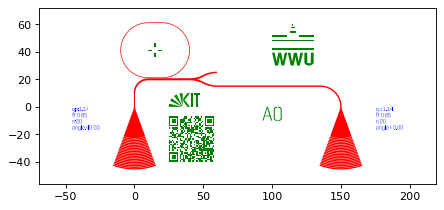
GDSHelpers is an open-source package for automatized pattern generation for nano-structuring.

Overview

GDSHelpers

Build Status Documentation Status GitHub release PyPI DOI

GDSHelpers in an open-source package for automatized pattern generation for nano-structuring. It allows exporting the pattern in the GDSII-format and OASIS-format, which are currently mainly used for describing 2D-masks. Currently, the focus is mainly on photonic and superconducting circuitry. The library consists of growing list of parts, which can be composed into larger circuits.

So far, the following parts are implemented:

  • A waveguide part, allowing easy chaining of bends and straight waveguides.
    • Includes parameterized paths and Bézier curves.
    • Automatic smooth connection to a target point/port
    • The size of the waveguide can be tapered (linear or by a user defined function), which can e.g. be used for optical edge coupling or electronic contact pads
    • Allows to design slot-waveguides and coplanar waveguides (with arbitrary number of rails)
  • Different types of splitters:
    • Y-splitter
    • MMI-splitters
    • Directional splitter
  • Couplers
    • Grating couplers (allowing apodized gratings)
    • Tapers for hybrid 3D-integration
  • Ring and racetrack resonators
  • Mach-Zehnder interferometers
  • Strip to slot mode converter
  • Spirals
  • Superconducting nanowire single photon detectors (SNSPDs)
  • Superconducting nanoscale Transistors (NTRONs)
  • Different types of markers
  • QRcodes
  • A possibility to include images
  • Text-elements for labeling the structures
  • GDSII-import

Besides this it also allows to perform conveniently operations on the design, like:

  • Convert the pattern for usage of positive resist
  • Create holes around the circuitry, which is e.g. necessary for under-etching
  • Shapely-operations can also be applied on the generated structures, e.g. shrinking or inflating of the geometry
  • Surrounding the structures with holes in a rectangular lattice and filling waveguides with holes in a honeycomb lattice for controlling vortex dynamics

The structures are organized in cells, which allow:

  • Adding structures on multiple layers
  • Adding cells into other cells, the cells can be added with an offset with respect to the parent cell and can be rotated
  • Storing additional information, which can be used for saving design parameters
  • Automatized generation of region layers
  • Parallelized export

Additionally the structures can conveniently be simulated by:

  • Using the meep integration (FDTD)

Finally, there are also different formats in which the pattern can be exported:

  • The GDSII-format, which is quite often used for (electron beam/...)-lithography
  • The OASIS-format, which one of the successors of the GDSII-format
  • To an 2D-image
  • To stl-objects which are useful e.g. for 3D-renderings
  • Directly to a blender-file or an rendered 3D-image

Citing GDSHelpers

We would appreciate if you cite the following paper in your publications for which you used GDSHelpers:

Helge Gehring, Matthias Blaicher, Wladick Hartmann, and Wolfram H. P. Pernice, "Python based open source design framework for integrated nanophotonic and superconducting circuitry with 2D-3D-hybrid integration" OSA Continuum 2, 3091-3101 (2019)

Documentation

You can find the documentation on readthedocs. If you have problems using GDSHelpers don't hesitate to contact us using Discussions or send me a mail.

Installation

The GDSHelpers can be installed via pip using (more details in the installation documentation)

pip install gdshelpers
Comments
  • Rounding & Spacing Issue when writing Cell Array to gdsii

    Rounding & Spacing Issue when writing Cell Array to gdsii

    https://github.com/HelgeGehring/gdshelpers/blob/96cfe541c18360dc8a8902fa723b7b5edfabbe72/gdshelpers/export/gdsii_export.py#L82-L84

    So I am trying to implement 2 cells within a cell as an array. I am using the standard micron as the unit, but I am trying to have increased precision to 0.1nm [10000 grid steps per micron]. When I make the spacing equal micron steps apart, it works. When they are not, there is a spacing issue. I am pretty sure the problem is here in the code referenced above as internally the spacing kept in the gdspy_cell->references->spacing is correct. The code shown seems to round before the points are scaled by the grid_steps_per_unit rather than after, which I think is causing my problem.

    opened by Trajectory989 4
  • Add Waveguide.add_route_straight_to_port

    Add Waveguide.add_route_straight_to_port

    Add method add_route_straight_to_port to Waveguide. Allows routing a straight segment to a target port and tapers the width linearly on the way.

    This can be used for electrode contact pads etc.

    route_port

    enhancement 
    opened by fbeutel 4
  • issue about Boolean operation: difference

    issue about Boolean operation: difference

    Thanks for gdshelpers, this package is amazing!

    When I used the boolean operation difference(), I got a small problem as shown in the figure, and it may occurr at the junction of the arc and the spiral. If I changed the parameter num, this issue would disapear. I don't know how to fix it. I tried to get the same layout by boolean operation not from gdspy package, and it looked correct.

    result_difference

    The code is attached below.

    from gdshelpers.geometry.chip import Cell
    from gdshelpers.parts.spiral import Spiral
    from gdshelpers.geometry import geometric_union
    
    # create the spiral
    spiral = Spiral(origin=(0,0), angle=0, width=0.45, num=16, gap=3, inner_gap=30)
    
    # get the shapely 
    device = geometric_union([spiral])
    # Boolean operation: difference
    buffer_device = device.buffer(3)
    buffer_not_device = buffer_device.difference(device)
    
    cell = Cell('cell_difference')
    cell.add_to_layer(1, buffer_not_device)
    # Here don't use cell.show() to verify the issue, and use cell.save() please.
    cell.save('gdshelpers_difference.gds')
    
    
    # And I found it's OK if I use "not" from gdspy.boolean()
    from gdshelpers.geometry import convert_to_layout_objs
    import gdspy
    # STEP 1: 
    lib = gdspy.GdsLibrary(precision = 1e-10)
    
    # create a new cell to save 
    cell_gdspy = lib.new_cell("cell_not_gdspy")
    
    geo1 = convert_to_layout_objs(buffer_device,library='gdspy')
    geo2 = convert_to_layout_objs(device,library='gdspy')
    inv = gdspy.boolean(geo1, geo2, "not")
    
    cell_gdspy.add(inv)
    lib.write_gds("gdspy_not.gds")
    bug 
    opened by HoneyGump 4
  • Waveguide.add_parameterized_path fails with multiple widths

    Waveguide.add_parameterized_path fails with multiple widths

    This seems to be a regression, because I think it worked before, but the following produces an error:

    wg = Waveguide([0, 0], 0, [1, 2, 1])
    wg.add_parameterized_path(lambda t: [10*t, 10*t])
    wg.get_shapely_object()
    

    Error:

    Traceback (most recent call last):
      File "gdshelpers/tests/test_waveguide.py", line 40, in test_waveguide_multiple_widths
        wg.add_parameterized_path(some_path)
      File "gdshelpers/parts/waveguide.py", line 275, in add_parameterized_path
        poly_path_1 = sample_coordinates + start[..., None] * sample_coordinates_d1_normed_ortho
    ValueError: operands could not be broadcast together with shapes (3,1) (28,2) 
    

    I opened a pull request which adds a failing test case: #26

    bug 
    opened by fbeutel 2
  • First example Script error

    First example Script error

    Hi @HelgeGehring,

    The first example script is flawed:

    1. numpy is missing
    2. Something is wrong with gdshelpers.parts.logo:
    ~/.local/lib/python3.7/site-packages/gdshelpers/parts/logo.py in get_shapely_object(self)
        180             # WWU width = 368.93 = 369     *M2 == w
        181             # box width unscaled = w = 336
    --> 182             m2 = w / 369.  # scale width of WWU to width of logo
        183             m = self.height / (h + 10 + 114)  # scaling factor height
        184 
    

    the code works with numpy and without logo:

    import numpy as np
    from gdshelpers.geometry.chip import Cell
    from gdshelpers.parts.waveguide import Waveguide
    from gdshelpers.parts.coupler import GratingCoupler
    from gdshelpers.parts.resonator import RingResonator
    from gdshelpers.parts.splitter import Splitter
    #from gdshelpers.parts.logo import KITLogo, WWULogo
    from gdshelpers.parts.optical_codes import QRCode
    from gdshelpers.parts.text import Text
    from gdshelpers.parts.marker import CrossMarker
    
    # Generate a coupler with parameters from the coupler database
    coupler1 = GratingCoupler.make_traditional_coupler_from_database([0, 0], 1, 'sn330', 1550)
    coupler2 = GratingCoupler.make_traditional_coupler_from_database([150, 0], 1, 'sn330', 1550)
    
    coupler1_desc = coupler1.get_description_text(side='left')
    coupler2_desc = coupler2.get_description_text(side='right')
    
    # And add a simple waveguide to it
    wg1 = Waveguide.make_at_port(coupler1.port)
    wg1.add_straight_segment(10)
    wg1.add_bend(-np.pi/2, 10, final_width=1.5)
    
    res = RingResonator.make_at_port(wg1.current_port, gap=0.1, radius=20,
                                     race_length=10, res_wg_width=0.5)
    
    wg2 = Waveguide.make_at_port(res.port)
    wg2.add_straight_segment(30)
    splitter = Splitter.make_at_root_port(wg2.current_port, total_length=20, sep=10, wg_width_branches=1.0)
    
    wg3 = Waveguide.make_at_port(splitter.right_branch_port)
    wg3.add_route_single_circle_to_port(coupler2.port)
    
    # Add a marker just for fun
    marker = CrossMarker.make_traditional_paddle_markers(res.center_coordinates)
    
    # The fancy stuff
    #kit_logo = KITLogo([25, 0], 10)
    #wwu_logo = WWULogo([100, 30], 30, 2)
    qr_code = QRCode([25, -40], 'https://www.uni-muenster.de/Physik.PI/Pernice', 1.0)
    dev_label = Text([100, 0], 10, 'A0', alignment='center-top')
    
    # Create a Cell to hold the objects
    cell = Cell('EXAMPLE')
    
    # Convert parts to gdsCAD polygons
    cell.add_to_layer(1, coupler1, wg1, res, wg2, splitter, wg3, coupler2)
    #cell.add_to_layer(2, wwu_logo, kit_logo, qr_code, dev_label)
    cell.add_to_layer(2, marker)
    cell.add_to_layer(3, coupler1_desc, coupler2_desc)
    cell.show()
    

    best, quearitis

    opened by quaeritis 2
  • Allow to set the last derivative point in add_parameterized_path

    Allow to set the last derivative point in add_parameterized_path

    Since add_parameterized_path has no information about how the waveguide will proceed afterwards, it can be useful to set the last point in the list of derivatives.

    opened by fbeutel 2
  • convert_to_positive_resist: Allow clearance features and exclusion features

    convert_to_positive_resist: Allow clearance features and exclusion features

    Allows specifying clearance_features: useful when building e.g. DLW tapers with positive resist image

    When reusing cells (e.g. grating couplers on one cell) which have interfaces to other features the interface must not be covered with the positive resist but must remain open. This allows to specify exclusion zones at these interfaces. image

    opened by fbeutel 1
  • Update waveguide.py

    Update waveguide.py

    changed line 283 from "...lower radii..." to "...larger radii..."

    If the outer lines of a parameterized wg intersect, a larger radius or smaller wg must be used.

    opened by jr2701 1
  • Allow to limit the max number of workers when exporting in parallel

    Allow to limit the max number of workers when exporting in parallel

    I ran into some out-of-memory errors when too many big cells where involved, limiting the number of workers can help (and might also help if you want to keep using your computer while exporting :) )

    opened by fbeutel 1
  • Create Contributing guide

    Create Contributing guide

    It would be helpful to have a small CONTRIBUTING.md in the root directory with the main instructions and conventions.

    Especially the Flake8 flavor used, so people don't have to look it up in the CI script

    flake8 gdshelpers/ --max-line-length=120

    opened by fbeutel 1
  • Fix waveguide route straight

    Fix waveguide route straight

    All route to port functions expect the target port to be pointing towards the current_port of the waveguide to be routed. This fixes add_route_straight_to_port to be consistent and adds a testcase.

    bug 
    opened by fbeutel 1
  • GDSIIImport's get_as_shapely does not work properly with cell arrays

    GDSIIImport's get_as_shapely does not work properly with cell arrays

    If this is run on a cell array, it does not recognize multiple instantiations....only the original copy at the original origin is placed (like just cellarray[0] and not the others....). See the zip.zip file. Use the Top Cell for copy image zip.zip

    opened by Trajectory989 2
  • Allow cell reuse when creating cells in parallel

    Allow cell reuse when creating cells in parallel

    Sometime, the cell creation is expensive and benefits from parallelization. At the same time, some sub-cells can be reused between cells.

    Currently, this fails because when ProcessPoolExecutor (or similar parallelization structures) are used, sub-cells are pickled and deserialized again. When merging the parallel cells together in the end, comparison for those sub-cells fails because they have no common identity anymore.

    This adds a UUID when a cell is created, such that cells can be identified by their UUID.

    Possible downside is that if a user modifies a sub-cell after it has been pickled, the changes might get lost, but this can easily be avoided by finishing the sub-cell before using it.

    opened by fbeutel 0
  • Desc format

    Desc format

    Suggestion for a new format for the desc output dictionary. This follows more closely the idea of GDSII that each cell is identified by a unique name and can be referenced mulitple times.

    With this new format, the resulting dict will only contain the desc data for each cell once and just store (name) references to the other cells.

    Basically, the resulting dict will look somewhat like this:

    {
        "root": "name_of_root_cell",
        "cells": {
            "name_of_root_cell": {
                "desc": {...},
                "cells": [ <list of all cells referenced by this cell (with origin, angle etc.)>  ]
            },
            "other_cell": {
                "desc": {...},
                "cells": [ <list of all cells referenced by this cell (with origin, angle etc.)>  ]
            },
        }
    }
    
    opened by fbeutel 0
  • Added new spiral part where length can be set

    Added new spiral part where length can be set

    This replaces the old spiral with a new version of an archimedean spiral which allows to set the length. The number of turns required to achieve the length is determined numerically (afaik an analytical solution doesn't exist).

    Different types are supported. Especially for use inside an MZI the inline and inline_rel types are of interest. spiral

    ToDo's before merge:

    • [ ] Update changelog
    • [x] Add to tests
    • [x] Update documentation
    • [x] Allow choosing the spiral direction (752d3b2)
    • [x] Choose an appropriate guess value for the numerical estimation
    enhancement 
    opened by fbeutel 5
Releases(v1.2.1)
  • v1.2.1(Jan 26, 2022)

    • Allow explicit definition of datatype by passing a tuple (layer, datatype) as layer
    • Allow setting the width of LineStrings
    • Angle of sub-cells considered in DLW-data and boundaries
    • Fix GDSII-export: allow negative angles, correct rounding of spacing
    • Allow specifying clearance features and exlusion features for convert_to_positive_resist
    Source code(tar.gz)
    Source code(zip)
  • v1.2.0(May 29, 2021)

  • v1.1.4(Jan 31, 2021)

    • Waveguide: added add_left_bend and add_right_bend to make code easier readable
    • added alphanumeric_to_id as an inverse of id_to_alphanumeric
    • allow to limit the numbers of workers for parallel export
    • fixed oasis export
    Source code(tar.gz)
    Source code(zip)
  • v1.1.3(Nov 24, 2020)

    • Grating coupler: make_traditional_coupler now allows to apodize the period of the grating
    • Port: added with_width function to generate a copy of the Port with a certain width
    • Increased precision in add_straight_segment by evaluating derivative
    • Added add_route_straight_to_port to Waveguide
    • Fixed evaluation of width-parameter in add_parametrized_path
    • Stopped testing with Python 3.5, as it reached it's end-of-life and added a warning
    • Deprecated gdsCAD, as it isn't compatible with Python 3
    • Fixed cell.show
    Source code(tar.gz)
    Source code(zip)
  • v1.1.2(Jun 4, 2020)

    • Added scale-parameter to save_image
    • fixed .dxf-export in Cell
    • Waveguide.add_parameterized_path now also supports an array as path_derivative
    • fixed add_dlw_marker, origin can now also be a list
    Source code(tar.gz)
    Source code(zip)
  • v1.1.1(Feb 5, 2020)

    • Removed __future__ imports and (object) in class definitions for Python 2
    • create_holes_for_under_etching now allows ovals and rectangles
    • add_route_single_circle_to_port now tapers the waveguide to match the width of the port
    • Bugfixes
    Source code(tar.gz)
    Source code(zip)
  • v1.1.0(Dec 3, 2019)

    • Added support for slot waveguides and coplanar waveguides
    • Direct GDSII-export is now the standard GDSII-writer
    • Added function for generating vortex traps
    • Improved shape generation performance of waveguide
    • Strip to slot mode converter added
    • Bugfixes
    Source code(tar.gz)
    Source code(zip)
  • v1.0.4(Sep 3, 2019)

  • v1.0.3(Aug 6, 2019)

    • Structures in Cell are now converted individually for pattern export
    • annotate_write_fields now works with Cells instead of gdscad.Cells
    • fixed some bugs
    Source code(tar.gz)
    Source code(zip)
  • v1.0.2(Jul 30, 2019)

  • v1.0.1(Jul 29, 2019)

Graphical display tools, to help students debug their class implementations in the Carcassonne family of projects

carcassonne_tools Graphical display tools, to help students debug their class implementations in the Carcassonne family of projects NOTE NOTE NOTE The

1 Nov 08, 2021
Farhad Davaripour, Ph.D. 1 Jan 05, 2022
Flame Graphs visualize profiled code

Flame Graphs visualize profiled code

Brendan Gregg 14.1k Jan 03, 2023
Python support for Godot 🐍🐍🐍

Godot Python, because you want Python on Godot ! The goal of this project is to provide Python language support as a scripting module for the Godot ga

Emmanuel Leblond 1.4k Jan 04, 2023
Sentiment Analysis application created with Python and Dash, hosted at socialsentiment.net

Social Sentiment Dash Application Live-streaming sentiment analysis application created with Python and Dash, hosted at SocialSentiment.net. Dash Tuto

Harrison 456 Dec 25, 2022
Automatically Visualize any dataset, any size with a single line of code. Created by Ram Seshadri. Collaborators Welcome. Permission Granted upon Request.

AutoViz Automatically Visualize any dataset, any size with a single line of code. AutoViz performs automatic visualization of any dataset with one lin

AutoViz and Auto_ViML 1k Jan 02, 2023
PanGraphViewer -- show panenome graph in an easy way

PanGraphViewer -- show panenome graph in an easy way Table of Contents Versions and dependences Desktop-based panGraphViewer Library installation for

16 Dec 17, 2022
Visualization Data Drug in thailand during 2014 to 2020

Visualization Data Drug in thailand during 2014 to 2020 Data sorce from ข้อมูลเปิดภาครัฐ สำนักงาน ป.ป.ส Inttroducing program Using tkinter module for

Narongkorn 1 Jan 05, 2022
Visualizations of some specific solutions of different differential equations.

Diff_sims Visualizations of some specific solutions of different differential equations. Heat Equation in 1 Dimension (A very beautiful and elegant ex

2 Jan 13, 2022
Profile and test to gain insights into the performance of your beautiful Python code

Profile and test to gain insights into the performance of your beautiful Python code View Demo - Report Bug - Request Feature QuickPotato in a nutshel

Joey Hendricks 138 Dec 06, 2022
Visualization Website by using Dash and Heroku

Visualization Website by using Dash and Heroku You can visit the website https://payroll-expense-analysis.herokuapp.com/ In this project, I am interes

YF Liu 1 Jan 14, 2022
📊 Charts with pure python

A zero-dependency python package that prints basic charts to a Jupyter output Charts supported: Bar graphs Scatter plots Histograms 🍑 📊 👏 Examples

Max Humber 54 Oct 04, 2022
Library for exploring and validating machine learning data

TensorFlow Data Validation TensorFlow Data Validation (TFDV) is a library for exploring and validating machine learning data. It is designed to be hig

688 Jan 03, 2023
Pyan3 - Offline call graph generator for Python 3

Pyan takes one or more Python source files, performs a (rather superficial) static analysis, and constructs a directed graph of the objects in the combined source, and how they define or use each oth

Juha Jeronen 235 Jan 02, 2023
A little word cloud generator in Python

Linux macOS Windows PyPI word_cloud A little word cloud generator in Python. Read more about it on the blog post or the website. The code is tested ag

Andreas Mueller 9.2k Dec 30, 2022
Python & Julia port of codes in excellent R books

X4DS This repo is a collection of Python & Julia port of codes in the following excellent R books: An Introduction to Statistical Learning (ISLR) Stat

Gitony 5 Jun 21, 2022
View part of your screen in grayscale or simulated color vision deficiency.

monolens View part of your screen in grayscale or filtered to simulate color vision deficiency. Watch the demo on YouTube. Install with pip install mo

Hans Dembinski 31 Oct 11, 2022
This is a web application to visualize various famous technical indicators and stocks tickers from user

Visualizing Technical Indicators Using Python and Plotly. Currently facing issues hosting the application on heroku. As soon as I am able to I'll like

4 Aug 04, 2022
The implementation of the paper "HIST: A Graph-based Framework for Stock Trend Forecasting via Mining Concept-Oriented Shared Information".

The HIST framework for stock trend forecasting The implementation of the paper "HIST: A Graph-based Framework for Stock Trend Forecasting via Mining C

Wentao Xu 111 Jan 03, 2023
A site that displays up to date COVID-19 stats, powered by fastpages.

https://covid19dashboards.com This project was built with fastpages Background This project showcases how you can use fastpages to create a static das

GitHub 1.6k Jan 07, 2023