Generate text captions for images from their CLIP embeddings. Includes PyTorch model code and example training script.

Overview

clip-text-decoder

Generate text captions for images from their CLIP embeddings. Includes PyTorch model code and example training script.

Example Predictions

Example captions were computed with the pretrained model mentioned below.

"A man riding a wave on top of a surfboard."

A surfer riding a wave

A baseball player is swinging a bat at a ball.
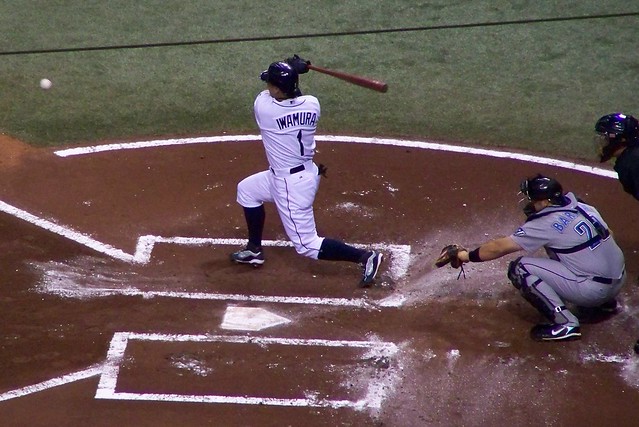
Baseball player

"A dog running across a field with a frisbee."

Dog with frisbee

Installation

Install for easier access to the following objects/classes:

  • clip_text_decoder.datasets.ClipCocoCaptionsDataset
  • clip_text_decoder.models.ClipDecoder
  • clip_text_decoder.models.ClipDecoderInferenceModel
  • clip_text_decoder.tokenizer.Tokenizer

The train.py script will not be available in the installed package, since it's located in the root directory. To train new models, either clone this repository or recreate train.py locally.

Using pip:

pip install clip-text-decoder

From source:

git clone https://github.com/fkodom/clip-text-decoder.git
cd clip-text-decoder
pip install .

NOTE: You'll also need to install openai/CLIP to encode images with CLIP. This is also required by ClipCocoCaptionsDataset to build the captions dataset the first time (cached for subsequent calls).

pip install "clip @ git+https://github.com/openai/CLIP.git"

For technical reasons, the CLIP dependency can't be included in the PyPI package, since it's not an officially published package.

Training

Open In Colab

Launch your own training session using the provided script (train.py):

python train.py --max-epochs 5

Training CLI arguments, along with their default values:

--max-epochs 5  # (int)
--num-layers 6  # (int)
--dim-feedforward 256  # (int)
--precision 16  # (16 or 32)
--seed 0  # (int)

Inference

The training script will produce a model.zip archive, containing the Tokenizer and trained model parameters. To perform inference with it:

import clip
from PIL import Image
import torch

from clip_text_decoder.model import ClipDecoderInferenceModel

device = "cuda" if torch.cuda.is_available() else "cpu"
model = ClipDecoderInferenceModel.load("path/to/model.zip").to(device)
clip_model, clip_preprocessor = clip.load("ViT-B/32", device=device, jit=False)

# Create a blank dummy image
dummy_image = Image.new("RGB", (224, 224))
preprocessed = clip_preprocessor(dummy_image).to(device)
# Add a batch dimension using '.unsqueeze(0)'
encoded = clip_model.encode_image(preprocessed.unsqueeze(0))
text = model(encoded)

print(text)
# Probably some nonsense, because we used a dummy image.

Pretrained Models

A pretrained CLIP decoder is hosted in my Google Drive, and can easily be downloaded by:

from clip_text_decoder.model import ClipDecoderInferenceModel

model = ClipDecoderInferenceModel.download_pretrained()

To cache the pretrained model locally, so that it's not re-downloaded each time:

model = ClipDecoderInferenceModel.download_pretrained("/path/to/model.zip")

Shortcomings

  • Only works well with COCO-style images. If you go outside the distribution of COCO objects, you'll get nonsense text captions.
  • Relatively short training time. Even within the COCO domain, you'll occasionally see incorrect captions. Quite a few captions will have bad grammar, repetitive descriptors, etc.
Comments
  • Decoding Text Embeddings Coded Using Hugging Face ClipTextModel

    Decoding Text Embeddings Coded Using Hugging Face ClipTextModel

    Suppose that I have text embeddings created using Hugging Face's ClipTextModel using the following method:

    import torch
    from transformers import CLIPTokenizer, CLIPTextModel
    
    class_list = ["i love going home and playing with my wife and kids", "i love going home", "playing with my wife and kids", 
    "family", "war", "writing"]
    
    model = CLIPTextModel.from_pretrained("openai/clip-vit-large-patch14")
    tokenizer = CLIPTokenizer.from_pretrained("openai/clip-vit-large-patch14")
    
    inputs = tokenizer(class_list, padding=True, return_tensors="pt")
    outputs = model(**inputs)
    hidden_state = outputs.last_hidden_state
    embeddings = outputs.pooler_output
    

    Questions:

    1. Is It possible to use the clip-text-decoder to convert the embeddings back to text?
    2. If it is indeed possible to do so, could you provide an example of how?

    Looking forward to receiving your feedback.

    opened by mbdzi 6
  • Fix string error when loading clip models.

    Fix string error when loading clip models.

    error

    The model name string ( VIT-xxx ) in the check_vision_backbone function is not compatible with the model name string ( ViT-xxx ) of the clip repository, which will cause at least one error in check_vision_backbone function or when loading the clip model.

    solution

    In this PR, the model name string in the check_vision_backbone function is modified to ViT-xxx to make it compatible with the clip repository.

    opened by Adenialzz 1
  • BLIP vision backbone

    BLIP vision backbone

    • Added blip backbone; still cleaning up last pieces
    • Bug fixes for training script, and remove debug code.
    • Fix dependencies in test workflow; update README statistics
    • Fix test issue with CUDA device
    • Update unit tests for newer Python, torch versions
    • Test up to Python 3.10
    • Test up to Python 3.9
    • Install lavis first
    opened by fkodom 0
  • Feature: Beam Search

    Feature: Beam Search

    • Add beam search, clip dependency to setup.py
    • Fix installation instructions
    • Remove main clause
    • Add '--beam-size' option to 'train.py' script.
    • Update README; propagate the '--beam-size' arg through eval functions
    • Update setup.cfg, add pre-commit hooks
    • Reformat images
    • Remove fixed image width
    • Add detail to README; comments to call method for beam search
    • Updated README headline
    opened by fkodom 0
  • Bug Fixes for Broken Tests

    Bug Fixes for Broken Tests

    • Cache the old fashioned way :)
    • Fix silly typo in test for image caption model
    • Apply black and isort formatting
    • Install latest version of 'black', reapply formatting
    • Fix flake8 issue (duplicate function definition), and install latest patch version of pytorch for tests.
    • Skip slow tests by default, add 'slow' marker to inference model tests.
    opened by fkodom 0
  • GPT2 Decoder

    GPT2 Decoder

    • Update model to use DistilGPT2 as a pre-trained decoder.
    • Removed tokenizer (no longer used), fixed bugs in Model source file, and updated model unit tests.
    • Backwards compatibility for 'gdown.download' method.
    • Update installation requirements, caption examples in README
    opened by fkodom 0
  • Upgrade CodeSee workflow to version 2

    Upgrade CodeSee workflow to version 2

    CodeSee is a code visibility platform.

    This change updates the CodeSee workflow file to the latest version for security, maintenance, and support improvements (see changelog below).

    That workflow file:

    • runs CodeSee's code analysis on every PR push and merge
    • uploads that analysis to CodeSee.
    • It does not transmit your code.

    The code analysis is used to generate maps and insights about this codebase.

    CodeSee workflow changelog:

    • Improved security: Updates permission to be read-only.
    • Improved future maintenance: Replaces the body of the workflow with a single github action: codesee-action. This makes it significantly easier for CodeSee to introduce future improvements and fixes without requiring another PR like this.
    • Improved Python support: The action now properly supports Python 3.11, and will continue to support new Python versions as they are released.
    opened by codesee-maps[bot] 1
  • Incompatible checksum error

    Incompatible checksum error

    I see the following error when trying to load the pretrained model.

        tokenizer=pickle.loads(tokenizer_buffer.read()),
      File "stringsource", line 6, in spacy.pipeline.trainable_pipe.__pyx_unpickle_TrainablePipe
    _pickle.PickleError: Incompatible checksums (102742709 vs 0x417ddeb = (cfg, model, name, vocab))
    

    Am I missing something?

    opened by dapurv5 0
Releases(1.4.4)
  • 1.4.4(Nov 7, 2022)

    What's Changed

    • Fix string error when loading clip models. by @Adenialzz in https://github.com/fkodom/clip-text-decoder/pull/12

    New Contributors

    • @Adenialzz made their first contribution in https://github.com/fkodom/clip-text-decoder/pull/12

    Full Changelog: https://github.com/fkodom/clip-text-decoder/compare/1.4.3...1.4.4

    Source code(tar.gz)
    Source code(zip)
  • 1.4.3(Nov 7, 2022)

    What's Changed

    • Refactor Dataset by @fkodom in https://github.com/fkodom/clip-text-decoder/pull/11

    Full Changelog: https://github.com/fkodom/clip-text-decoder/compare/1.4.2...1.4.3

    Source code(tar.gz)
    Source code(zip)
  • 1.4.2(Oct 26, 2022)

    What's Changed

    • Huggingface Evaluate by @fkodom in https://github.com/fkodom/clip-text-decoder/pull/9

    Full Changelog: https://github.com/fkodom/clip-text-decoder/compare/1.4.1...1.4.2

    Source code(tar.gz)
    Source code(zip)
  • 1.4.1(Oct 26, 2022)

    What's Changed

    • Datapipes by @fkodom in https://github.com/fkodom/clip-text-decoder/pull/8

    Full Changelog: https://github.com/fkodom/clip-text-decoder/compare/1.4.0...1.4.1

    Source code(tar.gz)
    Source code(zip)
  • 1.4.0(Oct 23, 2022)

    What's Changed

    • BLIP vision backbone by @fkodom in https://github.com/fkodom/clip-text-decoder/pull/7

    Full Changelog: https://github.com/fkodom/clip-text-decoder/compare/1.3.0...1.4.0

    Source code(tar.gz)
    Source code(zip)
  • 1.3.0(Oct 2, 2022)

    What's Changed

    • Feature: Beam Search by @fkodom in https://github.com/fkodom/clip-text-decoder/pull/5
    • Bug Fix: PyPI Release by @fkodom in https://github.com/fkodom/clip-text-decoder/pull/6

    Full Changelog: https://github.com/fkodom/clip-text-decoder/compare/1.2.0...1.3.0

    Source code(tar.gz)
    Source code(zip)
  • 1.2.0(Jan 29, 2022)

    What's Changed

    • Cache CLIP embeddings for the dataset, rather than recomputing them each time.

    • Reduce model file sizes by storing at lower precision

    • Add an ImageCaptionInferenceModel class for easier out-of-the-box use

    • Fix some broken unit tests

    • Better Data Caching by @fkodom in https://github.com/fkodom/clip-text-decoder/pull/3

    • Bug Fixes for Broken Tests by @fkodom in https://github.com/fkodom/clip-text-decoder/pull/4

    Full Changelog: https://github.com/fkodom/clip-text-decoder/compare/1.1.0...1.2.0

    Source code(tar.gz)
    Source code(zip)
  • 1.1.0(Dec 22, 2021)

    What's Changed

    • GPT2 Decoder by @fkodom in https://github.com/fkodom/clip-text-decoder/pull/2

    New Contributors

    • @fkodom made their first contribution in https://github.com/fkodom/clip-text-decoder/pull/2

    Full Changelog: https://github.com/fkodom/clip-text-decoder/compare/1.0.0...1.1.0

    Source code(tar.gz)
    Source code(zip)
  • 0.1.1(Nov 14, 2021)

  • 0.1.0(Nov 14, 2021)

Owner
Frank Odom
Director of Innovation at Plainsight. I like neural nets, and neural nets like me.
Frank Odom
Face Mask Detection on Image and Video using tensorflow and keras

Face-Mask-Detection Face Mask Detection on Image and Video using tensorflow and keras Train Neural Network on face-mask dataset using tensorflow and k

Nahid Ebrahimian 12 Nov 11, 2022
Nerf pl - NeRF (Neural Radiance Fields) and NeRF in the Wild using pytorch-lightning

nerf_pl Update: an improved NSFF implementation to handle dynamic scene is open! Update: NeRF-W (NeRF in the Wild) implementation is added to nerfw br

AI葵 1.8k Dec 30, 2022
A simple, high level, easy-to-use open source Computer Vision library for Python.

ZoomVision : Slicing Aid Detection A simple, high level, easy-to-use open source Computer Vision library for Python. Installation Installing dependenc

Nurettin Sinanoğlu 2 Mar 04, 2022
TorchFlare is a simple, beginner-friendly, and easy-to-use PyTorch Framework train your models effortlessly.

TorchFlare TorchFlare is a simple, beginner-friendly and an easy-to-use PyTorch Framework train your models without much effort. It provides an almost

Atharva Phatak 85 Dec 26, 2022
Complete U-net Implementation with keras

U Net Lowered with Keras Complete U-net Implementation with keras Original Paper Link : https://arxiv.org/abs/1505.04597 Special Implementations : The

Sagnik Roy 14 Oct 10, 2022
Speech recognition tool to convert audio to text transcripts, for Linux and Raspberry Pi.

Spchcat Speech recognition tool to convert audio to text transcripts, for Linux and Raspberry Pi. Description spchcat is a command-line tool that read

Pete Warden 279 Jan 03, 2023
In this project I played with mlflow, streamlit and fastapi to create a training and prediction app on digits

Fastapi + MLflow + streamlit Setup env. I hope I covered all. pip install -r requirements.txt Start app Go in the root dir and run these Streamlit str

76 Nov 23, 2022
A Novel Plug-in Module for Fine-grained Visual Classification

Pytorch implementation for A Novel Plug-in Module for Fine-Grained Visual Classification. fine-grained visual classification task.

ChouPoYung 109 Dec 20, 2022
A Pytorch loader for MVTecAD dataset.

MVTecAD A Pytorch loader for MVTecAD dataset. It strictly follows the code style of common Pytorch datasets, such as torchvision.datasets.CIFAR10. The

Jiyuan 1 Dec 27, 2021
Ludwig Benchmarking Toolkit

Ludwig Benchmarking Toolkit The Ludwig Benchmarking Toolkit is a personalized benchmarking toolkit for running end-to-end benchmark studies across an

HazyResearch 17 Nov 18, 2022
Official repository for the NeurIPS 2021 paper Get Fooled for the Right Reason: Improving Adversarial Robustness through a Teacher-guided curriculum Learning Approach

Get Fooled for the Right Reason Official repository for the NeurIPS 2021 paper Get Fooled for the Right Reason: Improving Adversarial Robustness throu

Sowrya Gali 1 Apr 25, 2022
Animal Sound Classification (Cats Vrs Dogs Audio Sentiment Classification)

this is a simple artificial neural network model using deep learning and torch-audio to classify cats and dog sounds.

crispengari 3 Dec 05, 2022
A set of simple scripts to process the Imagenet-1K dataset as TFRecords and make index files for NVIDIA DALI.

Overview This is a set of simple scripts to process the Imagenet-1K dataset as TFRecords and make index files for NVIDIA DALI. Make TFRecords To run t

8 Nov 01, 2022
EfficientNetv2 TensorRT int8

EfficientNetv2_TensorRT_int8 EfficientNetv2模型实现来自https://github.com/d-li14/efficientnetv2.pytorch 环境配置 ubuntu:18.04 cuda:11.0 cudnn:8.0 tensorrt:7

34 Apr 24, 2022
Implementation of Gans

GAN Generative Adverserial Networks are an approach to generative data modelling using Deep learning methods. I have currently implemented : DCGAN on

Sibam Parida 5 Sep 07, 2021
A framework for GPU based high-performance medical image processing and visualization

FAST is an open-source cross-platform framework with the main goal of making it easier to do high-performance processing and visualization of medical images on heterogeneous systems utilizing both mu

Erik Smistad 315 Dec 30, 2022
PyTorch code for BLIP: Bootstrapping Language-Image Pre-training for Unified Vision-Language Understanding and Generation

BLIP: Bootstrapping Language-Image Pre-training for Unified Vision-Language Understanding and Generation

Salesforce 1.3k Dec 31, 2022
MediaPipeで姿勢推定を行い、Tokyo2020オリンピック風のピクトグラムを表示するデモ

Tokyo2020-Pictogram-using-MediaPipe MediaPipeで姿勢推定を行い、Tokyo2020オリンピック風のピクトグラムを表示するデモです。 Tokyo2020Pictgram02.mp4 Requirement mediapipe 0.8.6 or later O

KazuhitoTakahashi 295 Dec 26, 2022
Semiconductor Machine learning project

Wafer Fault Detection Problem Statement: Wafer (In electronics), also called a slice or substrate, is a thin slice of semiconductor, such as a crystal

kunal suryawanshi 1 Jan 15, 2022
Simple tutorials on Pytorch DDP training

pytorch-distributed-training Distribute Dataparallel (DDP) Training on Pytorch Features Easy to study DDP training You can directly copy this code for

Ren Tianhe 188 Jan 06, 2023