alfred-py: A deep learning utility library for **human**

Overview

Alfred

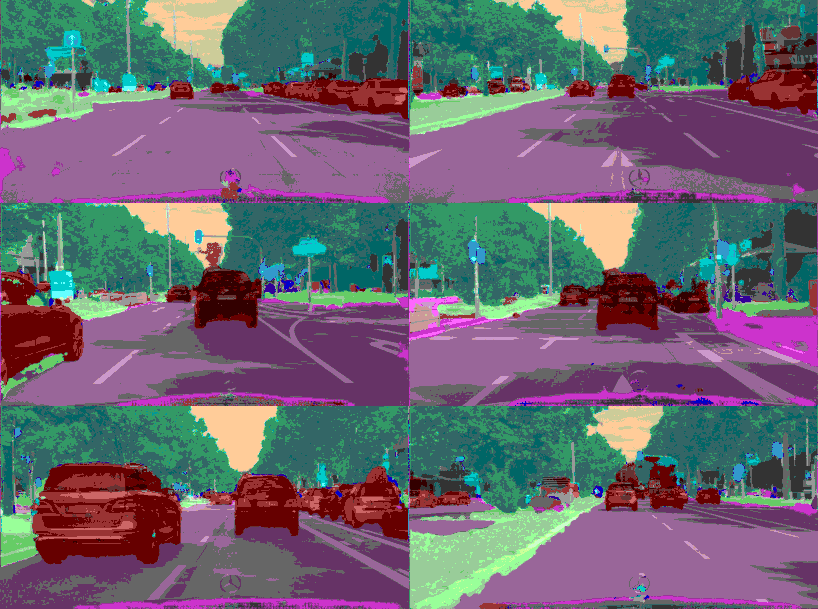
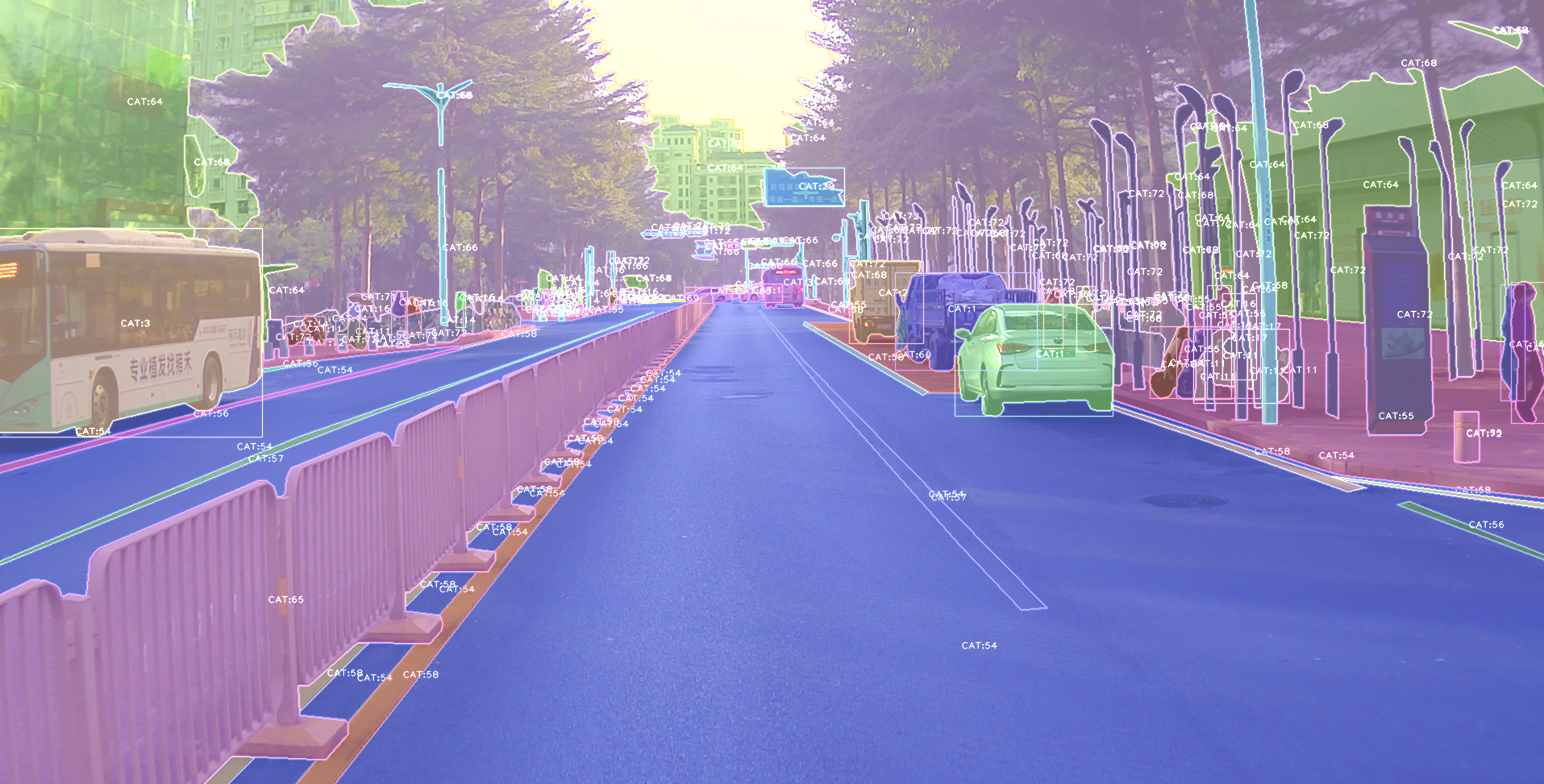
alfred vis segmentation annotation in coco format

Alfred is command line tool for deep-learning usage. if you want split an video into image frames or combine frames into a single video, then alfred is what you want.

Install

To install alfred, it is very simple:

sudo pip3 install alfred-py

alfred is both a lib and a tool, you can import it's APIs, or you can directly call it inside your terminal.

A glance of alfred, after you installed above package, you will have alfred:

  • data module:

    # show VOC annotations
    alfred data vocview -i JPEGImages/ -l Annotations/
    # show coco anntations
    alfred data cocoview -j annotations/instance_2017.json -i images/
    # show yolo annotations
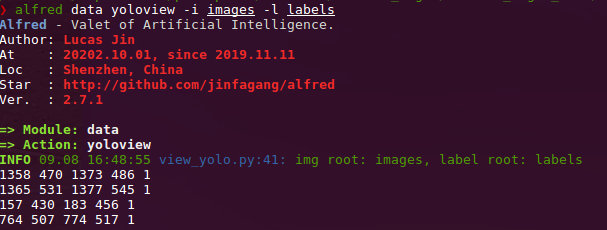
    alfred data yoloview -i images -l labels
    # show detection label with txt format
    alfred data txtview -i images/ -l txts/
    # show more of data
    alfred data -h
    
    # eval tools
    alfred data evalvoc -h
  • cab module:

    # count files number of a type
    alfred cab count -d ./images -t jpg
    # split a txt file into train and test
    alfred cab split -f all.txt -r 0.9,0.1 -n train,val
  • vision module;

    # extract video to images
    alfred vision extract -v video.mp4
    # combine images to video
    alfred vision 2video -d images/
  • -h to see more:

    usage: alfred [-h] [--version] {vision,text,scrap,cab,data} ...
    
    positional arguments:
      {vision,text,scrap,cab,data}
        vision              vision related commands.
        text                text related commands.
        scrap               scrap related commands.
        cab                 cabinet related commands.
        data                data related commands.
    
    optional arguments:
      -h, --help            show this help message and exit
      --version, -v         show version info.

    inside every child module, you can call it's -h as well: alfred text -h.

if you are on windows, you can install pycocotools via: pip install "git+https://github.com/philferriere/cocoapi.git#egg=pycocotools&subdirectory=PythonAPI", we have made pycocotools as an dependencies since we need pycoco API.

Updates

alfred-py has been updating for 3 years, and it will keep going!

  • 2050-xxx: to be continue;

  • 2021.11.13: Now I add Siren SDK support!

    from functools import wraps
    from alfred.siren.handler import SirenClient
    from alfred.siren.models import ChatMessage, InvitationMessage
    
    siren = SirenClient('daybreak_account', 'password')
    
    
    @siren.on_received_invitation
    def on_received_invitation(msg: InvitationMessage):
        print('received invitation: ', msg.invitation)
        # directly agree this invitation for robots
    
    
    @siren.on_received_chat_message
    def on_received_chat_msg(msg: ChatMessage):
        print('got new msg: ', msg.text)
        siren.publish_txt_msg('I got your message O(∩_∩)O哈哈~', msg.roomId)
    
    
    if __name__ == '__main__':
        siren.loop()
    

    Using this, you can easily setup a Chatbot. By using Siren client.

  • 2021.06.24: Add a useful commandline tool, change your pypi source easily!!:

    alfred cab changesource
    

    And then your pypi will using aliyun by default!

  • 2021.05.07: Upgrade Open3D instructions: Open3D>0.9.0 no longer compatible with previous alfred-py. Please upgrade Open3D, you can build Open3D from source:

      git clone --recursive https://github.com/intel-isl/Open3D.git
      cd Open3D && mkdir build && cd build
      sudo apt install libc++abi-8-dev
      sudo apt install libc++-8-dev
      cmake .. -DPYTHON_EXECUTABLE=/usr/bin/python3
    

    Ubuntu 16.04 blow I tried all faild to build from source. So, please using open3d==0.9.0 for alfred-py.

  • 2021.04.01: A unified evaluator had added. As all we know, for many users, writting Evaluation might coupled deeply with your project. But with Alfred's help, you can do evaluation in any project by simply writting 8 lines of codes, for example, if your dataset format is Yolo, then do this:

      def infer_func(img_f):
      image = cv2.imread(img_f)
      results = config_dict['model'].predict_for_single_image(
          image, aug_pipeline=simple_widerface_val_pipeline, classification_threshold=0.89, nms_threshold=0.6, class_agnostic=True)
      if len(results) > 0:
          results = np.array(results)[:, [2, 3, 4, 5, 0, 1]]
          # xywh to xyxy
          results[:, 2] += results[:, 0]
          results[:, 3] += results[:, 1]
      return results
    
      if __name__ == '__main__':
          conf_thr = 0.4
          iou_thr = 0.5
    
          imgs_root = 'data/hand/images'
          labels_root = 'data/hand/labels'
    
          yolo_parser = YoloEvaluator(imgs_root=imgs_root, labels_root=labels_root, infer_func=infer_func)
          yolo_parser.eval_precisely()

    Then you can get your evaluation results automatically. All recall, precision, mAP will printed out. More dataset format are on-going.

  • 2021.03.10: New added ImageSourceIter class, when you want write a demo of your project which need to handle any input such as image file / folder / video file etc. You can using ImageSourceIter:

    from alfred.utils.file_io import ImageSourceIter
    
    # data_f can be image_file or image_folder or video
    iter = ImageSourceIter(ops.test_path)
    while True:
        itm = next(iter)
        if isinstance(itm, str):
            itm = cv2.imread(itm)
        # cv2.imshow('raw', itm)
        res = detect_for_pose(itm, det_model)
        cv2.imshow('res', itm)
        if iter.video_mode:
            cv2.waitKey(1)
        else:
            cv2.waitKey(0)

    And then you can avoid write anything else of deal with file glob or reading video in cv. note that itm return can be a cv array or a file path.

  • 2021.01.25: alfred now support self-defined visualization on coco format annotation (not using pycoco tools):

    image-20210125194313093

    If your dataset in coco format but visualize wrongly pls fire a issue to me, thank u!

  • 2020.09.27: Now, yolo and VOC can convert to each other, so that using Alfred you can:

    • convert yolo2voc;
    • convert voc2yolo;
    • convert voc2coco;
    • convert coco2voc;

    By this, you can convert any labeling format of each other.

  • 2020.09.08: After a long time past, alfred got some updates: We providing coco2yolo ability inside it. Users can run this command convert your data to yolo format:

    alfred data coco2yolo -i images/ -j annotations/val_split_2020.json
    

    Only should provided is your image root path and your json file. And then all result will generated into yolo folder under images or in images parent dir.

    After that (you got your yolo folder), then you can visualize the conversion result to see if it correct or not:

    alfred data yolovview -i images/ -l labels/
    

    image-20200908164952171

  • 2020.07.27: After a long time past, alfred finally get some updates:

    image-20200727163938094

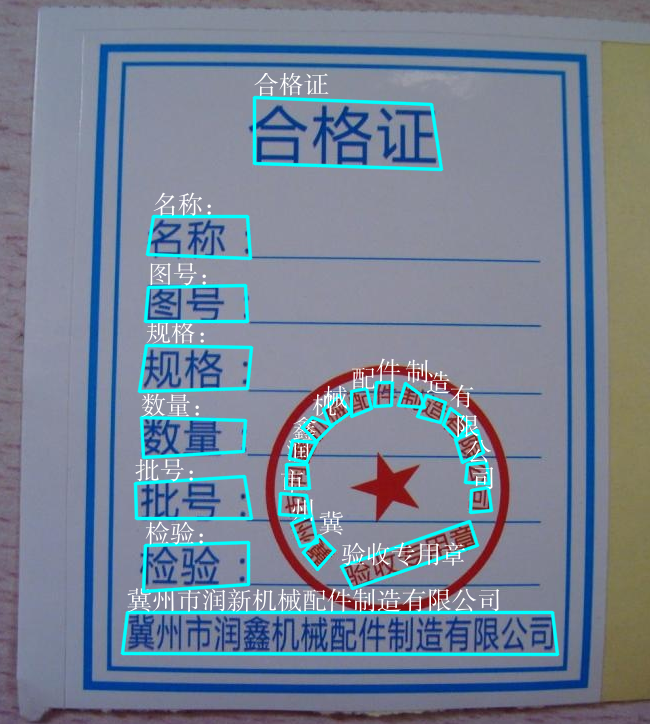
    Now, you can using alfred draw Chinese charactors on image without xxxx undefined encodes.

    from alfred.utils.cv_wrapper import put_cn_txt_on_img
    
    img = put_cn_txt_on_img(img, spt[-1], [points[0][0], points[0][1]-25], 1.0, (255, 255, 255))

    Also, you now can merge 2 VOC datasets! This is helpful when you have 2 dataset and you want merge them into a single one.

    alfred data mergevoc -h
    

    You can see more promotes.

  • 2020.03.08:Several new files added in alfred:

    alfred.utils.file_io: Provide file io utils for common purpose
    alfred.dl.torch.env: Provide seed or env setup in pytorch (same API as detectron2)
    alfred.dl.torch.distribute: utils used for distribute training when using pytorch
    
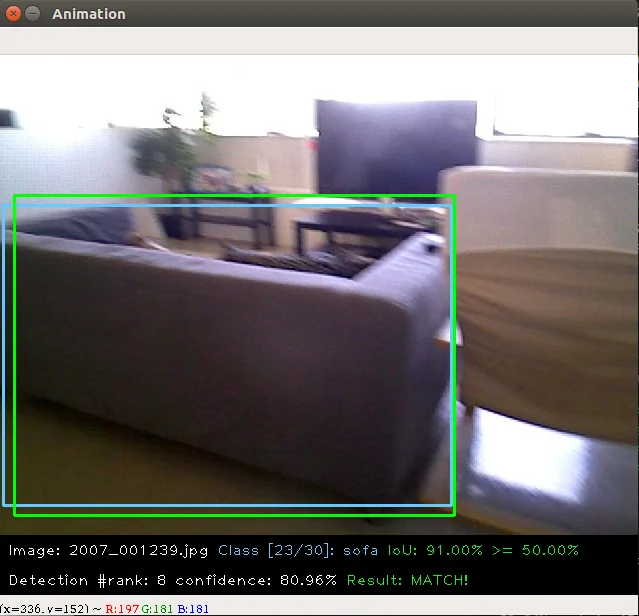
  • 2020.03.04: We have added some evaluation tool to calculate mAP for object detection model performance evaluation, it's useful and can visualize result:

    this usage is also quite simple:

    alfred data evalvoc -g ground-truth -d detection-results -im images
    

    where -g is your ground truth dir (contains xmls or txts), -d is your detection result files dir, -im is your images fodler. You only need save all your detected results into txts, one image one txt, and format like this:

    bottle 0.14981 80 1 295 500  
    bus 0.12601 36 13 404 316  
    horse 0.12526 430 117 500 307  
    pottedplant 0.14585 212 78 292 118  
    tvmonitor 0.070565 388 89 500 196 
  • 2020.02.27: We just update a license module inside alfred, say you want apply license to your project or update license, simple:

     alfred cab license -o 'MANA' -n 'YoloV3' -u 'manaai.cn'

    you can found more detail usage with alfred cab license -h

  • 2020-02-11: open3d has changed their API. we have updated new open3d inside alfred, you can simply using latest open3d and run python3 examples/draw_3d_pointcloud.py you will see this:

  • 2020-02-10: alfred now support windows (experimental);

  • 2020-02-01: 武汉加油! alfred fix windows pip install problem related to encoding 'gbk';

  • 2020-01-14: Added cabinet module, also add some utils under data module;

  • 2019-07-18: 1000 classes imagenet labelmap added. Call it from:

    from alfred.vis.image.get_dataset_label_map import imagenet_labelmap
    
    # also, coco, voc, cityscapes labelmap were all added in
    from alfred.vis.image.get_dataset_label_map import coco_labelmap
    from alfred.vis.image.get_dataset_label_map import voc_labelmap
    from alfred.vis.image.get_dataset_label_map import cityscapes_labelmap
  • 2019-07-13: We add a VOC check module in command line usage, you can now visualize your VOC format detection data like this:

    alfred data voc_view -i ./images -l labels/
    
  • 2019-05-17: We adding open3d as a lib to visual 3d point cloud in python. Now you can do some simple preparation and visual 3d box right on lidar points and show like opencv!!

    You can achieve this by only using alfred-py and open3d!

    example code can be seen under examples/draw_3d_pointcloud.py. code updated with latest open3d API!.

  • 2019-05-10: A minor updates but really useful which we called mute_tf, do you want to disable tensorflow ignoring log? simply do this!!

    from alfred.dl.tf.common import mute_tf
    mute_tf()
    import tensorflow as tf

    Then, the logging message were gone....

  • 2019-05-07: Adding some protos, now you can parsing tensorflow coco labelmap by using alfred:

    from alfred.protos.labelmap_pb2 import LabelMap
    from google.protobuf import text_format
    
    with open('coco.prototxt', 'r') as f:
        lm = LabelMap()
        lm = text_format.Merge(str(f.read()), lm)
        names_list = [i.display_name for i in lm.item]
        print(names_list)
  • 2019-04-25: Adding KITTI fusion, now you can get projection from 3D label to image like this: we will also add more fusion utils such as for nuScene dataset.

    We providing kitti fusion kitti for convert camera link 3d points to image pixel, and convert lidar link 3d points to image pixel. Roughly going through of APIs like this:

    # convert lidar prediction to image pixel
    from alfred.fusion.kitti_fusion import LidarCamCalibData, \
        load_pc_from_file, lidar_pts_to_cam0_frame, lidar_pt_to_cam0_frame
    from alfred.fusion.common import draw_3d_box, compute_3d_box_lidar_coords
    
    # consit of prediction of lidar
    # which is x,y,z,h,w,l,rotation_y
    res = [[4.481686, 5.147319, -1.0229858, 1.5728549, 3.646751, 1.5121397, 1.5486346],
           [-2.5172017, 5.0262384, -1.0679419, 1.6241353, 4.0445814, 1.4938312, 1.620804],
           [1.1783253, -2.9209857, -0.9852259, 1.5852798, 3.7360613, 1.4671413, 1.5811548]]
    
    for p in res:
        xyz = np.array([p[: 3]])
        c2d = lidar_pt_to_cam0_frame(xyz, frame_calib)
        if c2d is not None:
            cv2.circle(img, (int(c2d[0]), int(c2d[1])), 3, (0, 255, 255), -1)
        hwl = np.array([p[3: 6]])
        r_y = [p[6]]
        pts3d = compute_3d_box_lidar_coords(xyz, hwl, angles=r_y, origin=(0.5, 0.5, 0.5), axis=2)
    
        pts2d = []
        for pt in pts3d[0]:
            coords = lidar_pt_to_cam0_frame(pt, frame_calib)
            if coords is not None:
                pts2d.append(coords[:2])
        pts2d = np.array(pts2d)
        draw_3d_box(pts2d, img)

    And you can see something like this:

    note:

    compute_3d_box_lidar_coords for lidar prediction, compute_3d_box_cam_coords for KITTI label, cause KITTI label is based on camera coordinates!.

    since many users ask me how to reproduces this result, you can checkout demo file under examples/draw_3d_box.py;

  • 2019-01-25: We just adding network visualization tool for pytorch now!! How does it look? Simply print out every layer network with output shape, I believe this is really helpful for people to visualize their models!

    ➜  mask_yolo3 git:(master) ✗ python3 tests.py
    ----------------------------------------------------------------
            Layer (type)               Output Shape         Param #
    ================================================================
                Conv2d-1         [-1, 64, 224, 224]           1,792
                  ReLU-2         [-1, 64, 224, 224]               0
                  .........
               Linear-35                 [-1, 4096]      16,781,312
                 ReLU-36                 [-1, 4096]               0
              Dropout-37                 [-1, 4096]               0
               Linear-38                 [-1, 1000]       4,097,000
    ================================================================
    Total params: 138,357,544
    Trainable params: 138,357,544
    Non-trainable params: 0
    ----------------------------------------------------------------
    Input size (MB): 0.19
    Forward/backward pass size (MB): 218.59
    Params size (MB): 527.79
    Estimated Total Size (MB): 746.57
    ----------------------------------------------------------------


    Ok, that is all. what you simply need to do is:

    from alfred.dl.torch.model_summary import summary
    from alfred.dl.torch.common import device
    
    from torchvision.models import vgg16
    
    vgg = vgg16(pretrained=True)
    vgg.to(device)
    summary(vgg, input_size=[224, 224])

    Support you input (224, 224) image, you will got this output, or you can change any other size to see how output changes. (currently not support for 1 channel image)

  • 2018-12-7: Now, we adding a extensible class for quickly write an image detection or segmentation demo.

    If you want write a demo which do inference on an image or an video or right from webcam, now you can do this in standared alfred way:

    class ENetDemo(ImageInferEngine):
    
        def __init__(self, f, model_path):
            super(ENetDemo, self).__init__(f=f)
    
            self.target_size = (512, 1024)
            self.model_path = model_path
            self.num_classes = 20
    
            self.image_transform = transforms.Compose(
                [transforms.Resize(self.target_size),
                 transforms.ToTensor()])
    
            self._init_model()
    
        def _init_model(self):
            self.model = ENet(self.num_classes).to(device)
            checkpoint = torch.load(self.model_path)
            self.model.load_state_dict(checkpoint['state_dict'])
            print('Model loaded!')
    
        def solve_a_image(self, img):
            images = Variable(self.image_transform(Image.fromarray(img)).to(device).unsqueeze(0))
            predictions = self.model(images)
            _, predictions = torch.max(predictions.data, 1)
            prediction = predictions.cpu().numpy()[0] - 1
            return prediction
    
        def vis_result(self, img, net_out):
            mask_color = np.asarray(label_to_color_image(net_out, 'cityscapes'), dtype=np.uint8)
            frame = cv2.resize(img, (self.target_size[1], self.target_size[0]))
            # mask_color = cv2.resize(mask_color, (frame.shape[1], frame.shape[0]))
            res = cv2.addWeighted(frame, 0.5, mask_color, 0.7, 1)
            return res
    
    
    if __name__ == '__main__':
        v_f = ''
        enet_seg = ENetDemo(f=v_f, model_path='save/ENet_cityscapes_mine.pth')
        enet_seg.run()

    After that, you can directly inference from video. This usage can be found at git repo:
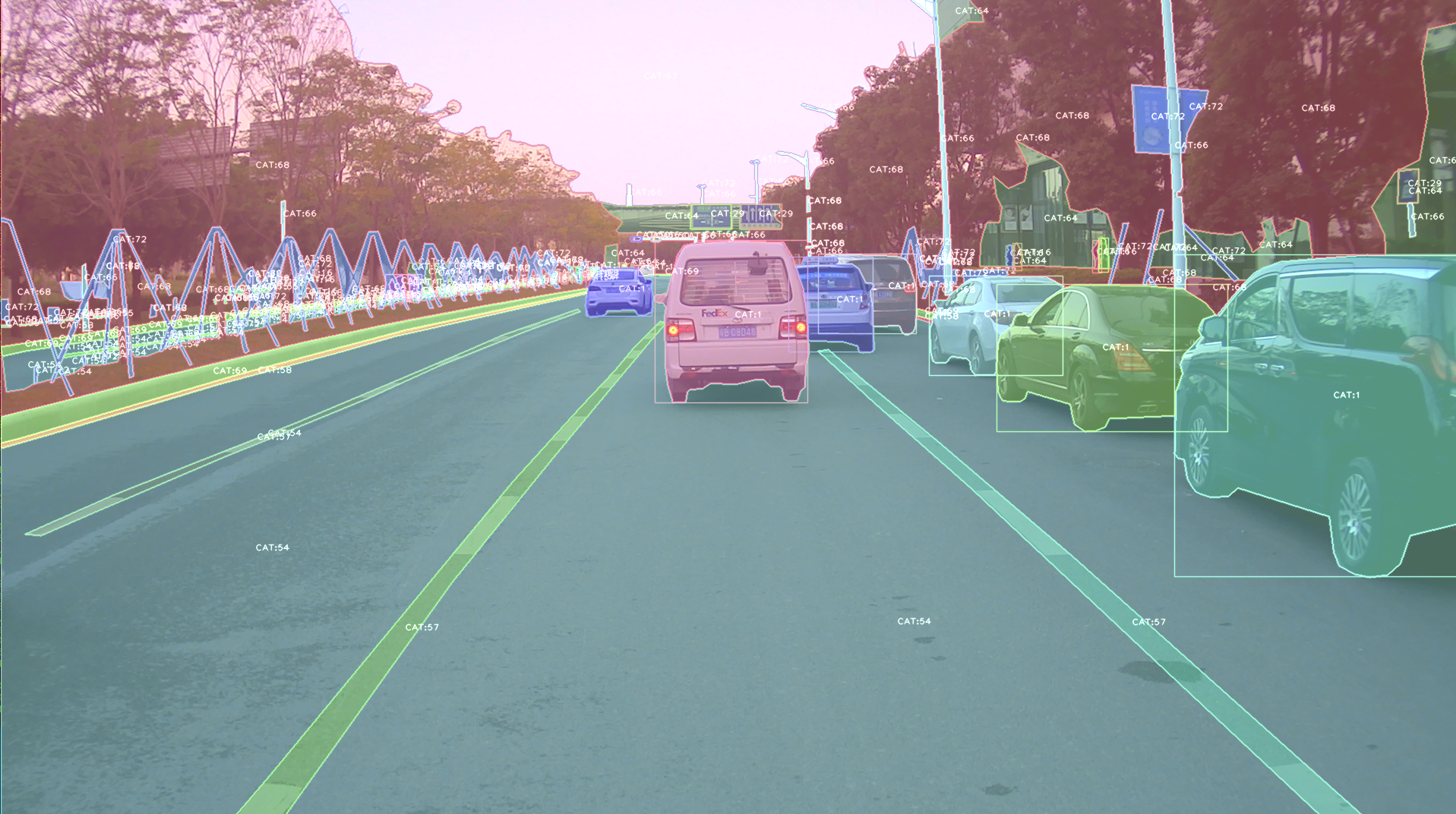
The repo using alfred: http://github.com/jinfagang/pt_enet

  • 2018-11-6: I am so glad to announce that alfred 2.0 released! 😄 ⛽️ 👏 👏 Let's have a quick look what have been updated:

    # 2 new modules, fusion and vis
    from alred.fusion import fusion_utils
    

    For the module fusion contains many useful sensor fusion helper functions you may use, such as project lidar point cloud onto image.

  • 2018-08-01: Fix the video combined function not work well with sequence. Add a order algorithm to ensure video sequence right. also add some draw bbox functions into package.

    can be called like this:

  • 2018-03-16: Slightly update alfred, now we can using this tool to combine a video sequence back original video! Simply do:

    # alfred binary exectuable program
    alfred vision 2video -d ./video_images

Capable

alfred is both a library and a command line tool. It can do those things:

# extract images from video
alfred vision extract -v video.mp4
# combine image sequences into a video
alfred vision 2video -d /path/to/images
# get faces from images
alfred vision getface -d /path/contains/images/

Just try it out!!

Copyright

Alfred build by Lucas Jin with ❤️ , welcome star and send PR. If you got any question, you can ask me via wechat: jintianiloveu, this code released under MIT license.

Comments
  • failed to run demo_o3d_server.py

    failed to run demo_o3d_server.py

    After run pip install alfred-py, run script demo_o3d_server.py in examples dir get error:

    ❯❯❯ py .\demo_o3d_server.py
    Traceback (most recent call last):
      File ".\demo_o3d_server.py", line 18, in <module>
        main()
      File ".\demo_o3d_server.py", line 8, in main
        cfg = get_default_visconfig()
      File "C:\Users\xq\miniconda3\envs\nn\lib\site-packages\alfred\vis\mesh3d\o3d_visconfig.py", line 87, in get_default_visconfig
        cfg = Config.load(
      File "C:\Users\xq\miniconda3\envs\nn\lib\site-packages\alfred\utils\base_config.py", line 21, in load
        cfg.merge_from_file(filename)
      File "C:\Users\xq\miniconda3\envs\nn\lib\site-packages\yacs\config.py", line 211, in merge_from_file
        with open(cfg_filename, "r") as f:
    FileNotFoundError: [Errno 2] No such file or directory: 'C:\\Users\\xq\\miniconda3\\envs\\nn\\lib\\site-packages\\alfred\\vis\\mesh3d\\default_viscfg.yml'
    

    Then found there is no assets and default_viscfg.yml under site-packages:

    ❯❯❯ ls -l
    total 88
    drwxrwxr-x    2 xq       xq            4096 Feb 27 15:32 __pycache__
    -rw-rw-r--    1 xq       xq           35379 Feb 27 15:32 o3d_visconfig.py
    -rw-rw-r--    1 xq       xq            8368 Feb 27 15:32 o3dsocket.py
    -rw-rw-r--    1 xq       xq           15428 Feb 27 15:32 o3dwrapper.py
    -rw-rw-r--    1 xq       xq            5552 Feb 27 15:32 skelmodel.py
    -rw-rw-r--    1 xq       xq            9290 Feb 27 15:32 utils.py
    

    So should I copy those files to site-packages as function get_default_visconfig do not allow arguments. Or other good suggestions?

    Thanks!

    opened by roachsinai 4
  • How do I visualize bounding boxes on my own point cloud?

    How do I visualize bounding boxes on my own point cloud?

    How do I visualize bounding boxes on my own point cloud? I mean, using draw_3d_pointcloud.py , what information does it need?

    For bounding box , xyz, hwl, r_y are needed, right?

    opened by SnowPi 4
  • glx error in pointcloud visualization.

    glx error in pointcloud visualization.

    For visualizing pointcloud, I use this repo.

    In draw_pcs_open3d function (after passing the geometries to it),

    I get the following error while it tries to create a visualization window:

    ~/anaconda3/envs/pointpillars/lib/python3.7/site-packages/alfred/vis/pointcloud/pointcloud_vis.py in draw_pcs_open3d(geometries)
         46         return False
         47     vis = visualization.Visualizer()
    ---> 48     vis.create_window()
         49     for g in geometries:
         50         vis.add_geometry(g)
    
    RuntimeError: [Open3D ERROR] GLFW Error: GLX: Failed to create context: GLXBadFBConfig
    

    Any idea how to fix this error?

    opened by tkasarla 4
  • inconsistent version: expected '2.2022.10.17.1', but metadata has '2.2022.10.25.1'

    inconsistent version: expected '2.2022.10.17.1', but metadata has '2.2022.10.25.1'

    I got this error from pip3:

    alfred-py-2.2022.10.17.1.tar.gz has inconsistent version: expected '2.2022.10.17.1', but metadata has '2.2022.10.25.1'
    

    Full log:

    $ pip3 install alfred-py
    Defaulting to user installation because normal site-packages is not writeable
    Collecting alfred-py
      Using cached alfred-py-2.2022.10.17.1.tar.gz (1.8 MB)
      Preparing metadata (setup.py) ... done
    Discarding https://files.pythonhosted.org/packages/9f/2d/832c6183c2fdd7815bea1057048bda188656adbc4ddc223a342321be94e5/alfred-py-2.2022.10.17.1.tar.gz (from https://pypi.org/simple/alfred-py/): Requested alfred-py from https://files.pythonhosted.org/packages/9f/2d/832c6183c2fdd7815bea1057048bda188656adbc4ddc223a342321be94e5/alfred-py-2.2022.10.17.1.tar.gz has inconsistent version: expected '2.2022.10.17.1', but metadata has '2.2022.10.25.1'
      Using cached alfred-py-2.12.6.tar.gz (232 kB)
      Preparing metadata (setup.py) ... error
      error: subprocess-exited-with-error
      
      × python setup.py egg_info did not run successfully.
      │ exit code: 1
      ╰─> [11 lines of output]
          running egg_info
          creating /tmp/pip-pip-egg-info-r8x814pr/alfred_py.egg-info
          writing /tmp/pip-pip-egg-info-r8x814pr/alfred_py.egg-info/PKG-INFO
          writing dependency_links to /tmp/pip-pip-egg-info-r8x814pr/alfred_py.egg-info/dependency_links.txt
          writing entry points to /tmp/pip-pip-egg-info-r8x814pr/alfred_py.egg-info/entry_points.txt
          writing requirements to /tmp/pip-pip-egg-info-r8x814pr/alfred_py.egg-info/requires.txt
          writing top-level names to /tmp/pip-pip-egg-info-r8x814pr/alfred_py.egg-info/top_level.txt
          writing manifest file '/tmp/pip-pip-egg-info-r8x814pr/alfred_py.egg-info/SOURCES.txt'
          /usr/lib/python3.8/distutils/dist.py:274: UserWarning: Unknown distribution option: 'find_packages'
            warnings.warn(msg)
          error: package directory 'alfred/fonts' does not exist
          [end of output]
      
      note: This error originates from a subprocess, and is likely not a problem with pip.
    error: metadata-generation-failed
    
    × Encountered error while generating package metadata.
    ╰─> See above for output.
    
    note: This is an issue with the package mentioned above, not pip.
    hint: See above for details.
    
    opened by mantkiew 2
  • ModuleNotFoundError: No module named 'pascal_voc_writer'

    ModuleNotFoundError: No module named 'pascal_voc_writer'

    python3.7/site-packages/alfred/modules/data/mergevoc.py", line 39, in <module> from pascal_voc_writer import Writer ModuleNotFoundError: No module named 'pascal_voc_writer' An unused python module (may has been deleted) pascal_voc_writer cause the error. Just delete this line and reinstall the alfred code. alfred/modules/data/mergevoc.py", line 39, in <module> from pascal_voc_writer import Writer

    Then it works!

    opened by elviswf 2
  • ModuleNotFoundError: No module named 'alfred'

    ModuleNotFoundError: No module named 'alfred'

    My dev enviroment is pycharm and anaconda. Below error was shown when install alfred by command "conda install alfred-py", how can I install alfred in my environment? thanks a lot.

    _Fetching package metadata .................

    PackageNotFoundError: Packages missing in current channels:

    • alfred-py

    We have searched for the packages in the following channels:

    • https://mirrors.tuna.tsinghua.edu.cn/anaconda/pkgs/main/win-64
    • https://mirrors.tuna.tsinghua.edu.cn/anaconda/pkgs/main/noarch
    • https://mirrors.tuna.tsinghua.edu.cn/anaconda/pkgs/free/win-64
    • https://mirrors.tuna.tsinghua.edu.cn/anaconda/pkgs/free/noarch
    • https://repo.continuum.io/pkgs/main/win-64
    • https://repo.continuum.io/pkgs/main/noarch
    • https://repo.continuum.io/pkgs/free/win-64
    • https://repo.continuum.io/pkgs/free/noarch
    • https://repo.continuum.io/pkgs/r/win-64
    • https://repo.continuum.io/pkgs/r/noarch
    • https://repo.continuum.io/pkgs/pro/win-64
    • https://repo.continuum.io/pkgs/pro/noarch
    • https://repo.continuum.io/pkgs/msys2/win-64
    • https://repo.continuum.io/pkgs/msys2/noarch_
    opened by sicwolf 2
  • any way to avoid installing opencv-contrib-python ?

    any way to avoid installing opencv-contrib-python ?

    I need to install this module for object detection task running on Jetson Nano However it failed to install opencv-contrib-python, maybe it's about Arm architecture problem, I guess, can I avoid install opencv-contrib-python

    Collecting alfred-py
      Using cached https://files.pythonhosted.org/packages/14/06/22789e703af1c65d762fb5cd4be849a95df959be3c717fa2d4fbac6c0665/alfred-py-2.5.21.tar.gz
    Collecting colorama
      Using cached https://files.pythonhosted.org/packages/4f/a6/728666f39bfff1719fc94c481890b2106837da9318031f71a8424b662e12/colorama-0.4.1-py2.py3-none-any.whl
    Collecting deprecated
      Using cached https://files.pythonhosted.org/packages/f6/89/62912e01f3cede11edcc0abf81298e3439d9c06c8dce644369380ed13f6d/Deprecated-1.2.7-py2.py3-none-any.whl
    Collecting future
      Using cached https://files.pythonhosted.org/packages/45/0b/38b06fd9b92dc2b68d58b75f900e97884c45bedd2ff83203d933cf5851c9/future-0.18.2.tar.gz
    Collecting loguru
      Using cached https://files.pythonhosted.org/packages/57/dd/be19f64691d250bbd98906254307abd626dbbd674b019a313f57d6338bc7/loguru-0.4.0-py3-none-any.whl
    Requirement already satisfied: lxml in /usr/lib/python3/dist-packages (from alfred-py) (4.2.1)
    Requirement already satisfied: numpy in /usr/local/lib/python3.6/dist-packages (from alfred-py) (1.17.4)
    ERROR: Could not find a version that satisfies the requirement opencv-contrib-python (from alfred-py) (from versions: none)
    ERROR: No matching distribution found for opencv-contrib-python (from alfred-py)
    
    
    opened by Stephenfang51 2
  • bug

    bug

     alfred data voc_view -i JPEGImages -l Annotations
    Alfred - Valet of Artificial Intelligence.
    Author: Lucas Jin
    At    : 2018.11.11
    Loc   : Shenzhen, China
    Star  : http://github.com/jinfagang/alfred
    Ver.  : 2.5.15
    
    => Module: scrap
    => Action: image
     parse args error, type -h to see help. msg: 'query'
    
    
    opened by jinfagang 2
  • win10下alfred保错

    win10下alfred保错

    No.1 File "........\pip-install-pgy54cbe\alfred-py\setup.py", line 29, in long_description = f.read() UnicodeDecodeError: 'gbk' codec can't decode byte 0x9c in position 5247: illegal multibyte sequence ---------------------------------------- ERROR: Command errored out with exit status 1: python setup.py egg_info Check the logs for full command output. No.2 安装alfred时会安装所需的包pycocotools在windows下安装会提示error: Failed building wheel for pycocotools

    opened by CassieZJX 1
  • Pip installation fails despite having colorama in dependencies

    Pip installation fails despite having colorama in dependencies

    Got this error from a docker build of another system that depends on Alfred: Ubuntu 20.04, Python 3.8.4, pip 22.0.2.

    Collecting alfred-py
      Downloading alfred-py-2.10.0.tar.gz (1.8 MB)
         ━━━━━━━━━━━━━━━━━━━━━━━━━━━━━━━━━━━━━━━━ 1.8/1.8 MB 51.6 MB/s eta 0:00:00
      Preparing metadata (setup.py): started
      Preparing metadata (setup.py): finished with status 'error'
      error: subprocess-exited-with-error
      
      × python setup.py egg_info did not run successfully.
      │ exit code: 1
      ╰─> [8 lines of output]
          Traceback (most recent call last):
            File "<string>", line 2, in <module>
            File "<pip-setuptools-caller>", line 34, in <module>
            File "/tmp/pip-install-dc1ysaug/alfred-py_3fa144628b9e4c4795003ef8f4b41a70/setup.py", line 32, in <module>
              from alfred.alfred import __VERSION__
            File "/tmp/pip-install-dc1ysaug/alfred-py_3fa144628b9e4c4795003ef8f4b41a70/alfred/alfred.py", line 31, in <module>
              from colorama import Fore, Back, Style
          ModuleNotFoundError: No module named 'colorama'
          [end of output]
      
      note: This error originates from a subprocess, and is likely not a problem with pip.
    error: metadata-generation-failed
    × Encountered error while generating package metadata.
    ╰─> See above for output.
    note: This is an issue with the package mentioned above, not pip.
    hint: See above for details.
    
    opened by mantkiew 1
  • AttributeError: 'NoneType' object has no attribute 'background_color'

    AttributeError: 'NoneType' object has no attribute 'background_color'

    Traceback (most recent call last): File "core/pointpillars_detector.py", line 156, in detector.predict_on_nucenes_local_file(sys.argv[1]) File "core/pointpillars_detector.py", line 146, in predict_on_nucenes_local_file draw_pcs_open3d(geometries) File "/usr/local/lib/python3.8/dist-packages/alfred/vis/pointcloud/pointcloud_vis.py", line 76, in draw_pcs_open3d opt.background_color = np.asarray([0, 0, 0]) AttributeError: 'NoneType' object has no attribute 'background_color'

    when following: https://pythonawesome.com/a-deep-learning-utility-library-for-visualization-and-sensor-fusion-purpose/

    opened by ahtchow 1
  • no image found

    no image found

    when i use 'alfred vocview -i JPEGImages/ -l Annotations/' in my pic catalog,it appears **Alfred - Valet of Artificial Intelligence. Author: Lucas Jin At : 20202.10.01, since 2019.11.11 Loc : Shenzhen, China Star : http://github.com/jinfagang/alfred Ver. : 2.7.1

    => Module: data => Action: vocview INFO 08.19 01:53:30 view_voc.py:58: img root: JPEGImages/, label root: Annotations/ INFO 08.19 01:53:30 view_voc.py:61: label major will using xmls to found images... it might cause no image found : cannot connect to X server **

    opened by shehuimao 1
  • How to exit alfred data viewer?

    How to exit alfred data viewer?

    There is not way to kill the process before looping through all the images under the folder. Now, I need to use Ctrl + Z to put alfred to background and then kill %1 to kill the process. Is there any more efficient way to do that?

    opened by imyhxy 4
Releases(latest)
Owner
JinTian
You know who I am.
JinTian
[ArXiv 2021] One-Shot Generative Domain Adaptation

GenDA - One-Shot Generative Domain Adaptation One-Shot Generative Domain Adaptation Ceyuan Yang*, Yujun Shen*, Zhiyi Zhang, Yinghao Xu, Jiapeng Zhu, Z

GenForce: May Generative Force Be with You 46 Dec 19, 2022
“英特尔创新大师杯”深度学习挑战赛 赛道3:CCKS2021中文NLP地址相关性任务

ccks2021-track3 CCKS2021中文NLP地址相关性任务-赛道三-冠军方案 团队:我的加菲鱼- wodejiafeiyu 初赛第二/复赛第一/决赛第一 前言 19年开始,陆陆续续参加了一些比赛,拿到过一些top,比较懒一直都没分享过,这次比较幸运又拿了top1,打算分享下 分类的任务

shaochenjie 131 Dec 31, 2022
The codebase for our paper "Generative Occupancy Fields for 3D Surface-Aware Image Synthesis" (NeurIPS 2021)

Generative Occupancy Fields for 3D Surface-Aware Image Synthesis (NeurIPS 2021) Project Page | Paper Xudong Xu, Xingang Pan, Dahua Lin and Bo Dai GOF

xuxudong 97 Nov 10, 2022
Deep Sea Treasure Environment for Multi-Objective Optimization Research

DeepSeaTreasure Environment Installation In order to get started with this environment, you can install it using the following command: python3 -m pip

imec IDLab 6 Nov 14, 2022
A Large Scale Benchmark for Individual Treatment Effect Prediction and Uplift Modeling

large-scale-ITE-UM-benchmark This repository contains code and data to reproduce the results of the paper "A Large Scale Benchmark for Individual Trea

10 Nov 19, 2022
generate-2D-quadrilateral-mesh-with-neural-networks-and-tree-search

generate-2D-quadrilateral-mesh-with-neural-networks-and-tree-search This repository contains single-threaded TreeMesh code. I'm Hua Tong, a senior stu

Hua Tong 18 Sep 21, 2022
Additional environments compatible with OpenAI gym

Decentralized Control of Quadrotor Swarms with End-to-end Deep Reinforcement Learning A codebase for training reinforcement learning policies for quad

Zhehui Huang 40 Dec 06, 2022
RAMA: Rapid algorithm for multicut problem

RAMA: Rapid algorithm for multicut problem Solves multicut (correlation clustering) problems orders of magnitude faster than CPU based solvers without

Paul Swoboda 60 Dec 13, 2022
DeepSTD: Mining Spatio-temporal Disturbances of Multiple Context Factors for Citywide Traffic Flow Prediction

DeepSTD: Mining Spatio-temporal Disturbances of Multiple Context Factors for Citywide Traffic Flow Prediction This is the implementation of DeepSTD in

5 Sep 26, 2022
Disagreement-Regularized Imitation Learning

Due to a normalization bug the expert trajectories have lower performance than the rl_baseline_zoo reported experts. Please see the following link in

Kianté Brantley 25 Apr 28, 2022
Boostcamp AI Tech 3rd / Basic Paper reading w.r.t Embedding

Boostcamp AI Tech 3rd : Basic Paper Reading w.r.t Embedding TL;DR 1992년부터 2018년도까지 이루어진 word/sentence embedding의 중요한 줄기를 이루는 기초 논문 스터디를 진행하고자 합니다. 논

Soyeon Kim 14 Nov 14, 2022
Train Scene Graph Generation for Visual Genome and GQA in PyTorch >= 1.2 with improved zero and few-shot generalization.

Scene Graph Generation Object Detections Ground truth Scene Graph Generated Scene Graph In this visualization, woman sitting on rock is a zero-shot tr

Boris Knyazev 93 Dec 28, 2022
Using a Seq2Seq RNN architecture via TensorFlow to predict future Bitcoin prices

Recurrent Bitcoin Network A Data Science Thesis Project About This repository contains the source code for implementing Bitcoin price prediciton using

Frizu 6 Sep 08, 2022
PyTorch implementation of Convolutional Neural Fabrics http://arxiv.org/abs/1606.02492

PyTorch implementation of Convolutional Neural Fabrics arxiv:1606.02492 There are some minor differences: The raw image is first convolved, to obtain

Anuvabh Dutt 25 Dec 22, 2021
Codes and Data Processing Files for our paper.

Code Scripts and Processing Files for EEG Sleep Staging Paper 1. Folder Tree ./src_preprocess (data preprocessing files for SHHS and Sleep EDF) sleepE

Chaoqi Yang 18 Dec 12, 2022
CATE: Computation-aware Neural Architecture Encoding with Transformers

CATE: Computation-aware Neural Architecture Encoding with Transformers Code for paper: CATE: Computation-aware Neural Architecture Encoding with Trans

16 Dec 27, 2022
A library built upon PyTorch for building embeddings on discrete event sequences using self-supervision

pytorch-lifestream a library built upon PyTorch for building embeddings on discrete event sequences using self-supervision. It can process terabyte-si

Dmitri Babaev 103 Dec 17, 2022
Pytorch code for "DPFM: Deep Partial Functional Maps" - 3DV 2021 (Oral)

DPFM Code for "DPFM: Deep Partial Functional Maps" - 3DV 2021 (Oral) Installation This implementation runs on python = 3.7, use pip to install depend

Souhaib Attaiki 29 Oct 03, 2022
Exploring whether attention is necessary for vision transformers

Do You Even Need Attention? A Stack of Feed-Forward Layers Does Surprisingly Well on ImageNet Paper/Report TL;DR We replace the attention layer in a v

Luke Melas-Kyriazi 461 Jan 07, 2023
This repo generates the training data and the model for Morpheus-Deblend

Morpheus-Deblend This repo generates the training data and the model for Morpheus-Deblend. This is the active development repo for the project and as

Ryan Hausen 2 Apr 18, 2022