Implementation of "Large Steps in Inverse Rendering of Geometry"

Overview

Large Steps in Inverse Rendering of Geometry
Logo

ACM Transactions on Graphics (Proceedings of SIGGRAPH Asia), December 2021.
Baptiste Nicolet · Alec Jacobson · Wenzel Jakob

Paper PDF Project Page


Table of Contents
  1. Installation
  2. Parameterization
  3. Running the experiments
  4. Repository structure
  5. License
  6. Citation
  7. Acknowledgments


Installation

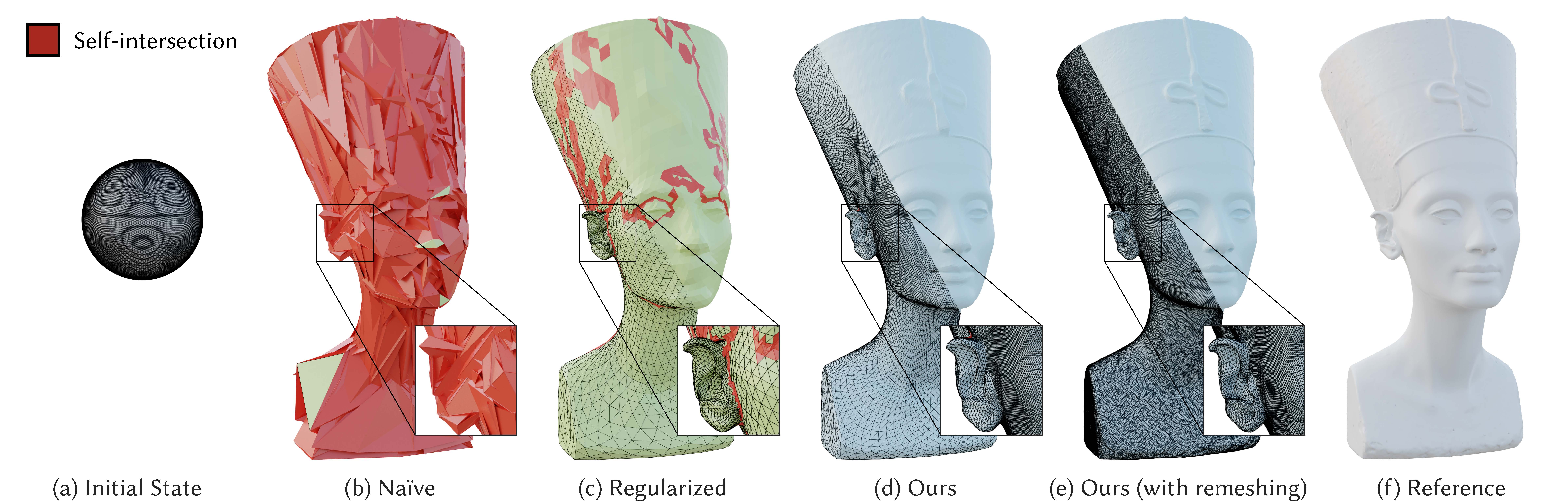
This repository contains both the operators needed to use our parameterization of vertex positions of meshes as well as the code for the experiments we show in the paper.

Parameterization package installation

If you are only interested in using our parameterization in an existing (PyTorch based) pipeline, we have made it available to install via pip. However, it depends on cupy and scikit-sparse, which need to be installed manually beforehand. We first need to install the suitesparse dependency.

# Ubuntu/Debian
apt install libsuitesparse-dev
# Fedora
yum install suitesparse-devel
# Arch linux
pacman -S suitesparse
# Mac OS X
brew install suite-sparse

Then install the python dependencies via pip:

pip install cupy-cudaXXX # Adjust this to your CUDA version, following https://docs.cupy.dev/en/stable/install.html#installing-cupy
pip install scikit-sparse

Then, install our package:

pip install largesteps

This will install the largesteps module. This only contains the parameterization logic implemented as a PyTorch custom operator. See the tutorial for an example use case.

Cloning the repository

Otherwise, if you want to reproduce the experiments from the paper, you can clone this repo and install the module locally. Make sure you have installed the cupy and scikit-sparse dependencies mentioned above before.

git clone --recursive [email protected]:rgl-epfl/large-steps-pytorch.git
cd large-steps-pytorch
pip install .

The experiments in this repository depend on PyTorch. Please follow instructions on the PyTorch website to install it.

To install nvdiffrast and the Botsch-Kobbelt remesher, which are provided as submodules, please run the setup_dependencies.sh script.

To install the other dependencies needed to run the experiments, also run:

pip install -r requirements.txt

⚠️ On Linux, nvdiffrast requires using g++ to compile some PyTorch extensions, make sure this is your default compiler:

export CC=gcc && CXX=g++

Rendering the figures will also require installing blender. You can specify the name of the blender executable you wish to use in scripts/constants.py

Downloading the scenes

The scenes for the experiments can be downloaded here. Please extract the archive at the toplevel of this repository.

Parameterization

In a nutshell, our parameterization can be obtained in just a few lines:

# Given tensors v and f containing vertex positions and faces
from largesteps.geometry import laplacian_uniform, compute_matrix
from largesteps.parameterize import to_differential, from_differential
L = laplacian_uniform(v, f)
M = compute_matrix(L, lambda_=10)
u = to_differential(v, M)

compute_matrix returns the parameterization matrix M = I + λL. This function takes another parameter, alpha, which leads to a slightly different, but equivalent, formula for the matrix: M = (1-α)I + αL, with α ∈ [0,1[. With this formula, the scale of the matrix M has the same order of magnitude regardless of α.

M = compute_matrix(L, alpha=0.9)

Then, vertex coordinates can be retrieved as:

v = from_differential(u, M, method='Cholesky')

This will in practice perform a cache lookup for a solver associated to the matrix M (and instantiate one if not found) and solve the linear system Mv = u. Further calls to from_differential with the same matrix will use the solver stored in the cache. Since this operation is implemented as a differentiable PyTorch operation, there is nothing more to be done to optimize this parameterization.

Running the experiments

You can then run the experiments in the figures folder, in which each subfolder corresponds to a figure in the paper, and contains two files:

  • generate_data.py: contains the script to run the experiment and write the output to the directory specified in scripts/constants.py
  • figure.ipynb: contains the script generating the figure, assuming generate_data.py has been run before and the output written to the directory specified in scripts/constants.py

We provide the scripts for the following figures:

  • Fig. 1 -> teaser
  • Fig. 3 -> multiscale
  • Fig. 5 -> remeshing
  • Fig. 6 -> reg_fail
  • Fig. 7 -> comparison
  • Fig. 8 -> viewpoints
  • Fig. 9 -> influence

⚠️ Several experiments are equal-time comparisons ran on a Linux Ryzen 3990X workstation with a TITAN RTX graphics card. In order to ensure reproducibility, we have frozen the step counts for each method in these experiments.

Repository structure

The largesteps folder contains the parameterization module made available via pip. It contains:

  • geometry.py: contains the laplacian matrix computation.
  • optimize.py: contains the AdamUniform optimizer implementation
  • parameterize.py: contains the actual parameterization code, implemented as a to_differential and from_differential function.
  • solvers.py: contains the Cholesky and conjugate gradients solvers used to convert parameterized coordinates back to vertex coordinates.

Other functions used for the experiments are included in the scripts folder:

  • blender_render.py: utility script to render meshes inside blender
  • constants.py: contains paths to different useful folders (scenes, remesher, etc.)
  • geometry.py: utility geometry functions (normals computation, edge length, etc.)
  • io_ply.py: PLY mesh file loading
  • load_xml.py: XML scene file loading
  • main.py: contains the main optimization function
  • preamble.py: utility scipt to a import redundant modules for the figures
  • render.py: contains the rendering logic, using nvdiffrast

License

This code is provided under a 3-clause BSD license that can be found in the LICENSE file. By using, distributing, or contributing to this project, you agree to the terms and conditions of this license.

Citation

If you use this code for academic research, please cite our method using the following BibTeX entry:

@article{Nicolet2021Large,
    author = "Nicolet, Baptiste and Jacobson, Alec and Jakob, Wenzel",
    title = "Large Steps in Inverse Rendering of Geometry",
    journal = "ACM Transactions on Graphics (Proceedings of SIGGRAPH Asia)",
    volume = "40",
    number = "6",
    year = "2021",
    month = dec,
    doi = "10.1145/3478513.3480501",
    url = "https://rgl.epfl.ch/publications/Nicolet2021Large"
}

Acknowledgments

The authors would like to thank Delio Vicini for early discussions about this project, Silvia Sellán for sharing her remeshing implementation and help for the figures, as well as Hsueh-Ti Derek Liu for his advice in making the figures. Also, thanks to Miguel Crespo for making this README template.

Comments
  • render faster

    render faster

    fyi you can speed up rendering by ~50%. Replace https://github.com/rgl-epfl/large-steps-pytorch/blob/e03b40e237276b0efe32d022f5886b81db45bc3c/scripts/render.py#L210-L213 by

    vert_light = self.sh.eval(n).contiguous()
    light = dr.interpolate(vert_light[None, ...], rast, f)[0]
    
    opened by wpalfi 3
  • suzanne.xml is missing

    suzanne.xml is missing

    I've just cloned the project and I'm trying to run the Tutorial.

    The whole directory scenes/suzanne and the suzanne.xml is missing

    ---------------------------------------------------------------------------
    FileNotFoundError                         Traceback (most recent call last)
    <ipython-input-7-8c8db06f0156> in <module>
          1 # Load the scene
          2 filepath = os.path.join(os.getcwd(), "scenes", "suzanne", "suzanne.xml")
    ----> 3 scene_params = load_scene(filepath)
          4 
          5 # Load reference shape
    
    ~/Desktop/large-steps-pytorch/scripts/load_xml.py in load_scene(filepath)
         58     assert ext == ".xml", f"Unexpected file type: '{ext}'"
         59 
    ---> 60     tree = ET.parse(filepath)
         61     root = tree.getroot()
         62 
    
    ~/miniconda3/envs/pytorch3d_06/lib/python3.8/xml/etree/ElementTree.py in parse(source, parser)
       1200     """
       1201     tree = ElementTree()
    -> 1202     tree.parse(source, parser)
       1203     return tree
       1204 
    
    ~/miniconda3/envs/pytorch3d_06/lib/python3.8/xml/etree/ElementTree.py in parse(self, source, parser)
        582         close_source = False
        583         if not hasattr(source, "read"):
    --> 584             source = open(source, "rb")
        585             close_source = True
        586         try:
    
    FileNotFoundError: [Errno 2] No such file or directory: '/home/bobi/Desktop/large-steps-pytorch/scenes/suzanne/suzanne.xml'
    
    
    opened by bobiblazeski 3
  • How to compile on Windows?

    How to compile on Windows?

    I try to build this project on my windows for a week, and unfortunately failed, can you give me the specific process of build the project on windows? :) The failure I met is related to libs in the ext/ (mainly numpyeigen).

    opened by cx-zzz 2
  • Program exits when running from_differential

    Program exits when running from_differential

    Hi, I got problems after updating to the latest 0.2.0 version. When my program invoked the from_differential function, it got stuck for a little while, and then exited directly. Nothing (warnings/errors/...) was shown on my prompt, and so I could not figure out what happened. However, the initial 0.1.1 version worked well. Tested on: Windows 10, AMD Ryzen 9 5900HX with Radeon Graphics @ 3.30GHz 16GB, GeForce RTX 3070 Laptop GPU 8GB.

    opened by 7DBW13 2
  • Memory leak when processing multiple meshes

    Memory leak when processing multiple meshes

    GPU memory is not properly freed when switching to other meshes, eventually leading to CUSPARSE_STATUS_ALLOC_FAILED:

    Traceback (most recent call last):
      File "scripts/show_largesteps_memory_leak.py", line 16, in <module>
        v = from_differential(M, u, 'Cholesky')
      File "/home/xuzhen/miniconda3/envs/flame/lib/python3.8/site-packages/largesteps/parameterize.py", line 51, in from_differential
        solver = CholeskySolver(L)
      File "/home/xuzhen/miniconda3/envs/flame/lib/python3.8/site-packages/largesteps/solvers.py", line 130, in __init__
        self.solver_1 = prepare(self.L, False, False, True)
      File "/home/xuzhen/miniconda3/envs/flame/lib/python3.8/site-packages/largesteps/solvers.py", line 68, in prepare
        _cusparse.scsrsm2_analysis(
      File "cupy_backends/cuda/libs/cusparse.pyx", line 2103, in cupy_backends.cuda.libs.cusparse.scsrsm2_analysis
      File "cupy_backends/cuda/libs/cusparse.pyx", line 2115, in cupy_backends.cuda.libs.cusparse.scsrsm2_analysis
      File "cupy_backends/cuda/libs/cusparse.pyx", line 1511, in cupy_backends.cuda.libs.cusparse.check_status
    cupy_backends.cuda.libs.cusparse.CuSparseError: CUSPARSE_STATUS_ALLOC_FAILED
    

    To reproduce, run this code example with this example mesh (extract armadillo.npz and place it where you run the code below):

    import torch
    import numpy as np
    from tqdm import tqdm
    
    from largesteps.parameterize import from_differential, to_differential
    from largesteps.geometry import compute_matrix
    from largesteps.optimize import AdamUniform
    
    armadillo = np.load('armadillo.npz')
    verts = torch.tensor(armadillo['v'], device='cuda')
    faces = torch.tensor(armadillo['f'], device='cuda')
    
    for i in tqdm(range(3000)):
        # assume there's different meshes w/ different topology
        M = compute_matrix(verts, faces, 10)
        u = to_differential(M, verts)
        u.requires_grad_()
        optim = AdamUniform([u], 3e-2)
        for j in range(5):
            v: torch.Tensor = from_differential(M, u, 'Cholesky')
            loss: torch.Tensor = (v.norm(dim=-1) - 1).mean()
            optim.zero_grad()
            loss.backward()
            optim.step()
    

    While running the code above, you should see the GPU memory continuously increase but the expected behavior is that it stays constant.

    For example, the result of nvidia-smi dmon -s m while running the code should be something like: image

    opened by dendenxu 2
  • How to deal with my datasets

    How to deal with my datasets

    Hi,

    Thank you for your excellent work, but I have a question. How should I handle my data so that it can be accepted by this framework? I only have meshes. I do not have the .blender file and the .xml file. And I have texture files of different formart.

    Thank you.

    opened by X1aoyueyue 1
  • Question about goal of project

    Question about goal of project

    I compiled and started the project, watches videos and papers but still can't understand the purpose of project. Is it reconstruction from images or this solutions solving one of the problems of area with reconstruction from images? In sources I can see source and destination model no images. Is this method showing how to get the same model like in target with simple in source but not from images? Is I understand correctly: The project giving target model -> render it from different positions and using this images for reconstruct the scene back? If the method using light of areas for reconstruct normals and mesh how far is it from using with photos from real life?

    opened by DAigory 1
  • Running blender_render.py

    Running blender_render.py

    First of all I'd like to thank you for making this phenomenal experience and make it available for testing. Running the nvdiffrast can be really straight forward and easy for rendering but I'm having some understanding problem with rendering the code inside the blender so please bear with me :)

    How do I run the rendering inside the blender? Is it by script editor? [I tried it but it gives me errors] Is it by running it as command ?

    I just need to understand the methodology of rendering that in blender since it's a utility and not included in the Tutorial.

    Thank you so much.

    opened by samgr55 1
  • Running The Dragon Example

    Running The Dragon Example

    Hi, Thanks for sharing your work! I tried to use the Tutorial notebook on the Dragon mesh but get really poor results. Can you share the parameters you used to make the model converge? thanks a lot

    opened by arielbenitah 1
  • eigen and cudatoolkit-dev missing

    eigen and cudatoolkit-dev missing

    Hi Baptiste, thanks for publishing the code:-) I found two requirements missing in the installation instructions:

    • apt install libeigen3-dev (required for building botsch-kobbelt)
    • conda install cudatoolkit-dev -c conda-forge (required by nvdiffrast)
    opened by wpalfi 1
  • Casting issue torch.nn.Parameter

    Casting issue torch.nn.Parameter

    Not sure if this should be solved here, in cholespy, or nanobind. The from_differential function throws an error if the second argument is a torch.nn.Parameter rather than a tensor. Parameter is directly derived from Tensor, so there's no reason the cast should fail.

    TypeError: solve(): incompatible function arguments. The following argument types are supported:
        1. solve(self, b: tensor[dtype=float32, order='C'], x: tensor[dtype=float32, order='C']) -> None
    
    Invoked with types: CholeskySolverF, Parameter, Tensor
    

    It's quite hard to workaround this "from the outside". E.g. doing from_differential(M, x.data) doesn't work because the gradient will be written to x.data.grad whereas the optimizer expects x.grad.

    opened by JHnvidia 0
  • Fix adamuniform update step when no grad

    Fix adamuniform update step when no grad

    Need to check whether there are gradients or not when updating parameters. Ref: https://github.com/pytorch/pytorch/blob/d05f07494a9a32c63f9218c0e703764a02033bb9/torch/optim/adam.py#L134

    opened by xk-huang 0
Releases(v0.2.1)
  • v0.2.1(Sep 5, 2022)

  • v0.2.0(Jun 3, 2022)

    • Use cholespy for the Cholesky solver, making the dependencies lighter and easier to install
    • Added an optimization to the rendering code

    :warning: These changes have an influence on the performance of different blocks of the experiments pipeline, so you may notice some timing discrepancies when running the experiments.

    Source code(tar.gz)
    Source code(zip)
  • v0.1.1(Dec 9, 2021)

    This repository contains the implementation of our research paper "Large Steps in Inverse Rendering of Geometry". It contains the parameterization code as a python package, as well as code to reproduce several figures from the paper.

    Source code(tar.gz)
    Source code(zip)
Owner
RGL: Realistic Graphics Lab
EPFL
RGL: Realistic Graphics Lab
Merlion: A Machine Learning Framework for Time Series Intelligence

Merlion: A Machine Learning Library for Time Series Table of Contents Introduction Installation Documentation Getting Started Anomaly Detection Foreca

Salesforce 2.8k Dec 30, 2022
A naive ROS interface for visualDet3D.

YOLO3D ROS Node This repo contains a Monocular 3D detection Ros node. Base on https://github.com/Owen-Liuyuxuan/visualDet3D All parameters are exposed

Yuxuan Liu 19 Oct 08, 2022
Composable transformations of Python+NumPy programs: differentiate, vectorize, JIT to GPU/TPU, and more

JAX: Autograd and XLA Quickstart | Transformations | Install guide | Neural net libraries | Change logs | Reference docs | Code search News: JAX tops

Google 21.3k Jan 01, 2023
OrienMask: Real-time Instance Segmentation with Discriminative Orientation Maps

OrienMask This repository implements the framework OrienMask for real-time instance segmentation. It achieves 34.8 mask AP on COCO test-dev at the spe

45 Dec 13, 2022
GBIM(Gesture-Based Interaction map)

手势交互地图 GBIM(Gesture-Based Interaction map),基于视觉深度神经网络的交互地图,通过电脑摄像头观察使用者的手势变化,进而控制地图进行简单的交互。网络使用PaddleX提供的轻量级模型PPYOLO Tiny以及MobileNet V3 small,使得整个模型大小约10MB左右,即使在CPU下也能快速定位和识别手势。

8 Feb 10, 2022
PyTorch implementation of paper "IBRNet: Learning Multi-View Image-Based Rendering", CVPR 2021.

IBRNet: Learning Multi-View Image-Based Rendering PyTorch implementation of paper "IBRNet: Learning Multi-View Image-Based Rendering", CVPR 2021. IBRN

Google Interns 371 Jan 03, 2023
Meta Representation Transformation for Low-resource Cross-lingual Learning

MetaXL: Meta Representation Transformation for Low-resource Cross-lingual Learning This repo hosts the code for MetaXL, published at NAACL 2021. [Meta

Microsoft 36 Aug 17, 2022
The official code for PRIMER: Pyramid-based Masked Sentence Pre-training for Multi-document Summarization

PRIMER The official code for PRIMER: Pyramid-based Masked Sentence Pre-training for Multi-document Summarization. PRIMER is a pre-trained model for mu

AI2 111 Dec 18, 2022
MaskTrackRCNN for video instance segmentation based on mmdetection

MaskTrackRCNN for video instance segmentation Introduction This repo serves as the official code release of the MaskTrackRCNN model for video instance

411 Jan 05, 2023
[ICCV 2021] Code release for "Sub-bit Neural Networks: Learning to Compress and Accelerate Binary Neural Networks"

Sub-bit Neural Networks: Learning to Compress and Accelerate Binary Neural Networks By Yikai Wang, Yi Yang, Fuchun Sun, Anbang Yao. This is the pytorc

Yikai Wang 26 Nov 20, 2022
A learning-based data collection tool for human segmentation

FullBodyFilter A Learning-Based Data Collection Tool For Human Segmentation Contents Documentation Source Code and Scripts Overview of Project Usage O

Robert Jiang 4 Jun 24, 2022
Interactive Image Generation via Generative Adversarial Networks

iGAN: Interactive Image Generation via Generative Adversarial Networks Project | Youtube | Paper Recent projects: [pix2pix]: Torch implementation for

Jun-Yan Zhu 3.9k Dec 23, 2022
Rate-limit-semaphore - Semaphore implementation with rate limit restriction for async-style (any core)

Rate Limit Semaphore Rate limit semaphore for async-style (any core) There are t

Yan Kurbatov 4 Jun 21, 2022
Official PyTorch implementation of paper: Standardized Max Logits: A Simple yet Effective Approach for Identifying Unexpected Road Obstacles in Urban-Scene Segmentation (ICCV 2021 Oral Presentation)

SML (ICCV 2021, Oral) : Official Pytorch Implementation This repository provides the official PyTorch implementation of the following paper: Standardi

SangHun 61 Dec 27, 2022
Code for the paper Hybrid Spectrogram and Waveform Source Separation

Demucs Music Source Separation This is the 3rd release of Demucs (v3), featuring hybrid source separation. For the waveform only Demucs (v2): Go this

Meta Research 4.8k Jan 04, 2023
Place holder for HOPE: a human-centric and task-oriented MT evaluation framework using professional post-editing

HOPE: A Task-Oriented and Human-Centric Evaluation Framework Using Professional Post-Editing Towards More Effective MT Evaluation Place holder for dat

Lifeng Han 1 Apr 25, 2022
Nsdf: A mesh SDF with just some code we can directly paste into our raymarcher

nsdf Representing SDFs of arbitrary meshes has been a bit tricky so far. Express

Jan Ivanecky 5 Feb 18, 2022
RIFE: Real-Time Intermediate Flow Estimation for Video Frame Interpolation

RIFE RIFE: Real-Time Intermediate Flow Estimation for Video Frame Interpolation Ported from https://github.com/hzwer/arXiv2020-RIFE Dependencies NumPy

49 Jan 07, 2023
From a body shape, infer the anatomic skeleton.

OSSO: Obtaining Skeletal Shape from Outside (CVPR 2022) This repository contains the official implementation of the skeleton inference from: OSSO: Obt

Marilyn Keller 166 Dec 28, 2022
CoMoGAN: continuous model-guided image-to-image translation. CVPR 2021 oral.

CoMoGAN: Continuous Model-guided Image-to-Image Translation Official repository. Paper CoMoGAN: continuous model-guided image-to-image translation [ar

166 Dec 31, 2022