An Open-Source Toolkit for Prompt-Learning.

Overview

An Open-Source Framework for Prompt-learning.


OverviewInstallationHow To UseDocsPaperCitation

version

What's New?

Overview

Prompt-learning is the latest paradigm to adapt pre-trained language models (PLMs) to downstream NLP tasks, which modifies the input text with a textual template and directly uses PLMs to conduct pre-trained tasks. This library provides a standard, flexible and extensible framework to deploy the prompt-learning pipeline. OpenPrompt supports loading PLMs directly from huggingface transformers. In the future, we will also support PLMs implemented by other libraries. For more resources about prompt-learning, please check our paper list.
What Can You Do via OpenPrompt?

demo

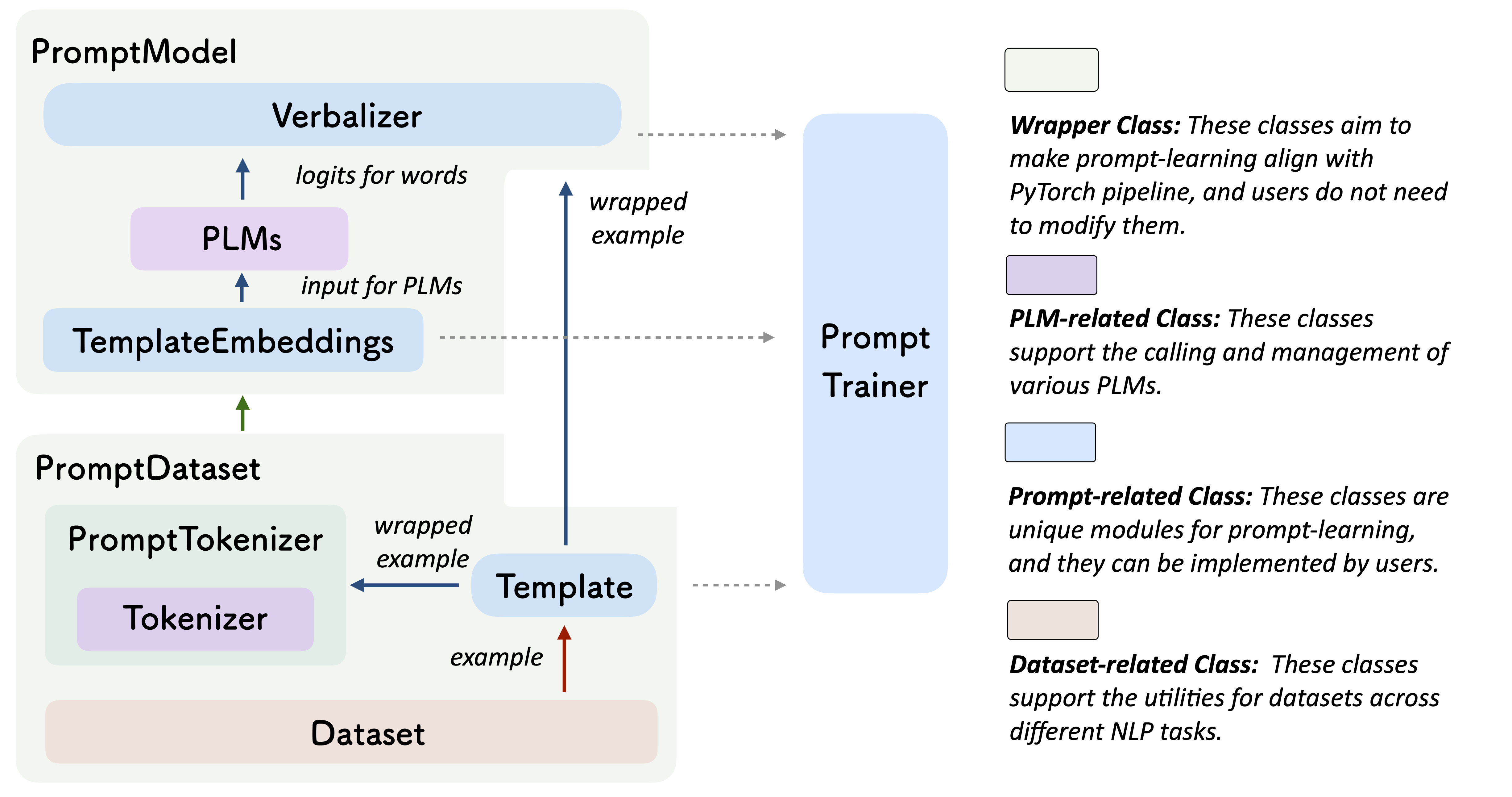
  • Use the implementations of current prompt-learning approaches.* We have implemented various of prompting methods, including templating, verbalizing and optimization strategies under a unified standard. You can easily call and understand these methods.
  • Design your own prompt-learning work. With the extensibility of OpenPrompt, you can quickly practice your prompt-learning ideas.

Installation

Using Git

Clone the repository from github:

git clone https://github.com/thunlp/OpenPrompt.git
cd OpenPrompt
pip install -r requirements.txt
python setup.py install

Modify the code

python setup.py develop

Use OpenPrompt

Base Concepts

A PromptModel object contains a PLM, a (or multiple) Template and a (or multiple) Verbalizer, where the Template class is defined to wrap the original input with templates, and the Verbalizer class is to construct a projection between labels and target words in the current vocabulary. And a PromptModel object practically participates in training and inference.

Introduction by a Simple Example

With the modularity and flexibility of OpenPrompt, you can easily develop a prompt-learning pipeline.

Step 1: Define a task

The first step is to determine the current NLP task, think about what’s your data looks like and what do you want from the data! That is, the essence of this step is to determine the classses and the InputExample of the task. For simplicity, we use Sentiment Analysis as an example. tutorial_task.

from openprompt.data_utils import InputExample
classes = [ # There are two classes in Sentiment Analysis, one for negative and one for positive
    "negative",
    "positive"
]
dataset = [ # For simplicity, there's only two examples
    # text_a is the input text of the data, some other datasets may have multiple input sentences in one example.
    InputExample(
        guid = 0,
        text_a = "Albert Einstein was one of the greatest intellects of his time.",
    ),
    InputExample(
        guid = 1,
        text_a = "The film was badly made.",
    ),
]

Step 2: Define a Pre-trained Language Models (PLMs) as backbone.

Choose a PLM to support your task. Different models have different attributes, we encourge you to use OpenPrompt to explore the potential of various PLMs. OpenPrompt is compatible with models on huggingface.

from openprompt.plms import get_model_class
model_class = get_model_class(plm_type = "bert")
model_path = "bert-base-cased"
bertConfig = model_class.config.from_pretrained(model_path)
bertTokenizer = model_class.tokenizer.from_pretrained(model_path)
bertModel = model_class.model.from_pretrained(model_path)

Step 3: Define a Template.

Template is a modifier of the original input text, which is also one of the most important modules in prompt-learning. 

from openprompt.prompts import ManualTemplate
promptTemplate = ManualTemplate(
    text = ["<text_a>", "It", "was", "<mask>"],
    tokenizer = bertTokenizer,
)

Step 4: Define a Verbalizer

Verbalizer is another important (but not neccessary) in prompt-learning,which projects the original labels (we have defined them as classes, remember?) to a set of label words. Here is an example that we project the negative class to the word bad, and project the positive class to the words good, wonderful, great.

from openprompt.prompts import ManualVerbalizer
promptVerbalizer = ManualVerbalizer(
    classes = classes,
    label_words = {
        "negative": ["bad"],
        "positive": ["good", "wonderful", "great"],
    },
    tokenizer = bertTokenizer,
)

Step 5: Combine them into a PromptModel

Given the task, now we have a PLM, a Template and a Verbalizer, we combine them into a PromptModel. Note that although the example naively combine the three modules, you can actually define some complicated interactions among them.

from openprompt import PromptForClassification
promptModel = PromptForClassification(
    template = promptTemplate,
    model = bertModel,
    verbalizer = promptVerbalizer,
)

Please refer to our tutorial scripts, and documentation for more details.

Datasets

We provide a series of download scripts in the dataset/ folder, feel free to use them to download benchmarks.

Performance Report

There are too many possible combinations powered by OpenPrompt. We are trying our best to test the performance of different methods as soon as possible. The performance will be constantly updated into the Tables. We also encourage the users to find the best hyper-parameters for their own tasks and report the results by making pull request.

Known Issues

Major improvement/enhancement in future.

  • We made some major changes from the last version, so part of the docs is outdated. We will fix it soon.

Citation

Please cite our paper if you use OpenPrompt in your work

@article{ding2021openprompt,
  title={OpenPrompt: An Open-source Framework for Prompt-learning},
  author={Ding, Ning and Hu, Shengding and Zhao, Weilin and Chen, Yulin and Liu, Zhiyuan and Zheng, Hai-Tao and Sun, Maosong},
  journal={arXiv preprint arXiv:2111.01998},
  year={2021}
}

Contributors

We thank all the contributors to this project, more contributors are welcome!

Comments
  • An error occurred while using the latest version (1.0.0)

    An error occurred while using the latest version (1.0.0)

    When I use ptr_template in the latest version.The following error occurred. TypeError: __init__() got an unexpected keyword argument 'placeholder_mapping' Version 0.1.1 does not have this problem.

    opened by blacker521 8
  • Failed to run the demo in `tutorial`

    Failed to run the demo in `tutorial`

    command: python tutorial/1.1_mixed_template.py

    output:

      File "tutorial/1.1_mixed_template.py", line 94, in <module>
        logits = prompt_model(inputs)
      File "/home/h/anaconda3/envs/openprompt/lib/python3.8/site-packages/torch/nn/modules/module.py", line 1051, in _call_impl
        return forward_call(*input, **kwargs)
      File "/home/h/work/OpenPrompt/openprompt/pipeline_base.py", line 241, in forward
        outputs = self.verbalizer.gather_outputs(outputs)
    TypeError: gather_outputs() takes 1 positional argument but 2 were given
    
    opened by huchinlp 7
  • no attribute 'tokenize_one_example'

    no attribute 'tokenize_one_example'

    Hi,

    thank you for your amazing work to ease the users of prompt learning.

    I tried to implement the LMBFF tutorial and happened to meet this error:

    Traceback (most recent call last):
      File "run_lmbff.py", line 116, in <module>
        dataloader = PromptDataLoader(dataset['train'], template, template_generate_tokenizer, template_tokenizer_wrapper, batch_size=len(dataset['train']), decoder_max_length=128) # register all data at once
      File "/home/oryza/playground/OpenPrompt/openprompt/pipeline_base.py", line 101, in __init__
        self.tokenize()
      File "/home/oryza/playground/OpenPrompt/openprompt/pipeline_base.py", line 137, in tokenize
        inputfeatures = InputFeatures(**self.tokenizer_wrapper.tokenize_one_example(wrapped_example, self.teacher_forcing), **wrapped_example[1]).to_tensor()
    AttributeError: 'T5Tokenizer' object has no attribute 'tokenize_one_example'
    

    This is my pip list:

    Package            Version   Editable project location
    ------------------ --------- ---------------------------------
    aiohttp            3.8.1
    aiosignal          1.2.0
    async-timeout      4.0.2
    asynctest          0.13.0
    attrs              21.4.0
    certifi            2021.10.8
    charset-normalizer 2.0.12
    click              8.1.2
    datasets           2.0.0
    dill               0.3.4
    filelock           3.6.0
    frozenlist         1.3.0
    fsspec             2022.3.0
    huggingface-hub    0.5.1
    idna               3.3
    importlib-metadata 4.11.3
    joblib             1.1.0
    multidict          6.0.2
    multiprocess       0.70.12.2
    nltk               3.7
    numpy              1.21.5
    openprompt         1.0.0     /home/oryza/playground/OpenPrompt
    packaging          21.3
    pandas             1.3.5
    pip                22.0.4
    protobuf           3.20.0
    pyarrow            7.0.0
    pyparsing          3.0.8
    python-dateutil    2.8.2
    pytz               2022.1
    PyYAML             6.0
    regex              2022.3.15
    requests           2.27.1
    responses          0.18.0
    rouge              1.0.0
    sacremoses         0.0.49
    scikit-learn       1.0.2
    scipy              1.7.3
    sentencepiece      0.1.96
    setuptools         41.2.0
    six                1.16.0
    sklearn            0.0
    tensorboardX       2.5
    threadpoolctl      3.1.0
    tokenizers         0.10.3
    torch              1.11.0
    tqdm               4.64.0
    transformers       4.10.0
    typing_extensions  4.1.1
    urllib3            1.26.9
    xxhash             3.0.0
    yacs               0.1.8
    yarl               1.7.2
    zipp               3.8.0
    

    Do you have any idea about the error? I read in another thread about installing SentencePiece to solve this problem but my sentencepiece is already there.

    Thank you in advance!

    Best, Oryza

    opened by khairunnisaor 6
  • 使用 InputExample() 构建中文数据集,汉字读入为Unicode编码

    使用 InputExample() 构建中文数据集,汉字读入为Unicode编码

    Code

    dataset = {}
    dataset["train"] = []
    for index,data in train_dataset.iterrows():
        input_example = InputExample(text_a = data["text"], label=data["class"], guid=data["id"])
        dataset["train"].append(input_example)
    print(dataset["train"][10])
    

    output

    {
      "guid": 13,
      "label": 2,
      "meta": {},
      "text_a": "\u522b\u6025\u3002\u8bf4\u4e0d\u51c6\u7684\u3002\u7b2c\u4e00\u6b21\u8fc7\u7684\u65f6\u5019\u4e5f\u5ba1\u6838\u4e86\u5341\u51e0\u5929\u3002\u4e0d\u8fc7\u6700\u540e\u5168\u989d\u5ea6\u901a\u8fc7\u3002\u5229\u606f\u9ad8\u5c31\u6ca1\u7528",
      "text_b": "",
      "tgt_text": null
    }
    
    opened by terence1023 6
  • bug:TypeError: _forward_unimplemented() got an unexpected keyword argument 'output_hidden_states'

    bug:TypeError: _forward_unimplemented() got an unexpected keyword argument 'output_hidden_states'

    File "/workspace/knowledgegraphcommon/business/text_classification/prompt/text_classification_prompt.py", line 185, in train logits = self.prompt_model(inputs) File "/root/miniconda3/lib/python3.9/site-packages/torch/nn/modules/module.py", line 1051, in _call_impl return forward_call(*input, **kwargs) File "/workspace/OpenPrompt/openprompt/pipeline_base.py", line 263, in forward outputs = self.prompt_model(batch) File "/root/miniconda3/lib/python3.9/site-packages/torch/nn/modules/module.py", line 1051, in _call_impl return forward_call(*input, **kwargs) File "/workspace/OpenPrompt/openprompt/pipeline_base.py", line 185, in forward outputs = self.plm(**input_batch, output_hidden_states=True) File "/root/miniconda3/lib/python3.9/site-packages/torch/nn/modules/module.py", line 1051, in _call_impl return forward_call(*input, **kwargs) TypeError: _forward_unimplemented() got an unexpected keyword argument 'output_hidden_states'

    opened by franztao 5
  • Use 2.1_conditional_generation.py , after fine-tuning, it only generates the same char.  Why ?

    Use 2.1_conditional_generation.py , after fine-tuning, it only generates the same char. Why ?

    use 2.1_conditional_generation.py in datasets/CondGen/webnlg_2017/

    generated txt: ''''''''''''''''''''''''''''''''''''''''''''''''''''''''''''''''''''''''''''''''''''''''''''''''''''''''''''''''

    opened by 353xiong 4
  • How to handle label words in Chinese?

    How to handle label words in Chinese?

    Label words may be tokenized into multiple tokens. In Chinese, label words are likely be tokenized into characters. So, how to handle label words that consist of more than one characters?

    opened by NLPpupil 4
  • Question about updating the repository

    Question about updating the repository

    How do you keep this repository up to date? Do I need to clone the entire library every time and update it again as follows:

    git clone https://github.com/thunlp/OpenPrompt.git
    cd OpenPrompt
    pip install -r requirements.txt
    python setup.py install
    
    opened by probe2 4
  • TypeError: __init__() missing 1 required positional argument: 'tokenizer_wrapper_class'

    TypeError: __init__() missing 1 required positional argument: 'tokenizer_wrapper_class'

    When going through the tutorial

    In step 6, raised the errors below:

    data_loader = PromptDataLoader( ... dataset = dataset, ... tokenizer = bertTokenizer, ... template = promptTemplate, ... ) Traceback (most recent call last): File "", line 1, in TypeError: init() missing 1 required positional argument: 'tokenizer_wrapper_class'

    opened by dongxiaohuang 4
  • 初始模型为bert,roberta时的特殊注意事项?

    初始模型为bert,roberta时的特殊注意事项?

    作者好,我使用t5,gpt2作为初始模型进行训练,验证集指标稳步上升没有问题,但是使用bert,roberta,electra的时候就出现问题,验证集指标一直是0.5203649397197784,想请教下,这是什么原因导致的? example: input_example = InputExample(text_a=line['text_pair'], text_b=line['text'], label=int(line['label']), guid=i)

    初始化模型: plm, tokenizer, model_config, WrapperClass = load_plm("bert", "bert-base-chinese")

    模板: template_text = '{"placeholder":"text_a"}{"placeholder":"text_b"}的情感倾向是{"mask"}.'

    verbalizer: myverbalizer = ManualVerbalizer(tokenizer, num_classes=2, label_words=[["负"], ["正"]])

    训练详情详情: Epoch 1, average loss: 3.3326262831687927 Epoch 1, average loss: 0.7787383239444913 Epoch 1, average loss: 0.7572225447236699 Epoch 1, average loss: 0.738348940730161 Epoch 1, average loss: 0.7296206120358232 Epoch 1, average loss: 0.7233000741192647 Epoch 1, average loss: 0.7194478078047589 Epoch 1, average loss: 0.7165702087618587 Epoch 1, average loss: 0.7136984900552019 Epoch 1, average loss: 0.7121389577100447 Epoch 1, average loss: 0.7103113287874931 Epoch 1, average loss: 0.7093091916511776 Epoch 1, average loss: 0.7082642679232515 Epoch 1, average loss: 0.7077864898547248 Epoch 1, average loss: 0.7074250399318126 Epoch 1, average loss: 0.7070826163498072 Epoch 1, average loss: 0.7063648934145984 Epoch 1, average loss: 0.7059904860616641 Epoch 1, average loss: 0.70552960885168 Epoch 1, average loss: 0.7050825911213101 Epoch 1, average loss: 0.7048186851440073 0.5203649397197784 Epoch 2, average loss: 0.6653246581554413 Epoch 2, average loss: 0.7000961779363898 Epoch 2, average loss: 0.6992864966194495 Epoch 2, average loss: 0.697152165840576 Epoch 2, average loss: 0.6964660410873108 Epoch 2, average loss: 0.6976269556980793 Epoch 2, average loss: 0.6974568861339253 Epoch 2, average loss: 0.6972834053179063 Epoch 2, average loss: 0.6972271847809284 Epoch 2, average loss: 0.6969758515266203 Epoch 2, average loss: 0.6968832315801383 Epoch 2, average loss: 0.6966261330479784 Epoch 2, average loss: 0.6964328451033501 Epoch 2, average loss: 0.6963928808987537 Epoch 2, average loss: 0.6964452584858793 Epoch 2, average loss: 0.6963973140276998 Epoch 2, average loss: 0.696516385802325 Epoch 2, average loss: 0.6964337500765108 Epoch 2, average loss: 0.6963930293084604 Epoch 2, average loss: 0.6962399163065522 Epoch 2, average loss: 0.7043500146401878 0.5203649397197784

    opened by qdchenxiaoyan 3
  • How to accelerate the downloading of pytorch_model.bin?

    How to accelerate the downloading of pytorch_model.bin?

    image hello, when I try to run the example in the readme, I found the download speed is too slow. I use miniconda with python3.8 and cuda11.1. Are there any ways to speed up the download?
    opened by FelliYang 3
  • Question about the test score in tutorial/3.1_lmbff.py

    Question about the test score in tutorial/3.1_lmbff.py

    Hello, I ran this tutorial code implementing lmbff and the final test score was 0.5091743119266054.

    This performance is too low, so I checked the evaluation score during training and the prediction results. In fact, the model scored 0.5 in each epoch, and the final prediction was all 0. Exactly, 0.509 equals to the score predicting majority as reported in the paper of lmbff.

    I did not check in more detail, but apparently there is something wrong with the training of the model here.

    opened by ZekaiShao25 0
  • 意图分类任务,label是中文,怎么定义label words

    意图分类任务,label是中文,怎么定义label words

    根据文档https://thunlp.github.io/OpenPrompt/notes/verbalizer.html, label_words里面定义的都是一个token。当处理中文文本分类任务时,label是多个字,应该怎么定义呢?

    mytemplate = ManualTemplate(tokenizer=tokenizer, text="""{"meta":"raw"}的意图是{"mask"}""") 比如 意图是 "天气"、"音乐"、"电影"。

    opened by lonelydancer 1
  • PromptForClassification shouldn't change plm

    PromptForClassification shouldn't change plm

    Hey! When I use freeze_plm in PromptForClassification with freeze_plm=True and then freeze_plm=False, the PLM would still behave as though it is frozen. This does not seem like an expected behavior in this case. i.e:

    plm, tokenizer, model_config, WrapperClass = load_plm("roberta", "roberta-base")
    prompt_model = PromptForClassification(plm=plm, template=promptTemplate, verbalizer=promptVerbalizer, 
                                           freeze_plm=True)
    prompt_model = PromptForClassification(plm=plm, template=promptTemplate, verbalizer=promptVerbalizer, 
                                           freeze_plm=False) 
    # do training.. behaves as though PLM frozen, 
    # e.g. outputs "RuntimeError: element 0 of tensors does not require grad and does not have a grad_fn"
    
    opened by guyd1995 0
  • Question about 2.1 conditional generation

    Question about 2.1 conditional generation

    When I run this code, I get the following error: PermissionError: [Errno 13] Permission denied: '../../Generated_sentence_webnlg_gpt2_False.txt'. After I gave the entire folder all permissions, I still didn't solve the problem

    opened by ZHUANG-jt 0
  • Save and re-load a trained prompt model

    Save and re-load a trained prompt model

    Currently, I am saving the model using the following: torch.save(prompt_model.state_dict(), PATH)

    How can we load this back to test performance on other data? Pytorch tutorial says to use the following. model = TheModelClass(*args, **kwargs) model.load_state_dict(torch.load(PATH)) model.eval()

    What would TheModelClass be? An example would be really appreciated.

    opened by agrimaseth 0
Releases(v1.0.0)
Owner
THUNLP
Natural Language Processing Lab at Tsinghua University
THUNLP
Train the HRNet model on ImageNet

High-resolution networks (HRNets) for Image classification News [2021/01/20] Add some stronger ImageNet pretrained models, e.g., the HRNet_W48_C_ssld_

HRNet 866 Jan 04, 2023
Official implementation of "MetaSDF: Meta-learning Signed Distance Functions"

MetaSDF: Meta-learning Signed Distance Functions Project Page | Paper | Data Vincent Sitzmann*, Eric Ryan Chan*, Richard Tucker, Noah Snavely Gordon W

Vincent Sitzmann 100 Jan 01, 2023
A pytorch implementation of Reading Wikipedia to Answer Open-Domain Questions.

DrQA A pytorch implementation of the ACL 2017 paper Reading Wikipedia to Answer Open-Domain Questions (DrQA). Reading comprehension is a task to produ

Runqi Yang 394 Nov 08, 2022
ACL'2021: LM-BFF: Better Few-shot Fine-tuning of Language Models

LM-BFF (Better Few-shot Fine-tuning of Language Models) This is the implementation of the paper Making Pre-trained Language Models Better Few-shot Lea

Princeton Natural Language Processing 607 Jan 07, 2023
Text2Art is an AI art generator powered with VQGAN + CLIP and CLIPDrawer models

Text2Art is an AI art generator powered with VQGAN + CLIP and CLIPDrawer models. You can easily generate all kind of art from drawing, painting, sketch, or even a specific artist style just using a t

Muhammad Fathy Rashad 643 Dec 30, 2022
MMdet2-based reposity about lightweight detection model: Nanodet, PicoDet.

Lightweight-Detection-and-KD MMdet2-based reposity about lightweight detection model: Nanodet, PicoDet. This repo also includes detection knowledge di

Egqawkq 12 Jan 05, 2023
This is the source code for the experiments related to the paper Unsupervised Audio Source Separation Using Differentiable Parametric Source Models

Unsupervised Audio Source Separation Using Differentiable Parametric Source Models This is the source code for the experiments related to the paper Un

30 Oct 19, 2022
The source code and data of the paper "Instance-wise Graph-based Framework for Multivariate Time Series Forecasting".

IGMTF The source code and data of the paper "Instance-wise Graph-based Framework for Multivariate Time Series Forecasting". Requirements The framework

Wentao Xu 24 Dec 05, 2022
Distributing reference energies for SMIRNOFF implementations

Warning: This code is currently experimental and under active development. Is it not yet suitable for distribution or use as reference implementation.

Open Force Field Initiative 1 Dec 07, 2021
A simple tutoral for error correction task, based on Pytorch

gramcorrector A simple tutoral for error correction task, based on Pytorch Grammatical Error Detection (sentence-level) a binary sequence-based classi

peiyuan_gong 8 Dec 03, 2022
Convolutional neural network web app trained to track our infant’s sleep schedule using our Google Nest camera.

Machine Learning Sleep Schedule Tracker What is it? Convolutional neural network web app trained to track our infant’s sleep schedule using our Google

g-parki 7 Jul 15, 2022
This is the repository for CVPR2021 Dynamic Metric Learning: Towards a Scalable Metric Space to Accommodate Multiple Semantic Scales

Intro This is the repository for CVPR2021 Dynamic Metric Learning: Towards a Scalable Metric Space to Accommodate Multiple Semantic Scales Vehicle Sam

39 Jul 21, 2022
A solution to the 2D Ising model of ferromagnetism, implemented using the Metropolis algorithm

Solving the Ising model on a 2D lattice using the Metropolis Algorithm Introduction The Ising model is a simplified model of ferromagnetism, the pheno

Rohit Prabhu 5 Nov 13, 2022
Gans-in-action - Companion repository to GANs in Action: Deep learning with Generative Adversarial Networks

GANs in Action by Jakub Langr and Vladimir Bok List of available code: Chapter 2: Colab, Notebook Chapter 3: Notebook Chapter 4: Notebook Chapter 6: C

GANs in Action 914 Dec 21, 2022
Autonomous Perception: 3D Object Detection with Complex-YOLO

Autonomous Perception: 3D Object Detection with Complex-YOLO LiDAR object detect

Thomas Dunlap 2 Feb 18, 2022
This is code to fit per-pixel environment map with spherical Gaussian lobes, using LBFGS optimization

Spherical Gaussian Optimization This is code to fit per-pixel environment map with spherical Gaussian lobes, using LBFGS optimization. This code has b

41 Dec 14, 2022
High performance, easy-to-use, and scalable machine learning (ML) package, including linear model (LR), factorization machines (FM), and field-aware factorization machines (FFM) for Python and CLI interface.

What is xLearn? xLearn is a high performance, easy-to-use, and scalable machine learning package that contains linear model (LR), factorization machin

Chao Ma 3k Jan 03, 2023
Pytorch Implementation for Dilated Continuous Random Field

DilatedCRF Pytorch implementation for fully-learnable DilatedCRF. If you find my work helpful, please consider our paper: @article{Mo2022dilatedcrf,

DunnoCoding_Plus 3 Nov 13, 2022
🏎️ Accelerate training and inference of 🤗 Transformers with easy to use hardware optimization tools

Hugging Face Optimum 🤗 Optimum is an extension of 🤗 Transformers, providing a set of performance optimization tools enabling maximum efficiency to t

Hugging Face 842 Dec 30, 2022
Full body anonymization - Realistic Full-Body Anonymization with Surface-Guided GANs

Realistic Full-Body Anonymization with Surface-Guided GANs This is the official

Håkon Hukkelås 30 Nov 18, 2022