当前位置:网站首页>MySQL-进阶CRUD
MySQL-进阶CRUD
2022-08-07 15:16:00 【m0_54850467】
进阶增删查改
一.数据库约束
1.约束类型
- not null - 指示某列不能存储 null 值。
- unique - 保证某列的每行必须有
唯一的值。 - default - 规定没有给列赋值时的默认值。
- primary key - nut null 和 unique的结合。确保某列(或两个列多个列的结合)有
唯一标识,有助于更容易更快速地找到表中的一个特定的记录。 - foreign key - 保证一个表中的数据匹配
另一个表中的值的参照完整性。 - check - 保证列中的值
符合指定的条件。对于MySQL数据库,对check子句进行分析,但是忽略check子句。
2.null约束
创建表时,可以指定某列
不为空
举个例子,我们指定 student 的学生id不为空:
-- 重新设置学生表结构
drop table if exists student;
create table student (
   id int not null,
   sn int,
   name varchar(20),
   mail varchar(20)
);

3.unique:唯一约束
指定某列列为
唯一的、不重复的
比如我们指定sn列为唯一的,不重复的:
-- 重新设置学生表结构
drop table if exists student;
create table student (
   id int not null,
   sn int unique,
   name varchar(20),
   mail varchar(20)
);

4.default:默认值约束
插入数据时,可以指定某列为空时的
默认值
我们指定插入数据时,name列为空,默认值unkown:
-- 重新设置学生表结构
drop table if exists student;
create table student (
   id int not null,
   sn int unique,
   name varchar(20) default 'unknow',
   mail varchar(20)
);

5.primary key:主键约束
not null和unique的结合,使用主键的时候,可以不用 not null
这里我们指定id为主键:
-- 重新设置学生表结构
drop table if exists student;
create table student (
   id int primary key,
   sn int unique,
   name varchar(20) default 'unknow',
   mail varchar(20)
);

注意!对于整数类型的主键,常配搭自增长auto_increment来使用。插入数据对应字段不给值时,使用最大值+1,这时候代码就可以这样写:
id int primary key auto_increment,
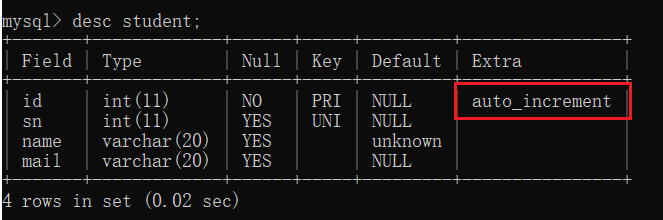
- 自增主键:在MySQL内部维护了一个全局变量,每次插入的记录如果是null的话,全局变量++。即使我们删除了前面的数据,全局变量也不受影响,继续++
- 如果手动插入的值超过了当前的全局变量,全局变量就会自动更新
- 表的数据如果清空了的话,全局变量还是会保存,除非将表删除
- 自增主键策略仅限于单台数据库,如果是多个数据库,自增主键就无法发挥其作用
6.foreign key:外键约束
外键用于关联其他表的
主键或唯一键
语法:
foreign key (字段名) references 主表(列)
这时候 咱们创建一个class表和一个student表:
这时候我们具体来看它们的结构: **注意:**此时class表是被student表关联着的,所以无法直接删除class表
7.check约束
MySQL使用时不报错,但忽略该约束:
drop table if exists test_user;
create table test_user (
   id int,
   name varchar(20),
   sex varchar(1),
   check (sex ='男' or sex='女')
);
二.表的设计
1.一对一

2.一对多

3.多对多

一对一和一对多都比较简单,这里我们重点讲一下多对多是怎么实现的。举个例子,我们要查找每个同学的各个科目的成绩,就是多对多的关系。这时候我们除了记录学生信息的student表和记录考试成绩的course表,我们还需要一个中间表score来将他们联系起来
接下来我们看看具体的实现,由于开始咱们创建了student表,所以接下来我们只需要创建course表即可:
create table course(
	id int primary key auto_increment,
	name varchar(20)
);
接下来我们往两个表里插入数据:
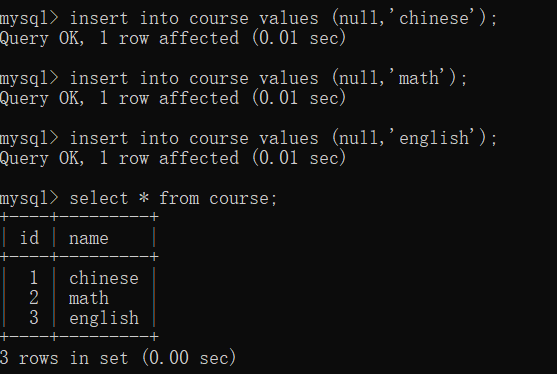
前面我们提到了我们需要一个中间表score来将这两个表联系起来,所以我们创建score:
create table score(
	id int primary key auto_increment,
	score decimal(3,1),
	s_id int,
	c_id int,
	foreign key (s_id) references student(id),
	foreign key (c_id) references course(id)
	);
我们往score中加入数据:
这样插入的数据就表示:amy同学在chinese上考了95分!
三.新增
语法:
insert into 表1(列,列) select 列,列 from 表2;
案例:创建一张用户表,设计有name姓名、email邮箱、sex性别、mobile手机号字段。需要把已有的学生数据复制进来,可以复制的字段为name:
drop table if exists test_user;
create table test_user (
   id int primary key auto_increment,
   name varchar(20) comment '姓名',
   age int comment '年龄',
   email varchar(20) comment '邮箱',
   sex varchar(1) comment '性别',
   mobile varchar(20) comment '手机号'
);

四.聚合查询
1.聚合函数
函数
说明
COUNT([DISTINCT] expr)
返回查询到的数据的 数量
SUM([DISTINCT] expr)
返回查询到的数据的 总和,不是数字没有意义
AVG([DISTINCT] expr)
返回查询到的数据的 平均值,不是数字没有意义
MAX([DISTINCT] expr)
返回查询到的数据的 最大值,不是数字没有意义
MIN([DISTINCT] expr)
返回查询到的数据的 最小值,不是数字没有意义
接下来我们具体看看这些聚合函数的用法
count
-- 统计班级共有多少同学
SELECT COUNT(*) FROM student;
SELECT COUNT(0) FROM student;
-- 统计班级收集的 qq_mail 有多少个,qq_mail 为 NULL 的数据不会计入结果
SELECT COUNT(qq_mail) FROM student;
sum
-- 统计数学成绩总分
SELECT SUM(math) FROM exam_result;
-- 不及格 < 60 的总分,没有结果,返回 NULL
SELECT SUM(math) FROM exam_result WHERE math < 60;
avg
-- 统计平均总分
SELECT AVG(chinese + math + english) 平均总分 FROM exam_result;
max
-- 返回英语最高分
SELECT MAX(english) FROM exam_result;
min
-- 返回 > 70 分以上的数学最低分
SELECT MIN(math) FROM exam_result WHERE math > 70;
2.group by子句
select 中使用 group up 子句可以对指定列进行分组查询。需要满足:使用 group by 进行分组查询时,select 指定的字段必须是“分组依据字段”,其他字段若想出现在 select 中则必须包含在聚合函数中。
语法:
select column1, sum(column2), .. from table group by column1,column3;
我们来具体看一个案例,先创建一个测试表准备测试表及数据:职员表,有id(主键)、name(姓名)、role(角色)、salary(薪水):
create table emp(
 id int primary key auto_increment,
 name varchar(20) not null,
 role varchar(20) not null,
 salary numeric(11,2)
);
insert into emp(name, role, salary) values
('马云','服务员', 1000.20),
('马化腾','游戏陪玩', 2000.99),
('孙悟空','游戏角色', 999.11),
('猪无能','游戏角色', 333.5),
('沙和尚','游戏角色', 700.33),
('老王','董事长', 12000.66);
然后我们试一试查询每个角色的最高工资、最低工资和平均工资:
select role,max(salary),min(salary),avg(salary) from emp group by role;

3.having
group by 子句进行分组以后,需要对分组结果再进行条件过滤时,不能使用 where 语句,而需要用 having
接着上面创建的表emp,我们试试查找平均工资低于1500的角色和它的平均工资:
select role,max(salary),min(salary),avg(salary)
from emp
group by role
having avg(salary)<1500;

五.联合查询
实际开发中往往数据来自不同的表,所以需要多表联合查询。多表查询是对多张表的数据取笛卡尔积
注意:关联查询可以对关联表使用别名。
为了方便接下来的操作学习,我们可以重新创建一个数据库,别忘了设置utf8字符集
create database if not exists test2 character set utf8mb4;
然后我们先创建几张表:
create table classes(
	id int primary key auto_increment,
	name varchar(20),
	`desc` varchar(100)
);
create table student(
	id int primary key auto_increment,
	sn varchar(20),
	name varchar(20),
	qq_mail varchar(20),
	class_id int
);
create table course(
	id int primary key auto_increment,
	name varchar(20)
);
create table score(
	score decimal(3,1),
	student_id int,
	course_id int
);
然后我们来初始化一下测试数据,方便接下来具体操作:
insert into classes(name, `desc`) values
('计算机系2019级1班', '学习了计算机原理、C和Java语言、数据结构和算法'),
('中文系2019级3班','学习了中国传统文学'),
('自动化2019级5班','学习了机械自动化');
insert into student(sn, name, qq_mail, classes_id) values
('09982','黑旋风李逵','[email protected]',1),
('00835','菩提老祖',null,1),
('00391','白素贞',null,1),
('00031','许仙','[email protected]',1),
('00054','不想毕业',null,1),
('51234','好好说话','[email protected]',2),
('83223','tellme',null,2),
('09527','老外学中文','[email protected]',2);
insert into course(name) values
('Java'),('中国传统文化'),('计算机原理'),('语文'),('高阶数学'),('英文');
insert into score(score, student_id, course_id) values
-- 黑旋风李逵
(70.5, 1, 1),(98.5, 1, 3),(33, 1, 5),(98, 1, 6),
-- 菩提老祖
(60, 2, 1),(59.5, 2, 5),
-- 白素贞
(33, 3, 1),(68, 3, 3),(99, 3, 5),
-- 许仙
(67, 4, 1),(23, 4, 3),(56, 4, 5),(72, 4, 6),
-- 不想毕业
(81, 5, 1),(37, 5, 5),
-- 好好说话
(56, 6, 2),(43, 6, 4),(79, 6, 6),
-- tellme
(80, 7, 2),(92, 7, 6);
插入数据成功后,我们就可以进行接下来的操作啦!

1.内连接
语法:
select 字段 from 表1 别名1 [inner] join 表2 别名2 on 连接条件 and 其他条件;
select 字段 from 表1 别名1,表2 别名2 where 连接条件 and 其他条件;
接下来看几个例子:
查询 “许仙”同学 的 成绩:
select sco.score from student stu
inner join score sco on stu.id=sco.student_id
and stu.name='许仙';

-- 或者
select sco.score from student stu, score sco
where stu.id=sco.student_id
and stu.name='许仙';
查询所有同学的总成绩,及同学的个人信息:
-- 成绩表对学生表是多对1关系,查询总成绩是根据成绩表的同学id来进行分组的
select stu.sn,stu.name,stu.qq_mail,sum( sco.score )
from student stu
join score sco on stu.id = sco.student_id
group by sco.student_id;
查询所有同学的成绩,及同学的个人信息:
-- 学生表、成绩表、课程表3张表关联查询
select
 stu.id,
 stu.sn,
 stu.name,
 stu.qq_mail,
 sco.score,
 sco.course_id,
 cou.name
from
 student stu
 join score sco on stu.id = sco.student_id
 join course cou on sco.course_id = cou.id
order by stu.id;
2.外连接
外连接分为左外连接和右外连接。如果联合查询,左侧的表完全显示我们就说是左外连接;右侧的表完全显示我们就说是右外连接。
-- 左外连接,表1完全显示
select 字段名  from 表名1 left join 表名2 on 连接条件;
-- 右外连接,表2完全显示
select 字段 from 表名1 right join 表名2 on 连接条件;
来看一个例子:
查询所有同学的成绩,及同学的个人信息,如果该同学没有成绩,也需要显示
-- “老外学中文”同学 没有考试成绩,也显示出来了
select * from student stu left join score sco on stu.id=sco.student_id;
-- 对应的右外连接为:
select * from score sco right join student stu on stu.id=sco.student_id;
-- 学生表、成绩表、课程表3张表关联查询
select
 stu.id,
 stu.sn,
 stu.NAME,
 stu.qq_mail,
 sco.score,
 sco.course_id,
 cou.NAME
from
 student stu
 left join score sco on stu.id = sco.student_id
 left join course cou on sco.course_id = cou.id
order by
 stu.id;
3.自连接
自连接是指在同一张表连接自身进行查询。
案例:显示所有“计算机原理”成绩比“Java”成绩高的成绩信息
先查询“计算机原理”和“Java”课程的id
select id,name from course where name='Java' or name='计算机原理';
再查询成绩表中,“计算机原理”成绩比“Java”成绩 好的信息(score表命名为s1和s2)
select
 s1.*
from
 score s1
 join score s2 on s1.student_id = s2.student_id
 and s1.score < s2.score
 and s1.course_id = 1
 and s2.course_id = 3;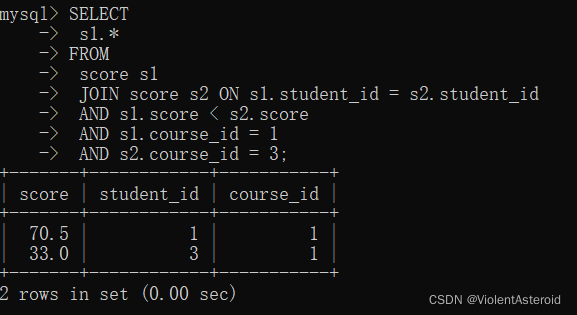
以上查询只显示了成绩信息,并且是分布执行的。要显示学生及成绩信息,并在一条语句显示:
SELECT
 stu.*,
 s1.score Java,
 s2.score 计算机原理
FROM
 score s1
 JOIN score s2 ON s1.student_id = s2.student_id
 JOIN student stu ON s1.student_id = stu.id
 JOIN course c1 ON s1.course_id = c1.id
 JOIN course c2 ON s2.course_id = c2.id
 AND s1.score < s2.score
 AND c1.NAME = 'Java'
 AND c2.NAME = '计算机原理';
4.子查询
子查询是指嵌入在其他sql语句中的select语句,也叫嵌套查询
单行子查询:返回一行记录的子查询
查询与“不想毕业” 同学的同班同学:
select * from student
where classes_id=
(select classes_id from student where name='不想毕业');

多行子查询:返回多行记录的子查询
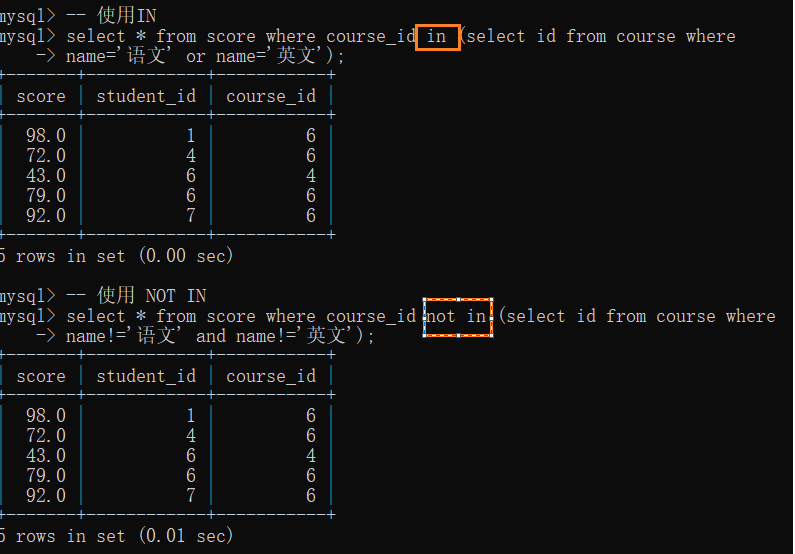
查询“语文”或“英文”课程的成绩信息:
[NOT] IN关键字:
– 使用IN
select * from score where course_id in (select id from course where
name=‘语文’ or name=‘英文’);
– 使用 NOT IN
select * from score where course_id not in (select id from course where
name!=‘语文’ and name!=‘英文’);
[NOT] EXISTS关键字:
– 使用exists
select * from score where exists (select score.course_id from course where (name = ‘语文’ or name = ‘英文’) and course.id = score.course_id);
– 使用not exists
select * from score where not exists (select score.course_id from course where (name != ‘语文’ and name != ‘英文’) and course.id = score.course_id);
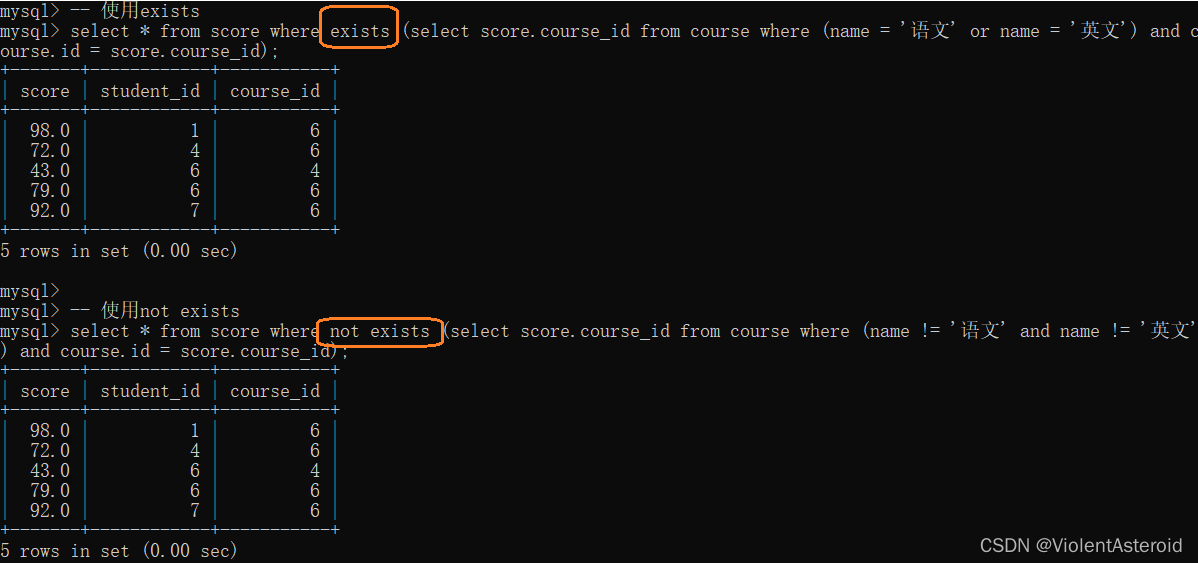
注意:
如果子表查询的结果集合比较小,就是用in;
如果子表查询的结果集合比较大,而主表的集合小,就使用exists。
5.合并查询
在实际应用中,为了合并多个select的执行结果,可以使用集合操作符 union,union all。使用union和union all时,前后查询的结果集中,
字段需要一致。
union:该操作符用于取得两个结果集的并集。当使用该操作符时,会自动去掉结果集中的重复行。
案例:查询id小于3,或者名字为“英文”的课程:
select * from course where id<3
union
select * from course where name='英文';
-- 或者使用or来实现
select * from course where id<3 or name='英文';

union all:该操作符用于取得两个结果集的并集。当使用该操作符时,不会去掉结果集中的重复行。
案例:查询id小于3,或者名字为“Java”的课程
-- 可以看到结果集中出现重复数据Java
select * from course where id<3
union all
select * from course where name='英文';

先自我介绍一下,小编13年上师交大毕业,曾经在小公司待过,去过华为OPPO等大厂,18年进入阿里,直到现在。深知大多数初中级java工程师,想要升技能,往往是需要自己摸索成长或是报班学习,但对于培训机构动则近万元的学费,着实压力不小。自己不成体系的自学效率很低又漫长,而且容易碰到天花板技术停止不前。因此我收集了一份《java开发全套学习资料》送给大家,初衷也很简单,就是希望帮助到想自学又不知道该从何学起的朋友,同时减轻大家的负担。添加下方名片,即可获取全套学习资料哦
边栏推荐
- 【数据库系统原理】第四章 高级数据库模型:弱实体集、E/R 联系到关系的转化、子类结构到关系的转化
- Two-day summary ([20][21])
- php源码随机输出某个目录下的图片API
- 【HCIP】BGP 选路问题小型实验
- C Expert Programming Chapter 8 Why Programmers Can't Tell the Difference Between Halloween and Christmas 8.7 Implementing Finite State Machines in C
- ETCD快速入门-01 ETCD概述
- LeetCode 热题 HOT 100(10.删除链表的倒数第 N 个结点)
- 03 "commonly used types (below)"
- LeetCode 热题 HOT 100(4.寻找两个正序数组的中位数)
- 小技巧——postman get&&post请求的使用方式
猜你喜欢

RTT学习笔记9-IO设备模型
Based on RTL8201F Ethernet port 100M debugging notes in RK3566

LeetCode每日两题02:买股票的最佳时机 (均1200道)

ETCD快速入门-01 ETCD概述
LeetCode每日两题01:删除排序数组中的重复项 (均1200道)

项目进度管理
![【Verilog】时序逻辑电路 -- 有限同步状态机[补充]](/img/fc/c0b2cef16cf9acdb8be3e838ba474b.png)
【Verilog】时序逻辑电路 -- 有限同步状态机[补充]

(路透社数据集)新闻分类:多分类问题实战

Lianshengde W801 series 2-WIFI one-key distribution network, information preservation

Short note_Altium Designer layout and routing reuse of the same module
随机推荐
【Verilog】Verilog基础知识整理
Threads of control and synchronization
LeetCode hot topic HOT 100 (4. Find the median of two positive-order arrays)
[Advanced Mathematics] Advanced Number Arrangement: Common Equivalent Infinitesimals, Derivatives and Differentials, Differential Equations
LeetCode Hot Questions HOT 100 (1. Sum of two numbers)
06 【Generic】
C专家编程 第8章 为什么程序员无法分清万圣节和圣诞节 8.8 软件比硬件更困难
服务器管理面板aaPanel使用中的一些问题汇总
03 【常用类型(下)】
C专家编程 第8章 为什么程序员无法分清万圣节和圣诞节 8.2 根据位模式构筑图形
C专家编程 第8章 为什么程序员无法分清万圣节和圣诞节 8.5 原型在什么地方会失败
jmter正则表达式提取器
亚马逊云科技 Build On 参与心得
分库分表和分布式acp和分布式事务
微信小程序——video视频全屏展示
MQTT X Newsletter 2022-07 | 自动更新、MQTT X CLI 支持 MQTT 5.0、新增 conn 命令…
66:第五章:开发admin管理服务:19:开发【查看用户详情,接口】;
(imdb数据集)电影评论分类实战:二分类问题
俩日总结(【20】【21】)
网页模板 pug 基本语法