当前位置:网站首页>Qt实战:云曦聊天室篇
Qt实战:云曦聊天室篇
2022-04-23 14:12:00 【ぃ灵彧が】
Qt实战:云曦聊天室篇
文章目录
前言
基于Qt的网络聊天室,可进行群聊,私聊,添加好友,创建群聊,添加群聊等功能
一、云曦聊天室效果图
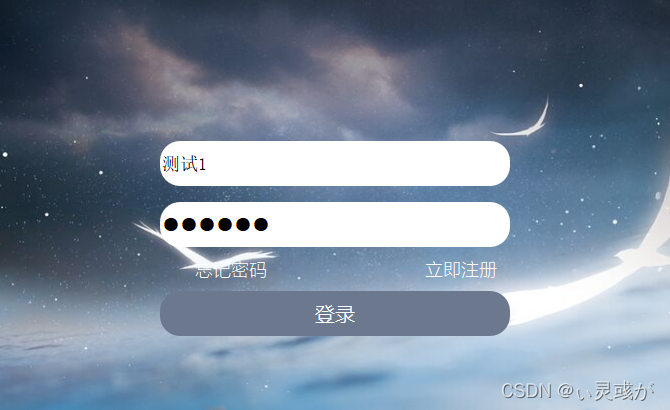
1. 登录界面:
如图1所示,输入用户名和密码,点击登录,即可进入如图3所示的好友列表界面。
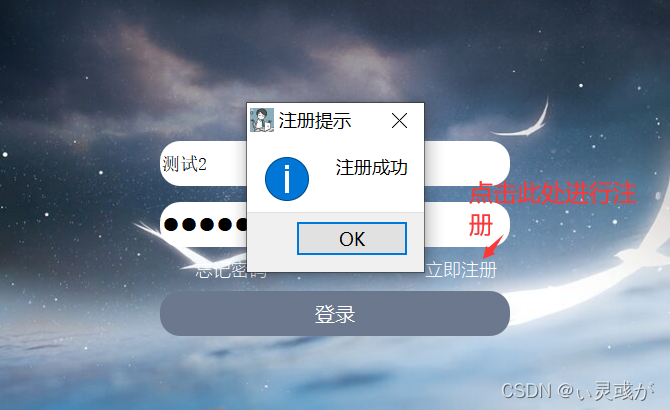
2. 注册界面:
如图2所示,输入用户名和密码,点击立即注册按钮,即可进行相关的注册功能,注册成功后,点击登录,即可进入如图3所示的好友列表界面。
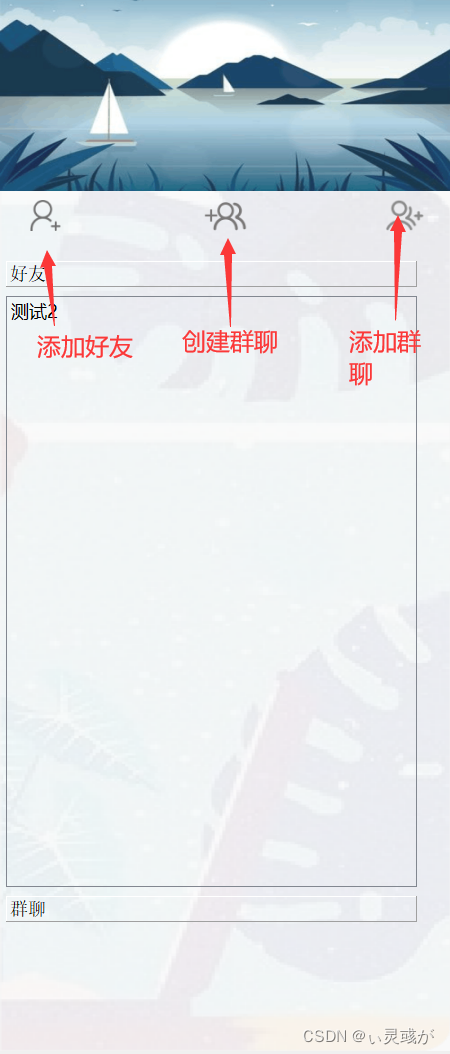
3. 好友列表界面:
如图3所示,即为好友列表界面,用户可在此进行私聊,群聊,好友的添加,创建群聊,加入群聊等功能。
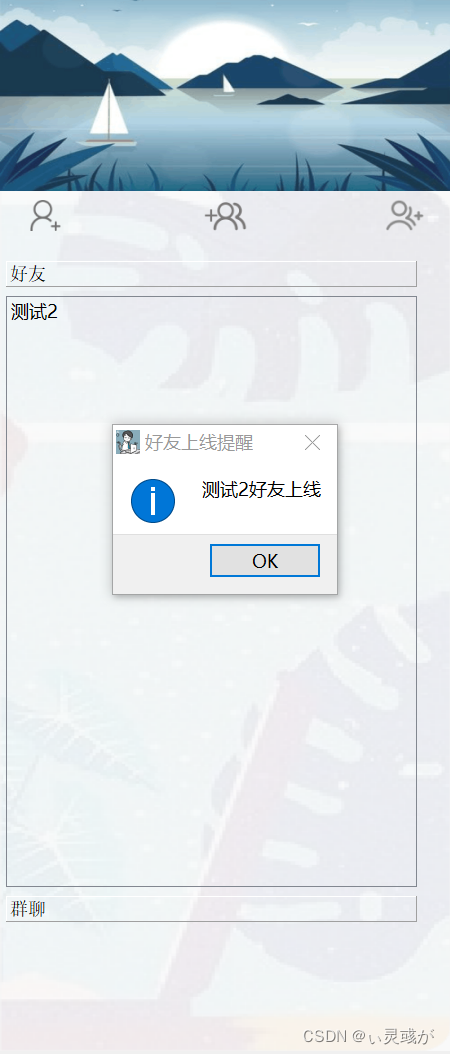
4. 好友上线提醒:
如图4所示,用户可在图3界面看到用户的相关好友的上下线提醒通知,以及关闭图3后,在左下角同QQ的托盘效果。
5. 私聊界面:
如图5所示,用户可选择任意一个好友,进行相关的私聊,其中,包括字体的样式、大小、加粗、倾斜、以及聊天记录的保存、清空等功能。
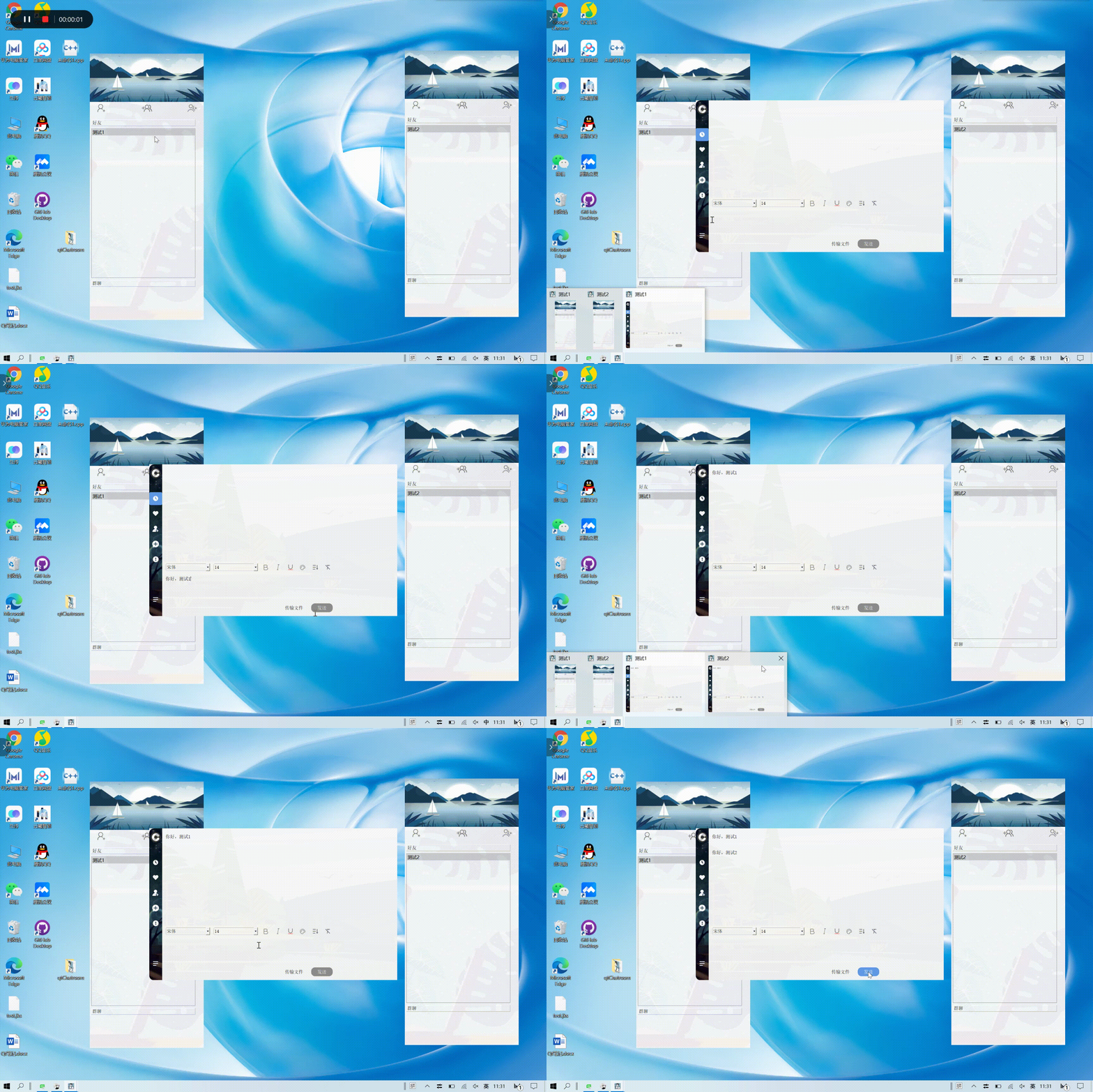
6. 私聊界面:
如图6所示,用户可在此界面进行群聊。
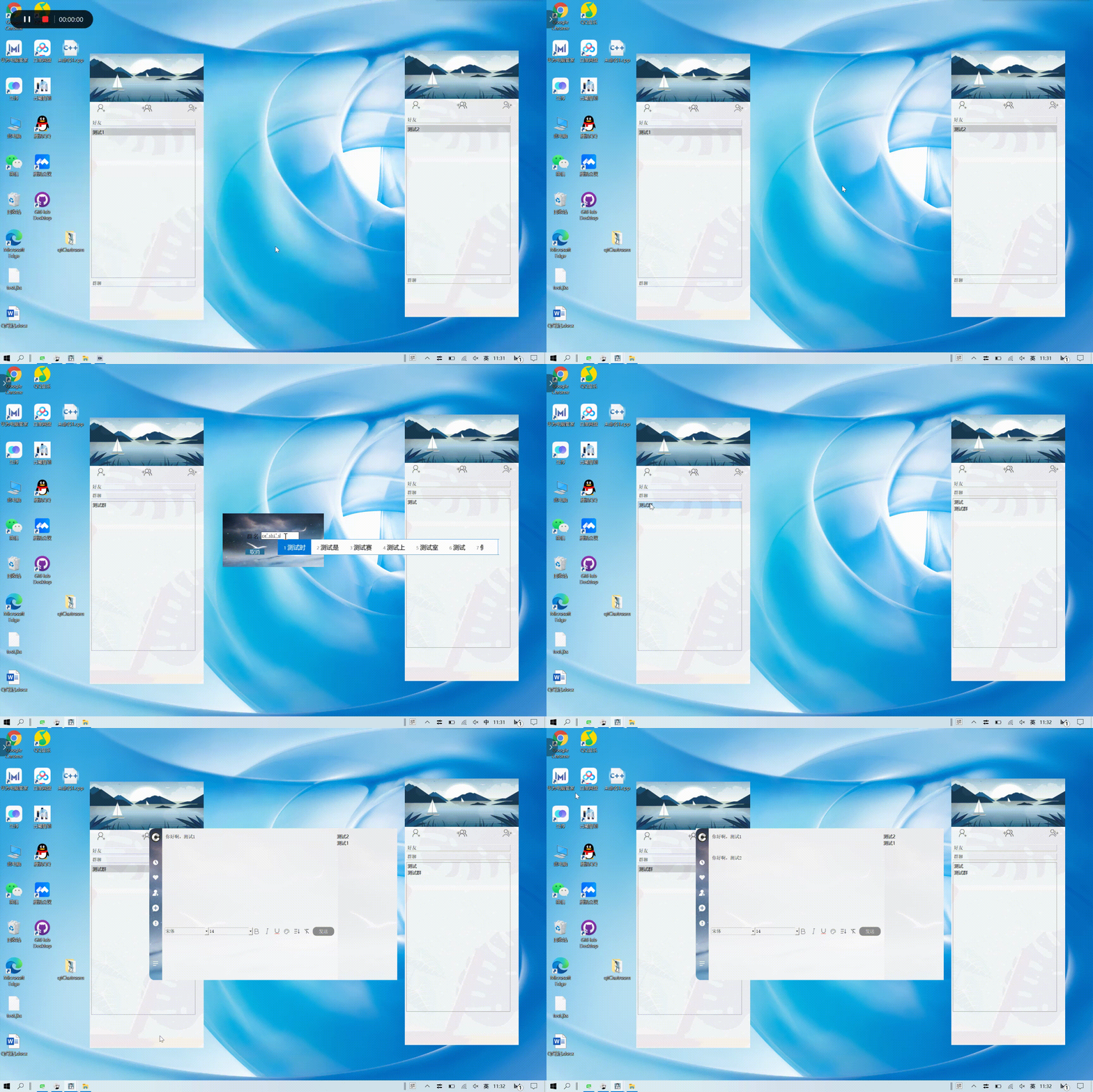
二、相关源代码
项目框架图:
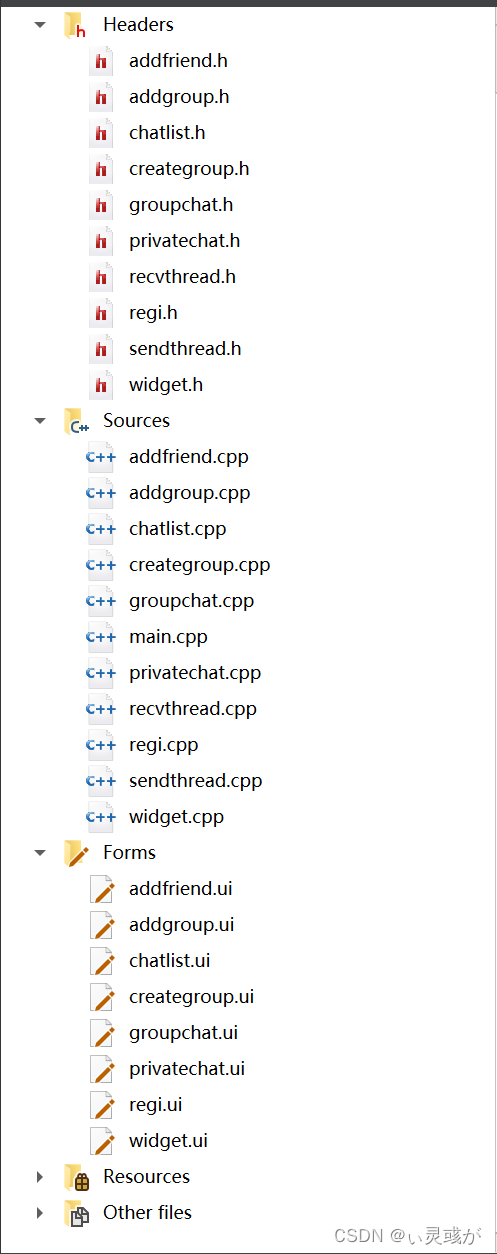
1. .cpp部分
privatechat:
#include "privatechat.h"
#include "ui_privatechat.h"
#include <QLabel>
#include <QPushButton>
#include <QDesktopWidget>
#include <QWidget>
#include <QToolButton>
#include <QColorDialog>

PrivateChat::PrivateChat(QTcpSocket *s, QString u, QString f, Chatlist *c, QList<ChatWidgetInfo> *l, QWidget *parent) :
    QWidget(parent),
    ui(new Ui::PrivateChat)
{

    ui->setupUi(this);
    socket = s;
    userName = u;
    friendName = f;
    mainWidget = c;
    chatWidgetList = l;

    connect(mainWidget, &Chatlist::signal_to_sub_widget, this, &PrivateChat::show_text_slot);
    connect(ui->exitBtn, &QPushButton::clicked,this, &GroupChat::close);

    setWindowIcon(QPixmap(":images//C3.png"));
    QLabel *  bglabel =  new QLabel;
    bglabel=ui ->label;
    bglabel ->setPixmap(QPixmap(":images//底框.png"));
    bglabel ->setScaledContents(true);

    QLabel *  bglabel1 =  new QLabel;
    bglabel1=ui ->label_2;
    bglabel1 ->setPixmap(QPixmap(":images//主导航框.png"));
    bglabel1->setScaledContents(true);
    //控件透明化
    ui->textEdit->setStyleSheet("background-color:rgba(0,0,0,0);");
    ui->listWidget->setStyleSheet("background-color:rgba(0,0,0,0);");
    ui->textBrowser->setStyleSheet("background-color:rgba(0,0,0,0);");
    ui->widget_5->setStyleSheet("background-color:rgba(0,0,0,0);");

    //窗口去边框
    this -> setWindowFlags(Qt::FramelessWindowHint);

    ui->pushButton->setStyleSheet(
                         //正常状态样式
                         "QPushButton{"
                         "border-radius:5px;"//设置圆角半径
                         "}"
                         "QPushButton:hover{"
                                              "background-color:#5f9ae6;"
                                              "color:white;"
                                              "}");
    ui->fileButton->setStyleSheet(
                         //正常状态样式
                         "QPushButton{"
                         "border-radius:5px;"//设置圆角半径
                         "}"
                         "QPushButton:hover{"
                                              "background-color:#5f9ae6;"
                                              "color:white;"
                                              "}");
    ui->exitBtn->setStyleSheet(
                //正常状态样式
                "QPushButton{"
                //"background-color:#67a6f8;"//设置按钮背景色
                "border-radius:5px;"//设置圆角半径
                "color:white;"//设置按钮字体颜色
                "}"
                "QPushButton:hover{"
                                     "background-color:#5f9ae6;"
                                     "color:white;"
                                     "}");
    ui->exitBtn_3->setStyleSheet(
                //正常状态样式
                "QPushButton{"
                //"background-color:#67a6f8;"//设置按钮背景色
                "border-radius:5px;"//设置圆角半径
                "color:white;"//设置按钮字体颜色
                "}"
                "QPushButton:hover{"
                                     "background-color:#5f9ae6;"
                                     "color:white;"
                                     "}");
    ui->exitBtn_9->setStyleSheet(
                //正常状态样式
                "QPushButton{"
                //"background-color:#67a6f8;"//设置按钮背景色
                "border-radius:5px;"//设置圆角半径
                "color:white;"//设置按钮字体颜色
                "}"
                "QPushButton:hover{"
                                     "background-color:#5f9ae6;"
                                     "color:white;"
                                     "}");
    ui->exitBtn_5->setStyleSheet(
                //正常状态样式
                "QPushButton{"
                //"background-color:#67a6f8;"//设置按钮背景色
                "border-radius:5px;"//设置圆角半径
                "color:white;"//设置按钮字体颜色
                "}"
                "QPushButton:hover{"
                                     "background-color:#5f9ae6;"
                                     "color:white;"
                                     "}");
    ui->exitBtn_6->setStyleSheet(
                //正常状态样式
                "QPushButton{"
                //"background-color:#67a6f8;"//设置按钮背景色
                "border-radius:5px;"//设置圆角半径
                "color:white;"//设置按钮字体颜色
                "}"
                "QPushButton:hover{"
                                     "background-color:#5f9ae6;"
                                     "color:white;"
                                     "}");
    ui->exitBtn_7->setStyleSheet(
                //正常状态样式
                "QPushButton{"
                //"background-color:#67a6f8;"//设置按钮背景色
                "border-radius:5px;"//设置圆角半径
                "color:white;"//设置按钮字体颜色
                "}"
                "QPushButton:hover{"
                                     "background-color:#5f9ae6;"
                                     "color:white;"
                                     "}");
    ui->exitBtn_8->setStyleSheet(
                //正常状态样式
                "QPushButton{"
                //"background-color:#67a6f8;"//设置按钮背景色
                "border-radius:5px;"//设置圆角半径
                "color:white;"//设置按钮字体颜色
                "}"
                "QPushButton:hover{"
                                     "background-color:#5f9ae6;"
                                     "color:white;"
                                     "}");

    ui->pushButton_2->setStyleSheet(
                         //正常状态样式
                         "QPushButton{"
                         "border-radius:5px;"//设置圆角半径
                         "}"
                         "QPushButton:hover{"
                                              "background-color:#5f9ae6;"
                                              "color:white;"
                                              "}");
    ui->pushButton_3->setStyleSheet(
                         //正常状态样式
                         "QPushButton{"
                         "border-radius:5px;"//设置圆角半径
                         "}"
                         "QPushButton:hover{"
                                              "background-color:#5f9ae6;"
                                              "color:white;"
                                              "}");
    ui->pushButton_4->setStyleSheet(
                         //正常状态样式
                         "QPushButton{"

                         "border-radius:5px;"//设置圆角半径
                         "}"
                         "QPushButton:hover{"
                                              "background-color:#5f9ae6;"
                                              "color:white;"
                                              "}");
    ui->pushButton_5->setStyleSheet(
                         //正常状态样式
                         "QPushButton{"

                         "border-radius:5px;"//设置圆角半径
                         "}"
                         "QPushButton:hover{"
                                              "background-color:#5f9ae6;"
                                              "color:white;"
                                              "}");
    ui->pushButton_6->setStyleSheet(
                         //正常状态样式
                         "QPushButton{"
                         "border-radius:5px;"//设置圆角半径
                         "}"
                         "QPushButton:hover{"
                                              "background-color:#5f9ae6;"
                                              "color:white;"
                                              "}");
    ui->sendButton->setStyleSheet(
                         //正常状态样式
                         "QPushButton{"
                         "background-color:#8D8D8D;"//设置按钮背景色
                         "border-radius:15px;"//设置圆角半径
                         "color:white;"//设置按钮字体颜色
                         "}"
                         "QPushButton:hover{"
                                              "background-color:#5f9ae6;"
                                              "color:white;"
                                              "}");

    //辅助功能//
    //字体

    connect(ui->fontComboBox,&QFontComboBox::currentFontChanged,this,[=](const QFont &font){

            ui->textEdit->setCurrentFont(font);
            ui->textEdit->setFocus();
        });

    //字号
    void (QComboBox:: * cbxSingal)(const QString &text) = &QComboBox::currentIndexChanged;
    connect(ui->comboBox,cbxSingal,this,[=](const QString &text){

            ui->textEdit->setFontPointSize(text.toDouble());
            ui->textEdit->setFocus();
        });

    //加粗
    connect(ui->pushButton_3,&QToolButton::clicked,this,[=](bool checked){

           if(checked)
           {

               ui->textEdit->setFontWeight(QFont::Bold);
           }
           else
           {

               ui->textEdit->setFontWeight(QFont::Normal);
           }
           ui->textEdit->setFocus();
       });

    //倾斜
    connect(ui->pushButton_4,&QToolButton::clicked,this,[=](bool checked){


            ui->textEdit->setFontItalic(checked);

            ui->textEdit->setFocus();
        });

    //下划线
    connect(ui->pushButton_5,&QToolButton::clicked,this,[=](bool checked){


           ui->textEdit->setFontUnderline(checked);

           ui->textEdit->setFocus();
       });

    //设置文本颜色
    connect(ui->pushButton_6,&QToolButton::clicked,[=](){

    QColor color = QColorDialog::getColor(Qt::red); //color对象可以在widget.h中定义私有成员
    ui->textEdit->setTextColor(color);

    });


    //保存聊天记录
    connect(ui->pushButton,&QToolButton::clicked,[=](){

        if( ui->textBrowser->document()->isEmpty())
        {

           QMessageBox::warning(this,"警告","内容不能为空");
           return;
        }
        else
        {

            QString path = QFileDialog::getSaveFileName(this,"保存聊天记录","聊天记录","(*.txt)");
            QFile file(path);
            //打开模式加换行操作
            file.open(QIODevice::WriteOnly | QFile::Text);
            QTextStream stream(&file);
            stream << ui->textBrowser->toPlainText();
            file.close();

        }
      });

    //清空聊天记录
    connect(ui->pushButton_2,&QToolButton::clicked,[=](){

           ui->textBrowser->clear();
   });


}

PrivateChat::~PrivateChat()
{

    delete ui;
}

void PrivateChat::on_sendButton_clicked()
{

    QString text = ui->textEdit->toPlainText();
    QJsonObject obj;
    obj.insert("cmd", "private_chat");
    obj.insert("user_from", userName);
    obj.insert("user_to", friendName);
    obj.insert("text", text);
    QByteArray ba = QJsonDocument(obj).toJson();
    socket->write(ba);

    ui->textEdit->clear();
    ui->textBrowser->append(text);
    ui->textBrowser->append("\n");
}

void PrivateChat::show_text_slot(QJsonObject obj)
{

    if (obj.value("cmd").toString() == "private_chat")
    {

        if (obj.value("user_from").toString() == friendName)
        {

            if (this->isMinimized())
            {

                this->showNormal();
            }
            this->activateWindow();
            ui->textBrowser->append(obj.value("text").toString());
            ui->textBrowser->append("\n");
        }
    }
}

void PrivateChat::closeEvent(QCloseEvent *event)
{

    for (int i = 0; i < chatWidgetList->size(); i++)
    {

        if (chatWidgetList->at(i).name == friendName)
        {

            chatWidgetList->removeAt(i);
            break;
        }
    }
    event->accept();
}

void PrivateChat::on_fileButton_clicked()
{

    QString fileName = QFileDialog::getOpenFileName(this, "发送文件", QCoreApplication::applicationFilePath());
    if (fileName.isEmpty())
    {

        QMessageBox::warning(this, "发送文件提示", "请选择一个文件");
    }
    else
    {

        QFile file(fileName);
        file.open(QIODevice::ReadOnly);
        QJsonObject obj;
        obj.insert("cmd", "send_file");
        obj.insert("from_user", userName);
        obj.insert("to_user", friendName);
        obj.insert("length", file.size());
        obj.insert("filename", fileName);
        QByteArray ba = QJsonDocument(obj).toJson();
        socket->write(ba);
    }
}
2. .h部分
privatechat:
#ifndef PRIVATECHAT_H
#define PRIVATECHAT_H

#include <QWidget>
#include <QTcpSocket>
#include <QJsonObject>
#include <QJsonDocument>
#include <QList>
#include <QFileDialog>
#include <QCoreApplication>
#include <QFile>

class Chatlist;
struct ChatWidgetInfo;
#include "chatlist.h"

namespace Ui {

class PrivateChat;
}

class PrivateChat : public QWidget
{

    Q_OBJECT

public:
    explicit PrivateChat(QTcpSocket *s, QString u, QString f, Chatlist *c, QList<ChatWidgetInfo> *l, QWidget *parent = 0);
    ~PrivateChat();
    void closeEvent(QCloseEvent *event);

private slots:
    void on_sendButton_clicked();
    void show_text_slot(QJsonObject);

    void on_fileButton_clicked();

private:
    Ui::PrivateChat *ui;
    QTcpSocket *socket;
    QString userName;
    QString friendName;
    Chatlist *mainWidget;
    QList<ChatWidgetInfo> *chatWidgetList;
    QPoint  label;
};

#endif // PRIVATECHAT_H
总结
以上是云曦聊天室(YXChatting)的相关简介和私聊部分代码,详细代码与相关讲解会后续逐步更新,如果有急于使用的,可以通过以下方式进行下载和使用,以及访问我主页的Qt界面优化系列文章,里面有相关细节的界面优化代码。
如有问题,也可直接私聊或在下方评论,技术萌新,初来乍到,如有不妥之处,还请各位大佬进行指正与谅解。
CSDN下载:
https://download.csdn.net/download/m0_54754302/85203455
微信公众号下载地址:
搜索关注微信公众号“云曦智划”,回复“云曦Chatting”,即可免费获取完整源代码与可执行程序。
版权声明
本文为[ぃ灵彧が]所创,转载请带上原文链接,感谢
https://blog.csdn.net/m0_54754302/article/details/124354361
边栏推荐
- 网页自适应,等比缩放
- 解决ssh配置文件优化以及连接慢的问题
- TLS/SSL 协议详解 (28) TLS 1.0、TLS 1.1、TLS 1.2之间的区别
- Redis数据库讲解(一)
- xx项目架构随记
- 错误:无法远程查找到密钥 “428F7ECC7117F726“
- After entering the new company, the operation and maintenance engineer can understand the deployment of the system from the following items
- Date的after时间判断
- ssh限制登录的四种手段
- 使用Executors类快速创建线程池
猜你喜欢
After entering the new company, the operation and maintenance engineer can understand the deployment of the system from the following items
Win10 comes with groove music, which can't play cue and ape files. It's a curvilinear way to save the country. It creates its own aimpack plug-in package, and aimp installs DSP plug-in
MySQL数据库讲解(九)
MySQL-InnoDB-事务

困扰多年的系统调研问题有自动化采集工具了,还是开源免费的
KVM learning resources
剑指offer刷题(2)--面向华为
uni-app消息推送

Logback logger and root
微信小程序客服接入,实现发送和接收消息
随机推荐
LLVM - 生成加法
预览CSV文件
Uni app message push
js 抛物线运动方法封装
常见存储类型和FTP主被动模式解析
ssh限制登录的四种手段
JS key value judgment
一些小小小小记录~
MYSQL一种分表实现方案及InnoDB、MyISAM、MRG_MYISAM等各种引擎应用场景介绍
使用开源调研工具Prophet是一种什么体验?
统信UOS PHP7.2.3升级至PHP7.2.24
source insight via samba
elk安装
Quickly understand the three ways of thread implementation
grep无法重定向到文件的问题
API gateway / API gateway (IV) - use of Kong - Integrated JWT and fuse plug-in
Returns the subscript after array sorting
Notes on Visio drawing topology
DP - [noip2000] grid access
Introduction to the use of countdownlatch and cyclicbarrier for inter thread control