当前位置:网站首页>使用 Ingress 实现金丝雀发布
使用 Ingress 实现金丝雀发布
2022-04-23 06:33:00 【愿许浪尽天涯】
使用 Ingress 实现金丝雀发布
一、基本介绍
Service 是基于四层协议来实现的路由转发,常用于 NodePort 方式来对外提供服务,但是 当我们的业务模块较多时,使用 NodePort 的方式便不利于管理。 所以,我们可以使用 Ingress Controller 来通过匹配 URL 的方式实现 HTTP/HTTPS 代理。
Ingress 特点:
- 通过配置 Ingress,可以实现对内部服务提供可访问的 URL、负载均衡、终止 SSL/TLS,并且可以提供基于域名的虚拟主机。
Ingress 支持的调度方式:
- URL 路径映射调度:通过配置 Ingress 中的
path实现。 - 主机调度:通过配置 Ingress 中的
host实现。
Ingress 常见配置方式: 用户通过访问域名,域名解析到 SLB 的 IP 地址上,接着 SLB 将请求代理到当前正在监听的端口上,我们这里绑定的是 Ingress 映射出来的端口号。Ingress 通过匹配 URL 的方式找到绑定的 Service,最后 Service 将请求转发到后端 Pod 应用中。

二、Ingress 使用介绍
1.安装
[root@k8s-master01 ~]# wget https://raw.githubusercontent.com/kubernetes/ingress-nginx/controller-v0.48.1/deploy/static/provider/cloud/deploy.yaml
[root@k8s-master01 ~]# sed -i 's/LoadBalancer/NodePort/' deploy.yaml			# Ingress 对外提供服务的方式
[root@k8s-master01 ~]# sed -i 's/Deployment/DaemonSet/' deploy.yaml				# Ingress 部署方式
[root@k8s-master01 ~]# sed -i '/k8s.gcr.io/s/image:.*/image: registry.aliyuncs.com\/google_containers\/nginx-ingress-controller:v0.48.1/' deploy.yaml
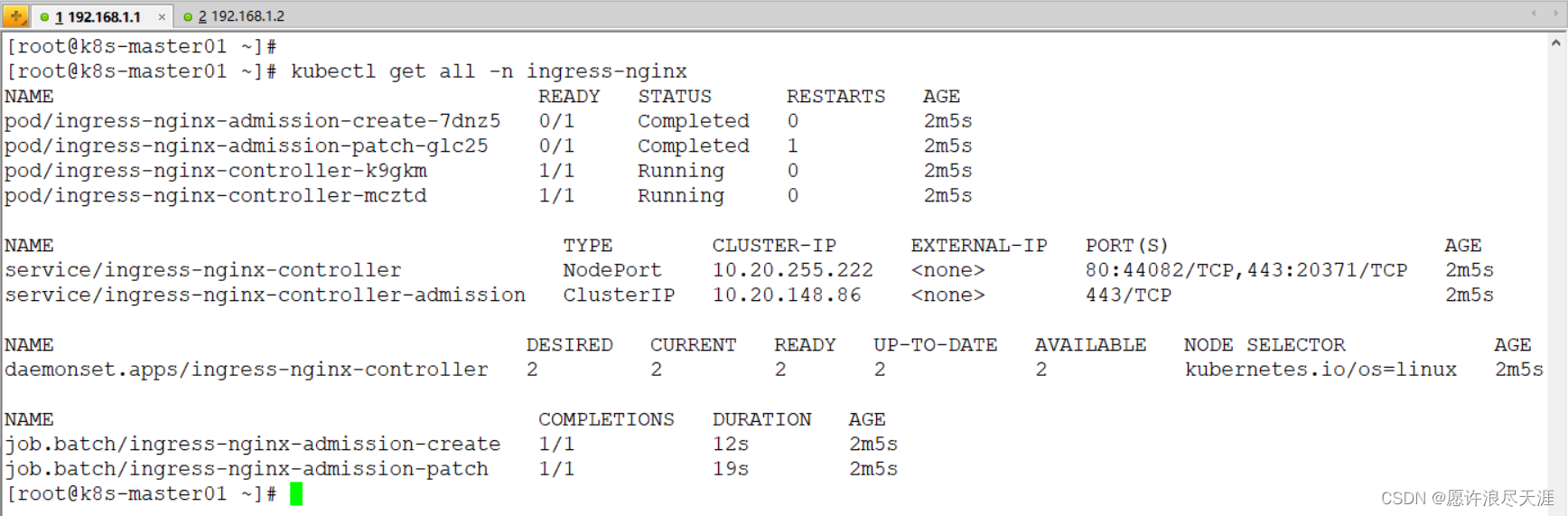
[root@k8s-master01 ~]# kubectl apply -f deploy.yaml
[root@k8s-master01 ~]# kubectl get all -n ingress-nginx
2.基本使用
1)创建 Pod 和 Service
[root@k8s-master01 ~]# vim test-web-server.yaml
apiVersion: v1
kind: Pod
metadata:
  name: test-web-server
  labels:
    app: test-web-server
spec:
  containers:
  - name: test-web-server
    image: registry.cn-hangzhou.aliyuncs.com/zhuang_zz/test:web-v1
    imagePullPolicy: IfNotPresent
    ports:
    - containerPort: 8080
---
apiVersion: v1
kind: Service
metadata:
  name: test-web-server
spec:
  ports:
  - name: test-web-server
    port: 8080
    targetPort: 8080
  selector:
    app: test-web-server
[root@k8s-master01 ~]# kubectl apply -f test-web-server.yaml
2)创建 Ingress
[root@k8s-master01 ~]# vim test-ingress.yaml
apiVersion: extensions/v1beta1
kind: Ingress
metadata:
  name: test-ingress
spec:
  rules:
  - host: www.tianya.com
    http:
      paths:
      - backend:
          serviceName: test-web-server
          servicePort: 8080
        path: /
[root@k8s-master01 ~]# kubectl apply -f test-ingress.yaml
因为我们这个域名是自定义配置的,所以需要配置 Hosts 解析(本地解析)
Linux:/etc/hosts
Windows:C:\Windows\System32\drivers\etc\hosts
3)验证

1)通过 Ingress 实现 HTTPS 代理
[root@k8s-master01 ~]# openssl req -x509 -nodes -days 365 \
-newkey rsa:2048 -keyout server.key -out server.crt -subj "/CN=*.tianya.com/O=*.tianya.com"
[root@k8s-master01 ~]# kubectl create secret tls www.tianya.com --key server.key --cert server.crt
[root@k8s-master01 ~]# vim test-ingress.yaml
apiVersion: extensions/v1beta1
kind: Ingress
metadata:
  name: test-ingress
spec:
  rules:
  - host: www.tianya.com
    http:
      paths:
      - backend:
          serviceName: test-web-server
          servicePort: 8080
        path: /
  tls:
  - hosts:
    - www.tianya.com
      secretName: www.tianya.com
2)验证

- 因为我们上面配置的证书是自签的,并没有 CA 认证,所以会出现证书错误(这是正常的)
1)实现 HTTP 不自动跳转到 HTTPS
当我们 Ingress 的配置含有 tls 时,HTTP 便会自动跳转到 HTTPS 上。所以我们可以通过 ssl-redirect: 'false' 来关闭自动跳转。
[root@k8s-master01 ~]# vim test-ingress.yaml
apiVersion: extensions/v1beta1
kind: Ingress
metadata:
  name: test-ingress
  annotations:
    nginx.ingress.kubernetes.io/ssl-redirect: 'false'
spec:
  rules:
  - host: www.tianya.com
    http:
      paths:
      - backend:
          serviceName: test-web-server
          servicePort: 8080
        path: /
  tls:
  - hosts:
    - www.tianya.com
      secretName: www.tianya.com
[root@k8s-master01 ~]# kubectl apply -f test-ingress.yaml
2)验证
1)通过 Service + Endpoints 实现代理到外部应用
我们下面是使用容器方式启动的 Nginx 应用,原因是因为简单,方便验证。要是物理安装的 Nginx 直接配置 Endpoints 即可。
[root@k8s-master01 ~]# vim external-nginx.yaml
apiVersion: apps/v1
kind: Deployment
metadata:
  name: nginx
spec:
  replicas: 1
  selector:
    matchLabels:
      app: nginx
  template:
    metadata:
      labels:
        app: nginx
    spec:
      nodeName: k8s-master01
      containers:
      - name: nginx
        image: nginx:1.21.0
        imagePullPolicy: IfNotPresent
        ports:
        - containerPort: 80
          hostPort: 8080
        volumeMounts:
        - mountPath: /usr/share/nginx/html/zhangsan
          name: nginx-html
      volumes:
      - hostPath:
          path: /root/zhangsan
        name: nginx-html
---
apiVersion: v1
kind: Endpoints
metadata:
  name: nginx
subsets:
- addresses:
  - ip: 192.168.1.1
  ports:
  - port: 8080
---
apiVersion: v1
kind: Service
metadata:
  name: nginx
spec:
  ports:
  - port: 80
    targetPort: 8080
[root@k8s-master01 ~]# kubectl apply -f external-nginx.yaml
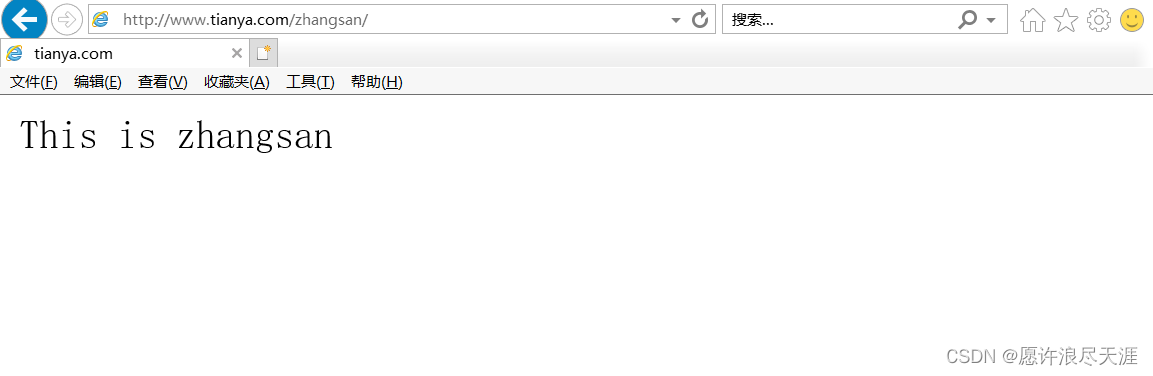
[root@k8s-master01 ~]# echo "This is zhangsan" > /root/zhangsan/index.html
2)修改 Ingress 配置
[root@k8s-master01 ~]# vim test-ingress.yaml
apiVersion: extensions/v1beta1
kind: Ingress
metadata:
  name: test-ingress
  annotations:
    nginx.ingress.kubernetes.io/ssl-redirect: 'false'
spec:
  rules:
  - host: www.tianya.com
    http:
      paths:
      - backend:
          serviceName: test-web-server
          servicePort: 8080
        path: /
      - backend:
          serviceName: nginx
          servicePort: 80
        path: /zhangsan/
  tls:
  - hosts:
    - www.tianya.com
      secretName: www.tianya.com
[root@k8s-master01 ~]# kubectl apply -f test-ingress.yaml
3)验证
3.实现金丝雀发布
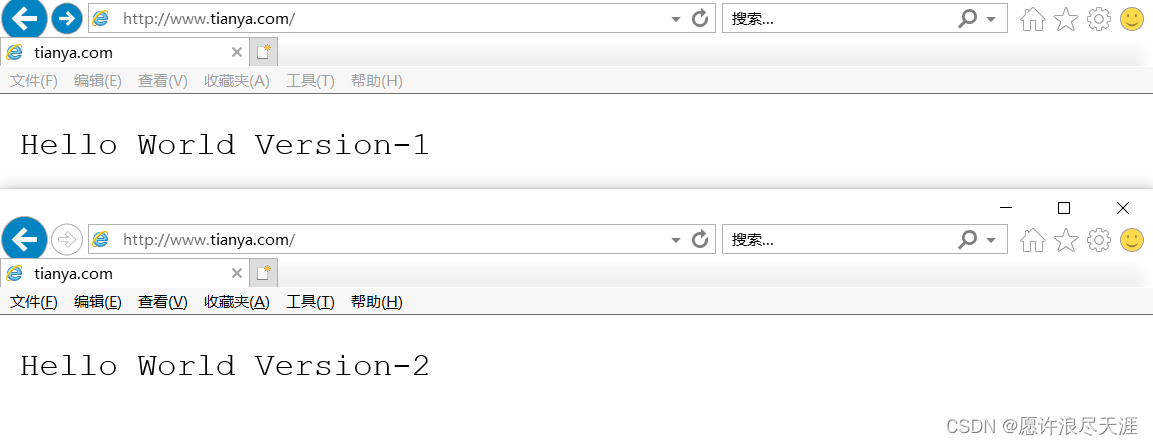
金丝雀发布,也叫做灰度发布,简单来说就是在两个版本之间进行切换,我们可以先分配一小部分流量给到新的应用,来进行功能验证。当验证通过时,我们便可以将流量完全的分配到新的应用上。即使在验证时出现问题,也可以很快的将流量切回到旧的应用。
Ingress 主要就是通过配置 annotations 来实现金丝雀发布:官方介绍
1)基于 Weight 实现金丝雀发布
[root@k8s-master01 ~]# vim uat-web-server.yaml
apiVersion: v1
kind: Namespace
metadata:
  name: uat
---
apiVersion: v1
kind: Pod
metadata:
  name: uat-web-server
  namespace: uat
  labels:
    app: uat-web-server
spec:
  containers:
  - name: uat-web-server
    image: registry.cn-hangzhou.aliyuncs.com/zhuang_zz/test:web-v2
    imagePullPolicy: IfNotPresent
    ports:
    - containerPort: 8080
---
apiVersion: v1
kind: Service
metadata:
  name: uat-web-server
  namespace: uat
spec:
  ports:
  - name: uat-web-server
    port: 8080
    targetPort: 8080
  selector:
    app: uat-web-server
[root@k8s-master01 ~]# kubectl apply -f uat-web-server.yaml
2)修改 Ingress 配置
[root@k8s-master01 ~]# vim canary-ingress.yaml
apiVersion: extensions/v1beta1
kind: Ingress
metadata:
  name: test-ingress
spec:
  rules:
  - host: www.tianya.com
    http:
      paths:
      - backend:
          serviceName: test-web-server
          servicePort: 8080
        path: /
---
apiVersion: extensions/v1beta1
kind: Ingress
metadata:
  name: uat-ingress
  namespace: uat
  annotations:
    nginx.ingress.kubernetes.io/canary: "true"
    nginx.ingress.kubernetes.io/canary-weight: "30"
spec:
  rules:
  - host: www.tianya.com
    http:
      paths:
      - backend:
          serviceName: uat-web-server
          servicePort: 8080
        path: /
[root@k8s-master01 ~]# kubectl apply -f canary-ingress.yaml
3)验证
1)基于 Cookie 实现金丝雀发布
[root@k8s-master01 ~]# vim canary-ingress.yaml
apiVersion: extensions/v1beta1
kind: Ingress
metadata:
  name: uat-ingress
  namespace: uat
  annotations:
    nginx.ingress.kubernetes.io/canary: "true"
    nginx.ingress.kubernetes.io/canary-by-cookie: "uat-web-canary"
spec:
  rules:
  - host: www.tianya.com
    http:
      paths:
      - backend:
          serviceName: uat-web-server
          servicePort: 8080
        path: /
[root@k8s-master01 ~]# kubectl apply -f canary-ingress.yaml
2)验证

1)基于 Header 实现金丝雀发布
[root@k8s-master01 ~]# vim canary-ingress.yaml
apiVersion: extensions/v1beta1
kind: Ingress
metadata:
  name: uat-ingress
  namespace: uat
  annotations:
    nginx.ingress.kubernetes.io/canary: "true"
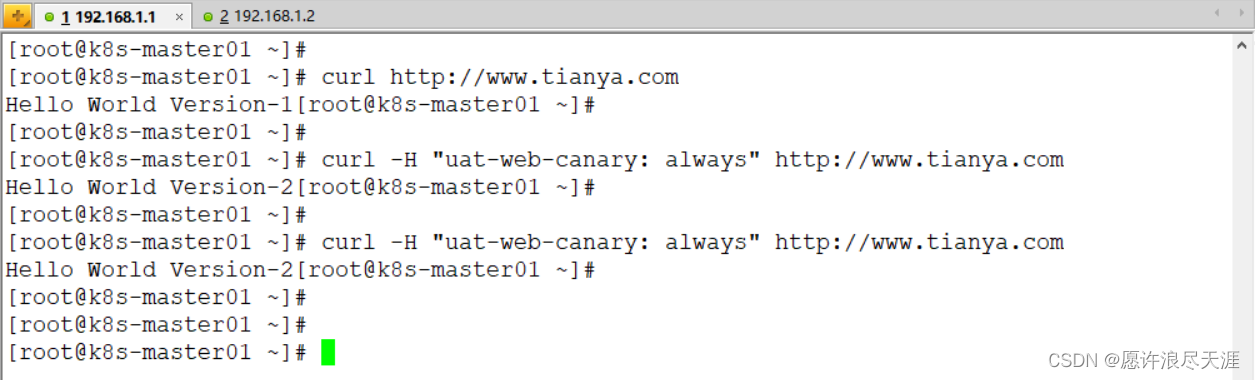
    nginx.ingress.kubernetes.io/canary-by-header: "uat-web-canary"
spec:
  rules:
  - host: www.tianya.com
    http:
      paths:
      - backend:
          serviceName: uat-web-server
          servicePort: 8080
        path: /
[root@k8s-master01 ~]# kubectl apply -f canary-ingress.yaml
2)验证
版权声明
本文为[愿许浪尽天涯]所创,转载请带上原文链接,感谢
https://blog.csdn.net/weixin_46902396/article/details/124163864
边栏推荐
- Unity C single case mode learning review notes
- Cloud computing skills competition -- the first part of openstack private cloud environment
- 内网渗透系列:内网隧道之pingtunnel
- strcat()、strcpy()、strcmp()、strlen()
- When using flash, the code ends automatically without an error, the connection cannot be maintained, and the URL cannot be accessed.
- 随笔(不定时更新)
- Dvwa 靶场练习记录
- Read and modify the JSON file under the resource folder
- Houdini>建筑道路可变,学习过程笔记
- KVM安装部署
猜你喜欢

CTF attack and defense world brush questions 51-

内网渗透系列:内网隧道之icmpsh

SAP GUI security
Attack and defense world misc questions 1-50

Cloud computing skills competition -- the first part of openstack private cloud environment

数据库之MySQL——基本常用查询命令

Simplify exporting to SVG data files and all images in SVG folder

How to present your digital portfolio: suggestions from creative recruiters

Cloud computing skills competition -- Part 2 of openstack private cloud environment

《内网安全攻防:渗透测试实战指南》读书笔记(八):权限维持分析及防御
随机推荐
About USB flash drive data prompt raw, need to format, data recovery notes
feign如何集成hystrix
第五章 投资性房地产
面试学习路线
The displayed amount of ABAP ALV is inconsistent with the exported amount
Chapter IV intangible assets
CTF-MISC总结
Research on system and software security (5)
Houdini terrain and fluid solution (simulated debris flow)
The projection vector of a vector to a plane
Houdini>流体,刚体导出学习过程笔记
SAP GUI security
Houdini地形与流体解算(模拟泥石流)
Unity gets a resource that is referenced by those resources
Cloud computing skills competition -- Part 2 of openstack private cloud environment
strcat()、strcpy()、strcmp()、strlen()
nacos源码分析思路
Unity gets the resources that a file depends on
Concours de compétences en informatique en nuage - - première partie de l'environnement cloud privé openstack
如何展示您的数字作品集:来自创意招聘人员的建议