当前位置:网站首页>Jupyter for local and remote access to ECS
Jupyter for local and remote access to ECS
2022-04-23 02:29:00 【Weiyaner】
List of articles
1 Server installation jupyter
1.1 pip install
pip install jupyter
1.2 The configuration file
View the configuration file .jupyter/jupyter_notebook_config.py, If not found, generate the configuration file
jupyter notebook --generate-config
1.3 Create login password
Method 1 : First create a password , This password is used to log in locally to a remote server jupyter notebook.
Open... On the server Python Environmental Science , Enter the following code
from notebook.auth import passwd
passwd()
Enter password:   #  Input password , This password is used for remote login jupyter notebook
Verify password:  #  Verify the password again , enter , The following ciphertext will be generated
'sha1:7***********************87d21'
Open the upyter_notebook_config.py file , Set access notebook Information about
c.NotebookApp.ip='*'  # * Express all IP, Set up here ip Accessible for all
c.NotebookApp.password = u'sha1:7***********************87d21'
c.NotebookApp.open_browser = False  #  prohibit notebook Automatically open browser at startup ( stay linux Servers are generally ssh Command line access , There's no graphical interface . therefore , It's no use starting )
c.NotebookApp.port =9000  #  Specify the port to access , The default is 8888
start-up jupyter notebook, Access... From your local browser :serve_ip:9000, appear notebook The login page , Enter the password to use .
Method 2 : Directly enter the following command on the server command line , This will be done in and jupyter_notebook_config.py Create... Under the same directory jupyter_notebook_config.conf file , There is a ciphertext for entering the password , It can also be used to log in jupyter notebook.
jupyter notebook password
Enter password: ****
Verify passsword: ****
2 SSH Mapping server ip To local
The main idea : have access to ssh Command to do a port mapping
Let's first learn how to map remote ports to local commands , as follows :
ssh -L 8080:localhost:9000 [email protected]
If we remote server jupyter notebook Open ports are 9000, Through the above command, we can send the remote 9000 Port mapping to local 8080 port , among user Is the user name of the remote server ,xxx.xxx.xxx It's a remote server ip, The following figure shows the successful interface .
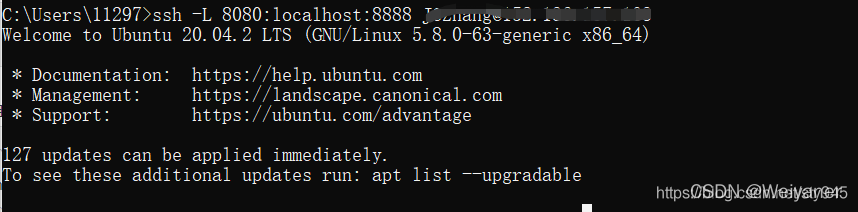
ps: I failed. , I haven't got this interface yet , It's always a mistake , The above is from Other bloggers
ssh: connect to host localhost port 22: Connection refused
3 About jupyter Other questions
3.1 Boot kernel cannot find virtual environment (tf,torch wait )
There are generally two solutions , Recommended approach 2, Solve the problem at one time .
-
Find... In the virtual environment directory jupyter lab And start the , Generally in
/envs/pytorch/bin, type :jupyter lab -
stay base Environment , Type the following command :
python -m ipykernel install --name pytorch --display-name torchamong ,pytorch Is the name of your virtual environment , The back is kernel Interface display name .
3.2
版权声明
本文为[Weiyaner]所创,转载请带上原文链接,感谢
https://yzsam.com/2022/04/202204230228265142.html
边栏推荐
- Leetcode46 Full Permutation
- Real math problems in 1958 college entrance examination
- Synchronized锁及其膨胀
- 全局、独享、局部路由守卫
- Gray scale range corresponding to colors (red, yellow, green, blue, purple, pink, brick red and magenta) in HSV color space
- How to recognize products from the perspective of Dialectics
- Rich intelligent auxiliary functions and exposure of Sihao X6 security configuration: it will be pre sold on April 23
- If you want to learn SQL with a Mac, you should give yourself a good reason to buy a Mac and listen to your opinions
- SO库依赖问题
- Niuke hand speed monthly race 48 C (I can't understand the difference. It belongs to yes)
猜你喜欢
89 logistic回歸用戶畫像用戶響應度預測

Open3d point cloud processing

How does Axure set the content of the text box to the current date when the page is loaded
【无标题】
MySQL JDBC programming
ThinkPHP kernel development blind box mall source code v2 0 docking easy payment / Alibaba cloud SMS / qiniu cloud storage

Wechat public platform test number application, authorized login function and single sign on using hbuilder X and wechat developer tools

Leetcode46 Full Permutation

Talk about current limiting

011_RedisTemplate操作Hash
随机推荐
牛客手速月赛 48 C(差分都玩不明白了属于是)
On LAN
【ValueError: math domain error】
Leetcode46 Full Permutation
Day18 -- stack queue
Execute external SQL script in MySQL workbench and report error
Is the sinking coffee industry a false prosperity or the eve of a broken situation?
006_redis_jedis快速入门
Summary of I / O knowledge points
Understanding process (multithreading primary)
Fast and robust multi person 3D pose estimation from multiple views
IAR embedded development stm32f103c8t6 Lighting LED
Data warehouse construction table 111111
16、 Anomaly detection
Latin goat (20204-2022) - daily question 1
Dynamic batch processing and static batch processing of unity
C语言中*与&的用法与区别 以及关键字static和volatile 的含义
Web learning record (medium)
Kubernetes cluster installation based on Kirin SP10 server version
012_ Access denied for user ‘root‘@‘localhost‘ (using password: YES)